
ACEMAGIC Kron K1
Updated on

The ACEMAGIC Kron K1 is a 5-inch brushed-aluminum desktop for home-office work, digital signage, and light always-on server tasks. Its AMD Ryzen Embedded R2544 is a 4-core, 8-thread chip with integrated Radeon Vega 8 graphics, enough for browser tabs, office suites, video calls, and 4K playback, and not enough for gaming or heavy creative work. It carries six USB-A ports and a USB-C connector, and it drives three 4K@60Hz displays at once across HDMI 2.0, DisplayPort 1.4, and USB-C, which is more reach than most boxes this size offer. Windows 11 Pro and a VESA bracket come in the box.
ACEMAGIC sells several machines under the K1 name. This Ryzen Embedded R2544 model is a different product from the Ryzen 7 5700U ACEMAGIC K1 and from the larger Ryzen 7 7730U ACEMAGICIAN Kron Mini K1. Same family name, different chassis and chips.
Pros and Cons
| Pros | Cons |
|---|---|
| Compact 5-inch aluminum chassis with VESA mount included | Wi-Fi 5 and Bluetooth 4.2 radios, no Wi-Fi 6 |
| Triple 4K@60Hz output (HDMI 2.0, DisplayPort 1.4, USB-C) | Entry-level 4-core R2544 (PassMark around 7,850) trails the Ryzen 7 in ACEMAGIC’s own 5700U K1 |
| Six USB-A ports plus a USB-C connector on a tiny box | Gigabit Ethernet only, no 2.5GbE |
| Dual M.2 2280 slots (one SATA/NVMe, one NVMe PCIe 3.0), up to 2TB each | USB-A ports are USB 3.2 Gen 1 (5Gbps), not 10Gbps |
| RAM upgradeable to 32GB across two SO-DIMM slots | Integrated Vega 8 graphics rule out modern gaming |
| Metal build that owners describe as quiet and cool-running | Stock SSD averaged 81.37 MB/s in Ryan Adapts’ benchmark |
Related Videos
ACEMAGIC Kron K1 Comparison Chart
 ACEMAGIC Kron K1 | ACEMAGIC Kron K1 | ACEMAGIC Kron K1 | ACEMAGIC Kron K1 | |
| Price | List Price: $299.00 Amazon Prices: Loading prices... | List Price: $319.98 Amazon Prices: Loading prices... | List Price: $339.00 Amazon Prices: | List Price: $323.98 Amazon Prices: |
| Version | 8GB/256GB | 16GB/256GB | 16GB/512GB | 16GB/1TB |
| Performance Rating | 3.0 | 3.4 | 3.4 | 3.4 |
| Operating System | Windows 11 Pro | Windows 11 Pro | Windows 11 Pro | Windows 11 Pro |
| Processor | Quad-core 3.35 Ghz (max 3.70 Ghz) AMD Ryzen Embedded R2544 | Quad-core 3.35 Ghz (max 3.70 Ghz) AMD Ryzen Embedded R2544 | Quad-core 3.35 Ghz (max 3.70 Ghz) AMD Ryzen Embedded R2544 | Quad-core 3.35 Ghz (max 3.70 Ghz) AMD Ryzen Embedded R2544 |
| GPU | Integrated Radeon RX Vega8 Graphics | Integrated Radeon RX Vega8 Graphics | Integrated Radeon RX Vega8 Graphics | Integrated Radeon RX Vega8 Graphics |
| RAM | 8 GB DDR4 SO-DIMM | 16 GB DDR4 SO-DIMM | 16 GB DDR4 SO-DIMM | 16 GB DDR4 SO-DIMM |
| Internal Storage | 256 GB SSD | 256 GB SSD | 512 GB SSD | 1 TB SSD |
| Dimensions width x length x thickness | 5.04 x 5.04 x 1.61 inches (128.02 x 128.02 x 40.89 mm) | 5.04 x 5.04 x 1.61 inches (128.02 x 128.02 x 40.89 mm) | 5.04 x 5.04 x 1.61 inches (128.02 x 128.02 x 40.89 mm) | 5.04 x 5.04 x 1.61 inches (128.02 x 128.02 x 40.89 mm) |
| Weight | 1.3 lbs (0.59 kg) | 1.3 lbs (0.59 kg) | 1.3 lbs (0.59 kg) | 1.3 lbs (0.59 kg) |
| WiFi | Wi-Fi 5 (802.11ac) | Wi-Fi 5 (802.11ac) | Wi-Fi 5 (802.11ac) | Wi-Fi 5 (802.11ac) |
| Bluetooth | Bluetooth 4.2 | Bluetooth 4.2 | Bluetooth 4.2 | Bluetooth 4.2 |
| Ethernet | 1 Ethernet port at 1 Gbps | 1 Ethernet port at 1 Gbps | 1 Ethernet port at 1 Gbps | 1 Ethernet port at 1 Gbps |
| HDMI | 1 Full-Size HDMI Port | 1 Full-Size HDMI Port | 1 Full-Size HDMI Port | 1 Full-Size HDMI Port |
| DisplayPort | 1 DisplayPort (DisplayPort 1.4, 4K@60Hz) | 1 DisplayPort (DisplayPort 1.4, 4K@60Hz) | 1 DisplayPort (DisplayPort 1.4, 4K@60Hz) | 1 DisplayPort (DisplayPort 1.4, 4K@60Hz) |
| VGA | No VGA Ports | No VGA Ports | No VGA Ports | No VGA Ports |
| USB Ports | 6 USB 3, 1 USB-C 6x USB-A 3.2 Gen 1 (5Gbps), 1x USB-C (data + DP 1.4) | 6 USB 3, 1 USB-C 6x USB-A 3.2 Gen 1 (5Gbps), 1x USB-C (data + DP 1.4) | 6 USB 3, 1 USB-C 6x USB-A 3.2 Gen 1 (5Gbps), 1x USB-C (data + DP 1.4) | 6 USB 3, 1 USB-C 6x USB-A 3.2 Gen 1 (5Gbps), 1x USB-C (data + DP 1.4) |
| Thunderbolt Ports | No | No | No | No |
| OCuLink | No | No | No | No |
| Internal SATA Ports | No SATA ports | No SATA ports | No SATA ports | No SATA ports |
| Card Reader | No Card Reader | No Card Reader | No Card Reader | No Card Reader |
| Headphone Jack | combo | combo | combo | combo |
| Fanless | No | No | No | No |
| VESA Mount | Yes | Yes | Yes | Yes |
| In the Box | Mini PC, power adapter, HDMI cable, VESA bracket with screws, user manual | Mini PC, power adapter, HDMI cable, VESA bracket with screws, user manual | Mini PC, power adapter, HDMI cable, VESA bracket with screws, user manual | Mini PC, power adapter, HDMI cable, VESA bracket with screws, user manual |
| Expandability | Up to 32GB DDR4 (2x SO-DIMM); dual M.2 2280 slots, up to 2TB each | Up to 32GB DDR4 (2x SO-DIMM); dual M.2 2280 slots, up to 2TB each | Up to 32GB DDR4 (2x SO-DIMM); dual M.2 2280 slots, up to 2TB each | Up to 32GB DDR4 (2x SO-DIMM); dual M.2 2280 slots, up to 2TB each |
Related Mini PCs
-
 ACEMAGIC K1 (Ryzen 7030 Series)The Ryzen 7030-series ACEMAGIC K1 puts a 6-core Ryzen 5 7530U or 4-core Ryzen 3 7330U in a 5-inch…
 -
 ACEMAGIC K1The ACEMAGIC K1 is a 5-inch mini PC built on the AMD Ryzen 7 5700U (a Ryzen 3 4300U variant also…
 -
 GEEKOM Mini Air12 LiteThe GEEKOM Mini Air12 Lite is a budget Intel N100 mini PC with 8GB of DDR4 (upgradeable to 16GB), a…
 -
 Glorlin GT101The Glorlin GT101 is a budget AMD mini PC built on the four-core Ryzen 5 3501U with Radeon Vega 8…
 -
 ASUS NUC 14 EssentialThe ASUS NUC 14 Essential is a 0.56-liter mini PC with an Intel N150, one DDR5 SODIMM slot, one M.2…
 -
 FIREBAT R3 Mini PCThe FIREBAT R3 is a 0.68-liter mini PC on AMD's Ryzen 3 4300U, with 16GB of soldered LPDDR4, two…
Two M.2 Slots and Six USB-A Ports in a 5-Inch Shell

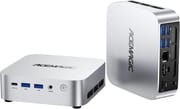
The chassis measures 5.04 x 5.04 x 1.61 inches (about 128mm square and 41mm tall) and weighs roughly 1.3 pounds, with a silver aluminum shell that several buyers compared to a Mac mini. The front panel carries a USB-C port, two USB-A ports, a combo audio jack, and the power button, while the rear adds four more USB-A ports alongside DisplayPort, HDMI, Gigabit Ethernet, and the DC power input. Ventilation slots run down one side, and the included VESA bracket lets the unit mount behind a display.
Zen+ (12nm) is the architecture underneath, which dates the R2544 well behind current mobile silicon. It has 4 cores, 8 threads, a 3.35GHz base and a 3.7GHz boost, and a PassMark CPU score around 7,850. That places it above Intel N100 and N150 class chips but well below the Ryzen 7 5700U in ACEMAGIC’s similarly named K1, which scores roughly 15,850. ACEMAGIC markets the chip as beating the Core i3-10110U and Ryzen 5 3500U, a vendor claim with no independent measurement behind it. In practice the chip handles browser tabs, office suites, video calls, 4K playback, and small server workloads; demanding multitasking and gaming are beyond it.
Wireless is Wi-Fi 5 with Bluetooth 4.2, both older standards, and wired networking tops out at Gigabit Ethernet. The six USB-A ports all run at USB 3.2 Gen 1 (5Gbps), while the USB-C port handles data plus DisplayPort 1.4 for the third display. One M.2 2280 slot takes a SATA or NVMe (PCIe 3.0 x2) drive and the second takes an NVMe (PCIe 3.0 x4) drive, for up to 2TB per slot, and both DDR4 SO-DIMM slots are user-accessible for the 32GB memory ceiling.
Independent Reviews

Ryan Adapts tested the Ryzen Embedded R2544 build with 16GB of DDR4 and the 256GB SSD. The unit passed his 12-hour OCCT platinum stress benchmark, and he calls the chip a “pretty solid option for everyday productivity, web browsing, media consumption, some light content creation.” The clear weak point in his testing is the stock drive: his storage benchmark averaged 81.37 MB/s, which he calls “hands-down one of the slowest ones I’ve ever tested.” Game results varied by title. Fortnite at 1080p ultra ran at 85-plus frames per second and he judges Minecraft and Roblox fine, Battlefield V managed 40-plus frames at 1080p, and Cyberpunk 2077 at minimum settings was “most definitely unplayable.”
Getting inside means pulling the rubber feet, four screws, and retention clips while working around a soldered antenna wire and the power button cabling, and he concludes, “I would not really call this friendly to get into service or to change anything.” There is one empty RAM slot, but his advice for anyone wanting more memory is to buy a higher configuration up front. He points to signage as a fit: “This would actually probably be pretty good at doing digital signage without buying some stupid fancy industrial computer that costs more than it should,” alongside point-of-sale duty, spreadsheets, and basic web browsing.
ITPro’s Kron Mini K1 review covers the Intel Core i5-12600H machine, which has its own ACEMAGIC K1 (Intel Core i5-12600H) page.
Customer Reviews
Buyers of the R2544 K1 converge on small, quiet, and enough machine for the money. Garry Amann bought two for Plex server and backup duty, called them “Quiet and cool,” and confirmed the internal layout while upgrading one of them: “It has 2 slots each for memory and m.2 SSD disk.” He also found the teardown fiddly, singling out the power button as the tricky part of reassembly. David Williams moved his to a nightstand and replaced Windows with Ubuntu, reporting that “it runs linux perfectly with no driver issues.” Buyer EHG described setup as trivial and the machine as “fast, silent, (no fan noise),” with one wish: “could use a power port & more USB ports.” On the 16GB configuration, Sliccato found it “quiet and capable of handling light applications like browsing” and uses it for home photo storage.
Savand spent ten days trying to get ACEMAGIC support to help with a unit that would not reach the internet, eventually diagnosed the fault alone, and wrote: “They will NOT assist you in understanding the problem or fix the unit or issues.” Po’boy Bob found the gaming billing oversold: “Does the job, it shouldn’t be listed as a gaming PC because if you read the fine print it says light gaming which it barely does.”
Who the Kron K1 Suits
A desk of browser tabs, documents, video calls, and media playback fits the R2544, and so does a small always-on service like the Plex box one buyer assembled from two of them. For stronger performance in the same footprint, compare the Ryzen 7 5700U ACEMAGIC K1; for compact AMD boxes aimed at a home lab, read our roundup of Linux-friendly mini PCs. For a side-by-side look at specs, see our Mini PC Comparison Chart.
Frequently Asked Questions
What processor does the ACEMAGIC Kron K1 use?
The AMD Ryzen Embedded R2544: 4 cores, 8 threads, a 3.35GHz base clock that boosts to 3.7GHz, with integrated Radeon Vega 8 graphics. Its PassMark score of approximately 7,850 suits everyday productivity, media playback, and light server tasks.
How many monitors can the ACEMAGIC Kron K1 drive?
Three at once, each at 4K@60Hz, using the HDMI 2.0 port, DisplayPort 1.4, and the USB-C port (which carries DisplayPort 1.4). That covers multi-monitor office setups and digital signage.
Can I upgrade the RAM and storage on the ACEMAGIC Kron K1?
Yes. Two DDR4 SO-DIMM slots accept up to 32GB of memory, and two M.2 2280 slots handle storage: one takes a SATA or NVMe (PCIe 3.0 x2) drive and the other takes an NVMe (PCIe 3.0 x4) drive, up to 2TB per slot.
What ports does the ACEMAGIC Kron K1 have?
Six USB-A 3.2 Gen 1 ports (two front, four rear), one USB-C port with data and DisplayPort 1.4, one HDMI 2.0 port, one DisplayPort 1.4, Gigabit Ethernet, and a combo headphone/microphone jack. Wireless is Wi-Fi 5 with Bluetooth 4.2.
Is the ACEMAGIC Kron K1 the same as the ACEMAGIC K1 or the Kron Mini K1?
No. This machine uses the AMD Ryzen Embedded R2544. The ACEMAGIC K1 is a separate model built on the Ryzen 7 5700U, the ACEMAGICIAN Kron Mini K1 is a larger chassis using the Ryzen 7 7730U, and ACEMAGIC also sells an Intel Core i5-12600H K1 that some outlets review under the “Kron Mini K1” name. They share a family name but differ in chip, chassis, and connectivity.
What comes in the box with the ACEMAGIC Kron K1?
Windows 11 Pro comes pre-installed. The box holds the mini PC unit, an external power adapter, an HDMI cable, a VESA mounting bracket with screws, and a user manual.