
GEEKOM Mini Air12 Lite
Updated on

The GEEKOM Mini Air12 Lite is a budget mini PC built on the Intel N100, a low-power quad-core Alder Lake-N chip suited to web browsing, office work, media streaming, and light gaming. It ships with Windows 11 Pro, 8GB of DDR4 (a single stick, replaceable with a 16GB module), and a 256GB NVMe SSD that owners have swapped for drives well past the official 1TB limit. The small footprint, VESA mount, and near-silent running make it a tidy fit for a desk or behind a monitor.
Connectivity is Wi-Fi 5, Bluetooth 5.1, Gigabit Ethernet, and dual 4K display output over HDMI and DisplayPort, plus six USB-A ports (two USB 2.0, four USB 3.0). The notable omissions are USB-C and Wi-Fi 6, so it leans budget rather than future-proof.
| Pros | Cons |
|---|---|
| Compact and lightweight design with VESA mount support. | Lacks USB-C ports, limiting modern connectivity options. |
| Quiet operation, even under load, with efficient power consumption. | Limited gaming performance due to the entry-level processor. |
| Expandable RAM (up to 16GB) and storage (up to 1TB). | Pre-installed SSD and RAM are from lesser-known brands. |
| Dual 4K display support via HDMI and DisplayPort. | No Wi-Fi 6 support, which may affect future-proofing. |
| Affordable price point with solid value for everyday tasks. | Plastic enclosure instead of a more durable metal chassis. |
| Includes a proprietary front panel connector for unique setups. | Ethernet driver requires manual installation in Linux environments. |
Related Videos
GEEKOM Mini Air12 Lite Comparison Chart
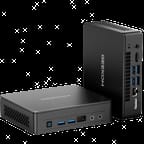 GEEKOM Mini Air12 Lite | |
| Price | List Price: $199.00 Amazon Prices: |
| Version | 8GB/256GB/Intel N100 |
| Performance Rating | 4.3 |
| Operating System | Windows 11 Pro |
| Processor | Quad-core 3.40 Ghz (max 3.40 Ghz) Intel Processor N100 |
| GPU | Integrated Intel UHD Graphics |
| RAM | 8 GB |
| Internal Storage | 256 GB |
| Dimensions width x length x thickness | 5.33 x 4.55 x 1.36 inches (135.38 x 115.57 x 34.54 mm) |
| Weight | 1.175 lbs (0.53 kg) |
| WiFi | Wi-Fi 5 (802.11ac) |
| Bluetooth | Bluetooth 5.1 |
| Ethernet | 1 Ethernet port at 1 Gbps |
| HDMI | 1 Full-Size HDMI Port |
| DisplayPort | 1 DisplayPort |
| VGA | No VGA Ports |
| USB Ports | 2 USB 2.0, 4 USB 3 |
| Thunderbolt Ports | No |
| OCuLink | No |
| Internal SATA Ports | No SATA ports |
| Card Reader | No Card Reader |
| Headphone Jack | combo |
| Fanless | No |
| VESA Mount | Yes |
| In the Box | Mini PC, power adapter, HDMI cable, VESA mount, screws, manual. |
| Expandability | RAM expandable to 16 GB by replacing the existing stick. Storage expandable to 1 TB SSD. |
Related Mini PCs
-
 GEEKOM Mini Air12The GEEKOM Mini Air12 is a compact Intel N100 mini PC with 16GB of DDR5 (upgradeable to 32GB), a…
 -
 ACEMAGIC Kron K1The ACEMAGIC Kron K1 pairs the AMD Ryzen Embedded R2544 with a compact 5-inch aluminum chassis,…
 -
 Bmax B2 PowerThe Bmax B2 Power delivers budget-friendly computing in an ultra-compact package. With its Intel…
 -
 Bmax B3 ProThe Bmax B3 Pro is a budget-friendly mini PC powered by the Intel Celeron N5095 processor, offering…
 -
 CyberGeek Nano J1Harness the power of compact computing with the CyberGeek Nano J1 Mini PC. Featuring Intel Celeron…
 -
 GEEKOM A5 (2025 Edition)The GEEKOM A5 2025 Edition delivers exceptional value with its AMD Ryzen 5 7430U processor,…
Detailed Look at the GEEKOM Mini Air12 Lite
The GEEKOM Mini Air12 Lite is built around the Intel Processor N100, a quad-core chip from Intel’s Alder Lake series, offering a maximum clock speed of 3.4 GHz. This processor is designed for energy efficiency and easily handles everyday tasks like web browsing, office applications, and media playback. Paired with 8GB of DDR4 RAM (expandable to 16GB) and a 256GB NVMe SSD, the Mini PC provides a responsive experience for general productivity. Users can also upgrade the storage to a 1TB SSD, making it adaptable for those needing more space for files or applications.
Regarding connectivity, the Mini Air12 Lite supports dual 4K displays via HDMI and DisplayPort, making it a great option for multitasking or media streaming setups. It includes Wi-Fi 5 and Bluetooth 5.1 for wireless connectivity and a gigabit Ethernet port for stable wired internet access. The device also features multiple USB ports (two USB 2.0 and four USB 3.0) for connecting peripherals and accessories. While it lacks USB-C and Wi-Fi 6, the available options are sufficient for most users. Its quiet operation and low power consumption (6W TDP) make it suitable for home or office environments where noise and energy efficiency are priorities.
The Mini Air12 Lite’s compact design measures just 5.33 x 4.55 x 1.36 inches and weighs 1.175 pounds, making it highly portable and ideal for space-saving setups. The VESA mount lets users attach the device behind a monitor, creating a clean, all-in-one workstation. Thoughtful design features, such as captive screws for easy upgrades and a proprietary front panel connector for external power button setups, add to its usability. While the plastic enclosure may not feel as premium as metal alternatives, the overall build quality is solid and functional.
What reviewers found
Technically Unsure
Technically Unsure gave the most thorough test, with a teardown, BIOS walkthrough, and power-meter runs. He measured idle draw around 11W and a peak of 26.4W under load, and praised the acoustics: “Absolutely no noise whatsoever, okay? I can’t hear a fan or anything.” He also showed the storage limit is soft, installing a 4TB SSD despite the official 1TB cap, and summed it up as “Everything is working for 199, absolutely a great deal,” with the caveats that the pre-installed SSD and RAM are lesser-known brands and the Ethernet driver needs manual installation under Linux.
TechfulGoodies
Carl at TechfulGoodies opened the chassis on camera to show the RAM and SSD upgrade path and framed it as a “good budget machine” for office work, media, and casual gaming, where he ran Subway Surfers smoothly. He liked the dual 4K output over HDMI and DisplayPort and the low power draw, while noting the integrated graphics rule out demanding titles.
Play Retro
Play Retro tested it as an emulation box and got GameCube titles like Mario Kart: Double Dash!! and Resident Evil 4 running smoothly at 2x native resolution, all while staying “really, really quiet.” He flagged GEEKOM’s 3-year warranty as a plus and concluded it is an “amazing entry-level option that can even be transformed into a dedicated console for retro gaming,” not a machine for video editing or AAA gaming.
Customer Reviews of the GEEKOM Mini Air12 Lite
Across 34 ratings on Amazon, the GEEKOM Mini Air12 Lite averages 4.2 stars, and the distribution is not all glowing: 71 percent are five-star, but 13 percent are one-star, so the experience is not uniform. The recurring positive theme is value for light, everyday use. A verified buyer, Anthony A Lorenc, wrote “Incredible value! No beating it for everyday use,” then added “don’t expect it be a substitute for $1K unit.” A longer verified review from S G called it “an impressive little machine for its size and price,” while noting “It’s not meant for heavy gaming or intensive video editing, but for office work or as a home entertainment system, it’s more than adequate.” Several owners echo that it suits web browsing, bill-paying, email, and 3D-printing software, but not demanding workloads.
The negative side is real and worth naming. A verified buyer posting as Larz left a one-star review titled “Mini virus box?” and wrote “Lags and freezes second time I booted it up.” One Australian reviewer, Tridoros, reported “an irritating restart issue” that was fixed only after upgrading to the latest BIOS (version 0.17), which is a setup step prospective buyers should plan for. Read more owner reviews on Amazon.
Who should consider the GEEKOM Mini Air12 Lite?
The GEEKOM Mini Air12 Lite fits buyers who want a cheap, compact, near-silent machine for web, office, media, and light or retro gaming. The VESA mount makes a tidy behind-the-monitor setup, and the low power draw suits a home or office desk left on all day. If you are weighing this against a cloud subscription, the mini PC vs cloud PC breakdown lays out which option saves more over time.
Its entry-level N100 and lack of a discrete GPU rule out video editing and AAA gaming. For more power, the GEEKOM Mini IT13 steps up to a Core i7, and anyone who needs USB-C or Wi-Fi 6 should look at the non-Lite GEEKOM Mini Air12, which adds both. But for plain affordability and portability, the Air12 Lite is a sensible pick.
To explore more Mini PCs and compare features, visit Starry Hope’s Mini PC Comparison Tool.
Frequently Asked Questions
Can the RAM and storage be upgraded on the Mini Air12 Lite?
The GEEKOM Mini Air12 Lite allows for RAM and storage upgrades. The 8GB of DDR4 RAM can be replaced with a 16GB module, and the 256GB NVMe SSD can be swapped out for a larger SSD, up to 1TB. This makes it a flexible option for users needing more memory or storage.
Does the Mini Air12 Lite support dual monitors?
Yes, the Mini Air12 Lite supports dual 4K displays via HDMI and DisplayPort, which is useful for multitasking, productivity setups, or media streaming.
Is the Mini Air12 Lite suitable for gaming?
The Mini Air12 Lite is capable of handling light gaming and retro gaming. It performs well with less demanding titles and emulation software like GameCube games. Still, it is not designed for high-end gaming or AAA titles due to its entry-level Intel N100 processor and integrated graphics.
Does the Mini Air12 Lite come with an operating system pre-installed?
Yes, the Mini Air12 Lite comes with Windows 11 Pro pre-installed. This allows users to use the device right out of the box without installing an operating system.
How quiet is the Mini Air12 Lite during operation?
The Mini Air12 Lite runs very quietly, even under load. Reviewers consistently describe it as near-silent, making it suitable for quiet environments like home offices or bedrooms.
Does the Mini Air12 Lite support Wi-Fi and Bluetooth?
Yes, the Mini Air12 Lite supports Wi-Fi 5 and Bluetooth 5.1, providing reliable wireless connectivity for internet access and peripheral devices. However, it does not support Wi-Fi 6, which may be a consideration for users looking for the latest wireless standards.
What’s included in the box with the Mini Air12 Lite?
The Mini Air12 Lite comes with the Mini PC itself, a power adapter, an HDMI cable, a VESA mount with screws, and a user manual. The included VESA mount allows for easy attachment to the back of a monitor for a space-saving setup.
Can I install Linux on the Mini Air12 Lite?
Yes, the Mini Air12 Lite is compatible with Linux operating systems. However, some users have noted that the Ethernet driver may require manual installation when using Linux. For a GEEKOM machine with thoroughly documented driver support, see the A5 Pro Linux walkthrough.
How portable is the Mini Air12 Lite?
Weighing just 1.175 pounds and measuring 5.33 x 4.55 x 1.36 inches, the Mini Air12 Lite is highly portable. Its compact size makes it easy to carry and set up in different locations, whether at home, in the office, or on the go.
Does the Mini Air12 Lite have USB-C ports?
No, the Mini Air12 Lite does not include USB-C ports. It features multiple USB-A ports (two USB 2.0 and four USB 3.0) for connecting peripherals, but users requiring USB-C connectivity may need to consider alternative models.