
GEEKOM A5 (2025 Edition)
Updated on

The GEEKOM A5 (2025 Edition) refreshes GEEKOM’s compact desktop with the AMD Ryzen 5 7430U in place of the previous Ryzen 7 5800H. The 7430U is a 15-watt Zen 3 part with six cores and twelve threads, and the swap shows up first in noise and power, with idle noise of 29 dBA, idle draw of about 6 watts, and a 65-watt power brick. Raw benchmark numbers land below the 5800H’s. Office work, web browsing, and light 4K video editing all run on it, and the integrated AMD Radeon Vega 7 graphics can drive up to four displays at 4K.
Pros and cons
| Pros | Cons |
|---|---|
| 29 dBA at idle, 33-35 dBA under sustained load | Benchmark scores below the Ryzen 7 5800H it replaces |
| Three drive mounts (M.2 NVMe, M.2 2242 SATA, 2.5” SATA) | No USB-C Power Delivery |
| Four 4K displays from two HDMI and two USB-C outputs | Vega 7 graphics rule out modern AAA titles |
| 3-year warranty | Primary M.2 slot runs at PCIe Gen 3, not Gen 4 |
| 2.5 Gigabit Ethernet and WiFi 6 | Both SODIMM slots filled at 16GB, so more memory means swapping modules |
| Two SODIMM slots that reach 64GB of DDR4-3200 | One of the rear USB ports is USB 2.0 |
Related Videos
GEEKOM A5 (2025 Edition) Comparison Chart
 GEEKOM A5 (2025 Edition) | GEEKOM A5 (2025 Edition) | |
| Price | List Price: $369 Amazon Prices: Loading prices... | List Price: $419 Amazon Prices: Loading prices... |
| Version | 16GB/512GB | 16GB/1TB |
| Performance Rating | 4.2 | 4.2 |
| Operating System | Windows 11 Pro | Windows 11 Pro |
| Processor | Hexa-core 2.30 Ghz (max 4.30 Ghz) AMD Ryzen 5 7430U | Hexa-core 2.30 Ghz (max 4.30 Ghz) AMD Ryzen 5 7430U |
| GPU | Integrated Radeon RX Vega 7 Graphics | Integrated Radeon RX Vega 7 Graphics |
| RAM | 16 GB | 16 GB |
| Internal Storage | 512 GB | 1 TB |
| Dimensions width x length x thickness | 4.6 x 4.4 x 1.9 inches (116.84 x 111.76 x 48.26 mm) | 4.6 x 4.4 x 1.9 inches (116.84 x 111.76 x 48.26 mm) |
| Weight | 1.44 lbs (0.65 kg) | 1.44 lbs (0.65 kg) |
| WiFi | Wi-Fi 6 (802.11ax) | Wi-Fi 6 (802.11ax) |
| Bluetooth | Bluetooth 5.2 | Bluetooth 5.2 |
| Ethernet | 1 Ethernet port at 2.5 Gbps | 1 Ethernet port at 2.5 Gbps |
| HDMI | 2 Full-Size HDMI Ports | 2 Full-Size HDMI Ports |
| DisplayPort | Display Port over USB-C is supported on both USB-C ports | Display Port over USB-C is supported on both USB-C ports |
| VGA | No VGA Ports | No VGA Ports |
| USB Ports | 1 USB 2.0, 3 USB 3, 2 USB-C 3x USB 3.2 Gen 2 Type-A (2 front, 1 back), 1x USB 2.0 (back), 2x USB-C 3.2 Gen 2 with DP Alt Mode (back) | 1 USB 2.0, 3 USB 3, 2 USB-C 3x USB 3.2 Gen 2 Type-A (2 front, 1 back), 1x USB 2.0 (back), 2x USB-C 3.2 Gen 2 with DP Alt Mode (back) |
| Thunderbolt Ports | No | No |
| OCuLink | No | No |
| Internal SATA Ports | 1 SATA port, includes 2.5" drive bay (Supports 2.5 inch SATA drive) | 1 SATA port, includes 2.5" drive bay (Supports 2.5 inch SATA drive) |
| Card Reader | SD Card Reader | SD Card Reader |
| Headphone Jack | combo | combo |
| Fanless | No | No |
| VESA Mount | Yes | Yes |
| In the Box | Mini PC, 65W Power Adapter, VESA mounting bracket, Mounting screws, User manual | Mini PC, 65W Power Adapter, VESA mounting bracket, Mounting screws, User manual |
| Expandability | RAM upgradable to 64GB (2x SODIMM DDR4-3200), storage expandable via M.2 2242 SATA slot and 2.5" SATA bay | RAM upgradable to 64GB (2x SODIMM DDR4-3200), storage expandable via M.2 2242 SATA slot and 2.5" SATA bay |
Related Mini PCs
-
 GEEKOM A5 ProThe GEEKOM A5 Pro packs an AMD Ryzen 5 7530U into a premium all-metal chassis measuring just 0.47…
 -
 GEEKOM Mini IT12The GEEKOM Mini IT12 is a mini PC with 12th Gen Intel Core i3, i5, i7, or i9 chips, DDR4 memory to…
 -
 MeLE Overclock X5The MeLE Overclock X5 is a compact Intel Core i5-12450H mini PC with dual 2.5GbE, quad-display…
 -
 ACEMAGIC K1 (Ryzen 7030 Series)The Ryzen 7030-series ACEMAGIC K1 puts a 6-core Ryzen 5 7530U or 4-core Ryzen 3 7330U in a 5-inch…
 -
 ACEMAGIC K1The ACEMAGIC K1 is a 5-inch mini PC built on the AMD Ryzen 7 5700U (a Ryzen 3 4300U variant also…
 -
 Beelink SER3The Beelink SER3 pairs an AMD Ryzen 7 3750H (Radeon Vega 10) with dual 4K HDMI output and extensive…
A 15-watt chip in a case with three drive mounts
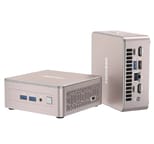
The chassis follows the NUC template at 4.6 by 4.4 by 1.9 inches, in a rose gold and bronze finish, with a metal internal frame and bottom plate built around the cooling system. Logan at Tek Syndicate praised the use of tantalum capacitors and the internal component choices after opening a unit up. Ventilation cutouts run in a lined pattern across the shell. At 1.44 pounds the box hangs off a monitor with the VESA bracket and screws that ship in the box.
The Ryzen 5 7430U is a refined version of the Ryzen 5 5625U with improved power efficiency. Six cores and twelve threads run at a 2.3 GHz base clock and boost to 4.3 GHz, which works out to a PassMark CPU score of 15,985 and Geekbench 6 scores around 1,887 single-core and 6,530 multi-core. Spreadsheet work and dozens of browser tabs sit well inside that envelope. The 15-watt TDP lets the cooling system stay quiet, at a measured 29 dBA at idle and 33-35 dBA under sustained load.
Two HDMI 2.0 ports, two USB-C 3.2 Gen 2 ports with DisplayPort Alt Mode, one USB 3.2 Gen 2 Type-A port, a USB 2.0 port, and 2.5 Gigabit Ethernet sit on the rear panel. The front adds two more USB 3.2 Gen 2 Type-A ports and a 3.5mm audio combo jack, and a full-size SD card slot sits on the left side. Storage goes past the M.2 2280 NVMe SSD that ships filled: an empty M.2 2242 SATA slot and a 2.5-inch SATA bay bring the total to three drives. The two SODIMM slots support up to 64GB of DDR4-3200 memory.
Reviewer Insights
Juan Bagnell flags the Wodposit RAM and SSD as the weak spot
Juan Bagnell starts his review with the switch from a Ryzen 7 to a Ryzen 5 processor. “We have a newer chip, but ranked at a lower tier of performance,” he explains, but quickly adds that “it performs better than I was expecting it to given the difference in CPU from the original A5.” He emphasizes that the A5 is now positioned as “a good, solid, affordable, all-rounder home PC” instead of a workstation replacement.
Juan particularly appreciates the reduced noise levels and smaller power brick, noting that “it should not cost a lot of money to get a punchy little system with a lot of upgrade potential that now runs quieter than it used to.” He points out the easy internal access for upgrades and the comprehensive port selection including the full-size SD card slot. His main criticism is the use of lesser-known Wodposit brand components for the RAM and SSD, though he acknowledges the performance is perfectly adequate. He recommends the A5 2025 Edition highly for students, home offices, and anyone prioritizing value and quiet operation over maximum raw performance.
Robtech: 29 dBA at idle on a Vega 7 box
Robtech declares the GEEKOM A5 his “favorite GEEKOM mini PC” specifically because of its U-series processor. “The U-series mobile processors have been neglected by mini PC brands,” he explains, noting that the 15-watt TDP enables the quietness that power users have been requesting. He confirms that “the 7430U is just a refresh of the 5625U with a new name” but views this positively given the thermal and acoustic benefits.
He measured 6 watts at idle, maxing out around 43-47 watts under full load, with CPU temperatures staying below 72 degrees Celsius even during stress tests. The noise measurements of 29 dBA idle and 33-35 dBA under load made it “one of the quietest mini PCs I’ve ever heard.” Robtech appreciates the triple storage configuration and the 3-year warranty, though he notes the lack of USB-C Power Delivery and the aging Vega architecture as minor drawbacks. For productivity-focused users who prioritize silence, he considers it an easy recommendation.
Logan at Tek Syndicate found emulation and older games run well on the Vega 7
Tek Syndicate’s Logan opens with “$279 for all this?!” and takes the unit apart to show the internal construction quality, specifically highlighting the tantalum capacitors and noting that “the engineers over at Geekom have gone way beyond what’s expected for these things.”
His real-world testing included 4K video editing in Premiere Pro, which he confirmed runs “without issue.” He tested gaming performance as well, acknowledging that while the Vega 7 graphics won’t handle modern AAA titles, emulation and older games work well. “It’s probably more than most people need as a matter of fact depending on what you’re doing with your system,” he concludes. His main criticisms are the lack of Thunderbolt and the use of PCIe Gen 3 for storage, but he considers these reasonable compromises at the price point.
ITPro and TechRadar both scored it near the top
According to ITPro, which awarded a perfect 5/5 score, the A5 is “possibly the best mini PC on the market” when considering the balance of price, performance, and features. TechRadar gave it 4/5 stars, noting that “the A5 is substantially better than any mini system that uses an Intel N100, N150 or N300, and even outperforms the Core i5-1235U.” Tom’s Guide praised its combination of “style meets substance on a budget,” awarding 4/5 stars after a month of daily use testing.
Madlittlepixel ran 16-bit emulation and 4K video on it
Madlittlepixel pitched the A5 (2025 Edition) as a sub-$300 productivity and light-gaming box, with the Ryzen 5 7430U comfortable at 4K playback, document work, and retro emulation up through the 16-bit era. He liked the practical extras for the price: a full-size SD card reader, captive screws for easy RAM and storage upgrades, and a 3-year warranty.
Customer Reviews
RVGregoryZ, a verified purchaser whose review opens by naming the “GEEKOM A5 Mini PC with AMD Ryzen 5 7430U”, replaced an aging Windows 7 desktop and put Linux on it instead: “It was very easy to setup Linux, in fact, I tried a couple of versions of the operating system before I chose what I did.” MMYoung, a verified buyer with the 16GB/1TB configuration, dual-booted Windows 11 and Kubuntu and reported that “My Wi-Fi, NVMe, secondary SSD, and AMD chipset/motherboard were all recognized “out of the box” when Kubuntu installed.” On build quality, The Volunteer wrote that “this GEEKOM A5 2025 Edition Mini-PC definitely presents Quality”, found “space for extra M.2 SSD storage; both SATA-3 and NVMe” inside, and added a 1TB NVMe drive with no tools needed.
Tod-Michael, a verified buyer who gave his unit four stars, hit fit-and-finish issues on his sample: a network jack sitting slightly misaligned behind the case that “didn’t exactly line up perfectly,” and memory slot clips he found “kind of loose.” He also notes his 16GB machine arrived as two 8GB sticks with both SODIMM slots occupied, so upgrading the RAM means replacing modules rather than adding one. Read more owner reviews on Amazon.
Suited to quiet office work and light editing
Buyers who need peak multi-threaded speed, or who play modern AAA titles, should look at GEEKOM’s higher-end boxes such as the GEEKOM A8. Anyone planning to run Linux on this platform will get more out of our look at the closely related GEEKOM A5 Pro 2026 Edition on Ubuntu, which covers the same efficient AMD platform. GEEKOM lists the 512GB build at $369; the $279 and sub-$300 figures the reviewers cited were sale prices.
At $369 for the 16GB/512GB build, it is the right pick for a desk where fan noise carries, with the three drive mounts and the 3-year warranty as the longer-term argument. The Mini PC Comparison Chart lines it up against the rest of the catalog.
Frequently Asked Questions
What’s the difference between the GEEKOM A5 2025 Edition and the original A5?
The 2025 Edition uses the AMD Ryzen 5 7430U, a 15-watt part with six cores, while the original A5 used the Ryzen 7 5800H. Benchmark scores are somewhat lower as a result, and idle noise drops to 29 dBA.
How many monitors can the GEEKOM A5 2025 Edition support?
Four screens run at once at 4K. Two HDMI 2.0 ports and two USB-C ports with DisplayPort Alt Mode make up the four outputs, and all of them can be driven together for an extended desktop.
Can I upgrade the RAM and storage in the GEEKOM A5?
Both are upgradable. Two SODIMM slots take up to 64GB of DDR4-3200, though a 16GB machine ships with both slots filled, so adding memory means swapping the modules. Storage has more room: an empty M.2 2242 SATA slot and a 2.5-inch SATA bay sit alongside the primary NVMe drive, and Madlittlepixel noted captive screws for the RAM and storage work.
Is the GEEKOM A5 2025 Edition good for gaming?
Retro gaming and emulation run well on it, up through the 16-bit era in Madlittlepixel’s testing, and Logan at Tek Syndicate found older titles playable. The integrated Radeon Vega 7 graphics will not carry modern AAA games, so a machine with a stronger GPU suits a gaming-first buyer better.
How quiet is the GEEKOM A5 2025 Edition?
Robtech measured 29 dBA at idle and 33-35 dBA under heavy load, which he called one of the quietest mini PCs he has heard. That is low enough for a bedroom or a shared office.
Does the GEEKOM A5 come with Windows pre-installed?
Windows 11 Pro comes pre-installed and activated as a full license, so the machine is usable out of the box. Owners who prefer Linux have put it on in place of Windows, as RVGregoryZ and MMYoung did.
Can I mount the GEEKOM A5 behind my monitor?
Yes, and the VESA mounting bracket and screws are in the box. At 1.44 pounds the machine hangs off the back of a compatible monitor and frees up the desk space it would otherwise take.
What warranty does the GEEKOM A5 come with?
The warranty runs three years. Robtech and Madlittlepixel both count the 3-year term among the reasons they recommend it.