
GEEKOM A5 Pro
Updated on

The GEEKOM A5 Pro pairs an AMD Ryzen 5 7530U, six Zen 3 cores and twelve threads, with an all-metal chassis that takes up 0.47 liters of desk space and drives four 4K displays at once. The aluminum shell is more refined than the standard A5 line. Wired and wireless connections cover 2.5 Gigabit Ethernet, WiFi 6, two USB-C ports with DisplayPort output, and a full-size SD card reader. That combination fits a tidy home office, a classroom workstation, or a compact HTPC.
Strengths and compromises
| Pros | Cons |
|---|---|
| Premium all-metal chassis with compact 0.47L volume | No USB-C Power Delivery support |
| Quad 4K display output via HDMI and USB-C | Weak Bluetooth range (3.5 meters measured) |
| 2.5 Gigabit Ethernet and WiFi 6 connectivity | 2.5-inch SATA drive bay removed from this model |
| Dual M.2 storage slots for expansion | PCIe Gen 3 storage instead of Gen 4 |
| Full-size SD card reader included | BIOS locked down with limited tuning options |
| 3-year warranty | Integrated Vega 7 graphics insufficient for gaming |
Related Videos
GEEKOM A5 Pro Comparison Chart
 GEEKOM A5 Pro | GEEKOM A5 Pro | GEEKOM A5 Pro | GEEKOM A5 Pro | |
| Price | List Price: $499 Amazon Prices: Loading prices... | List Price: $559 Amazon Prices: Loading prices... | List Price: $449 Amazon Prices: | List Price: $499 Amazon Prices: |
| Version | 16GB/512GB/Ryzen 5 7530U | 16GB/1TB/Ryzen 5 7530U | 16GB/512GB/Ryzen 5 7430U | 16GB/1TB/Ryzen 5 7430U |
| Performance Rating | 6.6 | 6.6 | 6.7 | 6.7 |
| Operating System | Windows 11 Pro | Windows 11 Pro | Windows 11 Pro | Windows 11 Pro |
| Processor | Hexa-core 2.00 Ghz (max 4.50 Ghz) AMD Ryzen 5 7530U | Hexa-core 2.00 Ghz (max 4.50 Ghz) AMD Ryzen 5 7530U | Hexa-core 2.30 Ghz (max 4.30 Ghz) AMD Ryzen 5 7430U | Hexa-core 2.30 Ghz (max 4.30 Ghz) AMD Ryzen 5 7430U |
| GPU | Integrated Radeon RX Vega 7 Graphics | Integrated Radeon RX Vega 7 Graphics | Integrated Radeon RX Vega 7 Graphics | Integrated Radeon RX Vega 7 Graphics |
| RAM | 16 GB DDR4 SO-DIMM, 2-channel (Dual-channel DDR4-3200) | 16 GB DDR4 SO-DIMM, 2-channel (Dual-channel DDR4-3200) | 16 GB DDR4 SO-DIMM, 2-channel (Dual-channel DDR4-3200) | 16 GB DDR4 SO-DIMM, 2-channel (Dual-channel DDR4-3200) |
| Internal Storage | 512 GB NVMe SSD | 1 TB NVMe SSD | 512 GB NVMe SSD | 1 TB NVMe SSD |
| Dimensions width x length x thickness | 4.61 x 4.41 x 1.52 inches (117.09 x 112.01 x 38.61 mm) | 4.61 x 4.41 x 1.52 inches (117.09 x 112.01 x 38.61 mm) | 4.61 x 4.41 x 1.52 inches (117.09 x 112.01 x 38.61 mm) | 4.61 x 4.41 x 1.52 inches (117.09 x 112.01 x 38.61 mm) |
| Weight | 1.44 lbs (0.65 kg) | 1.44 lbs (0.65 kg) | 1.44 lbs (0.65 kg) | 1.44 lbs (0.65 kg) |
| WiFi | Wi-Fi 6 (802.11ax) | Wi-Fi 6 (802.11ax) | Wi-Fi 6 (802.11ax) | Wi-Fi 6 (802.11ax) |
| Bluetooth | Bluetooth 5.2 | Bluetooth 5.2 | Bluetooth 5.2 | Bluetooth 5.2 |
| Ethernet | 1 Ethernet port at 2.5 Gbps | 1 Ethernet port at 2.5 Gbps | 1 Ethernet port at 2.5 Gbps | 1 Ethernet port at 2.5 Gbps |
| HDMI | 2 Full-Size HDMI Ports | 2 Full-Size HDMI Ports | 2 Full-Size HDMI Ports | 2 Full-Size HDMI Ports |
| DisplayPort | DP Alt Mode via 2x USB-C ports | DP Alt Mode via 2x USB-C ports | DP Alt Mode via 2x USB-C ports | DP Alt Mode via 2x USB-C ports |
| VGA | No VGA Ports | No VGA Ports | No VGA Ports | No VGA Ports |
| USB Ports | 1 USB 2.0, 3 USB 3, 2 USB-C 3x USB 3.2 Gen 2 Type-A, 1x USB 2.0, 2x USB-C 3.2 Gen 2 (DP Alt Mode) | 1 USB 2.0, 3 USB 3, 2 USB-C 3x USB 3.2 Gen 2 Type-A, 1x USB 2.0, 2x USB-C 3.2 Gen 2 (DP Alt Mode) | 1 USB 2.0, 3 USB 3, 2 USB-C 3x USB 3.2 Gen 2 Type-A, 1x USB 2.0, 2x USB-C 3.2 Gen 2 (DP Alt Mode) | 1 USB 2.0, 3 USB 3, 2 USB-C 3x USB 3.2 Gen 2 Type-A, 1x USB 2.0, 2x USB-C 3.2 Gen 2 (DP Alt Mode) |
| Thunderbolt Ports | No | No | No | No |
| OCuLink | No | No | No | No |
| Internal SATA Ports | No SATA ports | No SATA ports | No SATA ports | No SATA ports |
| Card Reader | SD Card Reader | SD Card Reader | SD Card Reader | SD Card Reader |
| Headphone Jack | combo | combo | combo | combo |
| Fanless | No | No | No | No |
| VESA Mount | Yes | Yes | Yes | Yes |
| In the Box | Mini PC, 65W adapter, HDMI cable, VESA bracket, screws, user guide | Mini PC, 65W adapter, HDMI cable, VESA bracket, screws, user guide | Mini PC, 65W adapter, HDMI cable, VESA bracket, screws, user guide | Mini PC, 65W adapter, HDMI cable, VESA bracket, screws, user guide |
| Expandability | Up to 64GB DDR4 (2x SODIMM). 2x M.2: PCIe Gen 4 + SATA 2242. | Up to 64GB DDR4 (2x SODIMM). 2x M.2: PCIe Gen 4 + SATA 2242. | Up to 64GB DDR4 (2x SODIMM). 2x M.2: PCIe Gen 4 + SATA 2242. | Up to 64GB DDR4 (2x SODIMM). 2x M.2: PCIe Gen 4 + SATA 2242. |
Related Mini PCs
-
 GEEKOM A5 (2025 Edition)The GEEKOM A5 (2025 Edition) is a Ryzen 5 7430U mini PC with 16GB of DDR4, a 512GB or 1TB drive, a…
 -
 GEEKOM Mini IT12The GEEKOM Mini IT12 is a mini PC with 12th Gen Intel Core i3, i5, i7, or i9 chips, DDR4 memory to…
 -
 MeLE Overclock X5The MeLE Overclock X5 is a compact Intel Core i5-12450H mini PC with dual 2.5GbE, quad-display…
 -
 ACEMAGIC K1 (Ryzen 7030 Series)The Ryzen 7030-series ACEMAGIC K1 puts a 6-core Ryzen 5 7530U or 4-core Ryzen 3 7330U in a 5-inch…
 -
 ACEMAGIC K1The ACEMAGIC K1 is a 5-inch mini PC built on the AMD Ryzen 7 5700U (a Ryzen 3 4300U variant also…
 -
 Beelink SER3The Beelink SER3 pairs an AMD Ryzen 7 3750H (Radeon Vega 10) with dual 4K HDMI output and extensive…
A 0.47-liter metal box with two M.2 slots and no SATA bay

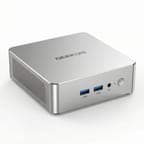
The A5 Pro measures 4.61 x 4.41 x 1.52 inches and weighs just 1.44 pounds, making it noticeably thinner than the standard A5 at 1.9 inches thick. The all-metal construction gives it a premium, balanced feel that Neowin praised as sturdy enough to withstand over 200kg of pressure. The silver-grey finish resists fingerprints, though opening the case requires removing glued rubber feet and eight screws, which several reviewers found fiddly. The front panel houses two USB 3.2 Gen 2 Type-A ports and a 3.5mm combo audio jack, while the rear provides two HDMI 2.0 ports, two USB-C 3.2 Gen 2 ports with DisplayPort Alt Mode, one USB 3.2 Gen 2 Type-A, one USB 2.0 port, 2.5 Gigabit Ethernet, and the DC power input. A full-size SD card reader sits on the left side of the chassis.
The AMD Ryzen 5 7530U runs at a 15-watt TDP with six Zen 3 cores, twelve threads, and boost clocks up to 4.5 GHz. The chip scores approximately 15,189 on PassMark’s CPU benchmark, which puts it in the everyday productivity tier. Thermals hold up under load, with TechMagnet reporting temperatures stabilizing around 65-70°C under sustained load. Techknowlux measured fan noise at approximately 38 dBA even under stress, while idle power draw sits at 6 watts. The integrated Radeon Vega 7 graphics handle 4K video playback and basic display driving without issue, though gaming is limited to retro titles and emulation at best.
WiFi 6 (802.11ax) and Bluetooth 5.2 handle wireless duties, though Robtech measured Bluetooth range at just 3.5 meters, notably below average. Storage expansion includes the primary M.2 2280 NVMe slot and an additional M.2 2242 SATA III slot, though the 2.5-inch SATA bay found in the standard A5 has been removed. CNX Software’s teardown confirmed the SATA connector remains unpopulated on the PCB. RAM is upgradeable to 64GB via two DDR4-3200 SODIMM slots, and the included 16GB arrives in a dual-channel configuration.
Reviewer Insights

Lon.TV
Lon.TV ran the A5 Pro through browser, video-editing, gaming, and Linux tests, and framed it as a light-duty machine: “It’s not going to knock your socks off with performance, but if you were looking for something capable for light duty work, this one might be worth taking a look at.” He measured idle draw between 7 and 7.5 watts, about 46 watts at full load, and full-speed 2.5 Gigabit Ethernet at roughly 2.3 Gbps in both directions. Browser work scored 23.1 on the Speedometer benchmark, which he called in line with the more expensive GEEKOM A8.
Graphics were the limit. He saw dropped frames on 4K 60 YouTube playback, scored 1,343 on 3DMark Time Spy, and barely reached 15 fps in Cyberpunk 2077 at 1080p on the lowest settings, though PS2 emulation ran at full speed. Ubuntu detected every piece of hardware, including WiFi and Ethernet, and he suggested the low power draw and 2.5 Gigabit port would suit a small home server, with the caveat that he does not recommend AMD chips for Plex transcoding. His maintenance complaint matches what other reviewers found inside the case: “the Wi-Fi antenna gets yanked out when you open up the case, and it’s really hard to get that little cable back in.”
TechMagnet’s Perspective
TechMagnet tested the GEEKOM A5 Pro focusing on its port selection and thermal behavior. He was impressed by the connectivity, noting that “this literally has all the ports you would ever need in a mini PC.” His thermal testing showed the device stabilizing around 65-70°C, which he considered cool enough for office and educational environments.
TechMagnet highlighted the easy internal access for RAM and storage upgrades, along with the thermal pad on the SSD for heat dissipation. He positioned the A5 Pro for students and office workers, stating that “mini PCs like this deliver everything that students need.” His primary reservations centered on the secondary M.2 slot being limited to the 2242 SATA form factor and the PCIe Gen 3 storage interface.
Robtech’s Analysis
Robtech delivered a detailed comparison between the A5 Pro and the standard A5, noting that “without performance mode enabled, the A5 Pro doesn’t hold up too well against the A5 considering the better CPU.” He found the compact form factor and premium build quality to be advantages, praising the metal construction and noting it feels “nice and premium in the hands.”
Bluetooth range measured just 3.5 meters, “quite a bit below the average we see across the board.” The lack of USB-C Power Delivery was another disappointment. He measured excellent idle power at 6 watts but noted that Performance Mode, which unlocks the processor’s full potential, pushes fan noise to 40 dBA. His overall assessment was mixed, acknowledging the build quality premium while questioning the value compared to the larger but more affordable standard A5.
Techknowlux’s First Impressions
Techknowlux focused on the A5 Pro’s potential as a long-term desktop replacement, praising the clean Windows installation with “almost no bloatware whatsoever out of the box.” His testing confirmed solid thermal management with temperatures rarely exceeding 64°C and noise levels around 38 dBA.
He noted the SSD performance reaches near the maximum for the PCIe Gen 3 standard, calling it a sensible choice for the target audience. However, he flagged a failure in LatencyMon testing, warning that “if you’re looking to get this device for audio work in DJ or audio production, this is something you’ll need to keep in mind.” He also observed WiFi stability issues during Ubuntu testing, suggesting Linux users should verify driver compatibility.
CNX Software
Jean-Luc Aufranc at CNX Software conducted a thorough three-part review including a detailed teardown. His examination revealed that the internal 2.5-inch SATA drive support has been removed despite the unpopulated connector remaining on the PCB. He confirmed quad display support through the dual HDMI 2.0 and dual USB-C ports, and noted the WiFi antenna’s attachment to the bottom cover requires careful handling during disassembly.
Neowin
Neowin’s review praised the all-metal construction and bloatware-free Windows installation. However, the reviewer discovered that the Kensington lock slot advertised in official specifications “is not present” on the actual hardware. They also noted the BIOS is restrictive with no Advanced tab for performance tuning, and flagged that Memory Integrity is disabled by default. The integrated Vega graphics drew criticism for struggling even at 720p on low settings in games.
TechRadar
TechRadar noted the A5 Pro maintains the expandability that made the A5 line popular, supporting up to 64GB of DDR4 memory and dual M.2 storage slots totaling up to 3TB. However, they highlighted a 15-20% performance drop compared to the older Ryzen 7 5800H model, along with a reduction in base RAM from 32GB to 16GB compared to some previous configurations.
Buy it for the footprint
The GEEKOM A5 Pro is for buyers who want the smallest metal box that still drives four screens, and who will pay a premium over the standard A5 to get it. The 0.47-liter volume suits tidy desk setups, digital signage, and anywhere a full tower will not fit. The Ryzen 5 7530U covers office productivity, web browsing, and media playback, and the 3-year warranty runs longer than most in this price bracket. Linux users should read CNX Software’s findings in our look at the GEEKOM A5 Pro 2026 Edition on Ubuntu, which covers full compatibility and idle power draw on this platform.
Buyers who do not need the smallest possible footprint should look at the GEEKOM A5 2025 Edition, which uses the same processor family in a slightly larger chassis and keeps the 2.5-inch SATA bay and an easier internal layout. The 3.5-meter Bluetooth range, the missing USB-C Power Delivery, and the locked BIOS are the compromises to weigh against the size. If you are weighing what to do with the bundled Windows install, our guide on whether to keep Windows, wipe it, or switch to Linux walks through the decision. For stronger graphics, look at the GEEKOM A8 or other models with more capable integrated graphics.
For those comparing options, see our Mini PC Comparison Chart to find the best match for your needs.
Frequently Asked Questions
What processor does the GEEKOM A5 Pro use?
Two chips ship in this line: the AMD Ryzen 5 7530U (2026 Edition) and the AMD Ryzen 5 7430U. Both are Zen 3 with 6 cores and 12 threads at a 15-watt TDP. The 7530U boosts to 4.5 GHz and scores approximately 15,189 on PassMark; the 7430U boosts to 4.3 GHz and scores around 15,985.
What’s the difference between the GEEKOM A5 Pro and the standard GEEKOM A5?
The A5 Pro features a more compact all-metal chassis (1.52 inches thick vs 1.9 inches), giving it a smaller 0.47-liter volume compared to the standard A5. The trade-off is that the Pro removes the 2.5-inch SATA drive bay found in the standard model. Both share similar processor options, port selections, and expandability through dual M.2 slots and upgradeable DDR4 RAM. The Pro’s premium metal construction and smaller footprint come at a higher price point.
Can I upgrade the RAM and storage in the A5 Pro?
Yes, the A5 Pro supports RAM upgrades up to 64GB via two DDR4-3200 SODIMM slots. For storage, you can replace the primary M.2 2280 NVMe SSD and add a secondary M.2 2242 SATA SSD. Note that the 2.5-inch SATA drive bay available in the standard A5 has been removed in the Pro model. Opening the case requires removing the glued rubber feet and eight screws.
How many monitors can the A5 Pro drive at once?
Four, all at 4K. Two HDMI 2.0 ports and two USB-C 3.2 Gen 2 ports with DisplayPort Alt Mode feed them, and all four outputs work at the same time in an extended desktop.
What ports does the A5 Pro have?
The front panel features two USB 3.2 Gen 2 Type-A ports and a 3.5mm combo audio jack. The rear provides two HDMI 2.0 ports, two USB-C 3.2 Gen 2 ports with DisplayPort Alt Mode, one USB 3.2 Gen 2 Type-A port, one USB 2.0 Type-A port, a 2.5 Gigabit Ethernet jack, and a DC power input. A full-size SD card reader is located on the left side.
Is the A5 Pro good for gaming?
No, the A5 Pro is not suitable for modern gaming. The integrated Radeon Vega 7 graphics can handle retro games and emulation, but Neowin’s testing showed it struggles even at 720p on low settings with contemporary titles. It handles 4K video playback and basic media tasks well, but gamers should look at mini PCs with more powerful integrated or discrete graphics.
What’s included in the box with the GEEKOM A5 Pro?
The box holds the mini PC, a 65W power adapter with power cord, an HDMI cable, a VESA mounting bracket with screws, a user guide, and a Thank You card. The VESA mount allows you to attach the PC behind a compatible monitor for a clean desk setup.
Does the A5 Pro work with Linux?
The A5 Pro can run Linux, though users should be aware of potential compatibility issues. CNX Software tested it with Ubuntu and found it generally functional, while techknowlux noted WiFi stability issues under Linux. The Ryzen 5 7530U has broad Linux kernel support, but wireless driver compatibility should be verified with your chosen distribution before purchasing specifically for Linux use.