
GEEKOM A8
Updated on

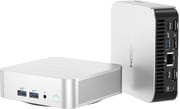
The GEEKOM A8 fits a full AMD Ryzen 8000-series mobile platform into a 4.4 x 4.4 x 1.5 inch aluminum case. The top configuration uses the eight-core Ryzen 9 8945HS with Radeon 780M graphics; cheaper builds drop to the Ryzen 7 8845HS or 8745HS. It runs Windows 11 Pro, takes up to 64GB of DDR5, and uses a single Gen 4 NVMe slot (up to 2TB), which suits productivity, creative work, and 1080p gaming. In this small a chassis, GEEKOM runs the chip at a capped power limit, so it does not reach the speeds the same CPU hits in a larger machine.
If you need more, the separate GEEKOM A8 Max adds extra storage bays, dual 2.5Gbps Ethernet, and industrial RS232/RS485 connectors in a slightly larger case.
| Pros | Cons |
|---|---|
| Aluminum chassis measuring 4.4 x 4.4 x 1.5 inches | BIOS exposes no TDP or VRAM controls |
| Ryzen 9 8945HS with Radeon 780M graphics on the top SKU | Fan is audible under heavy load |
| RAM upgradeable to 64GB DDR5, SSD user-replaceable | One M.2 slot only; the second set of pads has no connector |
| USB4, dual HDMI, SD card reader, 2.5Gbps Ethernet, Wi-Fi 6E | Wi-Fi reception weaker than some rivals (per reviewers) |
| Drives up to four displays over HDMI and USB-C | Internal layout makes RAM and SSD swaps fiddly |
| VESA mount included for hanging it behind a monitor | Top SKU nears laptop pricing |
Related Videos
GEEKOM A8 Comparison Chart
4 configurations
| Configuration | Processor | RAM | Storage | Performance | List price | Amazon price | Compare |
|---|---|---|---|---|---|---|---|
| 32GB/2TB/Ryzen 9 8945HS | Ryzen 9 8945HS | 32 GB | 2 TB | 5.7 | $849.00 | Details
| |
| 32GB/1TB/Ryzen 7 8845HS | Ryzen 7 8845HS | 32 GB | 1 TB | 5.7 | $699.00 | Details
| |
| 32GB/1TB/Ryzen 7 8745HS | Ryzen 7 8745HS | 32 GB | 1 TB | 5.7 | $649.00 | Details
| |
| 16GB/1TB/Ryzen 7 8745HS | Ryzen 7 8745HS | 16 GB | 1 TB | 5.3 | $639.00 | Loading... | Details
|
Specs shared by every configuration
| Operating System | Windows 11 Pro |
|---|---|
| GPU | Integrated AMD Radeon 780M |
| Dimensions width x length x thickness | 4.41 x 4.41 x 1.5 inches (112.01 x 112.01 x 38.1 mm) |
| Weight | unknown |
| WiFi | Wi-Fi 6E (802.11ax) |
| Bluetooth | Bluetooth 5.2 |
| Ethernet | 1 Ethernet port at 2.5 Gbps |
| HDMI | 2 Full-Size HDMI Ports |
| DisplayPort | DisplayPort over USB-C available. |
| VGA | No VGA Ports |
| USB Ports | 1 USB 2.0, 3 USB 3, 2 USB-C (1 USB4) (One USB-C port is USB 3.2 Gen 2, and the other is USB 4. USB-C ports support DisplayPort) |
| Thunderbolt Ports | No |
| OCuLink | No |
| Internal SATA Ports | No SATA ports |
| Card Reader | SD Card Reader |
| Headphone Jack | combo |
| Fanless | No |
| VESA Mount | Yes |
| In the Box | Mounting bracket, screws, 120 W power supply, HDMI cable, instruction manual. |
| Expandability | Supports up to 64 GB DDR5 RAM, 1 m.2 Gen 4 NVMe SSD. RAM and SSD are user-upgradable. |
Related Mini PCs
-
 GEEKOM A5The GEEKOM A5 is a compact AMD Ryzen 7 5800H (or 5825U or 7730U) mini PC with Radeon Vega 8…
 -
 GEEKOM AE7The GEEKOM AE7 is a Ryzen 9 7940HS mini PC (8 cores, Radeon 780M) with 32GB DDR5, a 1TB Gen4 SSD,…
 -
 AYANEO Retro Mini PC AM02The AYANEO Retro Mini PC AM02 is a NES-styled mini PC with a 4-inch touchscreen, an AMD Ryzen 7…
 -
 Beelink SER7 Mini PCPacked with an AMD Ryzen 7 7840HS, Radeon 780M GPU, and dual M.2 SSD slots, the Beelink SER7 Mini…
 -
 Beelink SER9 PRO+The Beelink SER9 PRO+ pairs an AMD Ryzen 7 H 255 with Radeon 780M graphics, 32GB LPDDR5X RAM, and…
 -
 BOSGAME P5 Mini PCThe BOSGAME P5 is a mini PC with an AMD Ryzen 7 6800H, Radeon 680M graphics, 32GB of DDR5, a 512GB…
A capped 8945HS, 64GB DDR5, and one NVMe slot
On the top SKU the Ryzen 9 8945HS (eight cores, 16 threads) pairs with the Radeon 780M, which is strong enough for 1080p gaming with FSR, 4K video editing, and light 3D work. In this chassis reviewers measured the chip held to a capped power limit (figures ranged from the high 30s to about 60W depending on the test), so it trails the same CPU in a larger system, and the BIOS does not expose TDP or VRAM controls to lift that. It ships with 32GB of DDR5 (upgradeable to 64GB) and a single Gen 4 NVMe slot (1TB or 2TB), so storage adds one drive, not several.
Ports run to a USB4 connector that can drive an external GPU, a second USB-C, dual HDMI, three USB-A, a full-size SD card reader, 2.5Gbps Ethernet, Wi-Fi 6E, and Bluetooth 5.2, with up to four displays across the HDMI and USB-C outputs. The separate GEEKOM A8 Max adds dual Ethernet, an extra M.2 SATA and 2.5-inch SATA bay, and industrial RS232/RS485 connectors for buyers who need them. The aluminum chassis aids cooling, and the VESA mount lets it sit behind a monitor, though the fan is audible under load.
Strong CPU scores against a capped power limit
SomeGadgetGuy (JuanBagnell)
JuanBagnell tested the 8945HS config and called it “a crazy powerful little home PC,” describing it as “the smallest computer in my office right now is one of the most powerful.” He leaned on the creative angle, running a DaVinci Resolve 4K render and praising the upgradeable RAM and SSD as flexibility the Mac Mini lacks, while noting the internal layout makes upgrades fiddly and Wi-Fi reception was weaker than some rivals.
ETA Prime
ETA Prime liked the look (“super clean, very elegant”) and the size, comparing the footprint to an Xbox controller. His key finding was thermal: the A8 holds its TDP to roughly 54 to 60W, and the BIOS offers no TDP or VRAM controls to change that. With FSR he saw smooth 1080p runs in Spider-Man Remastered and Shadow of the Tomb Raider.
Elevated Systems
Elevated Systems gave the most critical take. CPU performance was strong (Geekbench 6 multi around 13,400), but he measured the Radeon 780M running 16 to 25% behind the same iGPU in his Framework laptop, blaming memory-controller and Infinity Fabric clock differences. At “$900 US” he judged it close to laptop pricing and concluded “the A7 may be a better value for your money” for buyers who do not need the newer NPU.
Tech Notice
Tech Notice ran a full teardown and put the 8945HS Cinebench R23 multi (about 16,460) up against desktop chips like the Intel i9-10900K. He called it “one of the best designs of Mini PCs that I’ve come across” and confirmed there is no second M.2 slot (the pads exist but the connector is not soldered). He measured a 92C peak under stress without thermal throttling, since the chip is power-limited rather than heat-limited.
Customer Reviews
Across 133 ratings on Amazon, the GEEKOM A8 averages 3.9 stars, with 54 percent of ratings at five stars and 16 percent at one star. The positive reviews focus on how much power the small chassis packs. A verified buyer using the handle 8Ball, who describes himself as a 40-year IT person, called it a “Great little, but very powerful, mini-PC!” and praised it as a fit for tight desk space or a home-theater setup. Verified Linux users reported clean installs too: one buyer named Mike Sumrell said the AMD and Windows drivers loaded without issue, and another, posting under the handle Vilhjálmur, reported Debian 13 “running great out of the box.”
Heat and early stability drive the negative and mixed reviews. A verified buyer using the handle tgmail, a Linux user, noted “The unit can run surprisingly hot” and measured a real WiFi throughput drop versus their laptops, and a buyer in Singapore likewise found the box very hot under a Chrome and photo-editing load. Verified buyer emildlc hit intermittent rebooting weeks after delivery and initially rated the unit one star, then revised to four after GEEKOM support pointed them to firmware fixes: “After downloading and installing the updates, the PC is working very well now, no more intermittent rebooting.” A one-star verified reviewer using the handle PWH cited laggy Bluetooth and a four-monitor output ceiling as deal breakers and returned the unit.
Read more owner reviews on Amazon.
Buy it for the USB4 ports and the full I/O set
This machine is for anyone who wants Ryzen 9 8945HS-class CPU power, USB4, and a full I/O set (including a USB4 eGPU path and SD reader) in a tiny aluminum box for productivity, creative work, and 1080p gaming. It sits in what we argue is 2026’s quiet best-buy tier of mid-range mini PCs, and gamers cross-shopping a console can read our framework on waiting for Valve’s Steam Machine or buying a mini PC now. The VESA mount and small footprint suit a tucked-away desktop.
It is a weaker fit if you want BIOS-level TDP control, a second internal drive, or the most GPU performance per dollar; as Elevated Systems noted, the 780M here trails the same chip in larger machines and the A8 nears laptop pricing. Buyers who do not need the 8945HS or the NPU can weigh the cheaper GEEKOM A7. To compare other options, see Starry Hope’s Mini PC Comparison Tool.
Frequently Asked Questions
What operating system does the GEEKOM A8 come with?
Windows 11 Pro, preinstalled.
Can I upgrade the RAM and storage?
Yes. Memory goes up to 64GB of DDR5, and the single M.2 PCIe Gen 4×4 slot takes an NVMe SSD. There is no second M.2 slot and no support for 2.5” SATA drives; the A8 Max adds an M.2 SATA slot and a 2.5” SATA connector.
What are the main differences between the GEEKOM A8 and the A8 Max?
The A8 Max adds dual 2.5Gbps Ethernet ports, an M.2 SATA slot, 2.5” SATA drive support, RS232/RS485 industrial connectors, optional wireless charging, and an HDA CODEC for audio. Its case is slightly larger to fit them.
How many displays can it drive?
Four at once, across two HDMI ports and two USB-C ports with DisplayPort.
Is the GEEKOM A8 good for gaming?
The integrated Radeon 780M plays 1080p games and does best with less demanding titles and older AAA games, especially with AMD FidelityFX Super Resolution (FSR) improving frame rates. More graphically intensive games may need an external GPU connected via USB 4.
How does the cooling system perform?
The cooling holds off thermal throttling even under heavy workloads. The fan becomes audible during intensive tasks, though it keeps a lower-pitched, less intrusive tone.
Does the GEEKOM A8 support Linux?
Yes, it runs Linux.
What’s included in the box?
A 120W power supply, an HDMI cable, a VESA mounting bracket with screws, and an instruction manual.
Is it portable?
It measures 4.4 x 4.4 x 1.34 inches in a light aluminum shell, so it moves easily between desks. The included VESA mount also lets it hang behind a monitor.