
GEEKOM AE7
Updated on

The GEEKOM AE7 is a small workstation-class mini PC built on AMD’s Ryzen 9 7940HS, an eight-core, 16-thread chip with Radeon 780M graphics and a 10 TOPS NPU for on-device AI. GEEKOM ships it with 32GB of DDR5 and a 1TB PCIe Gen4 SSD in a silver, roughly 4.6 x 4.4 x 1.9-inch case, with USB4, dual HDMI, Wi-Fi 6E, a single 2.5GbE port, and an SD card reader. It launched around $699.
The Ryzen 9 7940HS is fast and the box sips power, with idle draw landing near 8W, and the 780M is capable for esports and 4K media. The DDR5 has no active cooling and throttles under sustained gaming load. Storage stops at one slot, and the single Ethernet port uses a Realtek 2.5GbE controller.
| Pros | Cons |
|---|---|
| Fast 8-core Ryzen 9 7940HS; tops several AMD benchmark charts | DDR5 has no active cooling and throttles under sustained gaming |
| Very efficient: about 8W idle (8.5W with 10 VMs running) | Single M.2 slot, no second drive (no supported 2.5-inch bay) |
| 10 TOPS NPU and Radeon 780M for AI and esports | One Realtek 2.5GbE port; needs a USB NIC for VMware ESXi |
| USB4 for an external GPU, dual HDMI, SD card reader | MediaTek Wi-Fi lacks out-of-the-box Linux driver support |
| Wi-Fi 6E and Bluetooth 5.2, with Windows 11 Pro and a 3-year warranty | About $699 at launch |
Related Videos
GEEKOM AE7 Comparison Chart
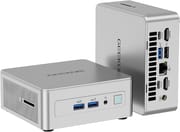 GEEKOM AE7 | |
| Price | List Price: $699.00 Amazon Prices: |
| Version | 32GB/1TB/Ryzen 9 7940HS |
| Performance Rating | 5.8 |
| Operating System | Windows 11 Pro |
| Processor | Octa-core 4.00 Ghz (max 5.20 Ghz) AMD Ryzen 9 7940HS |
| GPU | Integrated AMD Radeon 780M |
| RAM | 32 GB |
| Internal Storage | 1 TB |
| Dimensions width x length x thickness | 4.6 x 4.4 x 1.9 inches (116.84 x 111.76 x 48.26 mm) |
| Weight | unknown |
| WiFi | Wi-Fi 6E (802.11ax) |
| Bluetooth | Bluetooth 5.2 |
| Ethernet | 1 Ethernet port at 2.5 Gbps |
| HDMI | 2 Full-Size HDMI Ports |
| DisplayPort | No DisplayPort |
| VGA | No VGA Ports |
| USB Ports | 1 USB 2.0, 3 USB 3, 2 USB-C (1 USB4) (USB4 supports Power Delivery and DisplayPort Alt Mode; USB 3.2 Gen 2 Type-C supports Power Delivery and DisplayPort) |
| Thunderbolt Ports | No |
| OCuLink | No |
| Internal SATA Ports | No SATA ports |
| Card Reader | SD Card Reader |
| Headphone Jack | combo |
| Fanless | No |
| VESA Mount | Yes |
| In the Box | Mini PC, power adapter, HDMI cable, user guide, VESA mount, screws for VESA mounting, 120W power brick. |
| Expandability | Supports up to 64GB DDR5 RAM, 2TB M.2 PCIe Gen4 SSD |
Related Mini PCs
-
 GEEKOM A5The GEEKOM A5 is a compact AMD Ryzen 7 5800H (or 5825U or 7730U) mini PC with Radeon Vega 8…
 -
 GEEKOM A8The GEEKOM A8 is a compact AMD mini PC sold with Ryzen 8000-series chips (up to the Ryzen 9 8945HS)…
 -
 AYANEO Retro Mini PC AM02The AYANEO Retro Mini PC AM02 is a NES-styled mini PC with a 4-inch touchscreen, an AMD Ryzen 7…
 -
 Beelink SER7 Mini PCPacked with an AMD Ryzen 7 7840HS, Radeon 780M GPU, and dual M.2 SSD slots, the Beelink SER7 Mini…
 -
 Beelink SER9 PRO+The Beelink SER9 PRO+ pairs an AMD Ryzen 7 H 255 with Radeon 780M graphics, 32GB LPDDR5X RAM, and…
 -
 BOSGAME P5 Mini PCThe BOSGAME P5 is a mini PC with an AMD Ryzen 7 6800H, Radeon 680M graphics, 32GB of DDR5, a 512GB…
Reviewer Insights
A home-lab host that idles near 8.5W
Brandon Lee at VirtualizationHowto tested the AE7 as a virtualization host, running Proxmox, Docker, and VMware ESXi. He hit no trouble under that load, reporting “I didn’t really have any instability issues or overheating or throttling,” and he only heard the fan ramp up after pinning the CPU at 100 percent with a Linux stress test. The unit averaged “8 1/2 Watts with 10 VMs just idling” and topped out near 70W under full stress, far below the older Xeon servers he compared it to. He liked that it “feels smaller than some of the other 4x4 mini PCs” and called out the 10 TOPS NPU as a bonus for AI projects. The single Realtek 2.5GbE port drew his one complaint, since VMware ESXi will not recognize it without a USB network adapter. He called the machine “a Ryzen based Home Server.”
Toasty Bros put creation work ahead of gaming
The Toasty Bros treated the AE7 as a content-creation and workstation machine. In Adobe Premiere Pro they scrubbed and edited a fully-cut timeline with “no drop frames,” and a Photoshop file felt “very snappy.” On the teardown they found name-brand Crucial DDR5-5600 RAM, but the bundled Gen 4 NVMe was an off-brand drive they did not recognize. Overwatch 2 and Fortnite were “playable” at 1080p low, though they watched the iGPU power draw taper under sustained load and suggested dropping to 720p or adding airflow for serious gaming. They also logged 3DMark Steel Nomad Light at 2,896 and Time Spy at 3,377, and concluded the AE7 is “really solid” for creation work with “gaming on the side is acceptable.”
Top benchmark scores, memory at 79C
Robtech’s review put the 7940HS at or near the top of his AMD field. In Geekbench 6 single-core he described it as “putting it at the top of this selection,” with multi-core taking the top Ryzen spot and H.264 encoding beating an i9-13900H. He confirmed USB4 eGPU support (running an RTX 3070 over a Razer Core X) and the SD card slot. With no active cooling on the DDR5, leaving Cyberpunk 2077 running for 45 minutes pushed memory to 79C and dropped frame rates, and the MediaTek “Wi-Fi chip used still isn’t supported out of the box with Ubuntu.” He noted the case is “made of plastic on the outside” over a metal frame, and called the AE7 “a decent Mini PC with a few issues that keep it from being the best.”
Tech Closet clocked esports frame rates and 4K playback
Tech Closet’s review covered gaming and media on the 780M, all at 1080p: Valorant ran around 180 fps, CS2 over 100, Apex Legends around 100, while heavier titles like Cyberpunk 2077 and Elden Ring needed FSR and low settings to reach roughly 40 to 80 fps. The reviewer described the case as “mainly made of aluminum” with plastic cooling cutouts, found it “surprisingly quiet,” and noted CPU temperatures hovering around 90C with some throttling that stayed in a safe operating range. For creation, “I can edit 4K videos with smooth playback,” and the take on media was that “with its powerful iGPU, this Mini PC can easily be used as a 4K home theater.” The reviewer also pointed out “there is also a GEEKOM AE8” with similar or slightly better performance.
A Compact Workstation With One Storage Slot and Hot Memory
The Ryzen 9 7940HS tops several AMD benchmark charts, idle power sits near 8W, and the 780M is comfortable with esports, 4K editing, and 4K media. It suits professionals, students, and home-lab users who want a compact, power-sipping machine with USB4 and an SD card reader.
The DDR5 has no active cooling and throttles during long gaming sessions, there is only one storage slot, the single Ethernet port uses a Realtek 2.5GbE controller that needs a USB adapter for VMware ESXi, and the MediaTek Wi-Fi lacks out-of-the-box Linux drivers. Heavy gamers should plan on FSR, lowered settings, or an external GPU over USB4. To compare the AE7 with other models, use Starry Hope’s Mini PC Comparison Chart.