
BOSGAME P5 Mini PC
Updated on

The BOSGAME P5 is a compact Mini PC built around AMD’s Ryzen 7 6800H APU with Radeon 680M (RDNA 2) integrated graphics, 32GB of DDR5 memory, and a 512GB NVMe SSD. It is one of the first BOSGAME systems built by AW, the same OEM behind Beelink and Trigkey, and it inherits AW’s mature thermal layout while moving to a new chassis with a deliberately rear-heavy port arrangement. The 32GB / 512GB / Ryzen 7 6800H configuration is also identified as the “BOSGAME P5 Pro”; the bare “BOSGAME P5” label refers to a lower-tier Ryzen 5 6600H sibling SKU that ships with 24GB of memory at a lower price point.
Strong ports and a GPU that never reaches its rated clock
| Pros | Cons |
|---|---|
| Best-built BOSGAME chassis to date (AW manufacturing) | No front USB-C port for quick access |
| RDNA 2 Radeon 680M runs Counter-Strike 2 where Vega APUs struggle | Secondary M.2 slot uses smaller 2242 form factor |
| Dual rear USB4 ports (40Gbps, 8K-capable, eGPU eligible) | Fragile rubber pull-tab for bottom panel access |
| 32GB DDR5 dual-channel, user-upgradable to 64GB | GPU clocked at 1900MHz vs the silicon’s 2200MHz max |
| 120W adapter leaves headroom for the 45W CPU plus eGPU | RAM speed capped at 4800MHz by the processor |
| WiFi 6E, 2.5G Ethernet, quad-display output | Renamed to “P5 Pro”; original P5 branding now refers to a cheaper Ryzen 5 6600H SKU |
| VESA mountable for behind-monitor setups |
Related Videos
BOSGAME P5 Mini PC Comparison Chart
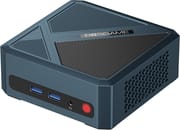 BOSGAME P5 Mini PC | |
| Price | List Price: $389.99 Amazon Prices: |
| Version | 32GB/512GB/Ryzen 7 6800H (sold as BOSGAME P5 Pro) |
| Performance Rating | 5.2 |
| Operating System | Windows 11 Pro |
| Processor | Octa-core 3.20 Ghz (max 4.70 Ghz) AMD Ryzen 7 6800H |
| GPU | Integrated AMD Radeon 680M |
| RAM | 32 GB |
| Internal Storage | 512 GB |
| Dimensions width x length x thickness | --- |
| Weight | unknown |
| WiFi | Wi-Fi 6E (802.11ax) |
| Bluetooth | Bluetooth 5.2 |
| Ethernet | 1 Ethernet port at 2.5 Gbps |
| HDMI | 1 Full-Size HDMI Port |
| DisplayPort | 1 DisplayPort |
| VGA | No VGA Ports |
| USB Ports | 2 USB 2.0, 2 USB 3, 2 USB-C (2 USB4) Dual USB4 ports on rear (40Gbps, DP Alt Mode, up to 8K@60Hz via USB-C, eGPU capable) |
| Thunderbolt Ports | No |
| OCuLink | No |
| Internal SATA Ports | No SATA ports |
| Card Reader | No Card Reader |
| Headphone Jack | combo |
| Fanless | No |
| VESA Mount | Yes |
| In the Box | 1 x Mini PC, 1 x User Manual, 1 x Power Adapter (120W), 1 x HDMI cable |
| Expandability | -- |
Related Mini PCs
-
 BOSGAME M4The BOSGAME M4 pairs an AMD Ryzen 7 8745HS with 32GB of DDR5, an OCuLink port for an external GPU,…
 -
 BOSGAME P3 LiteThe BOSGAME P3 Lite pairs an AMD Ryzen 7 6800H and Radeon 680M graphics with dual 2.5G Ethernet,…
 -
 AYANEO Retro Mini PC AM02The AYANEO Retro Mini PC AM02 is a NES-styled mini PC with a 4-inch touchscreen, an AMD Ryzen 7…
 -
 Beelink SER7 Mini PCPacked with an AMD Ryzen 7 7840HS, Radeon 780M GPU, and dual M.2 SSD slots, the Beelink SER7 Mini…
 -
 Beelink SER9 PRO+The Beelink SER9 PRO+ pairs an AMD Ryzen 7 H 255 with Radeon 780M graphics, 32GB LPDDR5X RAM, and…
 -
 GEEKOM A5The GEEKOM A5 is a compact AMD Ryzen 7 5800H (or 5825U or 7730U) mini PC with Radeon Vega 8…
Zen 3+ cores, dual rear USB4, and a PCIe 4.0 expansion slot

The AMD Ryzen 7 6800H is an 8-core / 16-thread Zen 3+ processor with a base clock of 3.2GHz and a boost to 4.7GHz, configured here at the standard 45W TDP. It pairs with the Radeon 680M integrated GPU and its 12 RDNA 2 compute units, a step up in integrated graphics from the Vega iGPU in the older Ryzen 7 5800H. The 32GB of DDR5 ships as two 16GB SODIMMs running at the processor-capped 4800 MT/s in dual channel; the platform itself supports 64GB if you want to swap in 2x32GB.
Both rear USB-C ports are full USB4 (40Gbps), supporting DisplayPort Alt Mode at up to 8K@60Hz and powering eGPU enclosures if you ever want to graduate past the 680M. The machine also exposes HDMI 2.0 and a DisplayPort for a four-display setup, plus 2.5G Ethernet, WiFi 6E, and Bluetooth 5.2. EVO Tech called out the decision to put both USB-C ports on the back rather than the front, noting that “this makes setups so much cleaner” when running a dock from a permanently routed cable.
The primary M.2 2280 slot runs at PCIe 3.0 x4, while the secondary M.2 2242 expansion slot is wired for PCIe 4.0 x4. It is smaller in physical footprint but capable of higher peak throughput than the boot drive if you fit a compatible 2242 NVMe. The 120W power adapter has headroom for the 45W TDP processor even when an eGPU draws over USB4.
Esports and older AAA titles at 1080p are the realistic ceiling
EVO Tech’s launch review and its P3 comparison both tested the entry-tier P5 with the Ryzen 5 6600H and 24GB of memory, not the Ryzen 7 6800H 32GB build. The chassis, port layout, cooling, and SODIMM configuration are shared across the family, so observations about build quality and connectivity transfer directly; performance numbers do not. The Ryzen 7 6800H has two more cores, a higher boost clock, and a higher-clocked Radeon 680M than the 6600H’s Radeon 660M, so gaming and Cinebench scores on the 32GB build run materially ahead of the entry-tier figures that EVO Tech recorded.
EVO Tech measured the 6600H P5 at a Cinebench R20 multi-core score of 10,115 and single-core score of 1,466 in the P3-vs-P5 comparison video, and noted that a Windows scheduler update in late 2024 lifted all Ryzen mobile chips by what they called a generational uplift, so a 6800H build in 2026 should score higher than its specs sheet suggests at launch. EVO Tech also pointed out that the GPU on these chips ships clocked at around 1900MHz rather than the platform’s nominal 2100 to 2200MHz ceiling, which leaves headroom the system never reaches even under sustained gaming load. Memory tops out at 4800 MT/s because of the CPU, not the SODIMMs themselves, and this chassis offers no way to overclock it.
EVO Tech demonstrated that Counter-Strike 2 runs comfortably on the 6600H and still better on the 6800H, while equivalent Vega APUs (5700U, 5800H) struggle with the same title; the difference is driver support more than raw silicon. Black Myth: Wukong is playable on the 680M only with FSR 3.0 frame generation at the lowest in-game settings, and demanding titles like Returnal are not realistic targets at any setting.
Reviewer Insights

EVO Tech on the P5 chassis and build
In the launch review of the P5 (the Ryzen 5 6600H entry-tier build), EVO Tech said the P5 “is the best buil[t] system that I have seen from boss[ ]game,” and noted the system is manufactured by AW, the OEM that also builds Beelink and Trigkey mini PCs. The reviewer was specifically positive about the rear-only USB-C placement: “this makes setups so much cleaner,” and “more usable” than the front USB-C ports typical on competing mini PCs in this price tier. About the 6600H entry build, EVO Tech said this Ryzen tier “is what I consider right now to be the lowest end that you should be looking for in terms of a gaming Mini PC.” Watch the full review on EVO Tech’s YouTube channel.
EVO Tech: P5 vs P3 comparison
In a follow-up comparison between the P5 (6600H entry SKU) and the more expensive Ryzen 9 6900HX P3, EVO Tech ultimately recommended the P3 for buyers who weight gaming performance heavily, but framed the P5 as the right pick for a general-purpose desktop budget: “save the money get yourself the P5 if all you care about is having a very nice computer to use on the day-to-day.” The reviewer summarised the 6600H entry tier as offering “the right balance of performance per dollar.” Both observations apply to the 6800H build as well, which sits between the entry 6600H P5 and the higher-end P3 on processor tier and price. The full comparison is on EVO Tech’s YouTube channel.
HowToGeek’s affordable mini PC roundup
The Ryzen 7 6800H build of the P5 (sold as “P5 Pro”) was included in HowToGeek’s June 2025 round-up of affordable mini PCs that can replace an aging Windows 10 desktop, which framed it as a gaming-capable pick in the under-$450 tier alongside the GMKtec M5 Plus and the GEEKOM A6. The article does not include first-party benchmarks, and contains minor spec slips that BOSGAME’s own listing does not (the article refers to the chip as the 6800HS and the SSD as a 512TB drive; both are the standard 6800H and 512GB).
Worth it for the 32GB of DDR5 and the second M.2 slot
This tier suits a buyer who wants a compact, quiet productivity desktop and would rather not pay for a Ryzen AI 300 or HX 370 tier system. The 512GB primary SSD and 32GB of DDR5 are healthy defaults for 2026, and the secondary M.2 2242 slot leaves an owner who wants to grow into the platform somewhere to put a second NVMe.
Newer Phoenix or Hawk Point chips give better single-thread results for CPU-bound work. For gaming, look at the BOSGAME P3 (Ryzen 9 6900HX) for the next tier up, or the BOSGAME M4 (Ryzen 7 7840HS) for a newer Phoenix-class part with the more capable Radeon 780M iGPU. The mini PC comparison chart lets you sort and filter the full catalog by processor, RAM, ports, and price. The bare “BOSGAME P5” name refers to a Ryzen 5 6600H 24GB / 512GB SKU around $290, which is the configuration EVO Tech reviewed.
Upgrades
Accessories that fit the BOSGAME P5 Mini PC's USB4 or Thunderbolt ports.

Core X V2
A Thunderbolt 5 enclosure that Razer lists as working with Thunderbolt 4 and USB4 hosts; it fits a four-slot card and needs an ATX power supply.

DEG2 eGPU Dock
Connects over USB4 or Thunderbolt 5, with an OCuLink input behind a switch, and adds an M.2 slot; it needs an ATX or SFX power supply.

Breakaway Box 850 T5
Has an 850W power supply built in, so only the graphics card is extra, and works with Thunderbolt 4 and USB4 Windows PCs.

TS4 Thunderbolt 4 Dock
An 18-port dock that CalDigit lists for Thunderbolt 4 and USB4 hosts, with 2.5GbE and a DisplayPort 1.4 output.

TBT4-UD5 Thunderbolt 4 Dock
Two HDMI ports drive two 4K60 monitors from one Thunderbolt 4 or USB4 port on a Windows PC.

Revodok Max 208 Thunderbolt 4 Dock
Adds three Thunderbolt 4 ports for dual 4K60 displays plus gigabit Ethernet; it has no HDMI port, so monitors connect over USB-C or an adapter.
Frequently Asked Questions
Is the “BOSGAME P5 Pro” configuration the same product as this page?
It is. BOSGAME relabelled the Ryzen 7 6800H / 32GB / 512GB configuration of the P5 chassis as the “P5 Pro” without changing the hardware. The bare “BOSGAME P5” name refers to a cheaper Ryzen 5 6600H / 24GB / 512GB sibling SKU.
Can I expand the storage on the P5?
The chassis has two M.2 slots: a primary 2280 slot at PCIe 3.0 x4 (the boot drive) and a secondary 2242 slot wired at PCIe 4.0 x4. Any replacement or expansion drive has to match the slot’s physical size; 2242 NVMe drives are less common than 2280 but readily available.
What type of graphics does the P5 have?
AMD Radeon 680M integrated graphics, 12 RDNA 2 compute units, included with the Ryzen 7 6800H APU. RDNA 2 has materially better driver support and game compatibility today than older Vega-based integrated graphics in the 5700U / 5800H tier, which is the most visible reason to step from a Vega-era mini PC to this generation.
Is the P5 suitable for gaming?
Esports and older AAA titles run at 1080p with modest settings. The integrated Radeon 680M ships clocked around 1900MHz and the DDR5 is capped at 4800 MT/s by the CPU. AAA 2024 / 2025 titles like Black Myth: Wukong are playable only with FSR 3.0 frame generation on the lowest settings. For higher-tier gaming, BOSGAME’s P3 (Ryzen 9 6900HX) is the next step up.
Does the P5 support multiple monitors?
Up to four run simultaneously, driven by the HDMI 2.0 port, the DisplayPort output, and the two rear USB4 ports (which carry DisplayPort Alt Mode at up to 8K@60Hz each).
Can the P5 be VESA mounted?
Yes, the chassis ships with a VESA mounting plate. Attaching it to the back of a VESA-compatible monitor is the cleanest way to use the dual rear USB-C ports without visible cabling.
What operating system comes with the P5?
Windows 11 Pro pre-installed. The Ryzen 7 6800H is fully supported by Linux distributions shipping a current kernel as well, so the system is a viable target for an Ubuntu, Fedora, or Bazzite install if you want to repurpose it as a steam-stream box or a small-form-factor workstation.