
BOSGAME M4
Updated on

The BOSGAME M4 is a compact mini PC built around the AMD Ryzen 7 8745HS (8 cores, 16 threads, up to 4.9GHz). Its OCuLink port is a direct PCIe 4.0 x4 connection for an external GPU, a wider path than a Thunderbolt or USB4 enclosure gets. Dual 2.5-gigabit Ethernet, USB4, and support for three simultaneous 4K displays fill out the rest, aimed at gamers and content creators working on a small desk.
Pros and Cons
| Pros | Cons |
|---|---|
| OCuLink port enables full-speed eGPU connectivity | Subpar thermal performance during extended gaming |
| Dual 2.5 Gigabit Ethernet suits NAS and homelab wiring | Fan becomes audible under sustained load |
| Active cooling for both M.2 SSD slots | Second M.2 slot shares PCIe lanes with WiFi |
| USB4 with 40Gbps bandwidth | All-plastic construction |
| RAM and storage sit behind an easy teardown | No Thunderbolt support |
| Drives three 4K displays without an add-in card | Only 12-month warranty |
Related Videos
BOSGAME M4 Comparison Chart
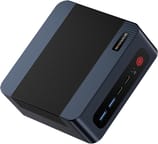 BOSGAME M4 | BOSGAME M4 | |
| Price | List Price: $499 Amazon Prices: | List Price: $569.99 Amazon Prices: |
| Version | 32GB/1TB/Ryzen 7 8745HS | 32GB/1TB/Ryzen 7 7840HS |
| Performance Rating | 5.7 | 5.7 |
| Operating System | Windows 11 Pro | Windows 11 Pro |
| Processor | Octa-core 3.80 Ghz (max 4.90 Ghz) AMD Ryzen 7 8745HS | Octa-core 3.80 Ghz (max 5.10 Ghz) AMD Ryzen 7 7840HS |
| GPU | Integrated AMD Radeon 780M | Integrated AMD Radeon 780M |
| RAM | 32 GB | 32 GB |
| Internal Storage | 1 TB | 1 TB |
| Dimensions width x length x thickness | 5.12 x 5.08 x 1.81 inches (130.05 x 129.03 x 45.97 mm) | 5.12 x 5.08 x 1.81 inches (130.05 x 129.03 x 45.97 mm) |
| Weight | 1.23 lbs (0.56 kg) | 1.23 lbs (0.56 kg) |
| WiFi | Wi-Fi 6E (802.11ax) | Wi-Fi 6E (802.11ax) |
| Bluetooth | Bluetooth 5.2 | Bluetooth 5.2 |
| Ethernet | 2 Ethernet ports at 2.5 Gbps | 2 Ethernet ports at 2.5 Gbps |
| HDMI | 1 HDMI Port | 1 HDMI Port |
| DisplayPort | 1 DisplayPort | 1 DisplayPort |
| VGA | No VGA Ports | No VGA Ports |
| USB Ports | 2 USB 2.0, 2 USB 3, 1 USB-C (1 USB4) | 2 USB 2.0, 2 USB 3, 1 USB-C (1 USB4) |
| Thunderbolt Ports | No | No |
| OCuLink | PCIe 4.0 x4 for eGPU | PCIe 4.0 x4 for eGPU |
| Internal SATA Ports | No SATA ports | No SATA ports |
| Card Reader | No Card Reader | No Card Reader |
| Headphone Jack | combo | combo |
| Fanless | No | No |
| VESA Mount | Yes | Yes |
| In the Box | Mini PC, 120W power adapter, VESA bracket, HDMI cable, user manual | Mini PC, 120W power adapter, VESA bracket, HDMI cable, user manual |
| Expandability | RAM: 2x SO-DIMM DDR5-4800 slots (up to 64GB). Storage: 2x M.2 2280 PCIe 4.0 slots with active SSD cooling. | RAM: 2x SO-DIMM DDR5-4800 slots (up to 64GB). Storage: 2x M.2 2280 PCIe 4.0 slots with active SSD cooling. |
Related Mini PCs
-
 BOSGAME P3 LiteThe BOSGAME P3 Lite pairs an AMD Ryzen 7 6800H and Radeon 680M graphics with dual 2.5G Ethernet,…
 -
 BOSGAME P6 NeoThe BOSGAME P6 Neo puts an 8-core AMD Ryzen 7 6800H, 24GB of soldered LPDDR5X, and triple 4K…
 -
 Beelink EQR7The Beelink EQR7 pairs an AMD Ryzen 7 7735U with a built-in power supply, dual Gigabit Ethernet,…
 -
 Beelink SER5 MAX (Ryzen 7 7735HS)The Beelink SER5 MAX pairs an 8-core Ryzen 7 7735HS and Radeon 680M graphics with 24GB of LPDDR5,…
 -
 GMKtec NucBox K16The GMKtec NucBox K16 is a CNC-aluminium mini PC on the AMD Ryzen 7 7735HS with Radeon 680M…
 -
 GMKtec Nucbox K2The GMKtec Nucbox K2 is a compact AMD Ryzen 7 7735HS mini PC with Radeon 680M graphics, DDR5 to…
OCuLink and dual 2.5GbE in a five-inch plastic shell

The chassis measures 5.12 x 5.08 x 1.81 inches and weighs 1.23 pounds, and the all-plastic construction keeps the cost down. Ports are split across both faces, with the USB4 Type-C port and headphone jack on the front and the dual 2.5GbE ports, HDMI 2.0, DisplayPort 1.4, OCuLink, and the remaining USB ports on the rear. TechRadar’s review notes that while it lacks the premium feel of metal-encased competitors, the M4 ticks every other box for a successful NUC design.
The Ryzen 7 8745HS carries integrated Radeon 780M graphics, whose 12 RDNA 3 compute units run at 2700MHz and cover casual gaming and 4K video editing. Heavier gaming is what the OCuLink port is for, once an external GPU enclosure is attached. Wccftech praised its everyday and creative performance for the price. Memory is 32GB of DDR5-4800 running in dual channel, which keeps demanding applications off a single-channel bottleneck.
Two Realtek RTL8125 controllers drive the 2.5-gigabit Ethernet ports, giving a NAS or homelab build a second wired path. WiFi 6E comes from an Intel AX210 card with 6GHz band support, and Bluetooth 5.2 handles peripherals. The inclusion of both USB4 at 40Gbps and OCuLink sets the M4 apart from competitors that often force users to choose between these standards. Storage covers two M.2 2280 PCIe 4.0 slots, though the second slot shares PCIe lanes with the WiFi card.
Reviewer Insights

OCuLink is the reason to pick it over a USB4-only rival
Tek Syndicate frames the M4 as a sub-$500 surprise, pairing the Ryzen 7 8745HS and Radeon 780M with OCuLink and dual 2.5-gigabit Ethernet. Their case for choosing it over rivals that stop at USB4 rests on that port, since an external GPU gets a full PCIe 4.0 x4 path instead of sharing a USB4 channel.
A budget base for a discrete GPU added later
The OCuLink port and the 8745HS together make a cheap starting point for anyone who plans to add a discrete card, which is how Team Pandory reads it. The video asks whether this is the cheapest OCuLink mini PC worth buying and walks through the hardware and the external-GPU expansion path, with the usual caveat that a dock and card add to the total cost.
TechRadar liked the easy access to RAM and storage
TechRadar rated the machine 4.5 out of 5 and described plenty of performance for a modest price. Their review emphasized the easy upgrade path for memory and storage, with accessible SO-DIMM slots and M.2 drives, and weighed the all-plastic construction against that value.
8.8 out of 10, with weak thermals in a long gaming session
Wccftech saw thermal performance drop during an extended gaming session, a limitation they described as common across this class. They awarded the M4 an 8.8 out of 10, highlighted the versatile connectivity and the honeycomb-vented design, and singled out the OCuLink and USB4 combination for enabling flexible expansion.
Customer Reviews
Amazon buyer feedback is mixed, with the written reviews leaning positive. Two use cases dominate the posted reviews, running local AI models and gaming. A verified buyer named Mycotoxin, who runs the 32GB unit as a Linux server for large language models, wrote “With 32gb it’s able to run the Qwen MOE 30b models , GPT OSS 20B and the Mistral 14B models . The tokens / second speed is acceptable also .”
On the gaming side, verified buyer OttoPaulson reported using it for Final Fantasy VII Remake and wrote “Lots of power and storage. It’s working flawlessly with a 55” QLED TV,” while adding the caveat “Haven’t had it very long yet, so we’ll see how it goes.” Two other verified buyers, James M. Merlotti and Win Huan, left brief 5-star notes (“Hi speed great unit” and “Good computer specification”) without much detail. Four written reviews is a small sample, and none of the less satisfied buyers left a written review.
An OCuLink base for a future GPU, warm under sustained load
The strongest argument for this machine is the expansion path. OCuLink hands a discrete card a full PCIe 4.0 x4 link, and the Ryzen 7 8745HS delivers solid processing power behind it. List pricing runs roughly $500 to $570 depending on configuration.
The tradeoff is heat. The M4 can run warm and its fan can get audible under sustained gaming, a trait Wccftech framed as common to this compact class; tuning the fan curve or routing graphics-heavy work through the OCuLink eGPU path both help. The 12-month warranty may also give pause to buyers expecting longer coverage. Starry Hope’s Mini PC Comparison Chart sets it against other compact desktop alternatives.
Upgrades
Accessories that fit the BOSGAME M4's OCuLink and USB4 or Thunderbolt ports.
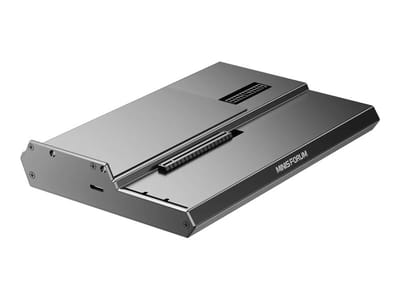
DEG1 eGPU Dock
A plain OCuLink dock with a PCIe 4.0 x4 link for a desktop graphics card; it takes an ATX or SFX power supply that you supply.
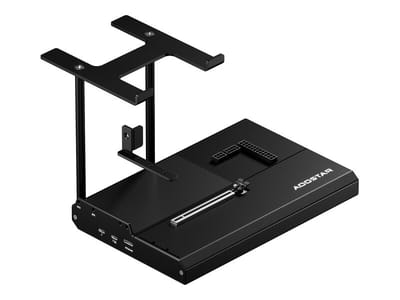
EG02 eGPU Dock
Connects over OCuLink for the full PCIe 4.0 x4 link and has Thunderbolt 5 as a second input; the graphics card and power supply are sold separately.

Core X V2
A Thunderbolt 5 enclosure that Razer lists as working with Thunderbolt 4 and USB4 hosts; it fits a four-slot card and needs an ATX power supply.

DEG2 eGPU Dock
Connects over USB4 or Thunderbolt 5, with an OCuLink input behind a switch, and adds an M.2 slot; it needs an ATX or SFX power supply.

Breakaway Box 850 T5
Has an 850W power supply built in, so only the graphics card is extra, and works with Thunderbolt 4 and USB4 Windows PCs.

TS4 Thunderbolt 4 Dock
An 18-port dock that CalDigit lists for Thunderbolt 4 and USB4 hosts, with 2.5GbE and a DisplayPort 1.4 output.

TBT4-UD5 Thunderbolt 4 Dock
Two HDMI ports drive two 4K60 monitors from one Thunderbolt 4 or USB4 port on a Windows PC.

Revodok Max 208 Thunderbolt 4 Dock
Adds three Thunderbolt 4 ports for dual 4K60 displays plus gigabit Ethernet; it has no HDMI port, so monitors connect over USB-C or an adapter.
Frequently Asked Questions
Which processor does the BOSGAME M4 use?
This page covers the AMD Ryzen 7 8745HS configuration: 8 cores, 16 threads, and boost clocks up to 4.9GHz, which is the version the professional reviews tested. BOSGAME also sells the M4 chassis with other chips (a Ryzen 7 7840HS, and some listings a Ryzen 9 7940HS), so check the exact processor on the listing before buying.
Can I connect an external GPU to the BOSGAME M4?
Yes. The OCuLink port provides a direct PCIe 4.0 x4 connection for an external GPU, which carries more bandwidth than a Thunderbolt or USB4 eGPU setup.
How many displays can the BOSGAME M4 support simultaneously?
Three 4K displays, driven from the HDMI 2.0, DisplayPort 1.4, and USB4 ports. OCuLink is a PCIe port for an external GPU, not a display output, so it does not add a fourth screen on its own.
Is the RAM in the BOSGAME M4 upgradeable?
Yes. Two SO-DIMM DDR5-4800 slots sit behind an easy teardown, and TechRadar found them accessible. The system ships with 32GB and likely supports up to 64GB.
Does the BOSGAME M4 have any known thermal issues?
It can run warm under sustained gaming. Wccftech described subpar thermal performance during an extended gaming session, calling it a trait common to this compact, high-performance class rather than a defect. For graphics-heavy workloads, routing a GPU through the OCuLink port keeps that load off the internal cooling. Separately, the second M.2 slot shares PCIe lanes with the WiFi card.
What networking options does the BOSGAME M4 offer?
Dual 2.5-gigabit Ethernet on Realtek RTL8125 controllers, WiFi 6E on an Intel AX210 card with 6GHz band support, and Bluetooth 5.2. The second Ethernet port is the draw for NAS setups, network redundancy, or router configurations.
How loud is the BOSGAME M4 during operation?
TechRadar found the airflow decent and the unit practically silent in normal use. Expect it to stay quiet for everyday tasks and to become more audible during long, heavy workloads; manually tuning the fan curve helps if the noise bothers you.