
GMKtec NucBox K16
Updated on

The GMKtec NucBox K16 is a compact desktop built around the AMD Ryzen 7 7735HS, an eight-core, sixteen-thread chip paired with integrated Radeon 680M graphics. Its port list runs long for a box this size: a full-function USB4 port, a dedicated OCuLink connector for an external GPU, dual 2.5GbE LAN, and Wi-Fi 6E, all wrapped in a CNC-machined aluminium C-frame chassis. The 32GB of LPDDR5-6400 is soldered to the board, but storage runs through two M.2 2280 PCIe 4.0 slots that accept up to 16TB combined. It ships with Windows 11 Pro and a configurable TDP that tops out at 50 watts. The 7735HS is a 2023-era Zen 3+ (Rembrandt-R) part, so the K16 suits buyers who value the chassis, the ports, and the eGPU runway above raw CPU throughput.
| Pros | Cons |
|---|---|
| CNC-machined aluminium C-frame; premium build | 32GB LPDDR5 is soldered and cannot be upgraded |
| OCuLink (PCIe 4.0 x4) plus USB4 for external GPUs | 2023-era Zen 3+ chip trails newer Ryzen 8000 parts |
| Dual 2.5GbE LAN with link aggregation, Wi-Fi 6E | No NPU, so no Windows Copilot+ acceleration |
| Two M.2 2280 PCIe 4.0 slots (up to 16TB) | Bundled SSD is PCIe 3.0 despite the Gen 4 slots |
| Triple display via HDMI 2.0, DP 1.4, and USB4 (to 8K) | OCuLink is not hot-pluggable; needs a reboot |
| Configurable TDP (35W, 45W, 50W) and dual-fan cooling | Only one USB-C port on the whole chassis |
GMKtec NucBox K16 Comparison Chart
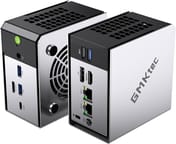 GMKtec NucBox K16 | GMKtec NucBox K16 | |
| Price | List Price: $899.99 Amazon Prices: | List Price: $949.99 Amazon Prices: Loading prices... |
| Version | 32GB/512GB/AMD Ryzen 7 7735HS | 32GB/1TB/AMD Ryzen 7 7735HS |
| Performance Rating | 5.3 | 5.3 |
| Operating System | Windows 11 Pro | Windows 11 Pro |
| Processor | Octa-core 3.20 Ghz (max 4.75 Ghz) AMD Ryzen 7 7735HS | Octa-core 3.20 Ghz (max 4.75 Ghz) AMD Ryzen 7 7735HS |
| GPU | Integrated AMD Radeon 680M | Integrated AMD Radeon 680M |
| RAM | 32 GB LPDDR5, 2-channel (LPDDR5-6400, soldered) | 32 GB LPDDR5, 2-channel (LPDDR5-6400, soldered) |
| Internal Storage | 512 GB NVMe SSD | 1 TB NVMe SSD |
| Dimensions width x length x thickness | 4.21 x 4.37 x 2.48 inches (106.93 x 111 x 62.99 mm) | 4.21 x 4.37 x 2.48 inches (106.93 x 111 x 62.99 mm) |
| Weight | 1.3 lbs (0.59 kg) | 1.3 lbs (0.59 kg) |
| WiFi | Wi-Fi 6E (802.11ax) | Wi-Fi 6E (802.11ax) |
| Bluetooth | Bluetooth 5.2 | Bluetooth 5.2 |
| Ethernet | 2 Ethernet ports at 2.5 Gbps | 2 Ethernet ports at 2.5 Gbps |
| HDMI | 1 Full-Size HDMI Port | 1 Full-Size HDMI Port |
| DisplayPort | 1 DisplayPort (DisplayPort 1.4) | 1 DisplayPort (DisplayPort 1.4) |
| VGA | No VGA Ports | No VGA Ports |
| USB Ports | 1 USB 2.0, 3 USB 3, 1 USB-C (1 USB4) 1x USB4 (40Gbps, PD, DP 1.4), 3x USB-A 3.2 Gen 2, 1x USB-A 2.0 | 1 USB 2.0, 3 USB 3, 1 USB-C (1 USB4) 1x USB4 (40Gbps, PD, DP 1.4), 3x USB-A 3.2 Gen 2, 1x USB-A 2.0 |
| Thunderbolt Ports | No | No |
| OCuLink | PCIe 4.0 x4 (64Gbps) eGPU; no hot-plug | PCIe 4.0 x4 (64Gbps) eGPU; no hot-plug |
| Internal SATA Ports | No SATA ports | No SATA ports |
| Card Reader | No Card Reader | No Card Reader |
| Headphone Jack | combo | combo |
| Fanless | No | No |
| VESA Mount | Yes | Yes |
| In the Box | -- | -- |
| Expandability | -- | -- |
Related Mini PCs
-
 GMKtec Nucbox K2The GMKtec Nucbox K2 is a compact AMD Ryzen 7 7735HS mini PC with Radeon 680M graphics, DDR5 to…
 -
 GMKtec NucBox K3 ProThe GMKtec NucBox K3 Pro pairs a 10-core Intel Core i7-12650H with 24GB of soldered LPDDR5 and a…
 -
 Beelink EQR7The Beelink EQR7 pairs an AMD Ryzen 7 7735U with a built-in power supply, dual Gigabit Ethernet,…
 -
 Beelink SER5 MAX (Ryzen 7 7735HS)The Beelink SER5 MAX pairs an 8-core Ryzen 7 7735HS and Radeon 680M graphics with 24GB of LPDDR5,…
 -
 BOSGAME M4The BOSGAME M4 pairs an AMD Ryzen 7 8745HS with 32GB of DDR5, an OCuLink port for an external GPU,…
 -
 BOSGAME P3 LiteThe BOSGAME P3 Lite pairs an AMD Ryzen 7 6800H and Radeon 680M graphics with dual 2.5G Ethernet,…
A machined cube with the eGPU port up front
The K16 measures 4.21 x 4.37 x 2.48 inches (107 x 111 x 63 mm) and weighs roughly 1.3 pounds, standing as an upright cube rather than lying flat. The body is a CNC-machined aluminium C-frame with a sandblasted anodised finish, and TechRadar found the result convincing: “A CNC-machined aluminium C-frame with a sandblasted anodised finish gives the K16 a premium, almost Zen-like quality on the desk.” The front panel carries the USB4 Type-C port, the OCuLink connector, two USB-A 3.2 Gen 2 ports, a 3.5mm combo jack, and the power button; the rear adds HDMI 2.0, DisplayPort 1.4, one more USB-A 3.2 Gen 2, a USB-A 2.0 port, the two 2.5GbE jacks, DC-in, and a Kensington lock slot. Cooling is handled by a dual-fan design, with a dedicated blower over the CPU and a second fan for the SSD and memory area.
The Ryzen 7 7735HS boosts to 4.75GHz and carries 16MB of L3 cache on TSMC’s 6nm process. It lands around 24,000 on PassMark’s multi-thread CPU test, enough for office work, multitasking, media, and code. The Radeon 680M, a 12-compute-unit RDNA 2 iGPU, covers light and esports-class gaming; demanding AAA titles at high settings are beyond it. NotebookCheck framed the machine around exactly this chip, opening with “The NucBox K16 is defined by its processor,” and cautioned on efficiency: “The aging CPU shows its limitations when analyzing power consumption as performance-per-watt is nowhere near as high as some of the latest alternatives.” The configurable TDP (Silent 35W, Balance 45W, Performance 50W) lets you trade a little speed for quieter, cooler operation.
Alongside Wi-Fi 6E and Bluetooth 5.2, the dual 2.5GbE ports support link aggregation, which makes the box a sensible home-lab, NAS, or firewall host. The USB4 port runs at 40Gbps with Power Delivery and DisplayPort output, and the OCuLink connector exposes a PCIe 4.0 x4 link (64Gbps) so an external GPU dock can drive gaming or GPU-compute work that the 680M cannot; note that OCuLink here is not hot-pluggable, so you connect the dock before boot. Storage expands through two M.2 2280 PCIe 4.0 slots, though TechRadar flagged that the drive GMKtec pre-installs is only a PCIe 3.0 unit, so dropping in a Gen 4 SSD is a straightforward first upgrade. The 32GB of LPDDR5 is soldered, so you choose your RAM at purchase and live with it.
Reviewer Insights
TechRadar
TechRadar’s Mark Pickavance rated the K16 3 out of 5 on value, praising the chassis and the port selection while questioning whether the platform justifies the asking price. On the price against the 2023 silicon he wrote, “For a machine built on a Zen 3+ platform, that is an assertive number, particularly when newer Ryzen 8000-series mini PCs are circling at similar or occasionally lower prices.” His verdict came down on the value side of the ledger, citing the soldered memory, the missing NPU, and the bundled drive: the K16, he wrote, “without an NPU and only a PCIe 3.0 SSD, it falls dramatically short on the value-for-money front.”
NotebookCheck
NotebookCheck scored the K16 65% and summed it up as “Small, Straightforward And Professional.” Its reviewer read the older chip as a deliberate trade: “the older Zen 3+ CPU in the NucBox K16 means the system is designed for users on tighter budgets who may value the physical features or ports of the chassis but don’t necessarily need the high performance of a Zen 5 processor.” It credited the standard 32GB of RAM, the metal build, the dual M.2 slots, and the OCuLink port, while listing slower-than-expected graphics, the lack of an NPU, and average power efficiency among its downsides.
TechDweeb
TechDweeb ran the K16 through Cinebench and Geekbench, then through a spread of games under Batocera, and placed it in the middle of the market: “Not top end, not low end, not expensive, but not dirt cheap.” Productivity and creative work came out well, and the strongest showing was as an indie and retro gaming machine. Gaming above that tier was where it fell down, and the blame landed on the graphics rather than the processor: “The real culprit here is the GPU. The 7735HS is a solid chip, but that 680M GPU… that’s never been great for gaming in my experience.” The case came off on camera to confirm the memory situation: “The RAM is not user-replaceable, by the way, so you’re stuck with 32 GB.”
Tech Guy Beau
Tech Guy Beau tore the K16 down, tested 4K video editing on the integrated graphics, and attached an external GPU over both USB4 and OCuLink. The OCuLink port is what sold him on the machine: “OcuLink is going to be faster for eGPUs. Basically, if you want max GPU performance, you’re going to use that. And that will also unlock the USB 4, so you can use them at the same time.” He measured noise first, and his unit ran quiet: “It is almost completely silent. There’s the tiniest amount of fan going. Like you can’t hear it.” He flagged the soldered memory and the speed of the bundled drive, though he was not bothered by either: “The RAM is not upgradeable on this system. It’s just on the board, but it’s fine,” and the internal NVMe, he noted, is “going to be gen 3 speeds.”
Team Pandory
Team Pandory stripped the K16 down to the board, repasted the CPU, and leaned on emulation testing, where the box handled PlayStation 3 and upscaled PlayStation 2 titles. For anything heavier, the channel pointed at the eGPU route: “If you are wanting to have any AAA titles on this system, the best bet is to use the Oculink port, which allows us to use an external GPU.” The channel flagged the memory and the fan noise. “The memory is soldered, so it can’t be upgraded or repaired,” and the machine “is also pretty noisy out of the box, although you can improve that by dialing back the aggressive fan curve.” Getting inside it also took more work than most mini PCs of this size.
A ports-first desktop that can grow through an eGPU
A home-lab or firewall host gets the most out of the dual 2.5GbE and the two Gen 4 M.2 slots, and a light-gaming desk can add heavier titles later through the OCuLink port. The Ryzen 7 7735HS and Radeon 680M comfortably handle everyday work, media, and esports-class games.
Look elsewhere if you want AMD’s latest silicon, an NPU for Windows Copilot+ features, or upgradeable memory. The soldered 32GB LPDDR5 is a hard ceiling, and buyers who plan to run local language models or edit high-resolution video will feel it, as both TechRadar and NotebookCheck point out. Anyone chasing maximum performance-per-dollar should also weigh newer Ryzen 8000-series boxes before deciding. To compare it against other options, use Starry Hope’s Mini PC Comparison Chart.
Upgrades
Accessories that fit the GMKtec NucBox K16's OCuLink and USB4 or Thunderbolt ports.
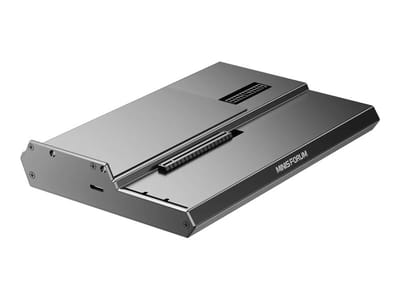
DEG1 eGPU Dock
A plain OCuLink dock with a PCIe 4.0 x4 link for a desktop graphics card; it takes an ATX or SFX power supply that you supply.
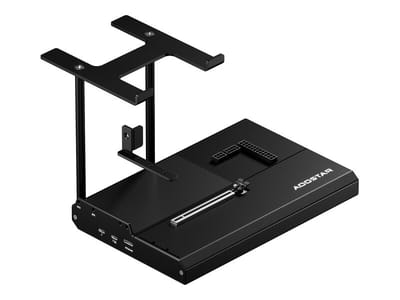
EG02 eGPU Dock
Connects over OCuLink for the full PCIe 4.0 x4 link and has Thunderbolt 5 as a second input; the graphics card and power supply are sold separately.

Core X V2
A Thunderbolt 5 enclosure that Razer lists as working with Thunderbolt 4 and USB4 hosts; it fits a four-slot card and needs an ATX power supply.

DEG2 eGPU Dock
Connects over USB4 or Thunderbolt 5, with an OCuLink input behind a switch, and adds an M.2 slot; it needs an ATX or SFX power supply.

Breakaway Box 850 T5
Has an 850W power supply built in, so only the graphics card is extra, and works with Thunderbolt 4 and USB4 Windows PCs.

TS4 Thunderbolt 4 Dock
An 18-port dock that CalDigit lists for Thunderbolt 4 and USB4 hosts, with 2.5GbE and a DisplayPort 1.4 output.

TBT4-UD5 Thunderbolt 4 Dock
Two HDMI ports drive two 4K60 monitors from one Thunderbolt 4 or USB4 port on a Windows PC.

Revodok Max 208 Thunderbolt 4 Dock
Adds three Thunderbolt 4 ports for dual 4K60 displays plus gigabit Ethernet; it has no HDMI port, so monitors connect over USB-C or an adapter.
Frequently Asked Questions
What processor does the GMKtec NucBox K16 use? The K16 runs the AMD Ryzen 7 7735HS, an eight-core, sixteen-thread chip with a 3.2 GHz base clock and a 4.75 GHz boost, built on TSMC’s 6nm process with 16MB of L3 cache. It scores roughly 24,000 on PassMark’s multi-thread benchmark, enough for office work, multitasking, media, and light content creation. The chip is a 2023-era Zen 3+ (Rembrandt-R) design.
Can I upgrade the RAM in the GMKtec NucBox K16? No. The K16 uses 32GB of LPDDR5-6400 memory soldered directly to the board, so it cannot be upgraded after purchase. Because there is only one memory configuration, both storage variants ship with the same 32GB, and you should treat that as the machine’s permanent memory ceiling.
What storage does the GMKtec NucBox K16 support? The K16 has two M.2 2280 slots, each wired for PCIe 4.0 x4, supporting up to 8TB per slot for 16TB total. The SSD GMKtec pre-installs is a PCIe 3.0 drive, so a Gen 4 swap is worth budgeting for. SATA drives are not supported.
What is the OCuLink port on the GMKtec NucBox K16 for? OCuLink is a PCIe 4.0 x4 connector carrying up to 64Gbps of bandwidth, more than Thunderbolt provides. It lets you attach an external GPU dock for gaming or GPU-compute work beyond what the integrated Radeon 680M can do. The port is not hot-pluggable, so connect the eGPU before powering the system on.
What ports does the GMKtec NucBox K16 have? The front carries one USB4 Type-C port (40Gbps, Power Delivery, DisplayPort 1.4), the OCuLink connector, two USB-A 3.2 Gen 2 ports, and a 3.5mm combo jack. The rear adds HDMI 2.0, DisplayPort 1.4, one more USB-A 3.2 Gen 2, a USB-A 2.0 port, and two 2.5GbE LAN jacks. It also has Wi-Fi 6E and Bluetooth 5.2.
Can the GMKtec NucBox K16 run multiple monitors? Yes. It supports up to three displays at once through HDMI 2.0, DisplayPort 1.4, and the USB4 port, with output up to 8K resolution depending on the display and cabling used.
Is the GMKtec NucBox K16 good for gaming? The integrated Radeon 680M handles esports and lighter titles well. Demanding AAA games at high settings are outside its range. Pair the OCuLink port with an external GPU dock and a discrete card and the K16 becomes a credible gaming machine.
What comes in the box with the GMKtec NucBox K16? The K16 ships with the mini PC, a power adapter, an HDMI cable, a VESA mount bracket, and a user manual.