
BOSGAME P3 Lite
Updated on

AMD’s Ryzen 7 6800H and Radeon 680M integrated graphics sit inside a chassis small enough to disappear behind a monitor. The chip’s 8 cores and 16 threads go well past what Intel’s N100-class mini PCs manage, which puts 1080p gaming, video editing, development work, and multi-display productivity within reach of a machine this size. The P3 Lite is the value-oriented option in the P3 family, below the Ryzen 9 6900HX P3.
Pros and Cons
| Pros | Cons |
|---|---|
| Radeon 680M delivers GTX 1050 Ti-class integrated graphics | Thermal throttling at 85C under sustained loads |
| Dual 2.5G Ethernet ports for NAS and networking use cases | No rear USB-C port, USB4 is front-only |
| USB4 with 40Gbps, DisplayPort Alt Mode, and 100W PD | No BIOS fan control options available |
| WiFi 6E with 6GHz band and Intel AX210 chipset | HDMI 2.0 limits display refresh to 60Hz |
| Very quiet operation with 32dB noise under load | Lacks OCuLink for external GPU expansion |
| Dual M.2 slots and upgradable RAM to 64GB | 24GB configuration was short-lived and replaced by 32GB |
Related Videos
BOSGAME P3 Lite Comparison Chart
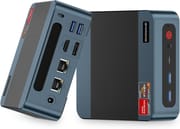 BOSGAME P3 Lite | |
| Price | List Price: $799.99 Amazon Prices: Loading prices... |
| Version | 32GB/1TB |
| Performance Rating | 5.2 |
| Operating System | Windows 11 Pro |
| Processor | Octa-core 3.20 Ghz (max 4.70 Ghz) AMD Ryzen 7 6800H |
| GPU | Integrated AMD Radeon 680M |
| RAM | 32 GB |
| Internal Storage | 1 TB |
| Dimensions width x length x thickness | 4.4 x 4.8 x 1.6 inches (111.76 x 121.92 x 40.64 mm) |
| Weight | 1.9 lbs (0.86 kg) |
| WiFi | Wi-Fi 6E (802.11ax) |
| Bluetooth | Bluetooth 5.2 |
| Ethernet | 2 Ethernet ports at 2.5 Gbps |
| HDMI | 1 HDMI Port |
| DisplayPort | 1 DisplayPort |
| VGA | No VGA Ports |
| USB Ports | 2 USB 2.0, 2 USB 3, 1 USB-C (1 USB4) |
| Thunderbolt Ports | No |
| OCuLink | No |
| Internal SATA Ports | No SATA ports |
| Card Reader | No Card Reader |
| Headphone Jack | combo |
| Fanless | No |
| VESA Mount | Yes |
| In the Box | Mini PC, 120W power adapter (19V/6.3A), VESA mounting bracket with screws, user manual |
| Expandability | RAM: 2x DDR5 SO-DIMM slots upgradable to 64GB (DDR5-4800). Storage: 2x M.2 2280 PCIe 4.0 slots supporting up to 8TB total. User-accessible via bottom panel. |
Related Mini PCs
-
 BOSGAME M4The BOSGAME M4 pairs an AMD Ryzen 7 8745HS with 32GB of DDR5, an OCuLink port for an external GPU,…
 -
 BOSGAME P6The BOSGAME P6 pairs an 8-core AMD Ryzen 9 6900HX with 24GB of soldered LPDDR5X, a 1TB PCIe 4.0…
 -
 Beelink EQR7The Beelink EQR7 pairs an AMD Ryzen 7 7735U with a built-in power supply, dual Gigabit Ethernet,…
 -
 Beelink SER5 MAX (Ryzen 7 7735HS)The Beelink SER5 MAX pairs an 8-core Ryzen 7 7735HS and Radeon 680M graphics with 24GB of LPDDR5,…
 -
 GMKtec NucBox K16The GMKtec NucBox K16 is a CNC-aluminium mini PC on the AMD Ryzen 7 7735HS with Radeon 680M…
 -
 GMKtec Nucbox K2The GMKtec Nucbox K2 is a compact AMD Ryzen 7 7735HS mini PC with Radeon 680M graphics, DDR5 to…
Radeon 680M graphics in a box that hides behind a monitor

The chassis measures 4.4 x 4.8 x 1.6 inches and weighs under two pounds, built from aluminum and plastic with ventilation slots feeding the internal cooler. The USB4 port, two USB 3.0 ports, and a 3.5mm audio jack sit up front where they are easy to reach, and the rear carries the display outputs, the Ethernet ports, and the remaining USB connections. A VESA bracket comes in the box, so the machine can tuck behind any monitor with a standard mounting pattern.
Cinebench R23 puts the 6800H at roughly 12,742 multi-core and 1,526 single-core, so heavily threaded exports and everyday desktop work both land in comfortable territory. The Radeon 680M does the heavier lifting for games. It pushes Counter-Strike 2 past 100fps and handles older titles like GTA V at playable framerates, rivaling discrete cards like the GTX 1050 Ti in some scenarios. That is enough for light gaming on a machine with no room for a dedicated card.
Two 2.5 Gigabit Ethernet ports make the machine a reasonable home server or NAS front end, and WiFi 6E with the Intel AX210 chipset opens the less congested 6GHz band for wireless clients. The single USB4 port drives an 8K display at 60Hz, delivers 100W of power, or moves data at 40Gbps, though it sits on the front panel rather than the back. Two M.2 2280 PCIe 4.0 slots take up to 8TB combined, and the two DDR5 SO-DIMM slots accept up to 64GB for anyone who needs more than the 32GB the system ships with.
Reviewer Insights

Near-silent under load, mid-80s Celsius while gaming
EVO Tech found the machine quiet in hands-on testing, with BOSGAME prioritizing silence over aggressive cooling, and saw temperatures during gaming regularly climb into the mid-80s Celsius. The reviewer stated “they’re very quiet but at the sacrifice of cooling performance” and pointed out that “in the BIOS you really can’t adjust this at all; you don’t have any control over this.”
EVO Tech also observed that “the 24 gigabyte version really seemed to have been a very short-lived model that got quickly replaced by 32 gigabytes.” The same review called the machine “really just a middle of the road system that is being overshadowed by competitors,” and recommended the GMKtec M7 instead at similar price points for its better thermal design and extras such as OCuLink support.
Integrated graphics that outrun Iris Xe
MiniPC Mothership rates the machine 4 out of 5 stars and praises its price-to-performance. The publication wrote that the “Radeon 680M (RDNA 2) outperforms Intel Iris Xe and older Vega GPUs,” and its testing showed “CS:GO at 1080p/High (~90fps) and GTA V at 1080p/Medium (~60fps), rivaling a GTX 1050 Ti.” The same review picked out the compact 0.55-liter form factor and dual 2.5G Ethernet as standout features for networking professionals.
Customer Reviews
Across 260 ratings on Amazon, the P3 Lite averages 4.2 stars, with 72% of reviewers leaving five stars and 13% leaving one. Happy owners describe it as fast, quiet, and worth the price. Paul Bahlin, a verified buyer who uses it for video editing and local AI apps, wrote that “If you’re looking for a fast PC that won’t empty your checking account, you won’t do better than this one.” Several others echo the value-for-money point and call out the dual HDMI ports and near-silent operation for light gaming and schoolwork.
The low ratings cluster around unit reliability and support. A verified buyer posting as 838383jdjfhf opened with “Specs are the best you can get for this price” but returned the unit, reporting that “it is plagued by constant reboots. Reached out to support multiple ways and have heard nothing back.” Another verified reviewer (Master of Cats) described a dead-on-arrival machine stuck on the initial Windows setup screen, and Doreen Riley’s first unit stopped working after a day (her replacement was running fine when she wrote). Read more owner reviews on Amazon.
A quiet mid-range machine for 1080p gaming and home networking
The 6800H handles office work and development while the 680M handles 1080p gaming. For the money BOSGAME charges, the pairing lands well ahead of Intel’s efficiency-focused chips. Conservative fan tuning keeps the machine near silent at the desk, and the same tuning is why long gaming sessions push it into thermal throttling.
Anyone who wants BIOS fan control or OCuLink for an external GPU will be happier with something like the GMKtec M7. To weigh this build against other machines by price and performance tier, Starry Hope’s Mini PC Comparison Chart lists them side by side.
Upgrades
Accessories that fit the BOSGAME P3 Lite's USB4 or Thunderbolt ports.

Core X V2
A Thunderbolt 5 enclosure that Razer lists as working with Thunderbolt 4 and USB4 hosts; it fits a four-slot card and needs an ATX power supply.

DEG2 eGPU Dock
Connects over USB4 or Thunderbolt 5, with an OCuLink input behind a switch, and adds an M.2 slot; it needs an ATX or SFX power supply.

Breakaway Box 850 T5
Has an 850W power supply built in, so only the graphics card is extra, and works with Thunderbolt 4 and USB4 Windows PCs.

TS4 Thunderbolt 4 Dock
An 18-port dock that CalDigit lists for Thunderbolt 4 and USB4 hosts, with 2.5GbE and a DisplayPort 1.4 output.

TBT4-UD5 Thunderbolt 4 Dock
Two HDMI ports drive two 4K60 monitors from one Thunderbolt 4 or USB4 port on a Windows PC.

Revodok Max 208 Thunderbolt 4 Dock
Adds three Thunderbolt 4 ports for dual 4K60 displays plus gigabit Ethernet; it has no HDMI port, so monitors connect over USB-C or an adapter.
Frequently Asked Questions
Can the BOSGAME P3 Lite run modern games?
Yes, the Radeon 680M integrated graphics can handle many modern games at 1080p with reduced settings. Benchmarks show around 109fps in Counter-Strike 2 and 60fps in older titles like GTA V at medium settings. Performance roughly matches a discrete GTX 1050 Ti for less demanding games.
How much RAM can the P3 Lite support?
The P3 Lite has two DDR5 SO-DIMM slots and supports up to 64GB of RAM (2x32GB). The system ships with 32GB of DDR5-4800 memory in a dual-channel configuration, which is sufficient for most users but can be upgraded if needed for memory-intensive workloads.
Does the P3 Lite support dual monitors?
The P3 Lite supports up to three displays simultaneously using HDMI 2.0, DisplayPort, and USB4 outputs. The USB4 port can drive an 8K display at 60Hz or serve as a third 4K display output alongside the dedicated video ports.
How loud is the BOSGAME P3 Lite during operation?
The P3 Lite operates at around 32dB under load, which reviewers describe as very quiet. BOSGAME prioritized noise reduction in the fan curve design, though this comes at the cost of higher operating temperatures during demanding tasks.
Can I install Linux on the BOSGAME P3 Lite?
Yes, BOSGAME officially states compatibility with Ubuntu alongside the pre-installed Windows 11 Pro. The AMD Ryzen and Radeon hardware generally has good Linux driver support, making the P3 Lite suitable for dual-boot or Linux-only configurations.
What is the difference between BOSGAME P3, P3 Lite, and P3 Plus?
The P3 Lite uses the AMD Ryzen 7 6800H processor, while the regular P3 uses the more powerful Ryzen 9 6900HX, and the P3 Plus features the newer Ryzen 7 7840HS. All three share similar chassis designs but differ in processor performance and pricing, with the P3 Lite positioned as the value-oriented option in the lineup.
Does the P3 Lite support Wake-on-LAN?
Yes, the P3 Lite supports Wake-on-LAN functionality, allowing you to remotely power on the system over your network. This feature, combined with dual 2.5G Ethernet ports, makes the P3 Lite suitable for home server or NAS applications where remote management is important.