
KAMRUI Hyper H1 11 Pro
Updated on

The KAMRUI Hyper H1 11 Pro pairs an AMD Ryzen 7 6800H with 32GB of DDR5 memory in a chassis that measures just over five inches square. That puts an 8-core, 16-thread chip in a box small enough to hide behind a monitor, which suits anyone who needs desktop-class speed and has no desk space to spare. Radeon 680M integrated graphics drive up to three 4K displays, so a multi-monitor office setup works without adding a card.
Pros and Cons
| Pros | Cons |
|---|---|
| 8-core, 16-thread Ryzen 7 6800H boosting to 4.7GHz | No dedicated GPU limits gaming to casual titles |
| 32GB DDR5 4800MHz in two SO-DIMM slots, expandable to 64GB | Primary M.2 slot uses PCIe 3.0 instead of 4.0 |
| Triple 4K display support via HDMI, DisplayPort, and USB-C | A minority of Amazon buyers report random reboots |
| Dual Ethernet, one 2.5GbE port and one 1GbE port | RAM and SSD ship as unbranded generic parts |
| VESA mount included for behind-monitor installation | Plastic enclosure instead of aluminum |
| Two M.2 2280 slots take up to 4TB of storage | Fan noise noticeable under heavy workloads |
Related Videos
KAMRUI Hyper H1 11 Pro Comparison Chart
 KAMRUI Hyper H1 11 Pro | KAMRUI Hyper H1 11 Pro | KAMRUI Hyper H1 11 Pro | |
| Price | List Price: $359.99 Amazon Prices: | List Price: $409.99 Amazon Prices: | List Price: $439.99 Amazon Prices: |
| Version | 16GB/512GB | 32GB/512GB | 32GB/1TB |
| Performance Rating | 4.8 | 5.2 | 5.2 |
| Operating System | Windows 11 Pro | Windows 11 Pro | Windows 11 Pro |
| Processor | Octa-core 3.20 Ghz (max 4.70 Ghz) AMD Ryzen 7 6800H | Octa-core 3.20 Ghz (max 4.70 Ghz) AMD Ryzen 7 6800H | Octa-core 3.20 Ghz (max 4.70 Ghz) AMD Ryzen 7 6800H |
| GPU | Integrated AMD Radeon 680M | Integrated AMD Radeon 680M | Integrated AMD Radeon 680M |
| RAM | 16 GB | 32 GB | 32 GB |
| Internal Storage | 512 GB | 512 GB | 1 TB |
| Dimensions width x length x thickness | 5.04 x 5.04 x 1.61 inches (128.02 x 128.02 x 40.89 mm) | 5.04 x 5.04 x 1.61 inches (128.02 x 128.02 x 40.89 mm) | 5.04 x 5.04 x 1.61 inches (128.02 x 128.02 x 40.89 mm) |
| Weight | 2.2 lbs (1 kg) | 2.2 lbs (1 kg) | 2.2 lbs (1 kg) |
| WiFi | Wi-Fi 6 (802.11ax) | Wi-Fi 6 (802.11ax) | Wi-Fi 6 (802.11ax) |
| Bluetooth | Bluetooth 5.2 | Bluetooth 5.2 | Bluetooth 5.2 |
| Ethernet | 2 Ethernet ports at 2.5 Gbps | 2 Ethernet ports at 2.5 Gbps | 2 Ethernet ports at 2.5 Gbps |
| HDMI | 1 Full-Size HDMI Port | 1 Full-Size HDMI Port | 1 Full-Size HDMI Port |
| DisplayPort | 1 DisplayPort (DP 2.0, supports 4K@60Hz) | 1 DisplayPort (DP 2.0, supports 4K@60Hz) | 1 DisplayPort (DP 2.0, supports 4K@60Hz) |
| VGA | No VGA Ports | No VGA Ports | No VGA Ports |
| USB Ports | 4 USB 2.0, 2 USB 3, 1 USB-C USB-C 3.2 Gen2 supports 4K display output | 4 USB 2.0, 2 USB 3, 1 USB-C USB-C 3.2 Gen2 supports 4K display output | 4 USB 2.0, 2 USB 3, 1 USB-C USB-C 3.2 Gen2 supports 4K display output |
| Thunderbolt Ports | No | No | No |
| OCuLink | No | No | No |
| Internal SATA Ports | No SATA ports | No SATA ports | No SATA ports |
| Card Reader | No Card Reader | No Card Reader | No Card Reader |
| Headphone Jack | combo | combo | combo |
| Fanless | No | No | No |
| VESA Mount | Yes | Yes | Yes |
| In the Box | Hyper H1 Mini PC, Power Adapter, HDMI Cable, VESA Mount Bracket with Screws, User Manual | Hyper H1 Mini PC, Power Adapter, HDMI Cable, VESA Mount Bracket with Screws, User Manual | Hyper H1 Mini PC, Power Adapter, HDMI Cable, VESA Mount Bracket with Screws, User Manual |
| Expandability | RAM expandable up to 64GB DDR5; storage expandable up to 4TB via dual M.2 slots | RAM expandable up to 64GB DDR5; storage expandable up to 4TB via dual M.2 slots | RAM expandable up to 64GB DDR5; storage expandable up to 4TB via dual M.2 slots |
Related Mini PCs
-
 KAMRUI AM21 Mini PCThe KAMRUI AM21 is a compact AMD Ryzen 9 6900HX mini PC with Radeon 680M graphics, up to 64GB of…
 -
 KAMRUI AM21The KAMRUI AM21 is a 0.5-liter mini PC with an AMD Ryzen 7 8745HS, Radeon 780M graphics, 16GB or…
 -
 ACEMAGIC K1 (Intel Core i5-12600H)The Intel version of ACEMAGIC's K1 pairs the 12-core Core i5-12600H with triple 4K output, seven…
 -
 ACEMAGIC M5 Mini PCThe ACEMAGIC M5 packs the 14-core Intel Core i5-14500HX into a 5-inch square chassis. Triple 4K…
 -
 ASUS NUC 14 ProThe ASUS NUC 14 Pro pairs Intel Core Ultra processors with a toolless chassis, two DDR5 SODIMM…
 -
 GEEKOM A6The GEEKOM A6 pairs an AMD Ryzen 7 6800H with Radeon 680M graphics, USB4, 2.5GbE, and two M.2 slots…
Dual Ethernet and Two M.2 Slots in a Five-Inch Shell
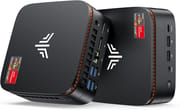
The plastic enclosure measures 5.04 x 5.04 x 1.61 inches and weighs 2.2 pounds. Ports are split between the front and rear panels, so the USB-C port stays within reach while the cables that never move stay tidy at the back. The plastic will not win a design contest, but it feels sturdy enough for daily use.
The Ryzen 7 6800H is an 8-core, 16-thread Zen 3+ chip that boosts to 4.7GHz and handles multitasking, content creation, and light gaming. Its integrated Radeon 680M graphics run at up to 2000MHz, which covers 1080p gaming in less demanding titles and smooth 4K video playback. Memory is 32GB of DDR5 4800MHz across two SO-DIMM slots, with headroom for 64GB.
Two Ethernet jacks sit on the back, one at 1.0Gbps and one at 2.5Gbps, and WiFi 6 with Bluetooth 5.2 covers wireless. Seven USB ports in total (four USB-A 2.0, two USB-A 3.2 Gen2, and one USB-C 3.2 Gen2) keep peripherals plugged in, and the USB-C port doubles as a display output for triple 4K monitor setups. The dual-NIC setup is also well-suited for running home server software, where a dedicated port for storage traffic keeps management separate from the main network.
Reviewer Insights
Ricks Tech Repairs’ Perspective
Ricks Tech Repairs opens the machine up in his unboxing video and walks through the internals. He notes that the unit uses “generic unknown brand” RAM and storage components, which is common at this price point but a caveat for users who prioritize brand-name parts. The reviewer came away “pretty impressed with the build quality” for the price, and appreciated the straightforward upgrade path with two accessible M.2 slots and SO-DIMM memory slots.
PCWorld’s Take
According to PCWorld, the KAMRUI Hyper H1 represents a good deal in the mini PC market. Their coverage emphasizes that “just because it’s tiny doesn’t mean it’s not powerful,” highlighting the Ryzen 7 6800H’s ability to handle demanding applications despite the compact form factor. They also point to the upgrade path, noting that users can expand RAM to 64GB and storage to 4TB as needs grow.
Customer Reviews
Across 453 ratings on Amazon, the KAMRUI Hyper H1 11 Pro averages 4.3 stars. Five-star ratings make up 72% of that total, and roughly 10% sit at one star. The recurring praise centers on its small footprint, light gaming ability, and value. cristian, a verified buyer, called it “Great as a desktop computer, easily portable, for office, video playback and light gaming” with “Excellent value for money.” James meckler, also verified, has “had the pc for 6 months and runs great” for Fortnite, driving a second monitor at 120fps. Khurram summed up the common note, calling it “a tiny powerhouse” that met his need for “a decent home always ON pc.”
Verified buyer Devin Blake started with a positive note (“Starts up fast, runs quietly and does not get hot”) but appended that “as others have reported this unit keeps rebooting randomly causing wasted time and interrupting communications.” A one-star review from verified buyer Stephen J, titled “BEWARE OF KAMRUI AND THEIR SUPPORT REP CHRIS,” describes a repeat customer who had a unit “just died, right in the middle of working on it” and a frustrating support experience on the replacement.
Fast Enough for Home-Office Work and Video Editing
This machine suits home office workers, photo and video editors, and students who want one capable computer. The 8 cores and 32GB of DDR5 handle that load, and the two M.2 slots plus the 64GB memory ceiling let the system grow with its owner. Anyone who wants dedicated graphics, sustained heavy workloads without thermal limits, or a metal chassis should look at other machines. Starry Hope’s Mini PC Comparison Chart puts the specs side by side with other small computers.
Frequently Asked Questions
Can the KAMRUI Hyper H1 11 Pro run games?
Casual and older games run at 1080p on the AMD Radeon 680M integrated graphics. Esports titles like League of Legends, Valorant, and older AAA games run reasonably well at medium settings. Modern demanding games need a dedicated GPU, which this mini PC lacks, so it fits productivity-first users who play lighter games now and then.
How many monitors can I connect to the Hyper H1 11 Pro?
Three at once, each at 4K resolution and 60Hz refresh rate. Connect them through HDMI 2.0, DisplayPort 2.0, and the USB-C port, which supports DisplayPort Alt Mode.
Is the RAM and storage upgradeable on the Hyper H1 11 Pro?
Yes, both are user-upgradeable. Two SO-DIMM slots take up to 64GB of DDR5 memory, and two M.2 2280 NVMe slots take up to 4TB of storage. One M.2 slot runs at PCIe Gen 3.0 x4 speeds and the second at the faster PCIe Gen 4.0 x4. The internals are easy to reach for upgrades.
Does the Hyper H1 11 Pro come with Windows pre-installed?
Yes, Windows 11 Pro arrives pre-installed and activated. The “11 Pro” in the product name refers to that operating system version, so the machine is ready to use after unboxing without buying or installing an operating system separately.
Can I mount the Hyper H1 11 Pro behind my monitor?
Yes, a VESA mount bracket with screws is included in the box for that purpose. The 5 x 5 x 1.6-inch size and 2.2-pound weight make it easy to attach behind any VESA-compatible monitor, keeping the desk clear and the machine out of sight while maintaining good airflow.
Why does the Hyper H1 11 Pro have two Ethernet ports?
The two jacks cover different networking scenarios. The 2.5 Gigabit port offers faster wired connectivity for 2.5GbE networks, NAS devices, or multi-gig internet connections, while the 1.0 Gigabit port works with any standard network equipment. Together they also allow network segmentation, bridging, or failover.
Is the Hyper H1 11 Pro fan noise noticeable?
The machine uses active fan cooling, and the fan becomes audible during intensive tasks like gaming, video encoding, or sustained heavy workloads. Under normal productivity use like web browsing, office work, and video streaming, it runs quietly. Users who require near-silent operation should consider a fanless mini PC alternative.
How does the AMD Ryzen 7 6800H compare to other mini PC processors?
The Ryzen 7 6800H is a high-performance mobile processor with 8 cores, 16 threads, and boost clocks up to 4.7GHz. Its CPU Mark score of approximately 23,615 places it among the faster processors available in mini PCs, outperforming many Intel 12th and 13th gen U-series chips. The integrated Radeon 680M graphics also provide better gaming capability than Intel’s integrated options, so it handles both productivity and light gaming.