
GMKtec NucBox K17
Published on

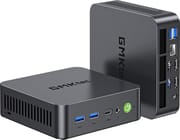
The GMKtec NucBox K17 is a 5-inch-square metal box built around Intel’s Core Ultra 5 226V, the entry Lunar Lake chip with four performance cores, four low-power efficient cores, and eight threads total. GMKtec pairs it with the Arc 130V integrated GPU, 16GB of LPDDR5X-8533 fused to the processor package, dual HDMI 2.1 outputs, a full-function USB4 port, 2.5-gigabit Ethernet, and a second M.2 slot wired for PCIe Gen5 x4. NotebookCheck measured 27.4 to 28.6 dB(A) under load in a room that already sat at 25.1 dB(A), and three separate video reviewers independently described it as among the quietest mini PCs they had tested. Lunar Lake solders its memory to the CPU package, so 16GB is the hard ceiling on the 226V, and eight threads only go so far when a job is multi-threaded. GMKtec also sells the same chassis as the K17 Plus with a Core Ultra 7 258V, Arc 140V graphics, and 32GB of on-package LPDDR5X; the reviews below all tested the 226V model.
Pros and Cons
| Pros | Cons |
|---|---|
| NotebookCheck logged 27.4 to 28.6 dB(A) under load against a 25.1 dB(A) room floor | Memory sits on the CPU package and can never be upgraded (16GB on the 226V, 32GB on the 258V) |
| One of the two M.2 2280 slots runs at PCIe Gen5 x4, the other at PCIe Gen4 x2 | 8 cores and 8 threads; Team Pandory called the multi-core result below average |
| Full-function USB4: 40Gbps, DisplayPort Alt Mode, USB-C power input, eGPU docks | The single USB4 port is on the front, so fast storage and an eGPU cannot share it |
| 2.5GbE via Intel I226-V, plus Wi-Fi 6E and Bluetooth 5.2 | The bundled SSD throttles under sustained load; its heatsink is undersized |
| NotebookCheck logged 4.7 to 9.6 W at idle and 32.7 to 41.3 W under load | Only one of the two HDMI 2.1 ports carries full FRL bandwidth; the other is TMDS |
| Metal chassis with a VESA mount in the box, and four screws to reach the storage | Wi-Fi antenna leads sit on the removable base and detach easily during an upgrade |
| Ubuntu and Batocera both boot with Wi-Fi, Bluetooth, and graphics working | Power profiles are set in the UEFI rather than from Windows |
Related Videos
GMKtec NucBox K17 Comparison Chart
5 configurations
| Configuration | Processor | RAM | Storage | GPU | List price | Amazon price | Compare |
|---|---|---|---|---|---|---|---|
| 16GB / 512GB / Intel Core Ultra 5 226V | Core Ultra 5 226V | 16 GB | 512 GB SSD | Intel Arc 130V | $559.99 | Details
| |
| 16GB / 1TB / Intel Core Ultra 5 226V | Core Ultra 5 226V | 16 GB | 1 TB SSD | Intel Arc 130V | $619.99 | Loading... | Details
|
| 32GB / 512GB / Intel Core Ultra 7 258V | Core Ultra 7 258V | 32 GB | 512 GB SSD | Intel Arc 140V | --- | Loading... | Details
|
| 32GB / 1TB / Intel Core Ultra 7 258V | Core Ultra 7 258V | 32 GB | 1 TB SSD | Intel Arc 140V | $949.99 | Loading... | Details
|
| 32GB / 2TB / Intel Core Ultra 7 258V | Core Ultra 7 258V | 32 GB | 2 TB SSD | Intel Arc 140V | $1,099.99 | Details
|
Specs shared by every configuration
| Operating System | Windows 11 Pro |
|---|---|
| Dimensions width x length x thickness | 5.02 x 5 x 1.75 inches (127.51 x 127 x 44.45 mm) |
| Weight | 1.01 lbs (0.46 kg) |
| WiFi | Wi-Fi 6E (802.11ax) |
| Bluetooth | Bluetooth 5.2 |
| Ethernet | 1 Ethernet port at 2.5 Gbps |
| HDMI | 2 Full-Size HDMI Ports |
| DisplayPort | DP Alt Mode via the front USB4 port |
| VGA | No VGA Ports |
| USB Ports | 1 USB 2.0, 5 USB 3, 1 USB-C (1 USB4) Front: 1x USB-A 10Gbps, 1x USB-A 5Gbps, 1x USB4 (40Gbps, PD, DP); Rear: 3x USB-A 5Gbps, 1x USB 2.0 |
| Thunderbolt Ports | No |
| OCuLink | No |
| Internal SATA Ports | No SATA ports |
| Card Reader | No Card Reader |
| Headphone Jack | 3.5mm combo jack |
| Fanless | No |
| VESA Mount | Yes |
| In the Box | Mini PC, 100W power adapter, HDMI cable, VESA mount, user manual |
| Expandability | RAM is on-package LPDDR5X-8533: 16GB on the 226V, 32GB on the K17 Plus 258V. Storage via 2x M.2 2280 slots (1x PCIe Gen5 x4, 1x PCIe Gen4 x2) up to 16TB. |
Related Mini PCs
-
 GMKtec NucBox K15The GMKtec NucBox K15 is an Intel Core Ultra 5 125U mini PC with an OCuLink port for an external…
 -
 GMKtec NucBox M6The GMKtec NucBox M6 pairs an AMD Ryzen 5 6600H with Radeon 660M graphics, up to 32GB of DDR5, two…
 -
 ACEMAGIC K1 (Ryzen 7030 Series)The Ryzen 7030-series ACEMAGIC K1 puts a 6-core Ryzen 5 7530U or 7430U, or a 4-core Ryzen 3 7330U,…
 -
 ACEMAGIC K1The ACEMAGIC K1 is a 5-inch mini PC built on the AMD Ryzen 7 5700U (a Ryzen 3 4300U variant also…
 -
 KAMRUI E3BThe KAMRUI E3B is a 5-inch-square AMD mini PC sold in Ryzen 7 PRO 5875U, Ryzen 7 5825U, Ryzen 5…
 -
 GEEKOM A5 (2025 Edition)The GEEKOM A5 (2025 Edition) is a Ryzen 5 7430U mini PC with 16GB of DDR4, a 512GB or 1TB drive, a…
A PCIe Gen5 slot and USB4 in a 5-inch metal box

The chassis measures about 5 by 5 by 1.75 inches, and TechRadar lists the unit at just over a pound. That combination puts it in classic NUC-square territory rather than the candy-bar shape GMKtec used for the NucBox K13. The case is metal with vertical ventilation slots down both sides and a plastic base panel, which Robtech notes is deliberate so the Wi-Fi and Bluetooth radios can see through it. A VESA mount ships in the box alongside a 100W adapter and an HDMI cable. Four screws release the bottom plate; behind it are the two M.2 slots and the Wi-Fi module, both reachable without further disassembly.
The Core Ultra 5 226V is the entry part in Intel’s Lunar Lake line. Intel’s own specification sheet lists four performance cores at up to 4.5 GHz, four low-power efficient cores at up to 3.5 GHz, 8MB of Smart Cache, a 17W base power with a 37W turbo ceiling, and a memory controller limited to 16GB of LPDDR5X at 8533 MT/s. Intel rates the NPU at 40 peak Int8 TOPS and the Arc 130V GPU at 53, with the CPU making up the balance of the 97 TOPS platform total GMKtec prints on the box. PassMark currently scores the chip at 17,883, and the Arc 130V at 4,511 on the G3D Mark, which places the graphics a step below the Arc 140V in the K13. This is a Q3 2024 part, so a 2026 buyer is looking at a mature platform. NotebookCheck found its multithread results short of the newer Ryzen APUs it benchmarked against, while Robtech measured it beating Intel’s newer Wildcat Lake Core 5 320 across every test he ran, at similar money.
The front carries one USB-A at 10Gbps, one USB-A at 5Gbps, the USB4 Type-C port, a 3.5mm combo jack, the power button, and a CMOS reset pinhole. The rear adds three more USB-A at 5Gbps, a USB 2.0 port, both HDMI 2.1 outputs, the 2.5GbE jack, and the DC barrel connector, and the chassis carries a Kensington lock slot. That USB4 port runs the full 40Gbps, accepts USB-C Power Delivery as a power input, and carries DisplayPort, which is what makes three-display output possible when both HDMI ports are already in use. GMKtec ships a PCIe 4.0 drive, and the two 2280 slots are wired for PCIe Gen5 x4 and PCIe Gen4 x2, with a 16TB combined ceiling. There is no OCuLink, so an external GPU has to go through USB4 and live with that bandwidth.
Reviewer Insights

Robtech
Robtech opens on the build, noting that GMKtec usually leans on plastic and that this one does not: “The K17 looks great and it feels premium.” He calls out the platform limit right away: “The RAM is not upgradeable.” During testing he saw benchmark scores swing wildly between power cycles, sometimes with CPU performance that “would absolutely plummet by more than half,” and after he reported it GMKtec sent him an August 13 BIOS that fixed the behaviour. He also flags the storage: “the biggest problem with the SSD is how hot it gets when constantly under load,” with the bundled heatsink doing little and the drive dropping into thermal throttling during his sustained stress run. On the positive side, he measured roughly 6W at idle and about 55W maximum out of the box (65W with performance mode enabled), and concluded that “I’m very happy to report that fan noise is very low, making this one easy on the ears even under load.” With performance mode switched on in the UEFI he found that “in performance mode, the K17 even beats AMD Ryzen minis with far more cores and power draw” in Quick Sync video encoding.
Lon.TV
Lon Seidman does not soften the memory situation: “It unfortunately though has soldered memory. This might be where some of you tune out.” He otherwise frames the K17 as a value argument in a market where mini PC prices have been drifting upward, and on the acoustics he says, “This is by far one of the quietest mini PCs with a fan that I’ve ever heard.” He measured about 5W at idle and roughly 48W under load. His 3DMark Time Spy run returned 3,458, below the Core Ultra 7 256V in the K13 but, he notes, in the same territory as a GTX 1060 or 1650 from a couple of years earlier, which prompted the line “It’s really fun to see just how far these on-board GPUs have come.” A 3DMark stress test came back at 98.9% stability with temperatures around 59 degrees Celsius. He also confirmed Ubuntu boots with Wi-Fi, Bluetooth, audio, and 4K video all detected, and rated Linux performance slightly ahead of Windows on the same box. On Cyberpunk 2077 at 1080p on the lowest settings he saw just over 40 FPS indoors and about 50 FPS outdoors, and DaVinci Resolve handled a 4K 60 project until heavier effects and color grading were added.
Team Pandory
Team Pandory covered 4K streaming, productivity, gaming, emulation, and a full teardown of the 16GB/512GB SKU. On acoustics they say, “This is one of the most silent systems we’ve reviewed in the past few years.” At the end they read out pros and cons: “The K17 has a beautiful-looking metal case and has a fairly powerful iGPU,” against “16 GB of soldered memory and the below-average multi-core performance can be a limiting factor.” They also found that “Wi-Fi strength is poor on the 5 GHz band,” measuring 60% signal on 5 GHz versus 84% on 2.4 GHz, which they attribute to the metal case, though they saw no dropouts. Thermals and power came in at 45 degrees Celsius and 11 to 12W at idle, and under 70 degrees at 41W while gaming, with performance mode barely moving either figure. Their gaming results put Rocket League above 100 FPS at 1080p, Counter-Strike 2 hanging in around 60 FPS at 1080p high, and Cyberpunk 2077 at 1080p, which they called the sweet spot for that title. Emulation held up through PlayStation 3 and Wii U, with only minor dips while shaders compiled. The teardown showed a Phison E27T-based PCIe 4.0 drive in one slot and the second slot free, and the motherboard lifted straight out of the case by hand.
NotebookCheck
Sebastian Bade at NotebookCheck scored the K17 at 82% on 2026-07-04, with the headline verdict that “The GMKtec NucBox K17 impresses with its efficiency and low noise level.” The review says the machine “made a strong overall impression in our test,” and singles out that “Particularly noteworthy are its extremely quiet operation, modern features including USB4, and straightforward maintenance.” The measured numbers behind that are 25.3 to 26.1 dB(A) at idle and 27.4 to 28.6 dB(A) under load against 25.1 dB(A) of room noise, and 4.7 to 9.6W at idle rising to 32.7 to 41.3W under load. On the forward-looking side the review argues that “The integrated NPU and Arc Graphics 130V also make the K17 a future-proof platform for multimedia and AI applications.” The review’s drawbacks are that performance profiles can only be changed in the UEFI, SSD performance is unstable under load, there is no OCuLink, and the RAM cannot be expanded. NotebookCheck’s test unit ran at a 25W sustained TDP on factory settings.
TechRadar
Alastair Jennings at TechRadar tested the 16GB/1TB configuration and rated it 4.5 out of 5 overall, with 5/5 for value. His summary is that “This compact packs in Intel’s latest AI-enhanced CPU, GPU and NPU combination that all provide an impressive amount of power,” and he closes with “There are a few small issues, but at the heart, this will make a solid office-based choice.” He returns to the expansion story repeatedly: “The inclusion of a spare slot for an ultrafast PCIe 5.0 M.2 SSD and 2.5Gbe networking shows that this has been spec’d to provide speed and power in a busy office environment where multiple applications and demands on the system will be made.” His benchmark run produced 9,469 Geekbench multi-core, 2,619 single-core, a PCMark 10 score of 6,855, Time Spy at 3,631, Fire Strike at 7,429, and CrystalDiskMark figures of 7,045 MB/s read and 6,182 MB/s write from the pre-installed PCIe 4.0 drive. He recorded a Windows Experience Index of 8.7, which he describes as one of the highest he has logged across recent mini PC testing. The single USB4 port sits on the front with no equivalent at the rear, so fast external storage and an eGPU cannot both be attached without a hub, and the Wi-Fi antenna connectors detach easily when the case is opened and are difficult to reattach. On workload fit he is clear that 16GB becomes the bottleneck in Premiere Pro and large Lightroom catalogues, and that a 32GB machine is the better starting point for creative work, while calling the K17 “exceptionally well priced” for office and everyday use.
Only NotebookCheck published decibel figures; Robtech, Lon.TV, and Team Pandory each reached their acoustics verdict by ear. All five name the 16GB on-package memory as the ceiling, and they split on who should buy it. TechRadar and NotebookCheck position it as an office and AI-assistant machine, Team Pandory as a family computer and a capable emulation box, and Lon.TV as a quiet, power-efficient general machine that he found runs a little nicer on Linux than on Windows. None of them puts it forward for sustained multi-threaded work, and Robtech and NotebookCheck separately flagged the bundled SSD’s behaviour under long loads.
A quiet desk machine with fixed memory
The K17 draws single-digit watts at idle, runs close to silent, and has a modern port set for the money (full-function USB4, 2.5GbE, dual HDMI 2.1, a PCIe Gen5-capable M.2 slot), and the graphics are good enough for 1080p gaming, PS3-era emulation, and 4K media. For a desk in a quiet room, a family computer in a living space, or a low-power Linux box, that combination fits well at this price.
On the 226V model, sixteen gigabytes of memory is welded to the processor package and cannot be changed later; the K17 Plus raises that to 32GB, but it is still fixed at purchase. Eight threads means long renders, big compiles, and multi-VM workloads will find the floor faster than the benchmark charts suggest. If either of those describes your work, start with more memory instead: the GMKtec M6 Ultra takes DDR5 SO-DIMMs, and the GMKtec NucBox K16 ships with 32GB and adds an OCuLink port for a properly wired external GPU. If you want the same Lunar Lake platform with a faster iGPU and 5-gigabit networking, the GMKtec NucBox K13 is the step up. Starry Hope’s Mini PC Comparison Chart is the quickest way to line it up against other machines in the same tier.
Frequently Asked Questions
Can the RAM in the GMKtec NucBox K17 be upgraded?
No. The Core Ultra 5 226V is a Lunar Lake processor, and Intel builds the LPDDR5X-8533 memory onto the same package as the CPU. Intel’s specification sheet lists 16GB as the maximum memory size for the chip itself, so the 226V model has no SO-DIMM slots and no memory option above 16GB. GMKtec sells the same chassis as the K17 Plus with a Core Ultra 7 258V and 32GB on the package, which is the only way to get more memory in this box; past 32GB, you need a mini PC built on a different platform.
What can go in the K17’s second M.2 slot?
GMKtec lists two M.2 2280 slots, one wired for PCIe Gen5 x4 and one for PCIe Gen4 x2, with a combined ceiling of 16TB (8TB per slot). The drive that ships in the machine is a PCIe 4.0 unit, and TechRadar confirmed the spare slot accepts a PCIe Gen5 x4 SSD. Installation is four screws on the base plate and then the drive itself. SATA drives are not supported.
How quiet is the GMKtec NucBox K17 in practice?
NotebookCheck measured 25.3 to 26.1 dB(A) at idle and 27.4 to 28.6 dB(A) under load, in a room whose own noise floor was 25.1 dB(A). That means the fan is only a couple of decibels above an already quiet room even when the chip is working. Lon.TV, Robtech, and Team Pandory all reached the same conclusion independently in their own testing.
Can the K17 drive three monitors?
Yes. GMKtec lists three-display support using the two rear HDMI 2.1 ports plus DisplayPort output over the front USB4 port. The two HDMI ports are not identical: TechRadar found one supports 8K at 60Hz and the other tops out at 4K at 60Hz, and Robtech identified the difference as one port running full FRL signalling and the other TMDS. The third display needs a USB-C to DisplayPort or HDMI adapter, and that cable comes off the front of the chassis.
Does the GMKtec NucBox K17 run Linux?
Yes. Lon.TV booted a current Ubuntu release and reported Wi-Fi, Bluetooth, audio, and 4K video output all detected, with performance slightly ahead of Windows on the same machine. Robtech also tested Ubuntu and reported it works fine. Team Pandory booted Batocera Linux from a USB drive and confirmed both the Wi-Fi and Bluetooth worked, including pairing a controller. The machine ships with a Windows 11 Pro licence, and the second M.2 slot makes dual-booting straightforward.
Can the K17 use an external GPU?
It can, over the front USB4 port, which runs at 40Gbps and which Lon.TV confirmed accepts Thunderbolt devices. There is no OCuLink port, which GMKtec states explicitly, so an eGPU enclosure is limited to USB4 bandwidth rather than a direct PCIe link. The practical catch TechRadar raises is that there is only one USB4 port and it is on the front, so an eGPU and a fast external SSD cannot both be connected without a hub.
How do you change the K17’s power limit?
Through the UEFI, not Windows. GMKtec lists 20W, 25W, and 35W TDP modes with a 37W peak, and Team Pandory found all three selectable in the BIOS along with manual peak power limits and fan curves. NotebookCheck notes the machine runs at 25W on factory settings and lists the UEFI-only restriction as a drawback. Robtech measured performance mode adding meaningful throughput in video encoding at the cost of roughly 10W more draw.