
GMKtec NucBox K13
Updated on

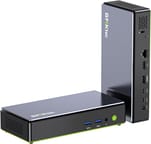
The GMKtec NucBox K13 is a Windows mini PC built as a slim candy bar rather than the familiar cube, so it tucks under a monitor stand or sits behind a display. It runs Intel’s Lunar Lake Core Ultra 7 256V with Arc 140V graphics, and it adds a 5GbE port and two full-bandwidth USB4 ports over the older K12. The 16GB of memory sits on the CPU package, so 16GB is the ceiling for the life of the machine.
Pros and Cons
| Pros | Cons |
|---|---|
| Lunar Lake Core Ultra 7 256V with Arc 140V iGPU (faster than Radeon 780M for most games) | RAM is on-package LPDDR5X and capped at 16GB; no upgrade path |
| Two full-bandwidth USB4 ports (40Gbps) with 100W PD and DP 1.4 | Second M.2 slot runs at PCIe 4.0 x2 only |
| 5GbE Ethernet (Realtek RTL8126) | HDMI 2.1 port is TMDS only, so effectively HDMI 2.0 bandwidth |
| Two M.2 2280 NVMe slots supporting up to 16TB total | Pre-installed Cherry AI bloatware on the Windows image |
| 0.6-litre candy-bar form factor fits under a monitor stand | Wi-Fi 6E rather than newer Wi-Fi 7 |
| Included VESA mount hangs the 1.15-lb chassis behind a display | Internal access requires prying tools and some force |
Related Videos
GMKtec NucBox K13 Comparison Chart
 GMKtec NucBox K13 | |
| Price | List Price: $719.99 Amazon Prices: Loading prices... |
| Version | 16GB / 1TB / Intel Core Ultra 7 256V |
| Performance Rating | 4.4 |
| Operating System | Windows 11 Pro |
| Processor | Octa-core 2.20 Ghz (max 4.80 Ghz) Intel Core Ultra 7 256V |
| GPU | Integrated Intel Arc 140V |
| RAM | 16 GB LPDDR5X, 4-channel (LPDDR5X-8533, on-package (not upgradable)) |
| Internal Storage | 1 TB NVMe SSD |
| Dimensions width x length x thickness | 7.32 x 3.46 x 1.44 inches (185.93 x 87.88 x 36.58 mm) |
| Weight | 1.15 lbs (0.52 kg) |
| WiFi | Wi-Fi 6E (802.11ax) |
| Bluetooth | Bluetooth 5.2 |
| Ethernet | 1 Ethernet port at 5 Gbps |
| HDMI | 1 Full-Size HDMI Port |
| DisplayPort | DisplayPort 1.4 via both USB4 ports (8K triple-display capable with HDMI) |
| VGA | No VGA Ports |
| USB Ports | 1 USB 2.0, 2 USB 3, 2 USB-C (2 USB4) Front: 2x USB-A 3.2 Gen 2 (10Gbps); Rear: 2x USB4 Type-C (40Gbps, DP 1.4, 100W PD), 1x USB-A 2.0 |
| Thunderbolt Ports | No |
| OCuLink | No |
| Internal SATA Ports | No SATA ports |
| Card Reader | No Card Reader |
| Headphone Jack | 3.5mm combo jack |
| Fanless | No |
| VESA Mount | Yes |
| In the Box | Mini PC, 100W power adapter, HDMI cable, VESA mount, user manual |
| Expandability | RAM is on-package LPDDR5X-8533 (not upgradable). Storage via 2x M.2 2280 NVMe slots (1x PCIe 4.0 x4, 1x PCIe 4.0 x2) supporting up to 16TB. |
Related Mini PCs
-
 GMKtec NucBox M6The GMKtec NucBox M6 pairs an AMD Ryzen 5 6600H with Radeon 660M graphics, up to 32GB of DDR5, two…
 -
 GMKtec M8The GMKtec M8 is a compact mini PC with an AMD Ryzen 5 PRO 6650H, an OCuLink port for an external…
 -
 Beelink SER3The Beelink SER3 pairs an AMD Ryzen 7 3750H (Radeon Vega 10) with dual 4K HDMI output and extensive…
 -
 Beelink SER5 (5500U)The Beelink SER5 (5500U) is a Ryzen 5 5500U mini PC with 16GB of DDR4 in two slots (64GB max), a…
 -
 Blackview MP100 (Ryzen 5 7430U)A 5-inch-square Ryzen 5 7430U mini PC with 16GB of DDR4, a 512GB SSD, room for two more drives, and…
 -
 Bmax MaxMini B11 ProA palm-sized office mini PC with an Intel Core Ultra 5 115U, 16GB of soldered LPDDR5, a 512GB SSD…
A 0.6-Litre Chassis With 5GbE and Dual USB4

The K13’s chassis measures 7.32 x 3.46 x 1.44 inches and weighs 1.15 pounds, putting it closer to a thick smartphone than a traditional NUC. Team Pandory compared it directly to a 3.5-inch hard drive and a modern handset; the unit is small enough to disappear behind a monitor on a VESA mount, which is included in the box along with a 100W power adapter and an HDMI cable. The housing is plastic, with a gray top cover carrying GMKtec’s logo above a black middle frame and a green bottom cover, and active cooling routes air through ventilation slots on the rear and one side. ETA PRIME was complimentary about how naturally the candy-bar shape slots under a 27-inch display, calling it “more like a candy bar style mini PC” that “should sit under the monitor really nicely.”
The Intel Core Ultra 7 256V is a Lunar Lake (Series 2) part with 8 cores (4 P-cores plus 4 E-cores), 8 threads, and a 4.8 GHz turbo. The 17W TDP and on-package 16GB of LPDDR5X at 8533 MT/s push it past 19,000 on PassMark, and the Arc 140V integrated GPU sits on Intel’s new Xe2 architecture. Team Pandory’s gaming tests show the iGPU beating the AMD Radeon 780M used in the GMKtec K12 and many more expensive mini PCs, with Cyberpunk 2077 hitting 86 FPS, DOOM Eternal reaching 235 FPS, and Black Myth: Wukong holding 86 FPS at Intel’s reference settings (XeSS frame generation enabled). According to the Wccftech review by Hassan Mujtaba, the combined NPU and GPU deliver roughly 115 TOPS of AI compute, putting the K13 well into Microsoft’s Copilot+ tier.
The front panel carries two USB-A 3.2 Gen 2 ports (10 Gbps) and a 3.5mm combo audio jack, while the rear adds a single USB-A 2.0 port, the 5GbE RJ-45, an HDMI 2.1 output (TMDS, so 4K at 60Hz), a Kensington lock, and two USB4 Type-C ports. Both USB4 ports run at the full 40 Gbps, both carry DisplayPort 1.4, and both support 100W Power Delivery, so either one can act as power input or as a Thunderbolt-compatible host for an external GPU dock. Lon.TV measured real-world Ethernet throughput approaching the 5 Gbps line rate and ran the latest Ubuntu with working video, audio, Wi-Fi, and Ethernet drivers. Wi-Fi 6E and Bluetooth 5.2 round out the wireless side, and there is no Wi-Fi 7.
Reviewer Insights

ETA PRIME Rates Arc 140V Competitive for Handheld-Class Gaming
ETA PRIME says the latest drivers, which add XeSS frame generation and multi-frame gen support, are “my new favorite feature for this Intel Arc iGPU.” He notes that the system is essentially barebones from GMKtec’s perspective (“the only thing we really need to add is storage because with these chips, the RAM is baked into the CPU itself”), which keeps the price down but locks the memory ceiling. His verdict is mixed on raw rasterization: “It’s definitely not a bad experience on an iGPU… but if you don’t want to deal with frame gen, then this is not the system for you.”
Lon.TV Measures the 5GbE Port and Finds Bloatware
Lon Seidman emphasizes the networking story and the system’s usefulness as a small workstation. His office-task and 4K media playback tests both come back positive, and on cooling he says “from a thermal perspective, this one does quite well” and “the fan noise is pretty minimal on this one.” He singles out the 5GbE port. “What’s cool is that we’re now starting to see faster Ethernet beyond 2.5 gigabit. So, this one has a 5 gigabit Ethernet port on board.” He also flags the non-upgradable memory (“This is not upgradeable from the memory standpoint. For many people, that will be when they stop watching”), and GMKtec ships the Windows image with Cherry AI bloatware (“I was a bit disappointed to see any kind of bloatware included on this given the fact that GMKtec is typically providing clean Windows installs”).
Teardown Benchmarks Put It Ahead of 780M Boxes
Team Pandory does the most thorough teardown and benchmark suite, including Cinebench, Geekbench, Time Spy, gaming tests in CS2 and Cyberpunk 2077, and emulation up through PS3 and Wii U. Their summary: “When it comes to gaming, the K13 is faster than the 780M mini PCs like the K12 and can beat many that are much more expensive.” Thermals stay around 60 degrees Celsius in-game and the unit remains quiet. They flag the HDMI 2.1 port as TMDS-only (so effectively HDMI 2.0 bandwidth), the absence of a dedicated DisplayPort, a second M.2 slot running PCIe x2 rather than x4, and a chassis that takes some force to open: the top “requires a bit of force,” and “a plastic pry tool comes in handy.” Their overall take is that the form factor and the iGPU are the reasons to buy the K13.
A Copilot+ Machine With a Barebones BIOS
According to Wccftech, the K13 “stands out the most” in GMKtec’s lineup because of the rectangular form factor and the choice to bring Lunar Lake to a desktop chassis. The review highlights selectable High-Performance, Balanced, and Quiet power profiles in the BIOS and praises the dual M.2 PCIe 4.0 storage layout. GMKtec’s spec page rates each slot for an 8TB drive, for 16TB in total. In testing, “the temperatures were good with the machine never going above 60 °C under games or apps.” Wccftech is more critical of the BIOS, which “is very barebones for the NucBox K13,” and of the hard 16GB memory cap that comes with the 256V SKU.
ETA PRIME and Team Pandory frame it as a gaming-leaning mini, while Lon.TV and Wccftech treat it more as a productivity and AI workstation. ETA PRIME, Lon.TV and Wccftech each name the 16GB on-package memory as the hard ceiling, and Team Pandory adds the second M.2 slot’s x2 lanes.
PS3, Xbox 360, and Switch Emulation Run Quiet
Madlittlepixel was impressed that a mini PC smaller than a paperback runs Intel’s Core Ultra 7 256V “Lunar Lake” with Arc 140V graphics well enough to handle PS3, Xbox 360, and Switch emulation smoothly. He praised the premium build and a quiet cooler that stays silent even under heavy load, plus dual PCIe 4.0 M.2 slots for up to 16TB.
Among the Most Power-Efficient Mini PCs TechMishka Has Tested
TechMishka runs 3DMark and Cinebench alongside everyday use, and his gaming read lands close to the other reviewers: “Fact is that playing Counter-Strike 2 at low video settings, of course, is on par with the famous Radeon 780M.” He reports that the CPU rarely throttles but scores roughly 5 to 10 percent below what some other configurations report, which he attributes to conservative default settings. Opening the bottom cover, he found a 1TB Crucial QLC NVMe drive, and he notes some batches of the same model ship a different SSD brand. Efficiency is where he puts the K13 ahead of its peers: “Power consumption is also very good and this is among the most power-efficient mini PCs I’ve tested to date.” His criticisms are the AI bloatware on the desktop, the lack of OCuLink and an SD card reader, the plastic housing, and a Wi-Fi module his testing showed is not impressive.
Robtech Finds the SSD Runs Hot Without Cooling
Robtech benchmarked the K13 in both its balanced and performance power modes against the GMKtec K17: “The out-of-box performance in multi-core was a bit behind its lower-tier cousin, but with performance mode, it came out ahead.” In his 3DMark graphics test, performance mode raised the GPU result by 31.5 percent, and the CPU topped out at 85 degrees Celsius. His main criticism is storage cooling, since the two Gen 4 NVMe slots get no heatsink: “However, the problem is the lack of cooling,” and the drive reached thermal throttling territory. He also found that performance mode “has a lot of extra noise,” and he dislikes the pre-installed app GMKtec now bundles with Windows. Ubuntu ran with Wi-Fi, Bluetooth, and display output working without extra drivers, and he still picks the K17 over the K13.
A Desk-Side Windows Mini With a Hard 16GB Ceiling
Buy the K13 for a small office PC, a Copilot+ machine on a monitor arm, or a low-profile gaming or emulation box that leans on XeSS.
If you need more than 16GB of RAM, Lunar Lake’s on-package memory architecture rules out the K13 entirely, and a 32GB or 64GB SO-DIMM machine like the GMKtec K12 with its OCuLink port is the better path. If you are price-sensitive and do not need 5GbE or USB4 with 100W PD, lower-tier Intel N-series or AMD Ryzen 5 machines will get most of the productivity work done for less.
For shoppers comparing mini PCs at this performance tier, Starry Hope’s Mini PC Comparison Chart is a quick way to put the K13 next to alternatives in the same class.
Frequently Asked Questions
Can I upgrade the RAM in the GMKtec NucBox K13?
No. The K13 uses the Intel Core Ultra 7 256V, a Lunar Lake (Series 2) processor where the LPDDR5X-8533 memory is fabricated on the same package as the CPU itself. There are no SO-DIMM slots inside the chassis and 16GB is the ceiling for this SKU. If you need 32GB or more, a different Mini PC with socketed SO-DIMMs or unified memory is the only path.
How does the Intel Arc 140V compare to the AMD Radeon 780M?
Across the K13 reviews, the Arc 140V tends to outperform the Radeon 780M in most modern titles, especially when XeSS frame generation is enabled in supported games. Team Pandory’s benchmarks put it at GTX 1650-class performance, with Cyberpunk 2077 hitting 86 FPS and DOOM Eternal at 235 FPS on the K13. The Radeon 780M, by contrast, remains stronger in older DirectX 11 titles and some emulation workloads. For Lunar Lake-era mini PCs, the Arc 140V is the more capable iGPU for current AAA games.
Does the GMKtec NucBox K13 support eGPU enclosures?
Yes. Both rear USB-C ports are full USB4 (40 Gbps) with DisplayPort 1.4 and 100W Power Delivery, and they are advertised as Thunderbolt-compatible. Lon.TV notes that they take Thunderbolt devices, such as a GPU in an external enclosure, and that a 100W dock on one port can power the whole unit. The K13 does not have a dedicated OCuLink port, so for the highest possible eGPU bandwidth you would still want a Mini PC with native OCuLink like the GMKtec K12.
Is the K13’s 5GbE Ethernet port useful for a home network?
Yes, if your switch and your file server both support 2.5GbE or faster. The K13’s Realtek RTL8126 5GbE port runs at the fastest speed they share, up to 5 Gbps, for NAS, video editing scratch drives, or large file transfers. On a 1GbE network, the K13 is still capped at 1 Gbps, but the cost of upgrading a single switch to 2.5GbE has fallen enough that pairing the K13 with one is a reasonable next step.
How does the K13 handle Linux?
Lon.TV ran the most recent version of Ubuntu on the K13 with no issues and reported that “the drivers all work for video, audio, Wi-Fi, Ethernet.” Intel’s Lunar Lake graphics support has shipped in recent mainline Linux kernels, so a current Ubuntu, Fedora, or Arch release is the safest path.
What is the difference between the K13’s two M.2 slots?
The primary M.2 2280 slot runs at PCIe 4.0 x4 and is the right place for the boot drive or any latency-sensitive workload. The secondary slot runs at PCIe 4.0 x2, so peak sequential bandwidth is roughly half. Both slots accept up to 8TB drives, for a 16TB total ceiling. For typical use, install the fastest drive in the primary slot and reserve the secondary slot for bulk storage.
Is the GMKtec NucBox K13 a Copilot+ PC?
Yes by silicon. The Core Ultra 7 256V meets Microsoft’s Copilot+ requirement of 40+ TOPS on the NPU, and the K13’s combined NPU plus GPU AI compute is rated at roughly 115 TOPS per Wccftech and GMKtec’s own marketing. Whether the K13 ships with Microsoft’s Copilot+ feature set already enabled depends on the Windows 11 build version it ships with; some early units may need a Windows Update pass before the Copilot+ surface lights up.