
ACEMAGIC M5 (Intel Core 5 220H)
Published on

This version of the ACEMAGIC M5 is a small Windows desktop for office work, programming, and desks with several monitors, and a poor pick for gaming. It shares its name and a similar 5-inch square case with the HX-based ACEMAGIC M5, but the board inside is different, with a 12-core Intel mobile chip and soldered memory in place of upgradeable slots, so buy the 16GB or 24GB build you will need for the life of the machine.
Pros and Cons
| Pros | Cons |
|---|---|
| 12-core, 16-thread Core 5 220H (PassMark about 21,900) | Memory is soldered; 16GB and 24GB builds cannot be upgraded |
| Two M.2 2280 slots for up to 4TB of storage | Integrated Intel graphics trailed an older Radeon 680M by 40 to 50% in Retro Handhelds’ games |
| Three 4K@60Hz outputs: HDMI 2.0, DisplayPort 1.4, and USB-C | No USB4, Thunderbolt, or 2.5GbE; one Gigabit Ethernet port |
| Seven USB ports, three of them 10Gbps | Opening it means peeling off the feet and removing small bottom screws |
| Front USB-C also accepts USB-C power delivery input | Fan is audible from a seated position under regular load (even downloads) |
| Replaceable Wi-Fi card and a VESA mount in the box | Plastic shell; the inner plate looks like a 2.5-inch drive mount but holds none |
ACEMAGIC M5 (Intel Core 5 220H) Comparison Chart
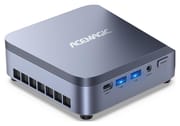 ACEMAGIC M5 (Intel Core 5 220H) | ACEMAGIC M5 (Intel Core 5 220H) | |
| Price | List Price: $570.00 Amazon Prices: Loading prices... | List Price: Amazon Prices: Loading prices... |
| Version | 16GB/512GB/Intel Core 5 220H | 24GB/512GB/Intel Core 5 220H |
| Performance Rating | 4.8 | 5.1 |
| Operating System | Windows 11 Pro | Windows 11 Pro |
| Processor | Twelve-core 2.70 Ghz (max 4.90 Ghz) Intel Core 5 220H | Twelve-core 2.70 Ghz (max 4.90 Ghz) Intel Core 5 220H |
| GPU | Integrated Intel Graphics | Integrated Intel Graphics |
| RAM | 16 GB LPDDR5 (LPDDR5-5200, soldered) | 24 GB LPDDR5 (LPDDR5-5200, soldered) |
| Internal Storage | 512 GB NVMe SSD | 512 GB NVMe SSD |
| Dimensions width x length x thickness | 5.04 x 5.04 x 1.63 inches (128.02 x 128.02 x 41.4 mm) | 5.04 x 5.04 x 1.63 inches (128.02 x 128.02 x 41.4 mm) |
| Weight | unknown | unknown |
| WiFi | Wi-Fi 6 (802.11ax) | Wi-Fi 6 (802.11ax) |
| Bluetooth | Bluetooth 5.2 | Bluetooth 5.2 |
| Ethernet | 1 Ethernet port at 1 Gbps | 1 Ethernet port at 1 Gbps |
| HDMI | 1 Full-Size HDMI Port | 1 Full-Size HDMI Port |
| DisplayPort | 1 DisplayPort (DP 1.4, 4K@60Hz; USB-C also carries DP 1.4) | 1 DisplayPort (DP 1.4, 4K@60Hz; USB-C also carries DP 1.4) |
| VGA | No VGA Ports | No VGA Ports |
| USB Ports | 6 USB 3, 1 USB-C Front: USB-C 10Gbps (DP, PD in), 2x USB-A 10Gbps. Rear: 4x USB-A 5Gbps | 6 USB 3, 1 USB-C Front: USB-C 10Gbps (DP, PD in), 2x USB-A 10Gbps. Rear: 4x USB-A 5Gbps |
| Thunderbolt Ports | No | No |
| OCuLink | No | No |
| Internal SATA Ports | No SATA ports | No SATA ports |
| Card Reader | No Card Reader | No Card Reader |
| Headphone Jack | 3.5mm (front) | 3.5mm (front) |
| Fanless | No | No |
| VESA Mount | Yes | Yes |
| In the Box | -- | -- |
| Expandability | RAM soldered (not upgradeable). Two M.2 2280 slots, up to 2TB each; the Wi-Fi card is replaceable. | RAM soldered (not upgradeable). Two M.2 2280 slots, up to 2TB each; the Wi-Fi card is replaceable. |
Related Mini PCs
-
 ACEMAGIC K1 (Intel Core i5-12600H)The Intel version of ACEMAGIC's K1 pairs the 12-core Core i5-12600H with triple 4K output, seven…
 -
 ACEMAGIC K5 (Ryzen 5 PRO 7640HS)The AMD build of ACEMAGIC's 5-inch K5 chassis pairs a six-core Zen 4 Ryzen 5 PRO 7640HS and Radeon…
 -
 ASUS NUC 14 ProThe ASUS NUC 14 Pro pairs Intel Core Ultra processors with a toolless chassis, two DDR5 SODIMM…
 -
 FIREBAT F1The FIREBAT F1 puts an 8-core Ryzen 7 H 255 and Radeon 780M graphics in a 5-inch square chassis…
 -
 GEEKOM A6The GEEKOM A6 pairs an AMD Ryzen 7 6800H with Radeon 680M graphics, USB4, 2.5GbE, and two M.2 slots…
 -
 HP Elite Mini 805 G8HP's 1-liter Elite Mini 805 G8 pairs a 6-core AMD Ryzen 5 PRO 5650G with DDR4 memory, dual M.2…
Ports, processor, and storage

The case measures about 5 x 5 x 1.6 inches, with vent slots along one side and a VESA mount in the box for hanging it behind a monitor. The front carries the power button, a 3.5mm audio jack, two USB-A 3.2 Gen 2 ports at 10Gbps, and a USB-C 3.2 Gen 2 port that handles 10Gbps data, DisplayPort 1.4 video, and power delivery input. The rear holds the DC barrel input, HDMI 2.0, DisplayPort 1.4, a Gigabit Ethernet jack, four USB-A 3.2 Gen 1 ports at 5Gbps, and a lock slot. Cooling is a single centrifugal fan with two copper heat pipes and two fin stacks. Wireless is Wi-Fi 6 with Bluetooth 5.2.
The Intel Core 5 220H has 4 performance cores and 8 efficient cores (16 threads), boosts to 4.9GHz, and carries 18MB of cache at a 45W base power. Intel launched it in late 2024 in its Core Series 2 line, but it is a Raptor Lake design built on the Intel 7 process, the same family as 13th-gen Core chips, so it has no NPU for on-device AI features. Its PassMark multi-thread score of about 21,900 puts it well ahead of the Intel N150 (about 5,300) and the Ryzen 5 5625U (about 14,500), and below the Core i5-14500HX (about 28,500) in the other M5. The integrated Intel Graphics has 80 execution units and decodes AV1 video.
Memory is LPDDR5 at 5200MT/s, soldered to the board in 16GB or 24GB. Both builds ship with a 512GB M.2 NVMe SSD. Both M.2 2280 slots run at PCIe 3.0 x4, one of them also accepts SATA M.2 drives, and ACEMAGIC rates each slot for up to 2TB. There is no 2.5-inch drive bay. Inside, the Wi-Fi card can be swapped along with the SSDs.
Ahead of most older Core i9 boxes in CPU tests, 40 to 50% behind a Radeon 680M in games

Ban at Retro Handhelds reviewed the 24GB/512GB M5 on a sample ACEMAGIC supplied, comparing it with five other mini PCs, most of them older ACEMAGIC Intel machines. In Geekbench 6 CPU tests, only the Core i9-14900HX version of the M5 beat the Core 5 220H. Ban wrote: “Considering this i5 is going toe to toe against top tier CPU’s from just a few years ago, that’s genuinely pretty impressive.” The 220H also won every GPU test against the older Intel Core i9 machines in the group.
The AMD Radeon 680M machine in the group scored at least twice as high in Geekbench GPU tests and about 20% higher in 3DMark. In games, Cyberpunk 2077 and Strange Brigade ran at around 30fps with reduced settings, and the M5 fell behind the 680M machine by around 40 to 50% at the review’s benchmark settings. The reviewer added that “this Core 5 performs better than any other Intel ACEMAGIC PC I’ve run across to date,” and wrote: “So if you’re looking for intel power, surprisingly this midrange chip will be the answer.”
The shell is light blue plastic that does not feel cheap but, in the reviewer’s view, does not feel like it will outlast the parts inside. Getting in requires peeling off the feet, removing small screws, flipping a latch, and lifting a metal midplate. Of that midplate, the reviewer wrote: “It looks like it should perfectly fit a 2.5” SSD, but ends up being completely useless even though there are screws in place.” Temperatures stayed cool for the most part, but under regular load (even Steam downloads) the low-pitched fan was audible from a normal seated position. The reviewer summed up the build: “I definitely preferred the build of the Retro X3, but this is far from the worst build on a mini PC that I’ve seen.”
Other mini PCs for gaming or more memory
For gaming, Retro Handhelds pointed to the ACEMAGIC Retro X3 at a similar price, which outperformed the M5 in its game tests. Buyers who expect to need more than 24GB of memory should pick a model with SO-DIMM slots, such as the HX-based ACEMAGIC M5, which takes up to 64GB of DDR4. The KAMRUI Hyper H2 also sells a Core 5 220H build with 24GB of soldered LPDDR5. To compare more options, see Starry Hope’s Mini PC Comparison Chart.
Frequently Asked Questions
Is this the same as the ACEMAGIC M5 with the Core i5-14500HX?
No. Both use the M5 name and a similar 5-inch square case with the same port layout, but the HX version uses 14th-gen Core i5, i7, or i9 HX processors with two DDR4 SO-DIMM slots (up to 64GB). This version uses the 12-core Core 5 220H with 16GB or 24GB of LPDDR5 soldered to the board.
Can I upgrade the RAM in the ACEMAGIC M5 Core 5 220H?
No. The LPDDR5-5200 memory is soldered to the board, so 24GB is the most this model can have. The SSDs and the Wi-Fi card are the parts you can change.
How much storage can the M5 Core 5 220H hold?
Up to 4TB, at 2TB per M.2 2280 slot. Both builds ship with one 512GB SSD, which leaves the second slot free for another drive.
How many monitors does the M5 Core 5 220H support?
Three at 4K and 60Hz: one on HDMI 2.0, one on DisplayPort 1.4, and one on the front USB-C port, which carries DisplayPort 1.4 video.
Is the ACEMAGIC M5 Core 5 220H good for gaming?
Only for light games. Its integrated Intel Graphics has 80 execution units, and Retro Handhelds measured around 30fps in Cyberpunk 2077 at reduced settings.
Is the ACEMAGIC M5 Core 5 220H loud?
Retro Handhelds wrote of the fan: “It’s a lower pitch so it isn’t the most annoying, but it was at least noticeable.”