
KAMRUI Hyper H2
Updated on

The KAMRUI Hyper H2 runs an Intel Core i9-11900H, an 8-core, 16-thread chip that boosts to 4.9 GHz. The standard configuration pairs it with 32GB of dual-channel DDR4 and a 1TB NVMe SSD, so nothing needs adding for a desk workload. HDMI 2.0, DisplayPort 1.4, and a video-capable USB-C port drive up to three 4K displays for a multi-monitor office or content-creation desk.
Pros and Cons
| Pros | Cons |
|---|---|
| The 8-core i9-11900H keeps up with a workstation desk load | Integrated graphics inadequate for gaming or GPU workloads |
| 32GB of RAM and a 1TB SSD ship in the box | Processor is several generations old (2021 architecture) |
| Triple storage expansion (2x M.2 + 1x 2.5” SATA bay) | No Thunderbolt support, limiting eGPU options |
| Fast 2.5GbE Ethernet for home server and NAS applications | Budget plastic chassis recycled from lower-end models |
| Draws 20W at idle, low enough to leave running 24/7 | Internal screws are soft metal and strip easily during upgrades |
| Quiet during light tasks thanks to on-demand cooling | No USB-C Power Delivery (requires proprietary 120W adapter) |
Related Videos
KAMRUI Hyper H2 Comparison Chart
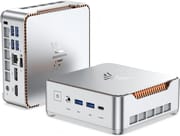 KAMRUI Hyper H2 | KAMRUI Hyper H2 | KAMRUI Hyper H2 | KAMRUI Hyper H2 | |
| Price | List Price: $459.91 Amazon Prices: | List Price: $519.99 Amazon Prices: | List Price: $567.99 Amazon Prices: | List Price: $459.99 Amazon Prices: |
| Version | 32GB/1TB/Intel i9-11900H | 32GB/1TB/Intel i7-13620H | 32GB/1TB/Intel Core i5-14450HX | 16GB/512GB/Intel Core i5-14500HX |
| Performance Rating | 5.0 | 5.4 | 5.3 | 5.4 |
| Operating System | Windows 11 Pro | Windows 11 Pro | Windows 11 Pro | Windows 11 Pro |
| Processor | Octa-core 2.50 Ghz (max 4.90 Ghz) Intel Core i9-11900H | Deca-core 3.60 Ghz (max 4.90 Ghz) Intel Core i7-13620H | Deca-core 2.40 Ghz (max 4.80 Ghz) Intel Core i5-14450HX | Fourteen-core 2.60 Ghz (max 4.90 Ghz) Intel Core i5-14500HX |
| GPU | Integrated Intel UHD Graphics | Integrated Intel UHD Graphics | Integrated Intel UHD Graphics | Integrated Intel UHD Graphics |
| RAM | 32 GB DDR4 SO-DIMM, 2-channel | 32 GB DDR4 SO-DIMM, 2-channel | 32 GB | 16 GB |
| Internal Storage | 1 TB | 1 TB | 1 TB | 512 GB |
| Dimensions width x length x thickness | 5.04 x 5.04 x 1.63 inches (128.02 x 128.02 x 41.4 mm) | 5.04 x 5.04 x 1.63 inches (128.02 x 128.02 x 41.4 mm) | 5.04 x 5.04 x 1.63 inches (128.02 x 128.02 x 41.4 mm) | 5.04 x 5.04 x 1.63 inches (128.02 x 128.02 x 41.4 mm) |
| Weight | unknown | unknown | unknown | unknown |
| WiFi | Wi-Fi 6 (802.11ax) | Wi-Fi 6 (802.11ax) | Wi-Fi 6 (802.11ax) | Wi-Fi 6 (802.11ax) |
| Bluetooth | Bluetooth 5.2 | Bluetooth 5.2 | Bluetooth 5.2 | Bluetooth 5.2 |
| Ethernet | 1 Ethernet port at 2.5 Gbps | 1 Ethernet port at 2.5 Gbps | 1 Ethernet port at 2.5 Gbps | 1 Ethernet port at 2.5 Gbps |
| HDMI | 1 Full-Size HDMI Port | 1 Full-Size HDMI Port | 1 Full-Size HDMI Port | 1 Full-Size HDMI Port |
| DisplayPort | 1 DisplayPort (DisplayPort 1.4) | 1 DisplayPort (DisplayPort 1.4) | 1 DisplayPort (DisplayPort 1.4) | 1 DisplayPort (DisplayPort 1.4) |
| VGA | No VGA Ports | No VGA Ports | No VGA Ports | No VGA Ports |
| USB Ports | 6 USB 3, 1 USB-C 6x USB-A 3.2 Gen2 (10Gbps), 1x USB-C 3.2 Gen2 (10Gbps with video output) | 6 USB 3, 1 USB-C 6x USB-A 3.2 Gen2 (10Gbps), 1x USB-C 3.2 Gen2 (10Gbps with video output) | 6 USB 3, 1 USB-C 6x USB-A 3.2 Gen2 (10Gbps), 1x USB-C 3.2 Gen2 (10Gbps with video output) | 6 USB 3, 1 USB-C 6x USB-A 3.2 Gen2 (10Gbps), 1x USB-C 3.2 Gen2 (10Gbps with video output) |
| Thunderbolt Ports | No | No | No | No |
| OCuLink | No | No | No | No |
| Internal SATA Ports | No SATA ports | No SATA ports | No SATA ports | No SATA ports |
| Card Reader | No Card Reader | No Card Reader | No Card Reader | No Card Reader |
| Headphone Jack | combo | combo | combo | combo |
| Fanless | No | No | No | No |
| VESA Mount | Yes | Yes | Yes | Yes |
| In the Box | 120W power adapter (19V/6.32A), VESA mount bracket, user manual | 120W power adapter (19V/6.32A), VESA mount bracket, user manual | 120W power adapter (19V/6.32A), VESA mount bracket, user manual | 120W power adapter (19V/6.32A), VESA mount bracket, user manual |
| Expandability | 2x DDR4 SO-DIMM slots (max 64GB), 2x M.2 2280 slots (1x PCIe 3.0x4 NVMe, 1x hybrid SATA/NVMe), 1x 2.5" SATA bay | 2x DDR4 SO-DIMM slots (max 64GB), 2x M.2 2280 slots (1x PCIe 3.0x4 NVMe, 1x hybrid SATA/NVMe), 1x 2.5" SATA bay | 2x DDR4 SO-DIMM slots (max 64GB), 2x M.2 2280 slots (1x PCIe 3.0x4 NVMe, 1x hybrid SATA/NVMe), 1x 2.5" SATA bay | 2x DDR4 SO-DIMM slots (max 64GB), 2x M.2 2280 slots (1x PCIe 3.0x4 NVMe, 1x hybrid SATA/NVMe), 1x 2.5" SATA bay |
Related Mini PCs
-
 KAMRUI AM21The KAMRUI AM21 is a 0.5-liter mini PC with an AMD Ryzen 7 8745HS, Radeon 780M graphics, 16GB or…
 -
 KAMRUI Hyper H1 (Ryzen 7 7735HS)The KAMRUI Hyper H1 is a compact mini PC with an AMD Ryzen 7 7735HS, Radeon 680M graphics, soldered…
 -
 ACEMAGIC M1 (Ryzen 7 7735HS)The 7735HS refresh of the ACEMAGIC M1 puts eight Zen 3+ cores, Radeon 680M graphics, and 24GB of…
 -
 ACEMAGIC M1The ACEMAGIC M1 is a 5-inch square Windows 11 Pro box sold in two very different Intel builds: a…
 -
 ACEMAGICIAN W1The ACEMAGICIAN W1 is a 5-inch mini PC built on the AMD Ryzen 7 H 255 with Radeon 780M graphics,…
 -
 Beelink SER9 Max H 255The Beelink SER9 Max H 255 pairs an AMD Ryzen 7 255 with Radeon 780M graphics in a 5.31-inch…
Two M.2 Slots, a SATA Bay, and a Recycled Shell

The case measures 5.04 x 5.04 x 1.63 inches and mounts behind a monitor on the VESA bracket included in the box. Its exterior is plastic, and OSReviews identifies it as the same shell KAMRUI already uses on its budget-tier mini PCs, with far more performant parts inside. Vents sit on several sides for airflow, and the 2.5-inch drive bay holds its disk in a metal caddy.
The i9-11900H scores around 20,000-21,000 on PassMark, enough for multi-application desk work. The dual-channel 32GB of RAM keeps dozens of browser tabs, Adobe Photoshop, and a development environment open at once, and boot times run under 20 seconds. Power draw sits near 20W at idle, 50W in typical use, and peaks around 77W under heavy load, low enough to leave the machine on a server workload around the clock.
Six USB-A 3.2 Gen2 ports run at 10Gbps, and the USB-C port carries video alongside data. A 2.5GbE Ethernet port handles NAS transfers and home server duty, while WiFi 6 comes from an RTL8852BE chipset with no 6GHz band. Storage expands through two M.2 2280 slots, one PCIe NVMe and one hybrid SATA/NVMe, plus that SATA bay.
Reviewer Insights

No Fan Noise Under Office Loads
Browser-based workflows and creative software move quickly here, and EBPMAN Tech Reviews notes that “this thing is fast… it was just really chomping through those screens very very fast.” His review covers office productivity, creative work, and specialized “maker” tasks like 3D printing and laser engraving software. On noise during light tasks he says, “it’s silent, I don’t hear anything.” He emphasizes that the i9 posts strong benchmark scores and handles heavy multitasking with ease. He sums up, “This is definitely a nice PC… for those of you who are not intense gamers.”
A Teardown That Finds Soft Screws
OSReviews positions it as a “flagship-grade” mini PC that offers a significant performance jump over common budget Celeron-based units, noting that “for most computing tasks, this i9 is no joke.” He is critical of the construction, pointing out that “they have essentially recycled the shell; it’s just the guts are much more performant.” The internal screws turn out to be soft metal and strip easily during his teardown. He still recommends it for users needing high CPU performance in a small form factor.
Sequential SSD Speed Strong, Random Speed Weak
Idle power draw measured 20W in testing by Michael’s Tinkerings, which suits 24/7 home server applications. He writes that the machine “represents a thoughtful balance of performance and value” for specific use cases. Sequential NVMe performance around 3,400 MB/s earns his praise, though he notes the included DRAMless QLC SSD shows weakness in random operations. He closes with “Not cutting-edge, but for the right use cases… it doesn’t need to be.”
Repeatable Benchmarks, Weak Graphics on the i5-14450HX
Elevated Systems tested the Core i5-14450HX configuration and found the results unusually repeatable, reporting that “the standard deviation across benchmark runs was the lowest I’ve ever recorded.” His Cinebench 2024 runs returned about 107 single-core and 669 multi-core, with Geekbench 6 near 2,488 single-core and 10,675 multi-core. Graphics were the weak spot: “In Geekbench GPU testing, the Hyper H2 scores around 4,000, the lowest GPU score of any mini PC I’ve tested.” He measured a 93W peak draw at the wall and fan noise topping out around 52 dB, and on the unit he covered he lists a single gigabit Ethernet port with no USB4 or Thunderbolt. On price he concludes, “You’re paying a premium here for CPU stability, thermals, and acoustics, not for raw performance or versatility.”
Customer Reviews
Most verified Amazon buyers bought the 32GB RAM and 1TB SSD configuration with Windows 11 Pro pre-installed. Thomas Yager, a verified buyer, wrote “This computer is super fast and is very easy to set up” and called it “so small and quiet, I love it.” Another verified buyer, K. Gomes, wrote of the value, “For $509 with 32GB of RAM, 1TB SSD, a high end gaming laptop CPU, and Windows Pro you can’t go wrong.”
Verified buyer Ken P. titled his four-star review “Good for intended uses. NOT useful for serious gaming.” and wrote that it “Works fine for light duty tasks. Not recommended for anything approaching serious gaming.” K. Gomes also flagged practical setup notes, including needing an HDMI-to-DisplayPort adapter for a second monitor and a BIOS Secure Boot key to get BitLocker working.
A Desk Workstation and a 24/7 Server Box
The integrated Intel UHD Graphics cannot handle modern gaming beyond very light titles, so the “gaming PC” marketing oversells what this machine does. The 11th-generation architecture dates to 2021, and the screw quality can frustrate anyone planning to open the case for upgrades. Buyers who want dedicated graphics should look at the KAMRUI Hyper H1 11 Pro with its Radeon GPU instead.
It fits a home office desk or a box left running server workloads. Starry Hope’s Mini PC Comparison Chart lines it up against alternatives across other price points and capability tiers.
Frequently Asked Questions
Can the KAMRUI Hyper H2 handle gaming?
Light gaming and older titles at reduced settings, yes. OSReviews saw Fortnite run around 60 to 70 FPS and the heavier Cyberpunk 2077 closer to 30 FPS at reduced settings. Modern titles need a mini PC with dedicated graphics.
How many displays can the KAMRUI Hyper H2 support?
Three 4K displays at once, over the HDMI 2.0, DisplayPort 1.4, and USB-C outputs. HDMI carries 4K at 60Hz and DisplayPort 1.4 carries 4K at 120Hz.
Can I upgrade the RAM and storage in the KAMRUI Hyper H2?
Yes. Two DDR4 SO-DIMM slots take up to 64GB of RAM in total, two M.2 2280 slots accept one PCIe NVMe and one hybrid SATA/NVMe drive, and the 2.5-inch bay adds a SATA disk. OSReviews found the internal screws are soft metal and strip easily, so work slowly during disassembly.
Is the KAMRUI Hyper H2 suitable for use as a home server?
It fits that role well. Idle draw of around 20W keeps running costs down, the 2.5GbE port reaches a NAS quickly, and the i9 has headroom for demanding server tasks. VESA mounting puts the box in a closet or behind a monitor.
How loud is the KAMRUI Hyper H2 during normal use?
It runs quietly during light tasks, and EBPMAN Tech Reviews said “it’s silent, I don’t hear anything” during normal office work. The fan spins up only under heavier workloads, though the top of the case gets warm and the fan becomes audible under sustained load.
What’s the power consumption of the KAMRUI Hyper H2?
Michael’s Tinkerings measured approximately 20W at idle, 50W during typical use, and peaks around 77W under heavy load. The included 120W power adapter (19V/6.32A) leaves headroom for all of those scenarios.
Does the KAMRUI Hyper H2 come with Windows installed?
Yes, Windows 11 Pro is pre-installed and ready to use out of the box. It also runs Linux for anyone who prefers a different operating system.