
ACEMAGICIAN Kron Mini K1
Updated on

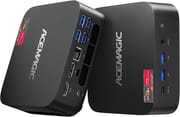
The ACEMAGICIAN Kron Mini K1 is a palm-sized office PC, just over five inches on each side, with six USB-A ports, two M.2 slots, and outputs for three displays. ACEMAGICIAN sells it with a Ryzen 5 7430U, a Ryzen 7 7730U, or a Ryzen 7 5825U, and prices run from $359 to $550 depending on processor, memory, and storage. It suits home office desks, media, and light creative work, and the included bracket mounts it behind a monitor.
Pros and Cons
| Pros | Cons |
|---|---|
| Palm-sized 5.19-inch chassis frees up desk space | Integrated graphics unsuitable for AAA gaming |
| Six USB 3.0 ports handle peripherals without a hub | Rubber feet cover case access screws |
| Triple 4K display output (HDMI + DisplayPort + USB-C) | 1Gbps Ethernet (no 2.5G option) |
| WiFi 6 and Bluetooth 5.2 keep the desk cable-light | Active cooling required (not fanless) |
| Two M.2 2280 slots for storage expansion | Reviewed Ryzen 5 units shipped with a SATA SSD |
| VESA bracket in the box puts it behind a display | No SD card reader |
Related Videos
ACEMAGICIAN Kron Mini K1 Comparison Chart
7 configurations
| Configuration | Processor | RAM | Storage | GPU | List price | Amazon price | Compare |
|---|---|---|---|---|---|---|---|
| Configuration 1 | Ryzen 7 7730UCPU Mark 16,835 | 16 GB | 512 GB | AMD Radeon Graphics | $599.00 | Loading... | Details
|
| Configuration 2 | Ryzen 7 7730UCPU Mark 16,835 | 32 GB | 512 GB | AMD Radeon Graphics | $470.00 | Details
| |
| Configuration 3 | Ryzen 7 7730UCPU Mark 16,835 | 32 GB | 1 TB | AMD Radeon Graphics | $550.00 | Details
| |
| 16GB/1TB | Ryzen 7 7730UCPU Mark 16,835 | 16 GB | 1 TB | AMD Radeon Graphics | $490.00 | Loading... | Details
|
| 16GB/512GB/Ryzen 5 7430U | Ryzen 5 7430UCPU Mark 15,028 | 16 GB | 512 GB | AMD Radeon Graphics | $359.00 | Details
| |
| 16GB/1TB/Ryzen 5 7430U | Ryzen 5 7430UCPU Mark 15,028 | 16 GB | 1 TB | AMD Radeon Graphics | $460.00 | Loading... | Details
|
| 32GB/1TB/Ryzen 7 5825U | Ryzen 7 5825UCPU Mark 17,771 | 32 GB | 1 TB | Radeon RX Vega8 Graphics | $460.00 | Details
|
Specs shared by every configuration
| Operating System | Windows 11 Pro |
|---|---|
| Dimensions width x length x thickness | 5.19 x 5.19 x 1.96 inches (131.83 x 131.83 x 49.78 mm) |
| Weight | 2.66 lbs (1.21 kg) |
| WiFi | Wi-Fi 6 (802.11ax) |
| Bluetooth | Bluetooth 5.2 |
| Ethernet | 1 Ethernet port at 1 Gbps |
| HDMI | 1 HDMI Port |
| DisplayPort | 1 DisplayPort |
| VGA | No VGA Ports |
| USB Ports | 6 USB 3, 1 USB-C 4x USB 3.2 Gen 1 (rear), 2x USB 3.2 Gen 2 (front) |
| Thunderbolt Ports | No |
| OCuLink | No |
| Internal SATA Ports | No SATA ports |
| Card Reader | No Card Reader |
| Headphone Jack | 3.5mm |
| Fanless | No |
| VESA Mount | Yes |
See every AMD Ryzen 7 7730U configuration in the chartSee every AMD Ryzen 5 7430U configuration in the chartSee every AMD Ryzen 7 5825U configuration in the chart
Related Mini PCs
-
 GEEKOM A5 (2027 Edition)The GEEKOM A5 2027 Edition puts a 15W eight-core Ryzen 7 7730U in the A5's NUC-sized case, with…
-
 GEEKOM A7 (2026 Edition)The GEEKOM A7 2026 Edition keeps the original A7's half-liter aluminum case and ports but swaps the…
-
 ACEMAGIC K1 (Ryzen 5000 and 7030 Series)This ACEMAGIC K1 puts an 8-core Ryzen 7 7730U, a 6-core Ryzen 5 7530U or 7430U, or a 4-core Ryzen 3…
-
 AYANEO Retro Mini PC AM01The AYANEO Retro Mini PC AM01 is a beige, 1984 Macintosh-styled box built on the AMD Ryzen 7 5825U,…
-
 BOSGAME P4 UltraA compact Ryzen 7 7730U mini PC with dual 2.5GbE LAN, Wi-Fi 6E, two PCIe 3.0 M.2 slots, and a…
-
 GMKtec NucBox M5 UltraAn affordable, highly flexible mini PC built around the AMD Ryzen 7 7730U. Dual 2.5G Ethernet, easy…
A mobile Ryzen with two M.2 slots
Construction is mostly plastic, which keeps weight under three pounds and leaves room for the vents the active cooling system needs. At 5.19 by 5.19 by 1.96 inches (roughly 128mm square and 41mm tall), the unit sits in the palm of your hand or tucks behind a VESA-compatible monitor on the included bracket. Six USB 3.0 ports (split between Gen 1 and Gen 2 speeds) is a generous count for a chassis this small, and they combine with HDMI, DisplayPort, USB-C with video output, gigabit Ethernet, and a 3.5mm audio jack, so most desk setups connect without dongles or hubs.
The AMD Ryzen 7 7730U is a Zen 3 chip with 16MB of L3 cache, essentially a refresh of the Ryzen 7 5825U. It offers 8 cores and 16 threads with base clocks of 2.0 GHz boosting to 4.5 GHz, and AMD rates it at 15W. PassMark benchmarks place it at about 16,835 points, a little behind the Intel Core i7-1360P. Integrated Radeon graphics cover 4K content playback and video conferencing. The gaming tests come from the Ryzen 5 7430U model. Clubic, which reports that ACEMAGIC raises that chip from AMD’s official 15W to 28W, measured 21 fps in Shadow of the Tomb Raider at 720p on the lowest settings, and The Gadgeteer found Fortnite playable once the settings came down and Borderlands 3 playable with some stutter.
Two M.2 2280 slots give the included 512GB or 1TB SSD room to grow. The Ryzen 5 7430U units that Clubic and The Gadgeteer tested shipped with a SATA SSD, and the two reviews disagree on whether the open slot takes NVMe, so check the slot interface for your build before buying a second drive. Wireless is WiFi 6 (802.11ax) with Bluetooth 5.2. Wired networking runs through a single gigabit Ethernet port, so anyone wanting faster LAN speeds will need an external adapter. Memory ships in 16GB or 32GB configurations. The Gadgeteer found an open RAM slot in its unit, while Clubic listed the memory as non-expandable, so treat a RAM upgrade as uncertain.
Reviewer Insights
Six USB-A ports, and rubber feet that fight a teardown
Chase Brogan unboxed and tested the Kron Mini K1 and called out the ports: “the fact that we have six USB-A ports on here is absolutely incredible.” His review unit ran the Ryzen 5 7430U (ACEMAGICIAN sells the same chassis across CPU tiers), so his observations about build quality and port layout carry over to the Ryzen 7 7730U configurations. Accessing the internals requires prying off rubber feet whose adhesive, he warned, will stop sticking after a couple of removals; he called it “not a huge deal, but it’s an inconvenience.” He pegged the Ryzen 5 unit as a solid office or home PC and “middle of the road” for gaming at its roughly $250 price.
A dashcam render and a 3D printer controller
Reviewing the Ryzen 5 7430U model, Kenneth Woodham of The Gadgeteer wrote that “for a PC under $300, I was thoroughly impressed with the Acemagic Kron mini K1.” His testing leaned on video rendering and 3D printer slicing, with a dashcam clip rendering in about a minute and a half versus two minutes on his older laptop, and a slicing job that made his laptop chug ran without trouble on the K1. He suggested mini PCs like this one as a media player, a dedicated 3D printer or laser-engraver PC, or a retro gaming box, and listed the price as $259, or $219 with a $40 coupon on ACEMAGIC’s site at the time.
Clubic scored it 7 out of 10 and faulted the SATA SSD
Clubic awarded the Kron Mini K1 7 out of 10. Their French-language review tested the Ryzen 5 7430U configuration and praised the chassis finish and the generous USB port selection, but it called AMD’s APU a sensible rather than exciting pick and flagged the SATA (rather than NVMe) SSD in their unit as a cost-cutting touch. They noted that ACEMAGIC asks close to 400 euros for the machine.
A home-office desktop that fits behind a monitor
For home office work, media, web apps, and light creative tasks, the Kron Mini K1 has enough USB ports for a full desk setup and a second M.2 slot for more storage.
The integrated Radeon Vega graphics rule out serious gaming and heavy content creation, even with ACEMAGIC running the Ryzen 5 7430U at up to 28W. The single gigabit Ethernet port may also disappoint buyers expecting 2.5G speeds at this price point. It suits a home office or a small business desk, not a gaming setup.
Starry Hope’s Mini PC Comparison Chart lines this machine up against the alternatives in the same price range.
Frequently Asked Questions
Can the ACEMAGICIAN Kron Mini K1 run games?
Light games, with settings turned down, judging by reviews of the Ryzen 5 7430U model. Demanding AAA games will not run well on the integrated Radeon Vega graphics, which Clubic noted are an older design than AMD’s RDNA graphics. Treat it as a productivity machine with light gaming on the side.
How many monitors can the ACEMAGICIAN Kron Mini K1 support?
Three, all at 4K resolution, over HDMI, DisplayPort, and USB-C, which carries video output. That covers multi-monitor productivity setups and digital signage.
Can I upgrade the RAM and storage in the Kron Mini K1?
Storage, yes: two M.2 2280 slots take another drive (the Ryzen 5 7430U units reviewers tested used a SATA SSD). Reviewers disagree on whether the RAM can be upgraded. Getting inside means removing the rubber feet, which may lose some adhesive over time.
Is the ACEMAGICIAN Kron Mini K1 fanless?
No. An internal fan cools the processor. Chase Brogan said of his Ryzen 5 7430U unit: “It’s also very quiet, keeps very cool.”
What operating system comes with the Kron Mini K1?
Windows 11 Pro, pre-installed and activated. BitLocker encryption, Remote Desktop, and Hyper-V virtualization support are all available out of the box.
Can I mount the Kron Mini K1 behind my monitor?
Yes. ACEMAGICIAN includes a VESA mount bracket, so the unit attaches to the back of any VESA-compatible monitor, out of sight and off the desk. The compact 5.19-inch form factor keeps the mounted assembly slim.
What is the difference between the Kron Mini K1 variants?
Every variant shares the same ports and physical design. Four use the AMD Ryzen 7 7730U and differ only in RAM and storage: 16GB RAM with a 512GB SSD ($599), 32GB RAM with a 512GB SSD, 32GB RAM with a 1TB SSD, and 16GB RAM with a 1TB SSD ($490). Two pair the Ryzen 5 7430U with 16GB RAM and either a 512GB SSD ($359) or a 1TB SSD, and another pairs the Ryzen 7 5825U and its Radeon Vega 8 graphics with 32GB RAM and a 1TB SSD ($460). Since the second M.2 slot takes another drive, a 512GB build is the cheapest place to start if you plan to add storage later.