
GEEKOM A7 (2026 Edition)
Published on

The GEEKOM A7 2026 Edition is a quiet half-liter desktop for office work, browsing, video, and multi-monitor setups, and it sips power at idle. It reuses the name and aluminum case of the 2024 GEEKOM A7, but the Ryzen 9 is gone: the 2026 Edition runs a six-core Ryzen 5, either the 7545U or the 7535HS. Both builds ship with 16GB of DDR5 on a single stick, so they run in single channel until you add a second module.
The two processors are different generations despite their similar model numbers. The 7545U is Zen 4 on 4nm with Radeon 740M graphics; the 7535HS is Zen 3+ on 6nm with the older Radeon 660M. Every review cited below tested the 7545U build, and Igor’s Lab advised against the 7535HS.
| Pros | Cons |
|---|---|
| Idles under 7W with a monitor attached | 16GB on one stick: single-channel memory out of the box |
| Quiet at idle and in light work | Gives up about a third of the original A7’s multi-core score |
| USB4, dual HDMI 2.0, 2.5GbE, Wi-Fi 6E, and a full-size SD reader | Radeon 740M is limited to light and indie games |
| Drives four independent displays and an eGPU over USB4 | One M.2 slot, no room for a second drive |
| Second SO-DIMM slot free, up to 64GB DDR5 | Opening the case means peeling adhered feet and minding the Wi-Fi antennas |
| VESA mount included, unlike the 2024 A7 | One review unit’s Wi-Fi driver dropped out intermittently |
Related Videos
GEEKOM A7 (2026 Edition) Comparison Chart
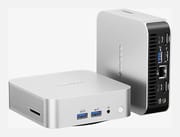 GEEKOM A7 (2026 Edition) | GEEKOM A7 (2026 Edition) | |
| Price | List Price: $699.00 Amazon Prices: Loading prices... | List Price: $699.00 Amazon Prices: Loading prices... |
| Version | 16GB/500GB/AMD Ryzen 5 7545U | 16GB/1TB/AMD Ryzen 5 7535HS |
| Performance Rating | 4.5 | 4.3 |
| Operating System | Windows 11 Pro | Windows 11 Pro |
| Processor | Hexa-core 3.20 Ghz (max 4.90 Ghz) AMD Ryzen 5 7545U | Hexa-core 3.30 Ghz (max 4.55 Ghz) AMD Ryzen 5 7535HS |
| GPU | Integrated AMD Radeon 740M | Integrated AMD Radeon 660M |
| RAM | 16 GB DDR5 SO-DIMM (One SO-DIMM fitted, second slot free) | 16 GB DDR5 SO-DIMM (One SO-DIMM fitted, second slot free) |
| Internal Storage | 500 GB NVMe SSD | 1 TB NVMe SSD |
| Dimensions width x length x thickness | 4.43 x 4.41 x 1.46 inches (112.52 x 112.01 x 37.08 mm) | 4.43 x 4.41 x 1.46 inches (112.52 x 112.01 x 37.08 mm) |
| Weight | 0.99 lbs (0.45 kg) | 0.99 lbs (0.45 kg) |
| WiFi | Wi-Fi 6E (802.11ax) | Wi-Fi 6E (802.11ax) |
| Bluetooth | Bluetooth 5.4 | Bluetooth 5.4 |
| Ethernet | 1 Ethernet port at 2.5 Gbps | 1 Ethernet port at 2.5 Gbps |
| HDMI | 2 Full-Size HDMI Ports | 2 Full-Size HDMI Ports |
| DisplayPort | DP Alt Mode on both USB-C ports | DP Alt Mode on both USB-C ports |
| VGA | No VGA Ports | No VGA Ports |
| USB Ports | 1 USB 2.0, 3 USB 3, 2 USB-C (1 USB4) Rear USB4 (40Gbps) and 10Gbps USB-C | 1 USB 2.0, 3 USB 3, 2 USB-C (1 USB4) Rear USB4 (40Gbps) and 10Gbps USB-C |
| Thunderbolt Ports | No | No |
| OCuLink | No | No |
| Internal SATA Ports | No SATA ports | No SATA ports |
| Card Reader | SD Card Reader | SD Card Reader |
| Headphone Jack | combo | combo |
| Fanless | No | No |
| VESA Mount | Yes | Yes |
| In the Box | Mini PC, HDMI cable, 120W power adapter, VESA mount, user guide | Mini PC, HDMI cable, 120W power adapter, VESA mount, user guide |
| Expandability | Up to 64GB DDR5 (2x SO-DIMM, one free). One M.2 2280 PCIe 4.0 slot, up to 4TB. | Up to 64GB DDR5 (2x SO-DIMM, one free). One M.2 2280 PCIe 4.0 slot, up to 4TB. |
Related Mini PCs
-
 GEEKOM Mini IT13The GEEKOM Mini IT13 is a 13th-gen Intel mini PC (Core i5-13500H up to i9-13900H/HK) with DDR4 to…
 -
 GEEKOM A6The GEEKOM A6 pairs an AMD Ryzen 7 6800H with Radeon 680M graphics, USB4, 2.5GbE, and two M.2 slots…
 -
 ASUS NUC 13 ProThe ASUS NUC 13 Pro is a 4x4 mini PC sold in Core i5-1340P and Core i7-1360P builds with two DDR4…
 -
 Beelink SER6 MAXThe Beelink SER6 MAX pairs a Ryzen 7 7735HS or Ryzen 9 6900HX with Radeon 680M graphics and up to…
 -
 Dell OptiPlex 7010 MicroDell's OptiPlex 7010 Micro is a 1-liter, 13th-Gen Intel business desktop built for enterprise…
 -
 Dell Pro Micro QCM1250Dell rebrands the long-running OptiPlex Micro line as the Pro Micro and ships the QCM1250 with the…
The 7545U runs about a third behind the Ryzen 9 A7 in threaded work
CNX Software ran the 7545U unit alongside the Ryzen 9 A7 in one comparison table. It scored 9,578 in Cinebench R23 multi-core against 15,291, 19,144 in PassMark CPU Mark against 30,720, and 2,893 in 3DMark Fire Strike against 7,895. Single-core barely moved (1,724 against 1,813), so it feels much the same in a browser or an office app and falls behind in anything threaded or graphical. PC Astuces measured a similar 9,871 in Cinebench R23 multi-core, and GBAtemp logged 8,015 multi-core and 2,480 single-core in Geekbench 6.
Storage is quick for the class. CNX Software measured 5,430 MB/s sequential reads from the bundled Kingston NVMe drive, and PC Astuces recorded 5,700 MB/s reads and 3,200 MB/s writes from its 512GB Kingston NV3. YouTube played smoothly up to 4K60 and 8K30 in CNX’s testing, while 8K60 dropped most of its frames in Firefox and Chrome.
The Radeon 740M is the weak spot, and the single memory stick makes it weaker. GBAtemp held 20 to 30 fps in Baldur’s Gate 3’s Act 3 only at 720p with the Low preset and FSR on Ultra Performance, and passed 3DMark’s Steel Nomad Light stress test at 99.2% consistency. AlHuTV found Rocket League playable and put Counter-Strike near the limit. PC Astuces ran Fortnite at 1080p on low settings and GTA 5 at 1080p low with a 75% resolution scale.
Near 90C under load without throttling, and under 7W at idle
CNX Software recorded a peak of 88.8C in Fire Strike and 90.2C during a Cinebench R23 multi-core run, with no thermal throttling reported either time at a 28 to 29C ambient. With the meter 5 cm above the case it measured 39.0 to 39.5 dBA at idle and 47.0 to 53.4 dBA in Fire Strike (the room itself read 36.6 to 37.1 dBA). Igor’s Lab, measuring from 40 cm, logged 33.4 dBA at idle and 41.1 dBA under load with a maximum CPU temperature of 85.2C. PC Astuces described the fan as very discreet even when it spins up under load.
At idle CNX measured 4.2 to 6.8W, and Igor’s Lab 4.8W under Windows 11 with a monitor attached. That draw suits a desktop or home server left on around the clock.
One memory stick, one M.2 slot, and a case that needs care to open
The 7545U unit has two SO-DIMM slots with one filled. CNX Software, AlHuTV, and PC Astuces each opened it and found a single 16GB module (PC Astuces lists it as DDR5-4800), and GBAtemp says both the 7545U and 7535HS builds ship with a single stick. A second module raises capacity toward the 64GB maximum and switches the memory to dual channel; CNX Software and GBAtemp both pinned part of the weak graphics results on the single stick. There is one M.2 2280 slot, so more storage means swapping the drive; GEEKOM rates the slot for drives up to 4TB.
AlHuTV removed eight screws and called the A7 simple to open and upgrade, while GBAtemp found the adhered rubber feet and the Wi-Fi antenna leads, which pull out of the card easily, made the shell the least maintainable in GEEKOM’s lineup. PC Astuces gave the same antenna warning. The case measures about 4.4 x 4.4 x 1.5 inches and weighs about a pound, and the box includes a 120W adapter, an HDMI cable, and a VESA bracket for mounting it behind a monitor.
The ports match the 2024 A7: two USB 3.2 Gen 2 Type-A and a combo audio jack on the front, a full-size SD reader on the side, and USB4, a 10Gbps USB-C, a third USB-A, a USB 2.0 port, two HDMI 2.0 outputs, and 2.5GbE on the back.
Reviewer Insights
CNX Software
CNX Software ran the 2026 Edition through a three-part test in June 2026: a teardown and first boot, a Windows 11 Pro benchmark run, and an Ubuntu 26.04 pass. The English articles carry Jean-Luc Aufranc’s byline and are a translation, with added insights, of Suthinee Kerdkaew’s original review for CNX Software Thailand. In the teardown the review had “access to the motherboard featuring two SODIMM RAM slots, but fitted with only one, meaning single-channel memory which may impact performance of graphics and AI tasks.” The machine “performs fairly well against peers, except for 3D graphics as shown in 3DMark Fire Strike and Unigine Heaven 4.0 benchmarks, which may have been impacted by using a single SO-DIMM memory (single channel),” with the note that “Adding an extra SO-DIMM module might help here.”
On the generational change the review wrote, “The first obvious remark is that the GEEKOM A7 2026 Edition is a downgrade from the GEEKOM A7 (2024 Edition), which should not be surprising considering we went from a Ryzen 9 to a Ryzen 5.” The USB4 port carried an external GPU (“Nonetheless, the USB4 port on the GEEKOM A7 works fine with an eGPU”), and the box “supports up to four independent displays via two HDMI 2.0 ports, and the USB4 and USB 3.2 Type-C ports with DisplayPort Alt mode.” The front-panel 10Gbps ports read slower than the rear ones: “All ports work as advertised, but the 10 Gbps ports on the front panel appear to be slightly slower (read speed), possibly because they are implemented through a USB hub.” Under Ubuntu 26.04 three 7-Zip passes averaged 41,830 MIPS, which “points to stable performance and no obvious thermal throttling.” The review also noted, “The VESA mount was not included in the previous generation A7 model, so that part is new.”
CNX Software reported that “While Wi-Fi 6 was super fast with Gigabit speeds measured using iperf3, the driver would stop working from time to time, requiring a reboot.” Rolling the driver back and refitting the module inside the case made it “mostly” go away, but the review still called it “a concern, especially since the root cause of the issue is unknown, and it may be specific to our sample,” and summed up: “This was the main issue we had with the mini PC.”
Igor’s Lab
Tim Kutzner’s seven-page test of the 7545U configuration reached an “Okay” rating, a verdict he tied to its 509-euro price at publication. On the chip he wrote that it, “released in Q2 2023, is no longer a performance marvel, but it is entirely sufficient for normal desktop use and one or another 3D application.” On power draw he wrote, “4.8 watts at idle under Windows 11 while a monitor is connected is truly respectable.”
He objected to AMD’s naming on the grounds that it hides how far apart the two configurations sit, since “the differences are considerable: Zen 4 vs Zen 3+, 4nm vs 6nm, Radeon 740M vs Radeon 660M,” and finished with “However, I would rather avoid the variant with the 7535HS.” GEEKOM supplied his review sample with no obligation to publish.
GBAtemp
Scarlet Bell’s review for GBAtemp scored the 7545U build 7 out of 10, on a sample GEEKOM provided. She found it handled browsing, 4K YouTube, and several monitors without trouble, and wrote of gaming, “Hampered further by the single-channel RAM configuration and you’re really limited to your smaller indie titles.” Her usual complaint about this chassis held too: “My usual criticism of this shell remains true here: it’s a pain to open up.”
She also disliked the reused name: “The original A7 remains the better system, resulting in a confusing landscape for prospective buyers who may have seen reviews for that PC.” She concluded, “In this current market of spiralling costs, the 2026 Edition of the A7 is a markedly fine Mini PC.”
PC Astuces
The French site PC Astuces tested the 7545U build with a 512GB Kingston NV3 drive and a single 16GB DDR5-4800 module, leaving the second slot free. It found the machine stayed responsive with dozens of browser tabs open, measured 9,871 in Cinebench R23 multi-core, and described the fan as very discreet under load. It rated the finish well above competing mini PCs, flagged the Wi-Fi antennas as the thing to watch when opening the case, and rated the machine one star out of five for recent AAA games.
AlHuTV
In his German-language review, AlHuTV opened the 7545U unit (eight screws) and showed the single 16GB module in the second slot with the first slot empty, and noted there is no room for a second M.2 drive. He placed it in home office, media server, and multi-monitor use, found Rocket League playable, and said Counter-Strike reached the limit of what it can handle, adding that gaming is not what the machine is built for.
Buy the 7545U for a quiet office desktop, and budget for a second memory stick
The 7545U build fits an office desktop that stays on all day, a four-display monitoring setup, or a home server, and the VESA bracket lets it hang behind a monitor. Plan on adding a second SO-DIMM: every reviewer who opened it found one module, and two reviews tied the weak graphics results to single-channel memory.
Skip it if you game beyond indie and older titles or need sustained multi-threaded speed. For the same chassis with the Ryzen 9 7940HS, the original GEEKOM A7 is the faster machine, and the GEEKOM A7 Max carries that chip in a larger, current case. The 7535HS build is the older architecture with the weaker Radeon 660M; Igor’s Lab’s Tim Kutzner said he would avoid it. To compare other options, see Starry Hope’s Mini PC Comparison Tool.
Upgrades
Accessories that fit the GEEKOM A7 (2026 Edition)'s USB4 or Thunderbolt ports.

Core X V2
A Thunderbolt 5 enclosure that Razer lists as working with Thunderbolt 4 and USB4 hosts; it fits a four-slot card and needs an ATX power supply.

DEG2 eGPU Dock
Connects over USB4 or Thunderbolt 5, with an OCuLink input behind a switch, and adds an M.2 slot; it needs an ATX or SFX power supply.

Breakaway Box 850 T5
Has an 850W power supply built in, so only the graphics card is extra, and works with Thunderbolt 4 and USB4 Windows PCs.

TS4 Thunderbolt 4 Dock
An 18-port dock that CalDigit lists for Thunderbolt 4 and USB4 hosts, with 2.5GbE and a DisplayPort 1.4 output.

TBT4-UD5 Thunderbolt 4 Dock
Two HDMI ports drive two 4K60 monitors from one Thunderbolt 4 or USB4 port on a Windows PC.

Revodok Max 208 Thunderbolt 4 Dock
Adds three Thunderbolt 4 ports for dual 4K60 displays plus gigabit Ethernet; it has no HDMI port, so monitors connect over USB-C or an adapter.
Frequently Asked Questions
How is the GEEKOM A7 2026 Edition different from the original GEEKOM A7?
It keeps the aluminum case and the same ports but replaces the 8-core Ryzen 9 7940HS with a 6-core Ryzen 5 (7545U or 7535HS), ships 16GB of RAM on a single stick, and adds a VESA mount. CNX Software measured about a third less multi-core performance and well under half the 3D graphics score of the original.
What is the difference between the Ryzen 5 7545U and Ryzen 5 7535HS versions?
The 7545U is a Zen 4 part built on 4nm with Radeon 740M graphics; the 7535HS is Zen 3+ on 6nm with the older Radeon 660M. Both are six-core, twelve-thread chips. Reviewers tested the 7545U configuration, and Igor’s Lab recommended against the 7535HS build.
Can I upgrade the RAM in the GEEKOM A7 2026 Edition?
Yes. It has two DDR5 SO-DIMM slots and takes up to 64GB. It ships with one 16GB module, so adding a second stick both raises capacity and switches the memory to dual channel, which helps the integrated graphics.
Can I add a second SSD to the GEEKOM A7 2026 Edition?
No. There is a single M.2 2280 PCIe 4.0 slot and no 2.5-inch bay, so a storage upgrade means swapping the drive. GEEKOM rates the slot for drives up to 4TB.
How many monitors can the GEEKOM A7 2026 Edition drive?
Up to four independent displays, through the two HDMI 2.0 ports plus the USB4 and USB-C ports with DisplayPort Alt Mode. CNX Software confirmed four-display support in testing.
Is the GEEKOM A7 2026 Edition good for gaming?
Only for light and indie titles. GBAtemp held 20 to 30 fps in Baldur’s Gate 3 only at 720p with the lowest settings and aggressive upscaling, and AlHuTV put Counter-Strike near the limit. The single memory stick holds the Radeon 740M back further.
Does the GEEKOM A7 2026 Edition support VESA mounting?
Yes. A VESA bracket comes in the box, which the 2024 A7 did not include.
Can I use an external GPU with the GEEKOM A7 2026 Edition?
Yes, over the USB4 port. CNX Software confirmed the port works with an eGPU.
What operating system does the GEEKOM A7 2026 Edition come with?
Windows 11 Pro. CNX Software also tested it under Ubuntu 26.04 and reported stable performance.
What is included in the box with the GEEKOM A7 2026 Edition?
The mini PC, an HDMI cable, a 120W power adapter, a VESA mount, and a user guide.