
GMKtec NucBox M5 Ultra
Updated on

The GMKtec NucBox M5 Ultra is a refresh of the company’s long-running NucBox M5 line, swapping in the AMD Ryzen 7 7730U in place of the older 5825U while keeping the same compact, easy-to-service chassis. The 7730U is an 8-core, 16-thread Zen 3 part with integrated Radeon Vega 8 graphics, and it comes with dual 2.5 Gigabit Ethernet, WiFi 6E, and enough port selection to drive three displays. Build cost is kept down with DDR4 memory and PCIe 3.0 storage rather than the DDR5 and PCIe 4.0 you see on premium mini PCs, and that combination still covers office work, browser-heavy multitasking, and home-server duties. The chassis pops open with a couple of screws, so RAM and storage are user-upgradable. This is a small Ryzen 7 box for productivity, light creative work, or quiet always-on duty in a closet.
Strengths and compromises
| Pros | Cons |
|---|---|
| Affordable Ryzen 7 7730U platform | Plastic case feels light and not especially durable |
| Dual 2.5 Gigabit Ethernet (Realtek RTL8125) | Storage stuck on PCIe Gen 3, no Gen 4 option |
| Two M.2 2280 slots, second slot adds easy storage expansion | Two of the four USB-A ports are slow USB 2.0 |
| WiFi 6E and Bluetooth 5.2 | DDR4 SO-DIMM rather than newer DDR5 |
| Easy internal access for RAM and SSD upgrades | A single USB-C port, with no USB4 or Thunderbolt |
| Triple-display support via HDMI, DisplayPort, and USB-C | Integrated Vega 8 graphics top out well short of modern gaming |
GMKtec NucBox M5 Ultra Comparison Chart
 GMKtec NucBox M5 Ultra | GMKtec NucBox M5 Ultra | GMKtec NucBox M5 Ultra | |
| Price | List Price: $449.99 Amazon Prices: Loading prices... | List Price: Amazon Prices: Loading prices... | List Price: $599.99 Amazon Prices: Loading prices... |
| Version | 16GB/512GB/Ryzen 7 7730U | 16GB/256GB/Ryzen 7 7730U | 32GB/1TB/Ryzen 7 7730U |
| Performance Rating | 4.4 | 4.4 | 4.8 |
| Operating System | Windows 11 Pro | Windows 11 Pro | Windows 11 Pro |
| Processor | Octa-core 2.00 Ghz (max 4.50 Ghz) AMD Ryzen 7 7730U | Octa-core 2.00 Ghz (max 4.50 Ghz) AMD Ryzen 7 7730U | Octa-core 2.00 Ghz (max 4.50 Ghz) AMD Ryzen 7 7730U |
| GPU | Integrated Radeon RX Vega8 Graphics | Integrated Radeon RX Vega8 Graphics | Integrated Radeon RX Vega8 Graphics |
| RAM | 16 GB DDR4 SO-DIMM, 2-channel (2x8GB DDR4-3200) | 16 GB DDR4 SO-DIMM, single-channel (1x16GB DDR4-3200) | 32 GB DDR4 SO-DIMM, 2-channel (2x16GB DDR4-3200) |
| Internal Storage | 512 GB NVMe SSD | 256 GB NVMe SSD | 1 TB NVMe SSD |
| Dimensions width x length x thickness | 5.07 x 5 x 1.88 inches (128.78 x 127 x 47.75 mm) | 5.07 x 5 x 1.88 inches (128.78 x 127 x 47.75 mm) | 5.07 x 5 x 1.88 inches (128.78 x 127 x 47.75 mm) |
| Weight | 1.16 lbs (0.53 kg) | 1.16 lbs (0.53 kg) | 1.16 lbs (0.53 kg) |
| WiFi | Wi-Fi 6E (802.11ax) | Wi-Fi 6E (802.11ax) | Wi-Fi 6E (802.11ax) |
| Bluetooth | Bluetooth 5.2 | Bluetooth 5.2 | Bluetooth 5.2 |
| Ethernet | 2 Ethernet ports at 2.5 Gbps | 2 Ethernet ports at 2.5 Gbps | 2 Ethernet ports at 2.5 Gbps |
| HDMI | 1 Full-Size HDMI Port | 1 Full-Size HDMI Port | 1 Full-Size HDMI Port |
| DisplayPort | 1 DisplayPort (DisplayPort and HDMI can drive an 8K display.) | 1 DisplayPort (DisplayPort and HDMI can drive an 8K display.) | 1 DisplayPort (DisplayPort and HDMI can drive an 8K display.) |
| VGA | No VGA Ports | No VGA Ports | No VGA Ports |
| USB Ports | 2 USB 2.0, 2 USB 3, 1 USB-C Front: 1x USB-C (USB 3.2 Gen 2, PD + DP Alt Mode), 2x USB-A 3.2 Gen 2. Rear: 2x USB-A 2.0. | 2 USB 2.0, 2 USB 3, 1 USB-C Front: 1x USB-C (USB 3.2 Gen 2, PD + DP Alt Mode), 2x USB-A 3.2 Gen 2. Rear: 2x USB-A 2.0. | 2 USB 2.0, 2 USB 3, 1 USB-C Front: 1x USB-C (USB 3.2 Gen 2, PD + DP Alt Mode), 2x USB-A 3.2 Gen 2. Rear: 2x USB-A 2.0. |
| Thunderbolt Ports | No | No | No |
| OCuLink | No | No | No |
| Internal SATA Ports | No SATA ports | No SATA ports | No SATA ports |
| Card Reader | No Card Reader | No Card Reader | No Card Reader |
| Headphone Jack | combo | combo | combo |
| Fanless | No | No | No |
| VESA Mount | Yes | Yes | Yes |
| In the Box | Mini PC, power adapter, HDMI cable, VESA mount with screws, user manual. | Mini PC, power adapter, HDMI cable, VESA mount with screws, user manual. | Mini PC, power adapter, HDMI cable, VESA mount with screws, user manual. |
| Expandability | Dual SO-DIMM DDR4 up to 64GB. Dual M.2 2280 PCIe 3.0 slots, up to 8TB each. | Dual SO-DIMM DDR4 up to 64GB. Dual M.2 2280 PCIe 3.0 slots, up to 8TB each. | Dual SO-DIMM DDR4 up to 64GB. Dual M.2 2280 PCIe 3.0 slots, up to 8TB each. |
Related Mini PCs
-
 GMKtec NucBox M6The GMKtec NucBox M6 pairs an AMD Ryzen 5 6600H with Radeon 660M graphics, up to 32GB of DDR5, two…
 -
 GMKtec M8The GMKtec M8 is a compact mini PC with an AMD Ryzen 5 PRO 6650H, an OCuLink port for an external…
 -
 Beelink SER3The Beelink SER3 pairs an AMD Ryzen 7 3750H (Radeon Vega 10) with dual 4K HDMI output and extensive…
 -
 Beelink SER5 (5500U)The Beelink SER5 (5500U) is a Ryzen 5 5500U mini PC with 16GB of DDR4 in two slots (64GB max), a…
 -
 Blackview MP100 (Ryzen 5 7430U)A 5-inch-square Ryzen 5 7430U mini PC with 16GB of DDR4, a 512GB SSD, room for two more drives, and…
 -
 Bmax MaxMini B11 ProA palm-sized office mini PC with an Intel Core Ultra 5 115U, 16GB of soldered LPDDR5, a 512GB SSD…
Two M.2 slots, dual 2.5GbE, and upgradable DDR4
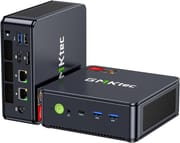
The M5 Ultra measures roughly 5.07 by 5 by 1.88 inches and weighs about 1.16 pounds as a barebones unit, which lands it solidly in the palm-of-your-hand mini PC category. The chassis is plastic rather than aluminum, with vent slots wrapping around the sides and a green power button on the front. The front panel carries the headphone-microphone combo jack, a USB-C port that handles data, Power Delivery, and DisplayPort Alt Mode, and two USB-A 3.2 Gen 2 ports for fast peripherals. Around the back you find the full-size HDMI output, DisplayPort, two USB 2.0 ports for low-bandwidth devices like keyboards and mice, two 2.5 Gigabit RJ45 jacks, a Kensington lock slot, and the barrel-plug DC input. The layout puts the ports you touch daily on the front and keeps the always-connected cables at the back.
The AMD Ryzen 7 7730U is an 8-core, 16-thread Zen 3 part that AMD positioned as a refresh of the Ryzen 7 5825U. The 7730U boosts to 4.5 GHz and lands around 17,677 in PassMark’s multi-thread benchmark, which is enough for comfortable office multitasking, video calls with background apps open, light Lightroom or Photoshop work, and 1080p casual gaming on older titles. The integrated Radeon Vega 8 graphics run at roughly 2 GHz and can drive three displays at up to 8K when the source content cooperates, but they are not pretending to be a discrete GPU and modern AAA games will need their settings turned down. As TechRadar’s Mark Pickavance put it, the M5 Ultra “is a jack-of-all-trades but a master of none.”
WiFi 6E and Bluetooth 5.2 cover wireless duties, and the dual 2.5 Gigabit Ethernet ports (driven by Realtek RTL8125 controllers) open up scenarios that single-NIC mini PCs cannot touch: a software firewall, a NAS frontend, link aggregation to a switch, or a virtualization host with separate management and workload networks. Storage expansion is handled by two M.2 2280 slots; both run at PCIe 3.0 x4 and the first slot also accepts SATA M.2 drives if you want to mix a fast NVMe boot drive with a cheaper SATA bulk drive. Memory is dual-channel DDR4-3200 via two SO-DIMM slots, and the manufacturer caps the configuration at 64GB. None of it is exotic, and all of it can be swapped by the owner with a screwdriver.
Reviewer Insights
TechRadar
TechRadar’s Mark Pickavance scored the M5 Ultra 4 out of 5 stars. He highlighted “easy internal access,” the “second M.2 slot,” and the “dual 2.5GbE LAN ports” as the standout features, and singled out the affordable starting price for a barebones unit as a meaningful advantage. He criticized the plastic case, which “isn’t especially durable,” and the system being limited to “only Gen 3 M.2 slots.” He concluded that the inclusion of “dual LAN ports, dual M.2 slots, and easily upgradable RAM” makes the M5 Ultra a credible candidate for best-mini-PC lists “purely on the basis of flexibility and great value.”
Customer Reviews
Among Amazon buyers, the recurring praise is price-to-performance, port selection, and quiet running. Several owners describe smooth everyday use and light gaming while noting it is not a dedicated gaming machine; Cooper, a verified purchaser, summed that up as “While it is no ‘gaming”pc, and it does not claim to be… I still had the urge to run a ‘3d mark’ test on it, and it did quite well, for being a mini pc.” Multi-monitor flexibility comes up repeatedly, with Brian Werner (4 stars, verified) noting it ran his two 4K monitors without display issues.
Yasiris (1 star, verified) reported the unit “kept restarting and giving many blue screen until it stopped working after 4 days of use” and returned it. Nic B started at five stars but added an update that the machine “does seem to crash applications almost everyday” and gets laggy and loud in performance mode. A verified buyer posting as Amazon Customer liked the value but could not get Bluetooth devices to work (“They were functional when tested on other computers/consoles in the house”), and Kevin Greenwood flagged that the hardware “does become hot to the touch when gaming.” Read more owner reviews on Amazon.
A quiet homelab box on older memory and storage
The Ryzen 7 7730U, dual 2.5 Gigabit Ethernet, dual M.2 slots, and easy-open chassis combine into a useful little machine for a home office, a secondary workstation, a media or game-streaming box, or a quiet always-on server in a closet. The dual NICs and two M.2 slots cover firewall, NAS, and Proxmox roles.
Storage stays on PCIe Gen 3, memory is DDR4, and the case is plastic. Buyers who want a premium-feeling chassis, the fastest possible NVMe, or strong integrated gaming graphics should look at a newer Ryzen AI 300 or Strix Halo system instead, even though the price climbs sharply. For users comparing mini PCs side-by-side, our Mini PC Comparison Chart is a quick way to line up the M5 Ultra against current alternatives.
Frequently Asked Questions
What processor does the GMKtec NucBox M5 Ultra use?
The NucBox M5 Ultra ships with the AMD Ryzen 7 7730U, an 8-core, 16-thread Zen 3 chip with a 2.0 GHz base clock that boosts up to 4.5 GHz. The 7730U scores approximately 17,677 on PassMark’s CPU benchmark and is paired with integrated AMD Radeon Vega 8 graphics running at about 2 GHz.
Can I upgrade the RAM and storage in the NucBox M5 Ultra?
Yes. The case opens with a couple of screws and exposes two DDR4 SO-DIMM slots and two M.2 2280 slots. Memory can be upgraded up to 64GB total (2x32GB) at DDR4-3200, and each M.2 slot supports up to 8TB. The first M.2 slot also accepts SATA SSDs if you want a slower bulk drive alongside an NVMe boot drive.
What ports does the GMKtec NucBox M5 Ultra include?
The front panel has a USB-C port (USB 3.2 Gen 2 with Power Delivery and DisplayPort Alt Mode), two USB-A 3.2 Gen 2 ports, a combo headphone-microphone jack, and the power button. The rear panel has one full-size HDMI, one DisplayPort, two USB 2.0 ports, two 2.5 Gigabit RJ45 Ethernet jacks, a Kensington lock slot, and the DC power input.
Does the NucBox M5 Ultra support triple displays?
Yes. The HDMI output, the DisplayPort output, and the USB-C port with DisplayPort Alt Mode together drive three independent displays, and GMKtec specifies up to 8K output on the HDMI and DisplayPort connections. The integrated Vega 8 graphics handle multi-monitor desktop work easily; gaming on three high-resolution panels is not what this hardware is for.
How many Ethernet ports does the NucBox M5 Ultra have?
Two, both 2.5 Gigabit RJ45 jacks driven by Realtek RTL8125 controllers. That pair of fast NICs makes the M5 Ultra a credible candidate for a software firewall (pfSense, OPNsense), a small NAS frontend, link aggregation to a managed switch, or a Proxmox host with separate management and workload networks.
What’s in the box with the NucBox M5 Ultra?
The retail box includes the M5 Ultra mini PC itself, the DC power adapter, an HDMI cable, a VESA mounting bracket with screws, and a printed user manual. Configured units ship with Windows 11 Pro preinstalled; the barebones variant is OS-free and expects you to bring your own RAM, storage, and operating system.
Is the NucBox M5 Ultra suitable for gaming?
For older titles and casual 1080p gaming, yes. The integrated Radeon Vega 8 at about 2 GHz handles esports games, older AAA titles, and retro emulation comfortably, especially with settings dialed back. For current AAA games at high settings or for 1440p gaming, you will want a system with a discrete GPU or one of AMD’s newer Radeon 780M/890M integrated parts.