
Lenovo ThinkCentre M70q Gen 5
Updated on

The Lenovo ThinkCentre M70q Gen 5 is a Lenovo Tiny desktop that fits a 10-core Intel 14th Gen Core i5-14400T into a chassis you can hold in one hand. It carries MIL-STD 810H certification for temperature, vibration, and humidity tolerance, which comes out of Lenovo’s enterprise desktop program.
Pros and Cons
| Pros | Cons |
|---|---|
| 14th Gen Intel Core i5-14400T (10 cores) for business multitasking | Integrated graphics only; not suitable for gaming or 3D work |
| Ultra-compact 1-liter chassis fits anywhere | USB-C port limited to 5Gbps speeds |
| MIL-STD 810H military-grade durability certification | Wired networking tops out at Gigabit Ethernet |
| Supports up to 64GB DDR5 RAM for future upgrades | No 2.5-inch drive bay for additional storage |
| Comprehensive port selection with HDMI 2.1 and DisplayPort 1.4a | One HDMI port, so a second display runs off the DisplayPort output |
| Lenovo’s 32GB/1TB model ships with a keyboard, mouse, and 3-year onsite warranty | Limited to 2TB official storage capacity |
Lenovo ThinkCentre M70q Gen 5 Comparison Chart
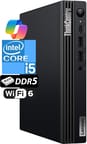 Lenovo ThinkCentre M70q Gen 5 | |
| Price | List Price: $869.95 Amazon Prices: |
| Version | 32GB/1TB/Intel i5-14400T |
| Performance Rating | 5.0 |
| Operating System | Windows 11 Pro |
| Processor | Deca-core 2.50 Ghz (max 4.40 Ghz) Intel Core i5-14400T |
| GPU | Integrated Intel UHD Graphics |
| RAM | 32 GB |
| Internal Storage | 1 TB |
| Dimensions width x length x thickness | 7.05 x 7.2 x 1.36 inches (179.07 x 182.88 x 34.54 mm) |
| Weight | 2.91 lbs (1.32 kg) |
| WiFi | Wi-Fi 6 (802.11ax) |
| Bluetooth | Bluetooth 5.1 |
| Ethernet | 1 Ethernet port at 1 Gbps |
| HDMI | 1 HDMI Port |
| DisplayPort | 1 DisplayPort |
| VGA | No VGA Ports |
| USB Ports | 1 USB 2.0, 5 USB 3, 1 USB-C |
| Thunderbolt Ports | No |
| OCuLink | No |
| Internal SATA Ports | No SATA ports |
| Card Reader | No Card Reader |
| Headphone Jack | combo |
| Fanless | No |
| VESA Mount | Yes |
| In the Box | Mini PC, power adapter, mouse, keyboard, WiFi antenna |
| Expandability | RAM upgradable to 64GB via 2x DDR5 SO-DIMM slots, storage expandable via dual M.2 Gen 4 slots |
Related Mini PCs
-
 Lenovo ThinkCentre M70q Gen 6The Lenovo ThinkCentre M70q Gen 6 is a 1-liter business desktop running the 35W Intel Core Ultra 3…
 -
 Lenovo ThinkCentre M75q Gen 5The Lenovo ThinkCentre M75q Gen 5 is a 1-liter business mini PC sold in Ryzen 3 PRO 8300GE, Ryzen 5…
 -
 ACEMAGIC M1 (Ryzen 7 7735HS)The 7735HS refresh of the ACEMAGIC M1 puts eight Zen 3+ cores, Radeon 680M graphics, and 24GB of…
 -
 ACEMAGIC M1The ACEMAGIC M1 is a 5-inch square Windows 11 Pro box sold in two very different Intel builds: a…
 -
 ACEMAGICIAN W1The ACEMAGICIAN W1 is a 5-inch mini PC built on the AMD Ryzen 7 H 255 with Radeon 780M graphics,…
 -
 Beelink SER9 Max H 255The Beelink SER9 Max H 255 pairs an AMD Ryzen 7 255 with Radeon 780M graphics in a 5.31-inch…
A 1-liter chassis with two DDR5 slots and three-display output

Measuring 7.05 x 7.20 x 1.36 inches and weighing under 3 pounds, the chassis tucks behind a monitor via the included VESA support, under a desk, or vertically on a shelf. The all-black matte finish resists fingerprints and dust accumulation, and the ventilation design keeps the system running cool through extended work sessions. That thermal headroom is what keeps the fan quiet under sustained load, which matters in an office where fan noise carries.
The Intel Core i5-14400T covers typical business workloads. Its hybrid architecture pairs 6 performance cores with 4 efficiency cores for a total of 10 cores and 16 threads, enough for heavy spreadsheet calculations or video conferencing with several applications open at once. The 32GB of DDR5 in this build suits most professional applications, and the two SO-DIMM slots take it to 64GB when a workflow demands more.
The rear panel provides HDMI 2.1 TMDS and DisplayPort 1.4a outputs supporting up to three independent displays at 4K resolution, which covers a productivity-focused multi-monitor desk. You get a total of six USB-A ports mixing 10Gbps and 5Gbps speeds, plus a front-facing USB-C port for quick device connections. Gigabit Ethernet handles wired networking while WiFi 6 and Bluetooth 5.1 cover wireless needs. The dual M.2 Gen 4 slots allow for flexible storage configurations, though the lack of a 2.5-inch bay means SATA drives are not an option for expansion.
Customer Reviews
A verified buyer named sgv wrote “It’s sooo much smaller than a traditional PC, but has all the speed and power of the big guys,” while adding “You sacrifice a bit of computing speed as a consequence.” Several owners bought it for small-business use: Scott Garner (verified) said it “Works well for my small business,” and J. Clifton (verified) liked dropping it into a Lenovo Tiny-in-One monitor dock for “very snappy performance for my business needs.” A couple of reviewers flagged practical limits rather than dealbreakers, including the single HDMI port (Glenn S., verified: “Only one HDMI do an adapter is needed for a second monitor”) and the one-year warranty (C Santiago, verified, wanted at least three years).
One verified buyer, posting as “Likeable,” gave it one star and reported a hardware reliability problem: “It has started going off and requiring a restart daily or more often. I do not know what to do or who can fix it.” That is a single account rather than a widespread pattern in this set, but it is the kind of failure worth weighing against the otherwise strong feedback.
A fleet-grade desktop for productivity workloads
The 1-liter chassis holds a 10-core desktop-class chip, and IT departments buying in quantity get the MIL-STD 810H certification and Lenovo’s business support infrastructure with it. The Intel Core i5-14400T carries office multitasking, and the DDR5 memory keeps the system viable as applications grow more demanding. The 1-liter chassis mounts behind a monitor or sits under a desk while still supplying the display outputs and USB ports a modern workflow runs on.
Gamers, 3D artists, and anyone who needs dedicated graphics should look elsewhere. The integrated Intel UHD 730 handles display output and light content creation, but it stalls on demanding visual workloads. The premium sits on the MIL-STD 810H certification, the 3-year onsite warranty Lenovo includes on the 32GB/1TB model, and Lenovo’s business support infrastructure, which consumer-focused alternatives do not match.
Starry Hope’s Mini PC Comparison Chart lines this machine up against other small desktops if you want to check the specs side by side.
Frequently Asked Questions
Can the Lenovo ThinkCentre M70q Gen 5 be used for gaming?
Integrated Intel UHD 730 graphics handle light gaming and older titles, but modern AAA games and demanding 3D applications are out of reach. Business and productivity workloads are what this system is built around.
How many monitors can the ThinkCentre M70q Gen 5 support?
Three, running from the HDMI 2.1 TMDS port and the DisplayPort 1.4a output. All three can run at 4K resolution.
What is MIL-STD 810H certification and why does it matter?
MIL-STD 810H is a U.S. Department of Defense standard for testing equipment durability under harsh conditions. The M70q Gen 5 meets 12 standards and 17 procedures covering temperature extremes, humidity, vibration, and shock. This certification indicates the system is built to survive demanding environments and should provide longer-term reliability than consumer alternatives.
Can I upgrade the RAM in the Lenovo ThinkCentre M70q Gen 5?
Yes. Two SO-DIMM slots take DDR5 up to 64GB, and the tool-less design opens the chassis without a screwdriver.
Does the M70q Gen 5 include a keyboard and mouse?
Yes. The OEMGENUINE configuration ships a Lenovo keyboard and mouse alongside the power adapter and WiFi antenna, so nothing else is needed to set it up.
How does the Intel Core i5-14400T compare to previous generation processors?
The Intel Core i5-14400T features a hybrid architecture with 6 performance cores and 4 efficiency cores for a total of 10 cores and 16 threads. It is a power-efficient T-series chip with a PassMark CPU Mark score of 20,358, solid for business and productivity workloads. It trades some multi-core throughput for lower power draw compared to non-T desktop chips.
Can the ThinkCentre M70q Gen 5 be mounted behind a monitor?
Yes. VESA mount support attaches it to the back of a compatible monitor, and at 7.05 x 7.20 x 1.36 inches it disappears behind most panels. It can also sit horizontally or vertically on a desk or shelf.