
MINISFORUM M2-356H
Updated on

The MINISFORUM M2-356H is built around Intel’s Core Ultra 7 356H, a Panther Lake part that Intel launched in the first quarter of 2026 on its 18A process. The chip carries 16 cores and 16 threads split into four performance cores, eight efficient cores and four low-power efficient cores, paired with a small four-core Xe3 integrated GPU and a 50 TOPS NPU. Minisforum kept memory and storage user-serviceable here: two DDR5 SO-DIMM slots and two M.2 2280 slots sit under a lid held on by four screws, and the machine is sold barebone as well as configured. The whole thing weighs 520 grams and measures roughly five inches square by two inches tall, so it fits behind a monitor on the bundled VESA bracket.
Pros and Cons
| Pros | Cons |
|---|---|
| Current-generation Panther Lake silicon with a 50 TOPS NPU | Four-core Xe3 iGPU, not the 12-core Arc B390 of the X-series chips |
| Two DDR5 SO-DIMM slots, upgradable to 128GB | Plastic chassis rather than the aluminum the design suggests |
| Two M.2 2280 PCIe 4.0 slots, up to 4TB each | No quiet or performance power profiles in the BIOS |
| Sold barebone, so you can supply your own RAM and SSD | Configured 32GB/1TB SKU costs close to twice the barebone |
| Dual 2.5GbE, Wi-Fi 7 and a 40Gbps USB4 port with 100W PD in | HDMI output tops out at 4K 60Hz while DisplayPort and USB4 reach 144Hz |
| 520 grams with a VESA bracket and a Kensington slot | Minisforum’s own spec sheet contradicts itself on M.2 generation |
Related Videos
MINISFORUM M2-356H Comparison Chart
 MINISFORUM M2-356H | MINISFORUM M2-356H | |
| Price | List Price: $679.00 Amazon Prices: Loading prices... | List Price: $1249.00 Amazon Prices: Loading prices... |
| Version | Barebone (no RAM or SSD) | 32GB/1TB |
| Performance Rating | 5.7 | 6.1 |
| Operating System | No OS | Windows 11 Pro |
| Processor | Sixteen-core 1.90 Ghz (max 4.70 Ghz) Intel Core Ultra 7 356H | Sixteen-core 1.90 Ghz (max 4.70 Ghz) Intel Core Ultra 7 356H |
| GPU | Integrated Intel Graphics | Integrated Intel Graphics |
| RAM | 0 GB DDR5 SO-DIMM, 2-channel (Up to 128GB DDR5-5600 (2x SO-DIMM)) | 32 GB DDR5 SO-DIMM, 2-channel (Up to 128GB DDR5-5600 (2x SO-DIMM)) |
| Internal Storage | 0 GB NVMe SSD | 1 TB NVMe PCIe 4.0 SSD |
| Dimensions width x length x thickness | 5 x 5.12 x 1.97 inches (127 x 130.05 x 50.04 mm) | 5 x 5.12 x 1.97 inches (127 x 130.05 x 50.04 mm) |
| Weight | 1.15 lbs (0.52 kg) | 1.15 lbs (0.52 kg) |
| WiFi | Wi-Fi 7 (802.11be) | Wi-Fi 7 (802.11be) |
| Bluetooth | Bluetooth 5.4 | Bluetooth 5.4 |
| Ethernet | 2 Ethernet ports at 2.5 Gbps | 2 Ethernet ports at 2.5 Gbps |
| HDMI | 1 Full-Size HDMI Port | 1 Full-Size HDMI Port |
| DisplayPort | 1 DisplayPort (DP 1.4 to 4K@144Hz; USB4 also to 4K@144Hz) | 1 DisplayPort (DP 1.4 to 4K@144Hz; USB4 also to 4K@144Hz) |
| VGA | No VGA Ports | No VGA Ports |
| USB Ports | 1 USB 2.0, 3 USB 3, 1 USB-C (1 USB4) Front: 1x USB4 (40Gbps, 100W PD in), 2x USB-A 3.2 Gen 2. Rear: 1x USB-A 3.2 Gen 2, 1x USB-A 2.0 | 1 USB 2.0, 3 USB 3, 1 USB-C (1 USB4) Front: 1x USB4 (40Gbps, 100W PD in), 2x USB-A 3.2 Gen 2. Rear: 1x USB-A 3.2 Gen 2, 1x USB-A 2.0 |
| Thunderbolt Ports | No | No |
| OCuLink | No | No |
| Internal SATA Ports | No SATA ports | No SATA ports |
| Card Reader | No Card Reader | No Card Reader |
| Headphone Jack | combo | combo |
| Fanless | No | No |
| VESA Mount | Yes | Yes |
| In the Box | Main unit, HDMI cable, 120W power adapter, wall/VESA mount bracket, manual | Main unit, HDMI cable, 120W power adapter, wall/VESA mount bracket, manual |
| Expandability | Up to 128GB DDR5-5600 across 2 SO-DIMM slots. 2x M.2 2280 PCIe 4.0 x4, up to 8TB total. Kensington lock and VESA mount. | Up to 128GB DDR5-5600 across 2 SO-DIMM slots. 2x M.2 2280 PCIe 4.0 x4, up to 8TB total. Kensington lock and VESA mount. |
Related Mini PCs
-
 MINISFORUM UN1290The MINISFORUM UN1290 is a Core i9-12900HK mini PC in a 0.9-liter chassis with two DDR4 slots (64GB…
 -
 MINISFORUM Venus UN1265The MINISFORUM Venus UN1265 is a compact mini PC on the Intel Core i7-12650H, with upgradeable DDR4…
 -
 ASUS NUC 15 Pro+The ASUS NUC 15 Pro+ is a 0.7-liter toolless mini PC with Intel Arrow Lake Core Ultra processors,…
 -
 GMKtec NucBox M3 ProA compact office and home-server box for three-monitor desks and small Linux setups; its 2023 Core…
 -
 AOOSTAR GEM12 MAXThe AOOSTAR GEM12 MAX is a 5.12-inch AMD Ryzen 7 8745HS mini PC with an OCuLink port for an…
 -
 AOOSTAR GEM12+ PROThe AOOSTAR GEM12+ PRO is a barebone Ryzen 7 PRO 8845HS mini PC with a small status screen and a…
A serviceable 520-gram box with dual 2.5GbE and USB4
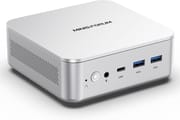
The chassis is a 130 x 127 x 50 mm square slab that pulls air in through the bottom and exhausts out the back, cooled by a dual heat-pipe assembly and a centrifugal fan. Minisforum rates the balanced fan profile at 42.52 dB measured 50 cm away and claims a 47W draw under full load, both vendor figures rather than independent measurements. The front face carries a 3.5mm combo jack, a USB4 port rated at 40Gbps with DisplayPort Alt Mode and 100W power input, and two USB-A 3.2 Gen 2 ports. The rear adds a second USB-A 3.2 Gen 2, a USB 2.0 port, HDMI 2.1, DisplayPort 1.4, two 2.5GbE jacks on Realtek RTL8125D controllers, the barrel power input and a Kensington slot. Between HDMI, DisplayPort and USB4 the box drives three displays, with the DisplayPort and USB4 outputs rated to 4K at 144Hz and HDMI to 4K at 60Hz.
Intel’s own specification page puts the 356H at a 25W base power with an 80W maximum turbo, and Minisforum tunes it to a 45W balanced TDP. The integrated graphics are simply branded Intel Graphics rather than Arc: four Xe3 cores clocking to 2.45 GHz and rated at 40 peak TOPS, a third of the twelve Xe3 cores in the Arc B390 that Intel pairs with the X-series Panther Lake chips such as the Core Ultra X7 358H in the GMKtec EVO-T2. Add the 50 TOPS NPU and Minisforum’s 90 TOPS marketing figure is the sum of those two blocks, not a CPU number. The company says it has run a 35-billion-parameter Qwen mixture-of-experts model locally at 22.1 tokens per second, a vendor claim published on its own store page rather than a measured third-party result. Liliputing’s launch write-up called the 356H the more run-of-the-mill Panther Lake option next to the higher-end chip in the M2 Pro, which had not shipped when that article ran, and pointed out that 2026 memory and storage prices are what push the configured model so far above the barebone.
Two SO-DIMM slots take up to 128GB of DDR5-5600, and running dual channel matters here because the iGPU carves its allocation out of system memory. Both M.2 2280 slots hold drives up to 4TB. Minisforum’s own spec table lists one M.2 slot as PCIe 5.0 x4 and the other as PCIe 4.0 x4, while the feature bullets higher up the same page, the retail listing and ETA PRIME’s teardown all describe both slots as PCIe 4.0. Plan around Gen 4 until something confirms otherwise. If you want the same generation of silicon in a more conventional NUC chassis with PCIe 5.0 storage, the ASUS NUC 16 Pro covers that ground, and our overview of the Panther Lake NUCs and their Arc B390 graphics walks through the wider lineup.
Reviewer Insights
ETA PRIME
ETA PRIME’s first look at the M2 covers the teardown, power behavior and gaming on a barebone unit he populated with two 16GB sticks and a 1TB SSD. He says “for this being the lowest cost barebones Panther Lake mini PC on the market, it actually puts down some really good gaming performance.” His power monitoring found the machine running well past its stated rating: “I’ve actually seen it spike out at around 60 W, but it seems we’ve got a sustained of 54 W here.” He also noted that the BIOS offers no power profiles at all, saying he “checked out the BIOS to see if we had like a quiet or performance mode there. Unfortunately, we don’t have anything.”
On the benchmark side he recorded a Geekbench 6 single-core score of 2,696 with a multi-core result around 15,000, a Cinebench R24 run of 118 single-core and 1,077 multi-core, and a 3DMark Time Spy score of 3,273. He compared that graphics figure against a Ryzen AI HX 470 system with Radeon 890M graphics he had tested previously, which scored a little over 4,100. In games, Cyberpunk 2077 at 1080p with XeSS balanced held above 45 FPS, and with XeSS multi-frame generation at 4x he measured that “we’re over 100 FPS with this 4 XE3 core iGPU, which is pretty crazy. We’re at 1080p and it feels super smooth.” Crimson Desert was harder on the iGPU and showed visible ghosting with frame generation on, which pushed him down to 900p. On the material he said “this is constructed of plastic. And originally I thought it was going to be an aluminum chassis.” He added that he still liked the design regardless.
Carey Holzman
Carey Holzman reviewed the configured 32GB/1TB unit on a live stream in May 2026, working through the unboxing, setup and driver state on a sample supplied by Minisforum. He was skeptical about the value case, arguing that for ordinary office work the extra money over a Core Ultra 5 machine buys performance most of his clients would never use. Acoustics counted for more, because he weighs these boxes for business deployments: “this Ultra 7 is as quiet as an Ultra 5.” He compares it with the company’s cheaper models, noting that “the M2 is nothing like the M1 in the sense that the M1 is really a good mid-range budget computer, and the M2 is more of a high-end budget computer.” He confirmed that the configured unit arrives with Windows and drivers already installed, while the barebone version leaves driver installation to the buyer.
A month later he came back to the same unit for a follow-up stream that added the benchmark run he had skipped the first time. His Cinebench multi-core result landed above the 15678 figure Minisforum publishes on its own listing: “We’re getting 16695. And then 2043 on the single core.” He went hunting through the BIOS for power profiles and came up empty, reporting “Yeah, no power settings here,” which lines up with what ETA PRIME found. On acoustics and heat he was positive, saying “temperatures looked really good on this” and that “so far, this has been very quiet.” His complaint was the port count: “That’s a total of five USB ports. I’d like to see six, personally, especially at this price point. I would have liked to have seen another USB 4 back here.”
Customer Reviews
Buyer feedback is thin, because both listings are new: the 32GB/1TB configuration has no ratings yet, and the barebone listing carries a single 4-star rating. A verified buyer posting as Zeo A. published a benchmark run and teardown on 12 July 2026 and flagged a specific mechanical problem: “Almost perfect product, but has one design flaw: if you populate the top sodimm slot with ram, the factory ssd fan assembly will not seat properly without putting excessive pressure on a corner of the sodimm.” The rest of the review is a long table of benchmark results taken at power limits from 3W all the way up to 85W. One rating is not a sample, so weigh it accordingly.
Buy the barebone and bring your own memory
The M2-356H is a sensible way to get onto Panther Lake without paying for the top-tier chip. You get current silicon, an NPU, dual 2.5GbE, Wi-Fi 7 and a USB4 port that will take power in as well as drive a display, in a box light enough to hang off a monitor arm. Buy the barebone SKU if you have parts on hand, because with memory and storage priced the way they are in 2026, supplying your own is where the savings live, and the two SO-DIMM slots mean you are not locked into whatever the factory installed.
The four-core Xe3 iGPU is the entry-level Panther Lake graphics tier, so gaming leans on XeSS frame generation to reach comfortable frame rates and shows ghosting when you push it. The chassis is plastic and the BIOS exposes no power profiles to tune. Minisforum’s own spec sheet contradicts itself on M.2 generation, which is a small but annoying thing to have to work around when you are picking a drive. If those tradeoffs matter, the MINISFORUM M1 Pro covers the previous Intel generation in the same house style and the MINISFORUM M2 Pro moves to the Core Ultra X7 358H with Arc B390 graphics, 10GbE and three M.2 slots, at the cost of soldered memory.
For those comparing options, see our Mini PC Comparison Chart to find the best match for your needs.
Frequently Asked Questions
What processor is in the MINISFORUM M2-356H?
It uses the Intel Core Ultra 7 356H, a Panther Lake chip from the Core Ultra Series 3 family that Intel launched in the first quarter of 2026. It has 16 cores and 16 threads, arranged as four performance cores boosting to 4.7 GHz, eight efficient cores to 3.5 GHz and four low-power efficient cores to 3.3 GHz, with 18MB of cache. Intel rates it at 25W base power and 80W maximum turbo power; Minisforum configures it to a 45W balanced TDP.
Can I upgrade the RAM and storage in the M2-356H?
Yes. The M2-356H has two DDR5 SO-DIMM slots supporting up to 128GB at 5600 MT/s and two M.2 2280 NVMe slots that each accept drives up to 4TB. Four screws on the bottom release the top cover, and both the memory and the drives sit under an auxiliary cooling fan. Minisforum also sells the machine barebone with no memory, no SSD and no operating system.
How good are the graphics in the M2-356H?
The 356H uses Intel’s entry-level Panther Lake graphics: four Xe3 cores clocking to 2.45 GHz, rated by Intel at 40 peak TOPS. ETA PRIME measured a 3DMark Time Spy score of 3,273 on this machine, and reached over 100 FPS in Cyberpunk 2077 at 1080p with XeSS multi-frame generation set to 4x, though harder titles like Crimson Desert showed ghosting and needed a drop to 900p. The X-series Panther Lake parts get a much larger GPU: the Core Ultra X7 358H, for example, pairs with the Arc B390 and its twelve Xe3 cores, which Intel rates at 122 peak TOPS.
What does the 90 TOPS figure on the M2-356H mean?
It is the sum of two separate accelerators. Intel rates the 356H’s NPU at 50 peak TOPS and its integrated graphics at 40 peak TOPS, both on INT8 workloads, and Minisforum adds them together for the platform figure. Only the NPU number applies to software that targets the NPU specifically, so treat 90 TOPS as a combined platform ceiling rather than a single-engine rating.
What ports does the MINISFORUM M2-356H have?
The front carries one USB4 Type-C port at 40Gbps with DisplayPort Alt Mode, 15W power output and 100W power input, two USB-A 3.2 Gen 2 ports and a 3.5mm combo audio jack. The rear adds one more USB-A 3.2 Gen 2, one USB 2.0, HDMI 2.1, DisplayPort 1.4, two 2.5GbE RJ45 jacks on Realtek RTL8125D controllers, the DC input and a Kensington lock slot. Wireless is Intel Wi-Fi 7 on a BE200 module with Bluetooth 5.4.
How much power does the M2-356H draw under load?
Minisforum ships it at a 45W balanced TDP and advertises 47W under full load. ETA PRIME’s stress testing found it holding a sustained 54W and spiking to roughly 60W without any tuning, and reported total system draw of about 30W while gaming in one title. The bundled adapter is a 120W unit, and the BIOS does not expose quiet or performance profiles to change that behavior.