
MINISFORUM UN1290
Updated on

The MINISFORUM UN1290 puts a 14-core Intel Core i9-12900HK into a 5-inch square chassis. It drives up to three 4K displays, carries 2.5 Gigabit Ethernet and WiFi 6E, and leaves room for more memory and a second drive. It sells as a barebone chassis for custom builds, or preconfigured with 32GB of RAM and a 512GB or 1TB SSD.
Strengths and limits at a glance
| Pros | Cons |
|---|---|
| 14-core/20-thread i9-12900HK with a 5.0 GHz boost | Uses DDR4 memory instead of newer DDR5 standard |
| Triple 4K@60Hz display support via HDMI, DisplayPort, and USB-C | No Thunderbolt or USB4 support |
| Alder Lake drivers are mature, so Linux installs cleanly | Rear Type-A ports are USB 2.0 |
| 2.5GbE networking and WiFi 6E connectivity | Integrated graphics limit modern AAA gaming |
| Includes VESA mount, HDMI cable, and SATA adapter | Single Ethernet port limits advanced network configurations |
| COLD WAVE 1.5 liquid metal cooling | Bottom access panel requires removing rubber feet |
Related Videos
MINISFORUM UN1290 Comparison Chart
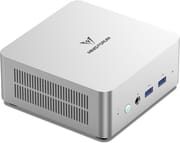 MINISFORUM UN1290 | MINISFORUM UN1290 | MINISFORUM UN1290 | |
| Price | List Price: $299.00 Amazon Prices: | List Price: $489.00 Amazon Prices: | List Price: $509.00 Amazon Prices: |
| Version | Barebone | 32GB/512GB | 32GB/1TB |
| Performance Rating | 5.1 | 5.6 | 5.6 |
| Operating System | Windows 11 Pro | Windows 11 Pro | Windows 11 Pro |
| Processor | Fourteen-core 3.80 Ghz (max 5.00 Ghz) Intel Core i9-12900HK | Fourteen-core 3.80 Ghz (max 5.00 Ghz) Intel Core i9-12900HK | Fourteen-core 3.80 Ghz (max 5.00 Ghz) Intel Core i9-12900HK |
| GPU | Integrated Intel Iris Xe Graphics | Integrated Intel Iris Xe Graphics | Integrated Intel Iris Xe Graphics |
| RAM | 0 GB (No RAM or storage included; install your own) | 32 GB DDR4 SO-DIMM | 32 GB DDR4 SO-DIMM |
| Internal Storage | 0 GB | 512 GB | 1 TB |
| Dimensions width x length x thickness | 5 x 5 x 2.15 inches (127 x 127 x 54.61 mm) | 5 x 5 x 2.15 inches (127 x 127 x 54.61 mm) | 5 x 5 x 2.15 inches (127 x 127 x 54.61 mm) |
| Weight | 1.26 lbs (0.57 kg) | 1.26 lbs (0.57 kg) | 1.26 lbs (0.57 kg) |
| WiFi | Wi-Fi 6E (802.11ax) | Wi-Fi 6E (802.11ax) | Wi-Fi 6E (802.11ax) |
| Bluetooth | Bluetooth 5.2 | Bluetooth 5.2 | Bluetooth 5.2 |
| Ethernet | 1 Ethernet port at 2.5 Gbps | 1 Ethernet port at 2.5 Gbps | 1 Ethernet port at 2.5 Gbps |
| HDMI | 1 Full-Size HDMI Port | 1 Full-Size HDMI Port | 1 Full-Size HDMI Port |
| DisplayPort | 1 DisplayPort (DisplayPort 1.4) | 1 DisplayPort (DisplayPort 1.4) | 1 DisplayPort (DisplayPort 1.4) |
| VGA | No VGA Ports | No VGA Ports | No VGA Ports |
| USB Ports | 2 USB 2.0, 2 USB 3, 1 USB-C USB-C supports DisplayPort Alt Mode and Power Delivery. 2x USB 3.2 Gen2 (10Gbps) on front, 2x USB 2.0 on rear. | 2 USB 2.0, 2 USB 3, 1 USB-C USB-C supports DisplayPort Alt Mode and Power Delivery. 2x USB 3.2 Gen2 (10Gbps) on front, 2x USB 2.0 on rear. | 2 USB 2.0, 2 USB 3, 1 USB-C USB-C supports DisplayPort Alt Mode and Power Delivery. 2x USB 3.2 Gen2 (10Gbps) on front, 2x USB 2.0 on rear. |
| Thunderbolt Ports | No | No | No |
| OCuLink | No | No | No |
| Internal SATA Ports | 1 SATA port, includes 2.5" drive bay (SATA 3.0 6.0Gb/s, includes SATA adapter cable) | 1 SATA port, includes 2.5" drive bay (SATA 3.0 6.0Gb/s, includes SATA adapter cable) | 1 SATA port, includes 2.5" drive bay (SATA 3.0 6.0Gb/s, includes SATA adapter cable) |
| Card Reader | No Card Reader | No Card Reader | No Card Reader |
| Headphone Jack | combo | combo | combo |
| Fanless | No | No | No |
| VESA Mount | Yes | Yes | Yes |
| In the Box | UN1290 mini PC, 120W power adapter, HDMI cable, VESA bracket and screws, SATA adapter cable, user manual | UN1290 mini PC, 120W power adapter, HDMI cable, VESA bracket and screws, SATA adapter cable, user manual | UN1290 mini PC, 120W power adapter, HDMI cable, VESA bracket and screws, SATA adapter cable, user manual |
| Expandability | 2x DDR4 SO-DIMM slots (max 64GB, 3200 MT/s dual-channel), 1x M.2 2280 PCIe 4.0 NVMe SSD slot (up to 2TB), 1x 2.5-inch SATA HDD bay (SATA 3.0 6.0Gb/s) | 2x DDR4 SO-DIMM slots (max 64GB, 3200 MT/s dual-channel), 1x M.2 2280 PCIe 4.0 NVMe SSD slot (up to 2TB), 1x 2.5-inch SATA HDD bay (SATA 3.0 6.0Gb/s) | 2x DDR4 SO-DIMM slots (max 64GB, 3200 MT/s dual-channel), 1x M.2 2280 PCIe 4.0 NVMe SSD slot (up to 2TB), 1x 2.5-inch SATA HDD bay (SATA 3.0 6.0Gb/s) |
Related Mini PCs
-
 MINISFORUM M2-356HThe MINISFORUM M2-356H puts Intel's Panther Lake Core Ultra 7 356H in a 520-gram box with two DDR5…
 -
 MINISFORUM Venus UN1265The MINISFORUM Venus UN1265 is a compact mini PC on the Intel Core i7-12650H, with upgradeable DDR4…
 -
 ASUS NUC 15 Pro+The ASUS NUC 15 Pro+ is a 0.7-liter toolless mini PC with Intel Arrow Lake Core Ultra processors,…
 -
 GMKtec NucBox M3 ProA compact office and home-server box for three-monitor desks and small Linux setups; its 2023 Core…
 -
 AOOSTAR GEM12 MAXThe AOOSTAR GEM12 MAX is a 5.12-inch AMD Ryzen 7 8745HS mini PC with an OCuLink port for an…
 -
 Minisforum AtomMan X7 TiThe Minisforum AtomMan X7 Ti pairs an Intel Core Ultra 9 185H with a built-in 4-inch touchscreen…
Liquid metal cooling and room for a second drive

The aluminum chassis measures 5 x 5 x 2.15 inches and takes up 0.9 liters, roughly 1/40th the size of a traditional desktop tower. Inside sits the Intel Core i9-12900HK with 14 cores (6 performance + 8 efficiency), 20 threads, and a boost clock of up to 5.0 GHz. The included 120W power adapter lets the processor sustain high clocks under demanding workloads, while the COLD WAVE 1.5 cooling system with liquid metal thermal compound holds sustained clocks under long loads.
The front panel provides two USB 3.2 Gen 2 ports running at 10Gbps alongside a 3.5mm combo audio jack, while the rear houses one HDMI 2.0 port, one DisplayPort 1.4 port, one USB-C port with DisplayPort Alt Mode and Power Delivery support, two USB 2.0 ports, a 2.5 Gigabit Ethernet port, and the power input. All three video outputs support 4K resolution at 60Hz. The USB-C port carries video, data, and power, so a compatible USB-C charger can run the machine.
The system supports up to 64GB of DDR4-3200 RAM across two SO-DIMM slots, uses a single M.2 2280 PCIe 4.0 NVMe SSD slot for primary storage with speeds up to 5000 MB/s, and includes a 2.5-inch SATA bay for additional mass storage. The VESA mounting bracket in the box lets it be tucked behind a monitor, creating a clean all-in-one style setup. MINISFORUM also includes an HDMI cable and SATA adapter cable in the box, along with a pre-installed heatsink on the M.2 slot.
Reviewer Insights

Lee PSP Video came away calling it good value
Lee PSP Video ran a teardown and installed several operating systems. The reviewer notes that “it just struck me as really good value for an i9, a terabyte of storage and 32 gig of RAM.” He successfully tested Windows 11, ChromeOS Flex, Ubuntu, and Batocera (for retro gaming), with all operating systems running smoothly. The inclusion of a pre-installed SSD heatsink and VESA mount impressed him: “I always like when you get a monitor mount so we can basically make a very smart TV or an all-in-one computer.” He concludes that the UN1290 is “overall, really good value for money” and highly recommends it for office work, heavy multitasking, and home theater use.
Mature Alder Lake drivers beat a newer chip for Linux
Elevated Systems calls the UN1290 “the best out of the box Linux experience.” The reviewer deliberately chose the 12th-generation Intel platform over newer 13th/14th-gen processors because the mature Alder Lake drivers are thoroughly tested and stable across Linux distributions. Testing Ubuntu 24.04 LTS, Manjaro, and Fedora 40, he found that “the UN1290 handles Linux exceptionally well with no hardware or software incompatibilities.” His benchmarks showed that “Linux on Alder Lake delivers better performance than Windows,” with Geekbench 6 single-core scores around 2700-2800 under Linux versus approximately 2400 under Windows.
Emulation runs clean while modern AAA titles stumble
Chase Brogan tested gaming and emulation on the UN1290. He praised the “exceptional cooling” that keeps the device cool even after hours of use, and said “This can handle everything that you throw at it in terms of emulation gaming,” covering N64, GameCube, Wii U, and Switch emulation flawlessly. However, “if you’re looking for a triple-A gaming experience, you probably want to avoid this mini PC.” Modern titles like Halo Infinite exhibited graphical issues and screen tearing with the integrated Intel Iris Xe graphics.
According to Electronikz, who awarded the UN1290 an 8.5/10 score, the system “provides lightning-fast performance for demanding applications” while noting its suitability for “video editing and gaming” within the limits of integrated graphics. Seraphim Gate tested the UN1290 as a Proxmox virtualization host, praising its i9 processor as “ideal for virtualization tasks with proxmox, office tasks, and even more demanding workloads like light rendering” while noting that the single 2.5GbE port limits its suitability for advanced network configurations.
Customer Reviews
Amazon owner accounts pull in opposite directions. Owners who got it working are enthusiastic about the speed-to-size ratio: verified buyer DannyP called it “Avery versatile and fast computer, fast enough for everything I do and a very compact design,” though he noted he had to add an external hub because he wanted more USB ports, and verified buyer Ibclever wrote “this thing is a BEAST, and you cant beat the price.” A verified buyer in Mexico, Lear Zamora, rated it four stars and pointed out that this is the barebones configuration, so it ships without RAM or an SSD; once he supplied those, he was happy with it.
Verified buyer Washington Irving gave it one star over software and firmware headaches, writing that “The device is not able to run legit OEM Windows from Microsoft: it requires drivers which aren’t published,” and describing a frustrating workaround to even disable secure boot before installing Linux. Separately, a verified buyer in Mexico, Fernando, gave it two stars and reported that the 2.5Gbps ethernet port did not work for him, with DNS failing to resolve on the unit while other devices on the same network had internet. If you are buying this for its networking or planning a clean Windows or Linux install, those two accounts are worth weighing before you order.
The i9 earns its keep outside of gaming
The 14-core Core i9, triple 4K display support, and mature Linux driver stack suit development and virtualization work on a desk where a tower will not fit. The barebone option at around $299 is for builders who supply their own memory and storage, while the fully configured 32GB/1TB variant at $509 offers plug-and-play convenience.
Buyers after a gaming machine should look elsewhere, since the integrated Intel Iris Xe graphics cannot keep pace with modern AAA titles. Anyone who needs Thunderbolt or a second Ethernet port will find the rear panel short. The VESA bracket and pre-fitted SSD heatsink in the box save two small purchases.
Amazon listings for the UN1290 were unavailable or relisted to other MINISFORUM models, so confirm the exact model and chip with MINISFORUM before ordering. The Mini PC Comparison Chart lines its specs up against the other small-form-factor machines in the catalog.
Frequently Asked Questions
What processor variants does the MINISFORUM UN1290 use?
The MINISFORUM UN1290 uses the Intel Core i9-12900HK, a 14-core chip (6 performance + 8 efficiency) with 20 threads and boost clocks up to 5.0 GHz.
Can the MINISFORUM UN1290 support three monitors?
Yes. Three independent 4K displays run at 60Hz at the same time, one on the HDMI 2.0 port, one on the DisplayPort 1.4 port, and one on the USB-C port using DisplayPort Alt Mode.
How much RAM can I install in the MINISFORUM UN1290?
Two SO-DIMM slots take up to 64GB of DDR4-3200 in total. The pre-configured models arrive with 32GB fitted as 2x16GB in dual-channel. The barebone version ships with no memory, so the choice is yours.
Is the MINISFORUM UN1290 good for Linux?
Drivers for the 12th-generation Intel Alder Lake platform are fully integrated into modern Linux kernels, so there are no compatibility gaps to work around. Reviewers have run Ubuntu, Manjaro, Fedora, and ChromeOS Flex on this machine, and their benchmarks put the i9-12900HK ahead under Linux compared with Windows.
Can the MINISFORUM UN1290 be used for gaming?
Retro and console emulation runs well, GameCube, Wii U, and Switch titles included. Modern AAA games are out of reach for the integrated Intel Iris Xe graphics at playable settings, so a mini PC with dedicated graphics is the better buy when gaming comes first.
What storage expansion options does the UN1290 offer?
Storage runs to one M.2 2280 PCIe 4.0 NVMe SSD slot, rated for drives up to 2TB, plus one 2.5-inch bay for a SATA HDD or SSD. A heatsink comes pre-fitted on the M.2 slot, and the SATA adapter cable is in the box.
Does the MINISFORUM UN1290 include a VESA mount?
Yes. A VESA mounting bracket and screws come with the machine, so it can hang behind a VESA-compatible monitor and free up the desk underneath.
What is the difference between the barebone and configured UN1290 versions?
The barebone version ($299) arrives with the processor, cooling, and full port set, but no RAM, storage, or operating system. The configured versions add 32GB of DDR4 and either a 512GB ($489) or 1TB ($509) NVMe SSD with Windows 11 pre-installed. Builders who already own compatible memory and a drive pay less by starting barebone.