
MINISFORUM AI X1-255
Updated on

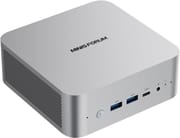
The MINISFORUM AI X1-255 is a compact desktop replacement built around AMD’s 8-core, 16-thread Ryzen 7 255 with Radeon 780M graphics, wrapped in an aluminum chassis that measures roughly five inches square. It leans on current connectivity: WiFi 7, Bluetooth 5.4, two USB4 ports, and a rear OCuLink port that opens the door to an external GPU. That port array can drive up to four displays through HDMI 2.1, DisplayPort 2.0, and the two USB4 connectors, while both the DDR5 memory and the pair of M.2 slots stay user-serviceable. Built-in dual speakers and dual microphones make it usable straight out of the box without extra peripherals. MINISFORUM also sells a similar-sounding X1 Lite-255 (WiFi 6E, no built-in speakers) and a higher-end Zen 5 AI X1 Pro, so it pays to confirm the exact model before buying.
Pros and cons
| Pros | Cons |
|---|---|
| 8-core Zen 4 Ryzen 7 255 with Radeon 780M handles multitasking and 1080p gaming | The “AI” name oversells it: the Ryzen 7 255 is a rebadged 2024 Hawk Point chip with a modest NPU |
| WiFi 7 and Bluetooth 5.4 bring current wireless standards | The rear OCuLink shares a PCIe lane with the second M.2 slot, so an eGPU costs a storage slot |
| Two USB4 (40Gbps) ports plus a rear OCuLink for external-GPU expansion | Single 2.5GbE LAN, where the AI X1 Pro offers dual ports |
| Drives up to four displays via HDMI 2.1, DP 2.0, and dual USB4 | Bluetooth range is weak, dropping past a few meters in one reviewer’s test |
| Quiet cooling that stays stable under sustained load | The rear USB-A port runs at USB 2.0 speed, too slow for external storage |
| User-upgradeable: 2x DDR5 SO-DIMM (up to 64GB) and 2x M.2 PCIe 4.0 | Radeon 780M is capable but aging, and no substitute for a discrete GPU in demanding games |
Related Videos
MINISFORUM AI X1-255 Comparison Chart
 MINISFORUM AI X1-255 | MINISFORUM AI X1-255 | MINISFORUM AI X1-255 | MINISFORUM AI X1-255 | |
| Price | List Price: $615.00 Amazon Prices: Loading prices... | List Price: $679.00 Amazon Prices: Loading prices... | List Price: $739.00 Amazon Prices: Loading prices... | List Price: $327.00 Amazon Prices: Loading prices... |
| Version | 16GB/512GB | 32GB/512GB | 32GB/1TB | Barebone |
| Performance Rating | 5.2 | 5.6 | 5.6 | 5.2 |
| Operating System | Windows 11 Pro | Windows 11 Pro | Windows 11 Pro | Windows 11 Pro |
| Processor | Octa-core 3.80 Ghz (max 4.90 Ghz) AMD Ryzen 7 H 255 | Octa-core 3.80 Ghz (max 4.90 Ghz) AMD Ryzen 7 H 255 | Octa-core 3.80 Ghz (max 4.90 Ghz) AMD Ryzen 7 H 255 | Octa-core 3.80 Ghz (max 4.90 Ghz) AMD Ryzen 7 H 255 |
| GPU | Integrated AMD Radeon 780M | Integrated AMD Radeon 780M | Integrated AMD Radeon 780M | Integrated AMD Radeon 780M |
| RAM | 16 GB DDR5 SO-DIMM, 2-channel | 32 GB DDR5 SO-DIMM, 2-channel | 32 GB DDR5 SO-DIMM, 2-channel | 0 GB DDR5 SO-DIMM, 2-channel |
| Internal Storage | 512 GB NVMe SSD | 512 GB NVMe SSD | 1 TB NVMe SSD | 0 GB NVMe SSD |
| Dimensions width x length x thickness | 5.04 x 4.96 x 2.05 inches (128.02 x 125.98 x 52.07 mm) | 5.04 x 4.96 x 2.05 inches (128.02 x 125.98 x 52.07 mm) | 5.04 x 4.96 x 2.05 inches (128.02 x 125.98 x 52.07 mm) | 5.04 x 4.96 x 2.05 inches (128.02 x 125.98 x 52.07 mm) |
| Weight | 1.32 lbs (0.6 kg) | 1.32 lbs (0.6 kg) | 1.32 lbs (0.6 kg) | 1.32 lbs (0.6 kg) |
| WiFi | Wi-Fi 7 (802.11be) | Wi-Fi 7 (802.11be) | Wi-Fi 7 (802.11be) | Wi-Fi 7 (802.11be) |
| Bluetooth | Bluetooth 5.4 | Bluetooth 5.4 | Bluetooth 5.4 | Bluetooth 5.4 |
| Ethernet | 1 Ethernet port at 2.5 Gbps | 1 Ethernet port at 2.5 Gbps | 1 Ethernet port at 2.5 Gbps | 1 Ethernet port at 2.5 Gbps |
| HDMI | 1 Full-Size HDMI Port | 1 Full-Size HDMI Port | 1 Full-Size HDMI Port | 1 Full-Size HDMI Port |
| DisplayPort | 1 DisplayPort (DP 2.0, up to 8K@60Hz) | 1 DisplayPort (DP 2.0, up to 8K@60Hz) | 1 DisplayPort (DP 2.0, up to 8K@60Hz) | 1 DisplayPort (DP 2.0, up to 8K@60Hz) |
| VGA | No VGA Ports | No VGA Ports | No VGA Ports | No VGA Ports |
| USB Ports | 1 USB 2.0, 2 USB 3, 2 USB-C (2 USB4) 2x USB4 (40Gbps, DP Alt/PD), 2x USB-A 3.2 Gen2, 1x USB-A 2.0 | 1 USB 2.0, 2 USB 3, 2 USB-C (2 USB4) 2x USB4 (40Gbps, DP Alt/PD), 2x USB-A 3.2 Gen2, 1x USB-A 2.0 | 1 USB 2.0, 2 USB 3, 2 USB-C (2 USB4) 2x USB4 (40Gbps, DP Alt/PD), 2x USB-A 3.2 Gen2, 1x USB-A 2.0 | 1 USB 2.0, 2 USB 3, 2 USB-C (2 USB4) 2x USB4 (40Gbps, DP Alt/PD), 2x USB-A 3.2 Gen2, 1x USB-A 2.0 |
| Thunderbolt Ports | No | No | No | No |
| OCuLink | Rear PCIe 4.0 x4 for eGPU | Rear PCIe 4.0 x4 for eGPU | Rear PCIe 4.0 x4 for eGPU | Rear PCIe 4.0 x4 for eGPU |
| Internal SATA Ports | No SATA ports | No SATA ports | No SATA ports | No SATA ports |
| Card Reader | No Card Reader | No Card Reader | No Card Reader | No Card Reader |
| Headphone Jack | combo | combo | combo | combo |
| Fanless | No | No | No | No |
| VESA Mount | Yes | Yes | Yes | Yes |
| In the Box | Mini PC, 120W power adapter, HDMI cable, VESA bracket with screws, quick start guide | Mini PC, 120W power adapter, HDMI cable, VESA bracket with screws, quick start guide | Mini PC, 120W power adapter, HDMI cable, VESA bracket with screws, quick start guide | Mini PC, 120W power adapter, HDMI cable, VESA bracket with screws, quick start guide |
| Expandability | Up to 64GB DDR5-5600 (2x SO-DIMM), 2x M.2 2280 PCIe 4.0 SSD (up to 4TB each), rear OCuLink PCIe 4.0 x4 for external GPU | Up to 64GB DDR5-5600 (2x SO-DIMM), 2x M.2 2280 PCIe 4.0 SSD (up to 4TB each), rear OCuLink PCIe 4.0 x4 for external GPU | Up to 64GB DDR5-5600 (2x SO-DIMM), 2x M.2 2280 PCIe 4.0 SSD (up to 4TB each), rear OCuLink PCIe 4.0 x4 for external GPU | Up to 64GB DDR5-5600 (2x SO-DIMM), 2x M.2 2280 PCIe 4.0 SSD (up to 4TB each), rear OCuLink PCIe 4.0 x4 for external GPU |
Related Mini PCs
-
 MINISFORUM UM680/UM760/UM870 SlimThe MINISFORUM UM680/UM760/UM870 Slim share one compact chassis across three AMD Ryzen chips (Ryzen…
 -
 MINISFORUM UM690L SlimThe MINISFORUM UM690L Slim packs an AMD Ryzen 9 6900HX and Radeon 680M into a compact 0.83L…
 -
 BOSGAME P3 MIXThe BOSGAME P3 MIX is a Ryzen 5 7640HS mini PC with 16GB of DDR5, a 512GB drive with a second PCIe…
 -
 BOSGAME P3 PlusA budget AMD Ryzen 7 7840HS mini PC with Radeon 780M graphics, dual Gigabit LAN, WiFi 6E, and two…
 -
 GMKtec K1The GMKtec K1 (also sold as the NucBox K1) is a Ryzen 7 6800H mini PC with Radeon 680M graphics,…
 -
 GMKtec M3 UltraThe GMKtec M3 Ultra is an aluminum mini PC built on the 14-core Intel Core i7-12700H, with two…
Zen 4 cores and an OCuLink port that costs a storage slot
The AI X1-255 keeps a small footprint, measuring about 128 by 126 by 52 millimeters (roughly 5.04 by 4.96 by 2.05 inches) in an aluminum-alloy chassis with mesh venting along the sides. Two USB-A 3.2 Gen 2 ports at 10Gbps, one USB4 Type-C port, a 3.5mm combo audio jack, dual microphones, and a power button with an LED sit on the front, which is where most day-to-day cables land. The rear carries the DC barrel jack, a second USB4 port, a single 2.5 Gigabit Ethernet jack, HDMI 2.1, DisplayPort 2.0, a USB 2.0 Type-A port, and the OCuLink connector. That rear panel covers what a desktop normally needs, though the lone USB 2.0 port suits a keyboard or mouse better than fast storage.
The Ryzen 7 255 is an 8-core, 16-thread Zen 4 part (AMD’s Hawk Point family, a rebadge of the Ryzen 7 8745HS) that boosts to 4.9GHz and configures up to a 65W TDP in this chassis. It lands around 28,700 on PassMark’s CPU benchmark, which is strong for productivity, video calls, and code compiles, though it sits a generation behind AMD’s Zen 5 Ryzen AI silicon and carries only a small NPU, so the “AI” in the name promises more than it delivers for on-device AI work. MINISFORUM’s own materials put it near 15,600 in Cinebench R23 multi-core and 1,724 single-core; those are vendor figures, not measured ones. The integrated Radeon 780M (12 compute units) is the same class of graphics found across this generation of AMD mini PCs, capable at 1080p and low-to-medium settings without standing in for a dedicated GPU.
Two SO-DIMM slots take up to 64GB of DDR5-5600, and two M.2 2280 slots run PCIe 4.0 for up to 4TB each. The rear OCuLink port (PCIe 4.0 x4) carries an external GPU with more bandwidth than USB4 or Thunderbolt can offer, and it is the path to serious gaming on this machine. Enabling OCuLink borrows a PCIe lane from the second M.2 slot, so heavy storage and an eGPU compete for the same resource. Our guide to mini PC eGPU connectors breaks down how much performance each port type preserves. Wireless is handled by WiFi 7 and Bluetooth 5.4, with a single 2.5GbE port for wired networking.
Reviewer Insights
NotebookCheck: temperature and noise held steady under continuous load
NotebookCheck frames the machine around its processor, writing that “the focus is on the new AMD Ryzen 7 255, which makes the AI X1 an exciting candidate for work environments, multimedia, and light gaming.” On sustained load, they wrote that “even under continuous load, the system remains surprisingly stable, both in terms of temperature and noise.” For daily work they found that “in everyday use, the AI X1 proves to be a responsive system that starts programs quickly and hardly breaks a sweat when using several applications in parallel.” They concluded that “with the AI X1, Minisforum delivers a versatile mini PC that packs modern technology into a small case and impresses above all with its efficiency, features, and practical performance.” The main limitation they flagged was the ceiling of integrated graphics, which do not reach the level of a dedicated GPU without external hardware.
Family Pop TV found Kingston internals and a Bluetooth link that fades past a few meters
Family Pop TV reviewed a 64GB/1TB configuration hands-on, with a teardown, thermal-camera readings, and noise measurements. On processor and graphics performance the reviewer said, “this thing punches above its weight… rendering in 4K is where the Radeon 780M really shows up.” With an external card attached over the OCuLink port, “with the eGPU connected via Oculink, Forza Horizon 5 is now flying at high setting, 138 to around 170 FPS. No drama, smooth and sharp.” Their measurements showed quiet, cool operation (exhaust temperatures peaking in the mid-40s Celsius, and noise around 32 decibels at idle rising to roughly 40 decibels under load) and identified name-brand internals like a Kingston NVMe SSD. The reviewer flagged the wireless range, noting that “Bluetooth range could use some gym time. Anything over 3m and your controller might start ghosting.”
Buy it for the OCuLink expansion, skip it if you want a current NPU
The 8-core Ryzen 7 255 covers office work, browsing, video calls, and light content creation, and the combination of WiFi 7, dual USB4, four-display output, and a rear OCuLink port gives this box more room to grow than its five-inch footprint suggests. The user-upgradeable DDR5 and dual PCIe 4.0 slots mean you can start small and add memory or storage later, and the built-in speakers make it usable the moment you plug in a display.
The Ryzen 7 255 is a rebadged 2024 Zen 4 chip, so buyers chasing the newest silicon or an on-device AI NPU should look at Zen 5 Ryzen AI systems instead. Using the OCuLink port for an external GPU costs one of the two M.2 storage slots, the machine has only a single 2.5GbE LAN port, and the Radeon 780M is capable but no longer the latest. If you want the same eGPU flexibility with a flagship processor, MINISFORUM’s AI X1 Pro steps up to the Zen 5 Ryzen AI 9 HX 370. To weigh this machine against other options, see Starry Hope’s Mini PC Comparison Chart.
Upgrades
Accessories that fit the MINISFORUM AI X1-255's OCuLink and USB4 or Thunderbolt ports.
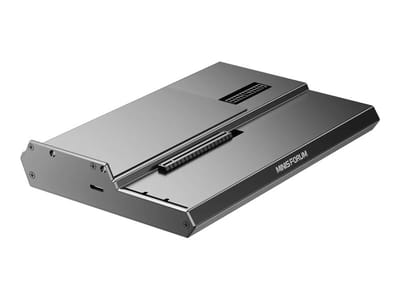
DEG1 eGPU Dock
A plain OCuLink dock with a PCIe 4.0 x4 link for a desktop graphics card; it takes an ATX or SFX power supply that you supply.
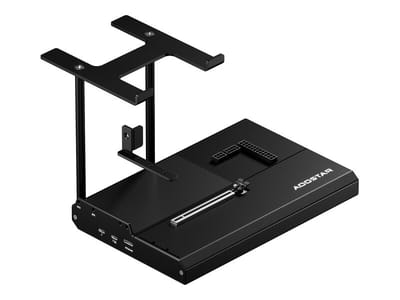
EG02 eGPU Dock
Connects over OCuLink for the full PCIe 4.0 x4 link and has Thunderbolt 5 as a second input; the graphics card and power supply are sold separately.

Core X V2
A Thunderbolt 5 enclosure that Razer lists as working with Thunderbolt 4 and USB4 hosts; it fits a four-slot card and needs an ATX power supply.

DEG2 eGPU Dock
Connects over USB4 or Thunderbolt 5, with an OCuLink input behind a switch, and adds an M.2 slot; it needs an ATX or SFX power supply.

Breakaway Box 850 T5
Has an 850W power supply built in, so only the graphics card is extra, and works with Thunderbolt 4 and USB4 Windows PCs.

TS4 Thunderbolt 4 Dock
An 18-port dock that CalDigit lists for Thunderbolt 4 and USB4 hosts, with 2.5GbE and a DisplayPort 1.4 output.

TBT4-UD5 Thunderbolt 4 Dock
Two HDMI ports drive two 4K60 monitors from one Thunderbolt 4 or USB4 port on a Windows PC.

Revodok Max 208 Thunderbolt 4 Dock
Adds three Thunderbolt 4 ports for dual 4K60 displays plus gigabit Ethernet; it has no HDMI port, so monitors connect over USB-C or an adapter.
Frequently Asked Questions
What processor does the MINISFORUM AI X1-255 use?
The AI X1-255 uses the AMD Ryzen 7 255, an 8-core, 16-thread Zen 4 processor (a rebadge of the Ryzen 7 8745HS from AMD’s Hawk Point family) that boosts up to 4.9GHz. It integrates Radeon 780M graphics and scores roughly 28,700 on PassMark’s CPU benchmark, which is well suited to productivity, browsing, and light gaming.
Can I upgrade the RAM and storage in the AI X1-255?
Yes. Two DDR5 SO-DIMM slots accept up to 64GB of DDR5-5600 memory, and two M.2 2280 slots run at PCIe 4.0 and support up to 4TB per slot. Both memory and storage are user-serviceable, and the barebone version ships with neither RAM nor an SSD so you can supply your own.
What is the OCuLink port for on the AI X1-255?
The rear OCuLink port runs at PCIe 4.0 x4 speeds, letting you connect an external GPU enclosure with more bandwidth than USB4 or Thunderbolt. That is the practical way to add desktop-class graphics performance. Using OCuLink borrows a PCIe lane from the second M.2 slot, so an external GPU and a second SSD share the same resource.
How many displays can the AI X1-255 drive?
Four displays at once, using the HDMI 2.1 port, the DisplayPort 2.0 port, and the two USB4 ports with DisplayPort Alt Mode. DisplayPort 2.0 handles up to 8K at 60Hz, which covers multi-monitor productivity setups.
How capable is the NPU in the AI X1-255?
Despite the “AI” branding, the Ryzen 7 255 is a rebadged 2024-era Zen 4 chip with only a modest NPU, well behind the newer Ryzen AI parts like the HX 370 in the AI X1 Pro. If on-device AI acceleration is your priority, a Zen 5 Ryzen AI system is a better fit; this machine is better understood as a capable general-purpose mini PC.
How is the AI X1-255 different from the X1 Lite-255 and AI X1 Pro?
All three share the Ryzen 7 255 family branding, but they are different machines. The AI X1-255 has WiFi 7, Bluetooth 5.4, built-in speakers, and a native rear OCuLink port. The X1 Lite-255 uses WiFi 6E. The AI X1 Pro is a higher-end machine with the Zen 5 Ryzen AI 9 HX 370 and dual 2.5GbE LAN.
What comes in the box with the MINISFORUM AI X1-255?
The box holds the mini PC, a 120W power adapter, an HDMI cable, a VESA mounting bracket with screws, and a quick start guide. Configured versions add the RAM and SSD listed for that model, while the barebone version leaves memory and storage for you to install.