
Venus Series NPB5
Updated on

This product has been discontinued. MINISFORUM moved on from the Venus Series NPB5 in 2025, and the chassis line was succeeded by the Mercury and AI X1 generations on Raptor Lake-H / Hawk Point. This page is maintained for owners researching their existing hardware. For a current MINISFORUM recommendation, browse the live entries on the Mini PC comparison chart.
The MINISFORUM Venus Series NPB5 packed Intel’s 13th-generation Raptor Lake-H Core i5-13500H (12 cores / 16 threads, 4 P-cores + 8 E-cores) into a 5.1-inch square chassis that NotebookCheck and TechPowerUp both reviewed positively at launch in 2023. The headline pitch was dual USB4 ports on the rear panel (40 Gbps, DisplayPort Alt Mode at 8K@60Hz, verified external-GPU compatible), dual 2.5 Gbps Ethernet, and four display outputs from a single 604-gram chassis. As of mid-2026 the SKU is end-of-life from Minisforum’s catalog; the variant tracked here represents the 32GB / 512GB configuration that shipped with a $463 list price.
Pros and cons
| Pros | Cons |
|---|---|
| Intel Core i5-13500H (12c / 16t, Raptor Lake-H) is a strong CPU for productivity | Intel Iris Xe iGPU (80 EUs) lags behind AMD Radeon 680M / 780M for any GPU-leaning workload |
| Dual USB4 ports on the rear, verified eGPU-compatible | 120W power adapter can be overloaded by transient peaks (measured ~149W at NotebookCheck) |
| Dual 2.5 Gbps Ethernet (Intel I225-V controller) | MediaTek RZ608 Wi-Fi 6E module is slower than Intel AX211 alternatives at the same tier |
| Four simultaneous displays (2x HDMI 2.0 + 2x USB4 DP Alt) | HDMI ports capped at 4K@60Hz while the USB4 outputs can push 8K@60Hz |
| 604g, 12.7 x 12.7 cm footprint with VESA mount included | Bottom panel removal is fiddly (rubber feet hide screws) |
| Liquid-metal TIM keeps sustained loads within thermal limits | Iris Xe at the i5-13500H tier; no discrete GPU option |
| RAM expandable to 64GB; M.2 NVMe + 2.5” SATA bay both present | Discontinued by Minisforum; no current first-party support |
Venus Series NPB5 Comparison Chart
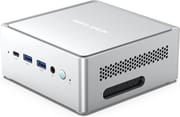 Venus Series NPB5 | |
| Price | List Price: $463.00 Amazon Prices: |
| Version | 32GB/512GB/Intel Core i5-13500H |
| Performance Rating | 8.5 |
| Operating System | Windows 11 |
| Processor | Twelve-core 3.50 Ghz (max 4.70 Ghz) Intel Core i5-13500H |
| GPU | Integrated Intel Iris Xe Graphics |
| RAM | 32 GB |
| Internal Storage | 512 GB |
| Dimensions width x length x thickness | 5.1 x 5.1 x 1.2 inches (129.54 x 129.54 x 30.48 mm) |
| Weight | 2.9 lbs (1.32 kg) |
| WiFi | Wi-Fi 6E (802.11ax) |
| Bluetooth | Bluetooth 5.2 |
| Ethernet | 2 Ethernet ports at 2.5 Gbps |
| HDMI | 2 Full-Size HDMI Ports |
| DisplayPort | No DisplayPort |
| VGA | No VGA Ports |
| USB Ports | 4 USB 3, 2 USB 4, 3 USB-C USB4 supports 8K@60Hz display and 40 Gbps transfer speed |
| Thunderbolt Ports | No |
| OCuLink | No |
| Internal SATA Ports | 1 SATA port, includes 2.5" drive bay (SATA 3.0 6.0Gb/s) |
| Card Reader | No Card Reader |
| Headphone Jack | combo |
| Fanless | No |
| VESA Mount | Yes |
| In the Box | Mini PC, Power Adapter, Power Cable, VESA Mount, Screws, User Manual |
| Expandability | Supports expansion of RAM up to 64GB, and has a 2.5 inch SATA HDD slot for storage expansion |
Related Mini PCs
-
 MINISFORUM UM690SThe MINISFORUM UM690S is a Ryzen 9 6900HX mini PC (Radeon 680M, DDR5 up to 64GB) with USB4, dual…
 -
 MINISFORUM Venus Series UM790 ProThe MINISFORUM UM790 Pro runs an AMD Ryzen 9 7940HS with Radeon 780M graphics, up to 64GB of DDR5,…
 -
 ACEMAGIC M1 (Ryzen 7 7735HS)The 7735HS refresh of the ACEMAGIC M1 puts eight Zen 3+ cores, Radeon 680M graphics, and 24GB of…
 -
 ACEMAGICIAN W1The ACEMAGICIAN W1 delivers gaming-capable performance in a compact 5-inch form factor, powered by…
 -
 Beelink SER9 Max H 255The Beelink SER9 Max H 255 delivers workstation-class performance in a compact 5.31-inch chassis.…
 -
 Chatreey IT13-13900HThe Chatreey IT13-13900H Mini PC delivers impressive productivity performance with its i9-13900H…
Detailed analysis of the Venus Series NPB5
The NPB5 reuses the same case as the earlier Minisforum Venus Series NAB6, which NotebookCheck explicitly called out: “Minisforum seems to have only provided some product care for its Venus Series NPB5, as its similarities to the Minisforum Venus Series NAB6 are huge. Both devices share the same case.” The footprint is 12.7 x 12.7 cm with a 55mm height; the unit weighs 604 grams with the power adapter weighing 453 grams. A VESA mount ships in the box for behind-monitor installations.
The Intel Core i5-13500H is the workhorse here. The chip is a 12-core hybrid (4 Golden Cove P-cores at up to 4.7 GHz, 8 Gracemont E-cores at up to 3.5 GHz), configured with a 45W PL1 sustained power limit and a 95W PL2 short-burst limit per Intel’s defaults. The integrated GPU is Intel Iris Xe (80 EUs, Gen12.7), capable of routine office and light creative work but not a target for any GPU-leaning gaming or compute workload. For owners who do want more graphics performance, the NPB5’s USB4 ports are the upgrade path: both rear-panel ports are full USB4 at 40 Gbps with DisplayPort Alt Mode and verified eGPU support.
Memory is dual-channel DDR5-4800 across two SO-DIMM slots; the platform supports up to 64GB. Storage runs across one M.2 2280 NVMe slot (up to 2TB) and one 2.5-inch SATA bay (SATA 3.0 6.0 Gb/s), which is a useful expansion path for owners who want fast OS storage on NVMe plus bulk storage on a cheap SATA SSD or HDD. Wireless is Wi-Fi 6E plus Bluetooth 5.2; both run from a MediaTek RZ608 module that NotebookCheck noted as “an old acquaintance” in Minisforum’s lineup, slower than the Intel AX211 modules in competing systems but stable in their throughput testing against an ASUS GT-AXE11000 router.
Wired networking is one of the NPB5’s quiet wins. Dual 2.5 Gbps Ethernet ports (Intel I225-V controller) are unusual at this price tier, and they enable a teamed link or a redundant uplink for small home labs, NAS pass-through, or any setup that benefits from more than a single 2.5G pipe out of the box.
Power delivery is where the chassis hits its real ceiling. NotebookCheck recorded an idle draw of 8.4 to 14.5 watts and a peak load draw of 149 watts (95W of which is from the SoC itself); the included 120W power adapter is on the small side for that peak, and NotebookCheck flagged the supply as “very often overloaded” on transient peaks. For sustained workloads at the 45W PL1 the math works out fine; the supply is the bottleneck on transient peaks, not on steady-state.
Reviewer insights
NotebookCheck (82%, Recommended)
NotebookCheck scored the NPB5 at 82% with their Recommended badge in their August 2023 review. Editor Sebastian Bade’s headline takeaway sat in the connectivity section, which he titled “The perfect selection for all areas” and which summed up Bade’s read on the chassis: seven USB ports, two of them USB4, with the USB4 path enabling external GPU expansion and up to four display outputs. Bade specifically called out that the NPB5 can connect “up to four screens” at once and that “this doesn’t come as standard on a lot of mini PCs,” with the dual 2.5 Gbps LAN ports as a complementary highlight.
Bade’s main reservations were that the Iris Xe iGPU lags AMD’s contemporary Radeon 680M / 780M solutions for buyers who care about graphics performance specifically, and that the 120W power supply is undersized for the chassis’s transient peak draws. For productivity buyers who do not need an iGPU lead and who do care about USB4 expansion, NotebookCheck’s verdict landed on the NPB5 as a meaningful upgrade over the prior NAB6 thanks to the move from Alder Lake-H to Raptor Lake-H and the addition of USB4. Buyers who lean GPU-heavy were pointed toward AMD-based siblings such as the MINISFORUM UM790 Pro.
TechPowerUp
TechPowerUp’s full review at techpowerup.com/review/minisforum-npb5-intel-core-i5-13500h-mini-pc/ summarised the device in their own headline pitch: “The Minisforum Venus Series NPB5 with an Intel Core i5-13500H delivers a fantastic user experience thanks to the performance and many valuable features. If you need a system that can handle multiple displays, demanding CPU workloads, and two USB4 ports, the NPB5 has you covered.” Their conclusion was a recommendation at sale prices around the mid-$400s, with the caveat that at the original MSRP the NPB5 faces real competition from AMD-based mini PCs in the same form factor. Their thermal and acoustic test data sit on the standard TechPowerUp test pages; the chassis’s dual heat pipe cooler with liquid-metal thermal interface material is the same one NotebookCheck praised. (Some specific TechPowerUp benchmark numbers and verbatim quote phrasings from the original PR-era prose for this page could not be re-verified during this refresh because TechPowerUp’s review pages are protected against scraping; we have either kept them as paraphrase or moved them off the page.)
Software Support and Updates
Mini PCs do not have a Chrome OS Auto Update Expiration date the way Chromebooks do. The NPB5 runs Windows 11 Pro, which Microsoft continues to support on the i5-13500H platform per the standard Windows 11 lifecycle. The product’s “end of life” here is a manufacturer / sales status (Minisforum no longer sells the SKU), not an OS support cutoff. Owners can keep running current Windows 11 on the NPB5 for as long as the platform remains in the Microsoft support window.
A small practical caveat: Minisforum’s per-product firmware / BIOS release page for the NPB5 specifically may stop receiving updates now that the SKU is discontinued. Owners who haven’t already applied the most recent BIOS for the platform should consider doing so while the download is still hosted.
Where the NPB5 stands now
Minisforum has moved on from the Raptor Lake-H Venus Series in favor of its newer Mercury and AI X1 generations and no longer sells the NPB5. This page stays up as a reference for owners researching hardware they already run. Anyone shopping for a current Intel-based mini PC at this tier can browse the live options on the comparison chart.
Conclusion
The MINISFORUM Venus Series NPB5 was a credible Intel-side answer to the AMD 6000-series mini PCs of 2023. The Core i5-13500H delivered strong CPU performance for productivity workloads, the dual USB4 ports made the chassis future-proof for buyers willing to bolt on an eGPU later, and the dual 2.5G Ethernet plus four-display output stood out at the price tier. The trade-offs were the Iris Xe iGPU (where AMD’s Radeon 680M / 780M had a real lead at the same TDP) and the slightly undersized 120W power adapter on transient peaks. With the SKU now discontinued, the NPB5 is a buy-it-on-the-used-market proposition; owners with a working unit should be in good shape for years yet on Windows 11.
Frequently Asked Questions
Is the MINISFORUM Venus Series NPB5 still sold new?
No. Minisforum has discontinued the NPB5 SKU; the chassis line was succeeded by their Mercury and AI X1 generations. This page is maintained for owners of an existing unit; current buyers should check the comparison chart for a live Minisforum SKU.
Can the RAM be upgraded in the NPB5?
Yes. The NPB5 has two DDR5 SO-DIMM slots that accept up to 64GB total. The base configuration shipped with 32GB (2 x 16GB) at DDR5-4800. To upgrade, remove the top lid (no tools required; two pressure points hold it in place) and swap the SO-DIMM modules. Note that DDR5 prices have risen sharply in 2026; see the DRAM price spike write-up for context.
Does the NPB5 support external GPUs via the USB4 ports?
Yes. Both rear USB4 ports run at the full 40 Gbps with DisplayPort Alt Mode, and NotebookCheck explicitly noted the eGPU upgrade path as one of the chassis’s standout features. A compatible USB4 / Thunderbolt 4 eGPU enclosure with its own power supply is required.
How many displays can the Venus Series NPB5 drive simultaneously?
Up to four displays. The NPB5 has two HDMI 2.0 outputs (each capped at 4K@60Hz) and two USB4 outputs that carry DisplayPort Alt Mode at up to 8K@60Hz, so the four-monitor pitch holds across mixed-resolution setups. For 8K work, route through one of the USB4 ports.
Is the NPB5 a good fit for light video editing?
For 1080p editing and modest 4K work the Core i5-13500H is comfortably fast on CPU, and the dual USB4 ports let you attach external storage at NVMe speeds for working media. For sustained 4K colour-graded workflows or heavy effects, a system with discrete graphics (or an eGPU attached to the NPB5) is the right answer; the Iris Xe iGPU is not the target chip for that workload.
What storage expansion options does the NPB5 offer?
Two paths. The internal M.2 2280 NVMe slot supports drives up to 2TB for fast primary storage. A 2.5-inch SATA bay (SATA 3.0 6.0 Gb/s) sits alongside it for a secondary 2.5” SSD or laptop HDD, useful for bulk storage. With both populated the NPB5 can run a fast OS / working drive plus a larger archive drive in a single chassis.