
MINISFORUM Venus Series UM790 Pro
Updated on

The MINISFORUM Venus Series UM790 Pro is a compact mini PC built on AMD’s Ryzen 9 7940HS, an 8-core, 16-thread chip that boosts to 5.2 GHz, with Radeon 780M graphics. It takes up to 64GB of DDR5 and two PCIe Gen 4 M.2 SSDs, and Minisforum also sells it as a barebones kit for buyers who bring their own RAM and storage. Connectivity covers dual USB4, dual HDMI 2.1, 2.5GbE, Wi-Fi 6E, and Bluetooth 5.2 in an aluminum case. Reviewers single it out for desktop-class CPU performance at low power; the limit, as with any integrated GPU, is high-end gaming.
| Pros | Cons |
|---|---|
| 8-core Ryzen 9 7940HS, desktop-class CPU at low power | Integrated 780M is not for high-end gaming |
| Up to 64GB DDR5 and two PCIe Gen 4 M.2 slots | No SATA bay and no dedicated DisplayPort |
| Dual USB4 (eGPU, 8K, 10GbE adapters) and dual HDMI 2.1 | Front-only USB4; no rear USB-C |
| Very low idle power and quiet operation | Priced above many mini PCs |
| Wi-Fi 6E, Bluetooth 5.2, 2.5GbE | Liquid-metal cooling makes disassembly risky |
| Sold ready-to-run or as a barebones kit | Runs warm under sustained load (high 80s C) |
Related Videos
MINISFORUM Venus Series UM790 Pro Comparison Chart
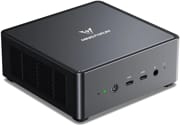 MINISFORUM Venus Series UM790 Pro | MINISFORUM Venus Series UM790 Pro | MINISFORUM Venus Series UM790 Pro | MINISFORUM Venus Series UM790 Pro | |
| Price | List Price: $779.99 Amazon Prices: Loading prices... | List Price: $619.99 Amazon Prices: Loading prices... | List Price: $899.99 Amazon Prices: | List Price: $759.99 Amazon Prices: |
| Version | 32GB/1TB/AMD Ryzen 9 7940HS | Barebone/AMD Ryzen 9 7940HS | 64GB/1TB/AMD Ryzen 9 7940HS | 32GB/512GB/AMD Ryzen 9 7940HS |
| Performance Rating | 9.3 | 8.6 | 9.5 | 9.3 |
| Operating System | Windows 11 Pro | Windows 11 Pro | Windows 11 Pro | Windows 11 Pro |
| Processor | Octa-core 4.00 Ghz (max 5.20 Ghz) AMD Ryzen 9 7940HS | Octa-core 4.00 Ghz (max 5.20 Ghz) AMD Ryzen 9 7940HS | Octa-core 4.00 Ghz (max 5.20 Ghz) AMD Ryzen 9 7940HS | Octa-core 4.00 Ghz (max 5.20 Ghz) AMD Ryzen 9 7940HS |
| GPU | Integrated AMD Radeon 780M | Integrated AMD Radeon 780M | Integrated AMD Radeon 780M | Integrated AMD Radeon 780M |
| RAM | 32 GB | 0 GB | 64 GB | 32 GB |
| Internal Storage | 1 TB | 0 GB | 1 TB | 512 GB |
| Dimensions width x length x thickness | 5.12 x 4.96 x 2.06 inches (130.05 x 125.98 x 52.32 mm) | 5.12 x 4.96 x 2.06 inches (130.05 x 125.98 x 52.32 mm) | 5.12 x 4.96 x 2.06 inches (130.05 x 125.98 x 52.32 mm) | 5.12 x 4.96 x 2.06 inches (130.05 x 125.98 x 52.32 mm) |
| Weight | unknown | unknown | unknown | unknown |
| WiFi | Wi-Fi 6E (802.11ax) | Wi-Fi 6E (802.11ax) | Wi-Fi 6E (802.11ax) | Wi-Fi 6E (802.11ax) |
| Bluetooth | Bluetooth 5.2 | Bluetooth 5.2 | Bluetooth 5.2 | Bluetooth 5.2 |
| Ethernet | 1 Ethernet port at 2.5 Gbps | 1 Ethernet port at 2.5 Gbps | 1 Ethernet port at 2.5 Gbps | 1 Ethernet port at 2.5 Gbps |
| HDMI | 2 Full-Size HDMI Ports | 2 Full-Size HDMI Ports | 2 Full-Size HDMI Ports | 2 Full-Size HDMI Ports |
| DisplayPort | No DisplayPort | No DisplayPort | No DisplayPort | No DisplayPort |
| VGA | No VGA Ports | No VGA Ports | No VGA Ports | No VGA Ports |
| USB Ports | 4 USB 3, 2 USB-C (2 USB4) USB 4 ports support DisplayPort | 4 USB 3, 2 USB-C (2 USB4) USB 4 ports support DisplayPort | 4 USB 3, 2 USB-C (2 USB4) USB 4 ports support DisplayPort | 4 USB 3, 2 USB-C (2 USB4) USB 4 ports support DisplayPort |
| Thunderbolt Ports | No | No | No | No |
| OCuLink | No | No | No | No |
| Internal SATA Ports | No SATA ports | No SATA ports | No SATA ports | No SATA ports |
| Card Reader | No Card Reader | No Card Reader | No Card Reader | No Card Reader |
| Headphone Jack | combo | combo | combo | combo |
| Fanless | No | No | No | No |
| VESA Mount | Yes | Yes | Yes | Yes |
| In the Box | HDMI cable, rubber feet, power supply, VESA mount and screws | HDMI cable, rubber feet, power supply, VESA mount and screws | HDMI cable, rubber feet, power supply, VESA mount and screws | HDMI cable, rubber feet, power supply, VESA mount and screws |
| Expandability | RAM and storage are user-upgradeable, supports bare bones configuration for customization | RAM and storage are user-upgradeable, supports bare bones configuration for customization | RAM and storage are user-upgradeable, supports bare bones configuration for customization | RAM and storage are user-upgradeable, supports bare bones configuration for customization |
Related Mini PCs
-
 MINISFORUM UM690SThe MINISFORUM UM690S is a Ryzen 9 6900HX mini PC (Radeon 680M, DDR5 up to 64GB) with USB4, dual…
 -
 MINISFORUM M1-1295The MINISFORUM M1-1295 packs a desktop-class Intel Core i9-12950HX processor into a compact…
 -
 AYANEO Retro Mini PC AM02The AYANEO Retro Mini PC AM02 channels classic NES aesthetics into a modern mini PC with a unique…
 -
 Beelink SER7 Mini PCPacked with an AMD Ryzen 7 7840HS, Radeon 780M GPU, and dual M.2 SSD slots, the Beelink SER7 Mini…
 -
 Beelink SER9 PRO+Premium mini PC with AMD Ryzen 7 H 255, Radeon 780M graphics, 32GB LPDDR5X RAM, and vapor chamber…
 -
 BOSGAME P5 Mini PCThe BOSGAME P5 Mini PC, featuring an AMD Ryzen 7 6800H with Radeon 680M graphics, 32GB DDR5 RAM,…
How the UM790 Pro performs
The Ryzen 9 7940HS is an 8-core, 16-thread chip, and the UM790 Pro posts strong CPU numbers for its size: ETA Prime logged Geekbench 6 multi-core at 12,415, and Level1Techs called the chip “basically better out of the box performance than an 11900K” (an 11th-gen desktop i9) at a fraction of the power. Across reviews idle draw runs from about 6 to 11W, and full load lands in the mid-60s to mid-80s of watts, which reviewers consistently praised as efficient.
Graphics come from the integrated Radeon 780M, which RGC called “the absolute best CPU that you can buy right now with integrated graphics” at the time. At 1080p he measured 90 FPS in GTA V, 220 in CS:GO, 60 in Doom Eternal, and about 50 in Cyberpunk 2077, with strong emulation up to PS3 and Switch; ServeTheHome showed it running 4K eSports titles “without dropping quality settings.” For more, the dual front USB4 ports take an external GPU (RGC tested an RTX 3060 Ti, lifting God of War from 45 to 85 FPS) and also handle 8K output and 10GbE adapters.
Cooling is the Cold Wave 2.0 system with liquid metal, which keeps the unit quiet (ServeTheHome found it added only a dBA or two over their 34 dBA studio noise floor) though the CPU still reaches the high 80s Celsius under sustained load. The liquid-metal application makes opening the case risky. Storage is two PCIe Gen 4 M.2 slots, RAM is user-upgradeable to 64GB, and the whole thing is sold ready-to-run or as a barebones kit.
What reviewers found
ServeTheHome
Patrick at ServeTheHome measured idle power as low as about 6 to 7W and load around 80 to 85W, with the unit adding just a dBA or two over their 34 dBA studio noise floor, and showed the 780M playing “e-sports titles at 4K without dropping quality settings.” He valued the front USB4 ports (8K output, eGPU, and 10GbE Thunderbolt adapters) and the barebones option, concluding that from a hardware perspective “the Minisforum folks did a great job.” His one real gripe: his review unit’s 256GB SSD was too small, and he recommended 512GB or more.
ETA Prime
ETA Prime logged Geekbench 6 multi-core at 12,415 and 3DMark Time Spy at 3,240, with about 74 FPS in Cyberpunk 2077 at 900p low. He credited the Cold Wave 2.0 liquid-metal cooling for keeping the APU under 80C and quiet at its 65W limit, and was impressed by the performance-per-watt.
Retro Game Corps
Russ at Retro Game Corps called it “the absolute best CPU that you can buy right now with integrated graphics,” logging the 1080p game results above plus heavy emulation (PS2, PS3, and Nintendo Switch). He compared it favorably to the Beelink GTR7, noting it comes in cheaper, and saw the CPU spike to 90C under a sustained Cinebench load without going beyond it.
Level1Techs
Level1Techs framed the metal chassis as a real step up for cooling, rigidity, and noise, and said it is “basically better out of the box performance than an 11900K” while idling near 8 to 11W and peaking around 70 to 75W. He praised the dialed-in BIOS but cautioned that the USB4 ports are bandwidth-limited for an external GPU, finding a card like an RX 6600 or 6700 reaches only about 80% of its native performance, and he warned against opening the unit because of the liquid-metal seal.
Customer Reviews of the MINISFORUM Venus Series UM790 Pro
Across 18 ratings on Amazon, the MINISFORUM Venus Series UM790 Pro averages 4.3 stars, with most owners (about 63%) leaving five stars and a smaller group (roughly 14%) landing at three. The recurring praise is performance and thermals: a verified buyer named Guy reported “Idle temp is 35C, and full strain is 80C max, and it is quiet even then,” and a verified buyer named David called it “a cool running, small inexpensive product.” Reviewers consistently note that it runs quietly and punches above its price for the money.
The lower scores point at real, specific gripes rather than failures. A verified buyer named Porkchop, who docked a star, wrote that it is “Phenomenal desktop replacement, but not enough peripheral ports” and flagged “windows memory issues.” Another verified buyer (posting as “r”) was happy with the hardware but disliked the build and the bundled OS, noting “The plastic parts used in the casing. They feel quite cheap.” So the pattern across this small set of reviews is strong, quiet performance paired with complaints about cheap-feeling plastic, a buggy Windows install, and limited port count.
Read more owner reviews on Amazon.
Who should consider the UM790 Pro?
The UM790 Pro suits people who want desktop-class CPU performance and the best integrated graphics of its generation in a small, quiet, power-efficient box: productivity, content work, 1080p gaming, emulation, and home-lab duty all fit. The barebones option and user-upgradeable RAM and storage make it flexible for enthusiasts, and the dual USB4 ports leave the door open to an external GPU later.
It is a weaker pick if you want maxed-out AAA gaming without an eGPU (the 780M is still integrated graphics), a SATA bay or rear USB-C, or easy internal servicing (the liquid-metal cooling makes opening it risky). It also sits above many mini PCs on price. To compare it with other models, see Starry Hope’s Mini PC Comparison Chart.
Frequently Asked Questions
Can I upgrade the RAM and storage on the UM790 Pro?
Yes, the UM790 Pro allows for user upgrades. It supports up to 64GB of DDR5 RAM, and you can add or replace the M.2 PCIe Gen 4 SSDs for additional storage.
What type of cooling system does the UM790 Pro use?
The UM790 Pro is equipped with Minisforum’s Cold Wave 2.0 cooling system, which includes a copper heatsink, cooling fan, and liquid metal to manage heat efficiently.
Does the UM790 Pro support multiple displays?
Yes. The UM790 Pro drives multiple displays through its two HDMI 2.1 ports and two USB4 ports, which also carry DisplayPort.
Can I connect an external GPU to the UM790 Pro?
Yes, you can. The UM790 Pro’s USB 4 ports support 40 Gbps protocols, allowing eGPU connectivity.
What operating system does the UM790 Pro come with?
The UM790 Pro comes with Windows 11 Pro pre-installed, though it also supports Linux if you prefer an alternative OS.
Is the UM790 Pro suitable for gaming?
While the UM790 Pro’s integrated AMD Radeon 780M graphics may struggle with demanding esports titles, it can handle light gaming and stream from a more powerful gaming system. For enhanced gaming performance, you can also connect an eGPU.
What is included in the box with the UM790 Pro?
The UM790 Pro package includes the power supply, an HDMI cable, spare rubber feet, and a VESA mount with screws.
Does the UM790 Pro have a VESA mount?
Yes, the UM790 Pro includes a VESA mount, allowing you to attach it to the back of a monitor for a clean and space-saving setup.
What are the networking capabilities of the UM790 Pro?
The UM790 Pro features Wi-Fi 6E and Bluetooth 5.2 for wireless connectivity and a 2.5 gigabit Ethernet port for wired networking.
Can I purchase a bare-bones version of the UM790 Pro?
Yes, Minisforum offers a bare-bones version of the UM790 Pro, which allows you to customize the configuration with your preferred memory and storage options.