
Beelink GTi15 Ultra
Published on

The Beelink GTi15 Ultra is a flagship mini PC built around Intel’s Arrow Lake Core Ultra 9 285H processor with 16 cores and 16 threads. Its proprietary PCIe 5.0 x8 expansion slot is designed for Beelink’s EX Pro Dock, which connects a full-sized desktop graphics card with far more bandwidth than Thunderbolt or OCuLink alternatives. The machine also packs dual 10 Gigabit Ethernet ports powered by Intel’s data-center-grade E610 controller, WiFi 7 via an Intel BE200 module, and a built-in 145W power supply that removes the need for an external power brick. That combination fits a compact video editing workstation, a home server with serious networking chops, or the base of a desktop-class gaming setup through the eGPU dock.
Pros and cons
| Pros | Cons |
|---|---|
| Proprietary PCIe 5.0 x8 slot enables desktop GPU performance via EX Pro Dock | High idle power draw (~41W) unless BIOS C-states are manually enabled |
| Dual 10GbE Ethernet with Intel E610 data-center controller | Difficult disassembly process to access RAM and SSD slots |
| Built-in 145W power supply eliminates external power brick | Integrated Arc 140T graphics lag behind AMD iGPU competitors for gaming |
| Extremely quiet operation even under heavy CPU loads | Pre-installed bloatware (Wondershare, Edraw) requires manual removal |
| WiFi 7, Bluetooth 5.4, USB4, and comprehensive port selection | No VESA mount option for behind-monitor placement |
| Integrated fingerprint reader, speakers, and quad-microphone array | EX Pro Dock sold separately and uses proprietary connector |
Related Videos
Beelink GTi15 Ultra Comparison Chart
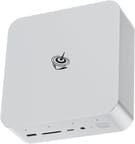 Beelink GTi15 Ultra | Beelink GTi15 Ultra | |
| Price | List Price: $1,249.00 Amazon Prices: Loading prices... | List Price: $1,449.00 Amazon Prices: |
| Version | 64GB/1TB/Intel Core Ultra 9 285H | 96GB/2TB/Intel Core Ultra 9 285H |
| Performance Rating | 6.4 | 6.4 |
| Operating System | Windows 11 Pro | Windows 11 Pro |
| Processor | Sixteen-core 3.70 Ghz (max 5.40 Ghz) Intel Core Ultra 9 285H | Sixteen-core 3.70 Ghz (max 5.40 Ghz) Intel Core Ultra 9 285H |
| GPU | Integrated Intel Arc graphics | Integrated Intel Arc graphics |
| RAM | 64 GB DDR5 SO-DIMM, 2-channel (Dual-channel DDR5 5600MHz (upgradeable to 128GB)) | 96 GB DDR5 SO-DIMM, 2-channel (Dual-channel DDR5 6400MHz (upgradeable to 128GB)) |
| Internal Storage | 1 TB NVMe SSD | 2 TB NVMe SSD |
| Dimensions width x length x thickness | 6.22 x 6.22 x 2.36 inches (157.99 x 157.99 x 59.94 mm) | 6.22 x 6.22 x 2.36 inches (157.99 x 157.99 x 59.94 mm) |
| Weight | 2.84 lbs (1.29 kg) | 2.84 lbs (1.29 kg) |
| WiFi | Wi-Fi 7 (802.11be) | Wi-Fi 7 (802.11be) |
| Bluetooth | Bluetooth 5.4 | Bluetooth 5.4 |
| Ethernet | 2 Ethernet ports at 10 Gbps | 2 Ethernet ports at 10 Gbps |
| HDMI | 1 Full-Size HDMI Port | 1 Full-Size HDMI Port |
| DisplayPort | 1 DisplayPort (DP 1.4a, supports 8K output) | 1 DisplayPort (DP 1.4a, supports 8K output) |
| VGA | No VGA Ports | No VGA Ports |
| USB Ports | 5 USB 3, 2 USB-C (1 USB4) Front: 1x USB-A 3.2 (10Gbps), 1x USB-C (10Gbps). Rear: 2x USB-A 3.2 (10Gbps), 1x USB4 Type-C (40Gbps/PD/DP1.4). Bottom: 2x USB-A 3.2. | 5 USB 3, 2 USB-C (1 USB4) Front: 1x USB-A 3.2 (10Gbps), 1x USB-C (10Gbps). Rear: 2x USB-A 3.2 (10Gbps), 1x USB4 Type-C (40Gbps/PD/DP1.4). Bottom: 2x USB-A 3.2. |
| Thunderbolt Ports | No | No |
| OCuLink | No | No |
| Internal SATA Ports | No SATA ports | No SATA ports |
| Card Reader | SD Card Reader | SD Card Reader |
| Headphone Jack | separate | separate |
| Fanless | No | No |
| VESA Mount | No | No |
| In the Box | Beelink GTi15 Ultra, HDMI cable, power cable, user manual, clear CMOS guide card | Beelink GTi15 Ultra, HDMI cable, power cable, user manual, clear CMOS guide card |
| Expandability | RAM upgradeable to 128GB DDR5 via dual SO-DIMM slots; dual M.2 PCIe 4.0 slots; proprietary PCIe 5.0 x8 slot for Beelink EX Pro eGPU Dock | RAM upgradeable to 128GB DDR5 via dual SO-DIMM slots; dual M.2 PCIe 4.0 slots; proprietary PCIe 5.0 x8 slot for Beelink EX Pro eGPU Dock |
Related Mini PCs
-
 Beelink GTi12 UltraThe Beelink GTi12 Ultra is a Core i9-12900H mini PC with two DDR5 slots (64GB max), two PCIe 4.0…
 -
 Beelink EQI13 PROThe Beelink EQI13 PRO pairs an Intel Core i7-13620H (10 cores, 16 threads) with 32GB of DDR4 and a…
 -
 GMKtec Nucbox M4 Mini PCThe GMKtec NucBox M4 pairs an 11th-gen Intel Core i9-11900H with DDR4 (up to 128GB), an M.2 NVMe…
 -
 GMKtec EVO-T1The GMKtec EVO-T1 pairs an Intel Core Ultra 9 285H with three M.2 NVMe slots, an OCuLink port for…
 -
 GEEKOM XT1 MegaThe GEEKOM XT1 Mega is a compact Meteor Lake mini PC (Intel Core Ultra 5 125H or Ultra 9 185H,…
 -
 GEEKOM XT12 ProThe GEEKOM XT12 Pro is a compact aluminum mini PC with an Intel Core i9-12900H (or i7-12650H), 32GB…
A metal six-inch box with data-center networking

The GTi15 Ultra measures 6.22 x 6.22 x 2.36 inches and weighs 2.84 pounds, making it noticeably larger than budget mini PCs but still compact enough for desk placement. The chassis is predominantly metal construction that doubles as a heatsink for improved thermal dissipation. The front panel provides a USB-A 3.2 port (10Gbps), a USB-C port (10Gbps data only), a full-size SD card reader, separate headphone and microphone jacks, and the power button with its integrated fingerprint sensor. The rear houses the HDMI port, full-size DisplayPort 1.4a, two more USB-A 3.2 ports, the USB4 Type-C port (40Gbps with Power Delivery and DisplayPort Alt Mode), and the dual 10GbE Ethernet jacks. As ServeTheHome pointed out, the front USB-C port runs at 10Gbps rather than USB4 speeds, which means the most capable port is tucked away in the back.
Intel’s Core Ultra 9 285H drives the machine, an Arrow Lake mobile processor with 16 cores and 16 threads, a base clock of 3.70 GHz, and boost up to 5.10 GHz. It scores approximately 34,478 on PassMark’s CPU benchmark, placing it firmly in workstation territory. The processor includes Intel’s triple AI engine delivering up to 99 TOPS of NPU performance. Multiple reviewers noted the machine runs quiet even under sustained loads, though one reviewer measured idle power consumption at 41 watts from the wall without manual BIOS adjustments to enable C-states. Elevated Systems highlighted Intel QuickSync support for video editing and AV1 encoding in their review.
The dual 10GbE ports use Intel’s E610-XT2 controller, the same chip found in data-center equipment. That suits NAS transfers, virtualization, or server duties. WiFi 7 via the Intel BE200 module supports 320MHz channel widths for wireless speeds that approach wired connections. Storage expansion comes through dual M.2 2280 PCIe 4.0 x4 slots supporting up to 8TB total, and the two SO-DIMM slots take up to 128GB of DDR5. Both sit behind the same difficult teardown, so plan upgrades before the machine goes into service. The SD card reader operates at 10Gbps, so camera cards transfer quickly.
Reviewer Insights

ServeTheHome’s Perspective
ServeTheHome conducted a thorough teardown and analysis of the GTi15 Ultra, focusing on its networking capabilities and build quality. They praised the dual 10GbE implementation using Intel’s E610 controller, noting that “instead of some kind of like low-end or weird controller, they’re actually using the Intel E610, which is a more modern controller.” The internal power supply was highlighted as a significant design improvement that makes the entire package cleaner and more portable. However, they noted the built-in speakers and microphones fall short of expectations, recommending external audio solutions for any serious use. Their overall assessment was positive, particularly for users who value networking and the eGPU expansion capability.
Tech Odyssey’s Perspective
Tech Odyssey tested the GTi15 Ultra with the EX Pro dock and multiple high-end GPUs and emphasized the PCIe x8 bandwidth advantage. They noted that “this has a trick that no other mini PC has. This can do more PCIe lanes in an external peripheral than any other one,” highlighting that the dock provides eight times the bandwidth of Thunderbolt 4. The review praised the quiet operation at 35dB under full load and the metal chassis that functions as a heatsink. The difficult teardown process was a recurring criticism, with delicate ribbon cables and specialized standoffs making the process “incredibly unfun.”
TechTablets’ Perspective
TechTablets provided detailed thermal testing and benchmark results, describing the GTi15 Ultra as “probably one of the best that I have covered recently.” They highlighted the fully unlocked BIOS that allows TDP adjustments up to 65W and beyond, giving power users fine-grained control over performance. The eGPU dock testing showed minimal performance loss compared to a directly connected GPU, which was described as “fantastic.” However, they noted pre-installed bloatware and observed that the SO-DIMM RAM running at 5600MT/s results in slightly lower benchmarks compared to systems using soldered LPDDR5x memory.
Elevated Systems’ Perspective
Elevated Systems focused on creative workflows and highlighted Intel QuickSync as still “king” for video editing and AV1 encoding. They noted that while raw integrated GPU benchmarks showed minimal improvement over the predecessor GTi14, the addition of XMX cores significantly improves image quality when using XeSS upscaling in games. Their assessment was that existing GTi14 Ultra owners should “probably save your money” unless they heavily rely on local AI processing, as the roughly 20% CPU performance improvement may not justify the upgrade cost.
Craft Computing’s Perspective
Craft Computing delivered a comprehensive analysis including power draw measurements and BIOS optimization. They found the GTi15 Ultra draws 41 watts at idle out of the box and 4 watts even when fully powered off, noting it “warms the case” when shut down. However, they praised the quiet operation and high-performance CPU capabilities. The PCIe Gen 5 x8 slot was described as “the best possible link for external GPUs,” superior to both OCuLink and Thunderbolt solutions. The lack of a VESA mount was flagged as a notable omission.
Dawid Does Tech Stuff’s Perspective
Dawid Does Tech Stuff pushed the eGPU dock to its absolute limits by connecting a liquid-cooled RTX 5090, claiming it to be “100% first in the world.” They emphasized the extremely quiet operation and premium build quality, noting “this has got to be one of the quietest PCs I’ve tried.” However, they observed that the default 54W TDP limit constrains CPU performance and recommended BIOS adjustments to unlock the processor’s full potential.
AlkTech
According to AlkTech, the GTi15 Ultra is “a high-end mini PC that bridges the gap between ultra-compact systems and desktop performance through its unique PCIe expansion slot and dual 10GbE networking.” The review highlighted the clean metal construction and integrated fingerprint reader as premium touches. However, they flagged difficult service access as a significant downside, noting that “getting access to the motherboard requires a fair bit of effort” since the speaker module and power supply must be removed to reach the SSD and RAM slots.
Customer Reviews
Across 8 ratings on Amazon, the Beelink GTi15 Ultra averages 3.8 stars. About 63 percent of ratings are five stars while 21 percent are one star. On the positive side, owners single out the build quality and the network hardware. A verified buyer posting as EDI Consultants wrote “The10 GB ethernet ports are more than capable of handling my 7GB speeds provided by my ISP Frontier. Very quiet.” Another verified buyer, Chris, praised the internals, noting “both RAM and SSD are Micron,” while cautioning that “the memory slots are somewhat buried, so if you upgraded the memory or ssd on a prior model of computers from this company, doing so will be a lot harder on this one.”
Steven Hollis, a verified buyer who rated it three stars, reported power and firmware trouble and a spec mismatch: he says the unit “still draws about 10 watts of power” when off, lacks modern standby and Wake-on-LAN, and “falsely claimed wifi 7, ddr5-6400 and usb5.4,” when what he received was “wifi 6, usb5.2 and ddr5-5600.” Separately, a one-star verified buyer named julius described a unit that failed after three months and a frustrating warranty experience, titling the review “AVOID THIS.” If you buy one, budget time for BIOS configuration and verify the wireless and memory specs on arrival.
Read more owner reviews on Amazon.
Worth it if you will use the dock or the 10GbE
The GTi15 Ultra is built for power users who need desktop-class expandability in a compact package. PCIe 5.0 x8 dock support, dual 10 Gigabit Ethernet, and the Core Ultra 9 285H cover home server builds, video editing workstations, AI development, and anyone who wants the option of a full desktop GPU without the bandwidth compromises of Thunderbolt or OCuLink. The built-in 145W power supply and the quiet cooling finish the package.
That said, users who primarily need standalone gaming performance should consider AMD-based alternatives like the Beelink SER9 or GEEKOM A8, which offer stronger integrated graphics. The high idle power draw and difficult internal access for RAM and SSD upgrades are drawbacks to weigh. Those who don’t plan to use the eGPU dock or dual 10GbE networking may find better value elsewhere.
For those comparing options, see our Mini PC Comparison Chart to find the best match for your needs.
Upgrades
Accessories that fit the Beelink GTi15 Ultra's USB4 or Thunderbolt ports.

Core X V2
A Thunderbolt 5 enclosure that Razer lists as working with Thunderbolt 4 and USB4 hosts; it fits a four-slot card and needs an ATX power supply.

DEG2 eGPU Dock
Connects over USB4 or Thunderbolt 5, with an OCuLink input behind a switch, and adds an M.2 slot; it needs an ATX or SFX power supply.

Breakaway Box 850 T5
Has an 850W power supply built in, so only the graphics card is extra, and works with Thunderbolt 4 and USB4 Windows PCs.

TS4 Thunderbolt 4 Dock
An 18-port dock that CalDigit lists for Thunderbolt 4 and USB4 hosts, with 2.5GbE and a DisplayPort 1.4 output.

TBT4-UD5 Thunderbolt 4 Dock
Two HDMI ports drive two 4K60 monitors from one Thunderbolt 4 or USB4 port on a Windows PC.

Revodok Max 208 Thunderbolt 4 Dock
Adds three Thunderbolt 4 ports for dual 4K60 displays plus gigabit Ethernet; it has no HDMI port, so monitors connect over USB-C or an adapter.
Frequently Asked Questions
What processor does the Beelink GTi15 Ultra use?
The Beelink GTi15 Ultra is powered by the Intel Core Ultra 9 285H, an Arrow Lake mobile processor featuring 16 cores and 16 threads with a base clock of 3.70 GHz and boost up to 5.10 GHz. This processor includes Intel’s triple AI engine delivering up to 99 TOPS of NPU performance and scores approximately 34,478 on PassMark’s CPU benchmark.
Can I upgrade the RAM in the GTi15 Ultra?
Yes, the GTi15 Ultra supports RAM upgrades via dual SO-DIMM DDR5 slots, with a maximum capacity of 128GB. However, accessing the RAM requires significant disassembly, including removing the speaker module and power supply. Multiple reviewers described the teardown process as difficult and time-consuming, so plan accordingly.
What ports does the GTi15 Ultra have?
The GTi15 Ultra includes 5x USB-A 3.2 (10Gbps), 1x USB-C (10Gbps data on front), 1x USB4 Type-C (40Gbps with Power Delivery and DisplayPort Alt Mode on rear), 1x HDMI, 1x DisplayPort 1.4a, dual 10GbE Ethernet (RJ45), a full-size SD card reader, and separate headphone and microphone jacks. A proprietary PCIe 5.0 x8 connector on the bottom connects to the optional EX Pro eGPU dock.
What’s included in the box?
The GTi15 Ultra comes with the mini PC unit, an HDMI cable, a power cable, a user manual, and a clear CMOS guide card. The built-in 145W power supply means there is no external power brick. The EX Pro eGPU docking station is sold separately.
What is the PCIe 5.0 x8 slot used for?
The proprietary PCIe 5.0 x8 connector on the bottom of the GTi15 Ultra is designed for Beelink’s EX Pro Docking Station, which lets you connect a full-sized desktop graphics card. This provides approximately eight times the bandwidth of Thunderbolt 4, resulting in near-native GPU performance according to reviewers. The dock includes its own 600W power supply and supports high-end GPUs including the RTX 5090.
How quiet is the GTi15 Ultra?
Multiple reviewers measured noise levels at around 35dB under full CPU load, which is barely audible in a typical room. Several reviewers specifically called out its quiet operation as a standout feature, making it well-suited for office environments and home theater setups.
Is the GTi15 Ultra good for gaming?
The integrated Intel Arc 140T graphics can handle esports titles and older games at 1080p Low settings, but struggle with modern AAA titles. Gaming performance comes through the EX Pro eGPU dock, which lets you connect a desktop GPU with minimal performance loss. With a capable external GPU, the system can handle demanding games at high settings. Intel’s XMX cores also enable XeSS upscaling for improved image quality in supported titles.
Does the GTi15 Ultra have high power consumption?
Out of the box, the GTi15 Ultra draws approximately 41 watts at idle and consumes about 4 watts even when fully powered off. However, enabling C-states in the BIOS can significantly reduce idle power consumption. Under full CPU load, the system draws considerably more power from its built-in 145W supply. If energy efficiency is a priority, be prepared to adjust BIOS settings after setup.