
ASUS ExpertCenter PB64
Published on

The ASUS ExpertCenter PB64 is a small business desktop built around Intel’s desktop Core Ultra chips rather than the laptop processors used in most mini PCs, including ASUS’s own NUC line. It suits offices, clinics, and shop counters that want a machine IT staff can open without tools, upgrade, and lock down. Three builds are on sale, each with a different processor and the same memory, storage, and Windows 11 Pro. The desktop chips are worth paying for when work keeps many cores busy for long stretches, or when a site needs a serial or VGA port on the back. Its limits are the integrated graphics on every build and a single USB4 port that runs at 20Gbps.
Pros and Cons
| Pros | Cons |
|---|---|
| 65W desktop Core Ultra chips, up to 20 cores on the Core Ultra 7 265 | Integrated Intel Graphics with 2 to 4 Xe cores is not built for gaming |
| Two DDR5 SO-DIMM slots and a tool-less chassis | ASUS lists the memory ceiling as 64GB in its launch release but 32GB on its spec page |
| Two M.2 2280 PCIe 4.0 x4 slots plus a 2.5-inch SATA bay | The front USB4 port runs at 20Gbps, and there is no Thunderbolt |
| Up to four 4K displays, plus a rear port that can be HDMI, DisplayPort, VGA, COM, or a second 2.5G LAN | ASUS does not say which module each build ships with in the configurable port |
| Hardware TPM, chassis intrusion alert, Kensington slot, and padlock ring | At 2.65 pounds and 1.35 liters it is larger than NUC-class boxes |
| Offered under ASUS’s paid Corporate Stable Model program (36-month supply) | The Core Ultra 7 265 build drops to Wi-Fi 6E |
ASUS ExpertCenter PB64 Comparison Chart
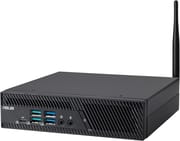 ASUS ExpertCenter PB64 | ASUS ExpertCenter PB64 | ASUS ExpertCenter PB64 | |
| Price | List Price: $1,200.00 Amazon Prices: Loading prices... | List Price: $1,300.00 Amazon Prices: Loading prices... | List Price: $1,600.00 Amazon Prices: Loading prices... |
| Version | 16GB/512GB/Core Ultra 5 225 | 16GB/512GB/Core Ultra 5 235 | 16GB/512GB/Core Ultra 7 265 |
| Performance Rating | 5.3 | 6.0 | 7.0 |
| CPU Mark | 30,370 | 36,452 | 48,260 |
| Operating System | Windows 11 Pro | Windows 11 Pro | Windows 11 Pro |
| Processor | Deca-core 3.30 Ghz (max 4.90 Ghz) Intel Core Ultra 5 225 | Fourteen-core 3.40 Ghz (max 5.00 Ghz) Intel Core Ultra 5 235 | Twenty-core 2.40 Ghz (max 5.30 Ghz) Intel Core Ultra 7 265 |
| GPU | Integrated Intel UHD Graphics 2Xe | Integrated Intel UHD Graphics 3Xe | Integrated Intel UHD Graphics 4Xe |
| RAM | 16 GB DDR5 SO-DIMM, 2-channel (DDR5-5600 SO-DIMM) | 16 GB DDR5 SO-DIMM, 2-channel (DDR5-5600 SO-DIMM) | 16 GB DDR5 SO-DIMM, 2-channel (DDR5-5600 SO-DIMM) |
| Internal Storage | 512 GB NVMe SSD | 512 GB NVMe SSD | 512 GB NVMe SSD |
| Dimensions width x length x thickness | 6.89 x 6.89 x 1.74 inches (175.01 x 175.01 x 44.2 mm) | 6.89 x 6.89 x 1.74 inches (175.01 x 175.01 x 44.2 mm) | 6.89 x 6.89 x 1.74 inches (175.01 x 175.01 x 44.2 mm) |
| Weight | 2.65 lbs (1.2 kg) | 2.65 lbs (1.2 kg) | 2.65 lbs (1.2 kg) |
| WiFi | Wi-Fi 7 (802.11be) | Wi-Fi 7 (802.11be) | Wi-Fi 6E (802.11ax) |
| Bluetooth | Bluetooth 5.4 | Bluetooth 5.4 | Bluetooth 5.4 |
| Ethernet | 1 Ethernet port at 2.5 Gbps | 1 Ethernet port at 2.5 Gbps | 1 Ethernet port at 2.5 Gbps |
| HDMI | No HDMI | No HDMI | No HDMI |
| DisplayPort | 2 DisplayPorts (2x DP 1.4, DP 2.1 via USB4, 1 optional port) | 2 DisplayPorts (2x DP 1.4, DP 2.1 via USB4, 1 optional port) | 2 DisplayPorts (2x DP 1.4, DP 2.1 via USB4, 1 optional port) |
| VGA | No VGA Ports | No VGA Ports | No VGA Ports |
| USB Ports | 1 USB 2.0, 5 USB 3, 2 USB-C (1 USB4) USB4 runs at 20Gbps; rear USB-C takes 100W PD | 1 USB 2.0, 5 USB 3, 2 USB-C (1 USB4) USB4 runs at 20Gbps; rear USB-C takes 100W PD | 1 USB 2.0, 5 USB 3, 2 USB-C (1 USB4) USB4 runs at 20Gbps; rear USB-C takes 100W PD |
| Thunderbolt Ports | No | No | No |
| OCuLink | No | No | No |
| Internal SATA Ports | 1 SATA port, includes 2.5" drive bay (One 2.5-inch bay, 7mm drives) | 1 SATA port, includes 2.5" drive bay (One 2.5-inch bay, 7mm drives) | 1 SATA port, includes 2.5" drive bay (One 2.5-inch bay, 7mm drives) |
| Card Reader | No Card Reader | No Card Reader | No Card Reader |
| Headphone Jack | front | front | front |
| Fanless | No | No | No |
| VESA Mount | Yes | Yes | Yes |
| In the Box | Main unit, 120W adapter, power cord, Wi-Fi antenna, VESA mount | Main unit, 120W adapter, power cord, Wi-Fi antenna, VESA mount | Main unit, 120W adapter, power cord, Wi-Fi antenna, VESA mount, keyboard, mouse |
| Expandability | 2x DDR5 SO-DIMM slots. 2x M.2 2280 PCIe 4.0 x4 plus one 2.5-inch SATA bay. Tool-less chassis. | 2x DDR5 SO-DIMM slots. 2x M.2 2280 PCIe 4.0 x4 plus one 2.5-inch SATA bay. Tool-less chassis. | 2x DDR5 SO-DIMM slots. 2x M.2 2280 PCIe 4.0 x4 plus one 2.5-inch SATA bay. Tool-less chassis. |
Related Mini PCs
-
 ASUS NUC 14 ProThe ASUS NUC 14 Pro pairs Intel Core Ultra processors with a toolless chassis, two DDR5 SODIMM…
-
 ASUS NUC 15 ProThe ASUS NUC 15 Pro is the mainstream Cyber Canyon NUC, sold mostly as slim or tall barebones kits,…
-
 GEEKOM A7 MaxThe GEEKOM A7 Max pairs an AMD Ryzen 9 7940HS with dual USB4, dual 2.5GbE, one filled DDR5 slot…
-
 GEEKOM A8 MaxThe GEEKOM A8 Max adds dual 2.5G Ethernet ports to the A8 platform, with dual USB4 and up to 64GB…
-
 ACEMAGIC K1 (Intel Core i5-12600H)The Intel version of ACEMAGIC's K1 pairs the 12-core Core i5-12600H with triple 4K output, seven…
-
 ACEMAGIC K5 (Ryzen 5 PRO 7640HS)The AMD build of ACEMAGIC's 5-inch K5 chassis pairs a six-core Zen 4 Ryzen 5 PRO 7640HS and Radeon…
Ports, displays, and networking

The PB64 measures about 6.9 x 6.9 x 1.7 inches and weighs 2.65 pounds. The front panel carries a USB4 Type-C port with DisplayPort 2.1 output, two USB 3.2 Gen 2 Type-A ports at 10Gbps, two USB 3.2 Gen 1 Type-A ports at 5Gbps, a headset jack, and a separate microphone jack. The back adds another 10Gbps USB-A port, a USB 3.2 Gen 2 Type-C port that ASUS rates for 100W Power Delivery input, a USB 2.0 port, two DisplayPort 1.4 outputs, an RJ45 jack on Intel 2.5G Ethernet, and the 19V input for the 120W power adapter. That is eight USB ports in total. A Kensington slot and a padlock ring sit on the rear panel, and a 1W speaker is built in.
The rear panel also has one configurable port that ASUS fits with HDMI, DisplayPort 1.4, VGA, a COM port, or a second 2.5G Ethernet port. The COM and VGA options matter for offices and stores that still run serial scales, receipt printers, or older monitors. With the two DisplayPort outputs, the USB4 port, and that configurable port carrying video, the PB64 drives up to four 4K displays. If you need a particular connector there, confirm which module a build carries before you buy.
The Core Ultra 5 225 and 235 builds use Intel’s Wi-Fi 7 module with Bluetooth 5.4. The Core Ultra 7 265 build ships with Wi-Fi 6E instead. Both use an external Wi-Fi antenna at the back, which helps when the PC sits inside a cabinet or behind a monitor.
Processor choices across the three builds

All three chips are LGA1851 Arrow Lake desktop parts that Intel launched in early 2025, rated at 65W base power on an Intel B860 chipset. The Core Ultra 5 225 has 10 cores (6 performance, 4 efficient) and boosts to 4.9GHz. The Core Ultra 5 235 has 14 cores (6 plus 8) and reaches 5.0GHz. The Core Ultra 7 265 has 20 cores (8 plus 12) and reaches 5.3GHz, with a 182W maximum turbo rating against 121W for the two Core Ultra 5 chips. None of them run Hyper-Threading, so the thread count equals the core count.
PassMark’s CPU Mark puts the three at about 30,400, 36,500, and 48,300. Each scores higher than the 35W T-series version of the same chip (about 25,800, 30,800, and 37,500) and several times higher than the N-series Intel chips in budget boxes. How much of that the PB64 sustains under long loads depends on its cooling.
Intel’s integrated graphics on these chips have 2 Xe cores on the 225, 3 on the 235, and 4 on the 265. That handles office work, video playback, and multi-monitor desktops. The 13 TOPS NPU on each chip also falls short of the 40 TOPS Microsoft requires for Copilot+ PC features.
Memory, storage, and upgrades
The PB64 takes DDR5 SO-DIMMs in two slots, and the three builds on sale ship with 16GB of DDR5-5600. ASUS’s spec page says the system needs both slots filled for full performance, so a single-module build is worth upgrading to a matched pair. ASUS’s launch announcement lists support for two 32GB modules (64GB total) and DDR5-6400 on CSO-DIMM modules only, while its current tech spec page lists 32GB as the maximum. Plan on 32GB if you want to stay inside what ASUS’s spec page lists.
The PB64 holds three drives. There are two M.2 2280 slots, both PCIe 4.0 x4, and a bay for a 2.5-inch SATA drive up to 7mm thick, so a 512GB system SSD can sit beside a second NVMe drive and a hard drive for bulk files. The chassis opens without tools to reach the memory and SSD slots. ASUS also sells an optional optical drive that raises the height to about 3 inches.
Business and management features
The three builds on sale carry a discrete TPM 2.0 chip, and the chassis has an intrusion sensor that alerts administrators when the case was opened since the last boot. ASUS says the PB64 was tested to MIL-STD-810H reliability standards. ASUS offers the PB64 through its Corporate Stable Model program, a paid service that guarantees at least 36 months of supply and an end-of-life notice, so a company can roll out identical machines over several years. The three builds include a VESA mount, and the Core Ultra 7 265 build also comes with a keyboard and mouse.
Our verdict
The PB64 fits businesses that want desktop-class processor performance in a box they can upgrade and service in-house: two memory slots, three drive positions, legacy serial or VGA output when the configurable port is fitted for it, and a fixed supply window for fleet rollouts. The Core Ultra 5 235 build sits in the middle, with four more efficient cores than the 225, and the Core Ultra 7 265 suits heavier multitasking and compile work.
Skip it if you want gaming or GPU work, a 40Gbps USB4 or Thunderbolt port for docks and external drives, or a smaller box. The ASUS NUC 15 Pro has Thunderbolt in a smaller chassis, and the HP EliteDesk 8 Mini G1i and HP ProDesk 4 Mini G1i run the 35W T-series versions of these chips in business mini PCs. To compare more options, use the Mini PC Comparison Chart.
Frequently Asked Questions
Which processors does the ASUS ExpertCenter PB64 use?
It uses Intel’s 65W desktop Core Ultra (Series 2) chips. The three builds on sale have a Core Ultra 5 225 (10 cores, up to 4.9GHz), a Core Ultra 5 235 (14 cores, up to 5.0GHz), or a Core Ultra 7 265 (20 cores, up to 5.3GHz). ASUS also lists a Core Ultra 5 245 for the line.
Can I upgrade the RAM in the ASUS ExpertCenter PB64?
Yes. It has two DDR5 SO-DIMM slots behind a tool-less panel, and the builds ship with 16GB of DDR5-5600. ASUS’s launch announcement lists up to two 32GB modules, while its spec page lists 32GB as the maximum. Fill both slots for dual-channel performance.
How many drives can the ASUS ExpertCenter PB64 hold?
Three. It has two M.2 2280 PCIe 4.0 x4 slots for NVMe SSDs and one bay for a 2.5-inch SATA drive up to 7mm thick. The builds ship with a 512GB NVMe SSD in one M.2 slot.
What ports does the ASUS ExpertCenter PB64 have?
The front has a 20Gbps USB4 Type-C port with DisplayPort output, two 10Gbps and two 5Gbps USB-A ports, a headset jack, and a microphone jack. The back has a 10Gbps USB-A port, a 10Gbps USB-C port with 100W Power Delivery input, a USB 2.0 port, two DisplayPort 1.4 outputs, a 2.5G Ethernet jack, and one configurable port.
What is the configurable port on the ASUS ExpertCenter PB64?
It is a rear slot that ASUS fits with one of five modules: HDMI, DisplayPort 1.4, VGA, a COM (serial) port, or a second 2.5G Ethernet port. ASUS does not list which module each build ships with.
How many monitors can the ASUS ExpertCenter PB64 run?
Up to four 4K displays, using the two rear DisplayPort outputs, the front USB4 port, and the configurable port when it is fitted with a video module.
Is the ASUS ExpertCenter PB64 good for gaming?
No. It relies on Intel’s integrated graphics with 2 to 4 Xe cores depending on the processor, and it has no discrete GPU or external GPU port. It is built for office work, multi-monitor desktops, and line-of-business software.
What comes in the box with the ASUS ExpertCenter PB64?
The unit, a 120W power adapter with its cord, the Wi-Fi antenna, and a VESA mount. The Core Ultra 7 265 build adds a keyboard and mouse.