
GMKtec EVO-T1
Updated on

The GMKtec EVO-T1 pairs Intel’s Core Ultra 9 285H with 99 TOPS of combined CPU, GPU, and NPU acceleration, pointed at local LLM inference and creative work rather than gaming. An OCuLink port adds external GPU expansion, and three M.2 slots carry storage alongside two DDR5 SO-DIMM slots. At just over $900 for a system with 64GB of DDR5 RAM and a 1TB NVMe drive, it is aimed at power users, developers, and content creators who want 16 cores on a desk with no room for a tower.
Strong Cores and Storage, Warm Under Load
| Pros | Cons |
|---|---|
| 16-core CPU performance with 80W TDP capability | Runs warm under heavy load (up to 97C peak) |
| Triple M.2 NVMe slots for up to 12TB of storage | Only WiFi 6, lacks newer WiFi 6E/7 |
| OCuLink Gen4x4 port for high-bandwidth external GPU | Larger chassis than typical mini PCs |
| Dual 2.5GbE Ethernet for networking flexibility | Fan noise noticeable at full performance |
| 99 TOPS AI acceleration for local LLM and AI tasks | No SD card reader |
| RAM expandable to 128GB via SO-DIMM slots | Fan speed adjusts only in rough 20% increments |
Related Videos
GMKtec EVO-T1 Comparison Chart
 GMKtec EVO-T1 | GMKtec EVO-T1 | GMKtec EVO-T1 | |
| Price | List Price: $949.99 Amazon Prices: Loading prices... | List Price: $2199.99 Amazon Prices: | List Price: $1069.99 Amazon Prices: |
| Version | 64GB/1TB/Core Ultra 9 285H | 96GB/2TB/Core Ultra 9 285H | 64GB/2TB/Core Ultra 9 285H |
| Performance Rating | 6.4 | 6.4 | 6.4 |
| Operating System | Windows 11 Pro | Windows 11 Pro | Windows 11 Pro |
| Processor | Sixteen-core 3.70 Ghz (max 5.40 Ghz) Intel Core Ultra 9 285H | Sixteen-core 3.70 Ghz (max 5.40 Ghz) Intel Core Ultra 9 285H | Sixteen-core 3.70 Ghz (max 5.40 Ghz) Intel Core Ultra 9 285H |
| GPU | Integrated Intel Arc 140T | Integrated Intel Arc 140T | Integrated Intel Arc 140T |
| RAM | 64 GB | 96 GB | 64 GB |
| Internal Storage | 1 TB | 2 TB | 2 TB |
| Dimensions width x length x thickness | 6.06 x 5.94 x 2.9 inches (153.92 x 150.88 x 73.66 mm) | 6.06 x 5.94 x 2.9 inches (153.92 x 150.88 x 73.66 mm) | 6.06 x 5.94 x 2.9 inches (153.92 x 150.88 x 73.66 mm) |
| Weight | 2.09 lbs (0.95 kg) | 2.09 lbs (0.95 kg) | 2.09 lbs (0.95 kg) |
| WiFi | Wi-Fi 6 (802.11ax) | Wi-Fi 6 (802.11ax) | Wi-Fi 6 (802.11ax) |
| Bluetooth | Bluetooth 5.2 | Bluetooth 5.2 | Bluetooth 5.2 |
| Ethernet | 2 Ethernet ports at 2.5 Gbps | 2 Ethernet ports at 2.5 Gbps | 2 Ethernet ports at 2.5 Gbps |
| HDMI | 1 HDMI Port | 1 HDMI Port | 1 HDMI Port |
| DisplayPort | 1 DisplayPort | 1 DisplayPort | 1 DisplayPort |
| VGA | No VGA Ports | No VGA Ports | No VGA Ports |
| USB Ports | 2 USB 2.0, 3 USB 3, 2 USB-C (1 USB4) | 2 USB 2.0, 3 USB 3, 2 USB-C (1 USB4) | 2 USB 2.0, 3 USB 3, 2 USB-C (1 USB4) |
| Thunderbolt Ports | No | No | No |
| OCuLink | OCuLink Gen4x4 for external GPU (not hot-pluggable) | OCuLink Gen4x4 for external GPU (not hot-pluggable) | OCuLink Gen4x4 for external GPU (not hot-pluggable) |
| Internal SATA Ports | No SATA ports | No SATA ports | No SATA ports |
| Card Reader | No Card Reader | No Card Reader | No Card Reader |
| Headphone Jack | separate | separate | separate |
| Fanless | No | No | No |
| VESA Mount | Yes | Yes | Yes |
| In the Box | 150W GaN power adapter, VESA mounting bracket, HDMI cable, user manual | 150W GaN power adapter, VESA mounting bracket, HDMI cable, user manual | 150W GaN power adapter, VESA mounting bracket, HDMI cable, user manual |
| Expandability | RAM upgradable to 128GB via 2x DDR5 SO-DIMM slots, storage expandable via 3x M.2 2280 NVMe slots (up to 12TB total), OCuLink Gen4x4 for external GPU expansion | RAM upgradable to 128GB via 2x DDR5 SO-DIMM slots, storage expandable via 3x M.2 2280 NVMe slots (up to 12TB total), OCuLink Gen4x4 for external GPU expansion | RAM upgradable to 128GB via 2x DDR5 SO-DIMM slots, storage expandable via 3x M.2 2280 NVMe slots (up to 12TB total), OCuLink Gen4x4 for external GPU expansion |
Related Mini PCs
-
 GMKtec K12The GMKtec K12 is a 1.5-liter mini PC with an AMD Ryzen 7 H 255 (Radeon 780M graphics), three M.2…
 -
 GMKtec Nucbox K8 PLUSThe GMKtec NucBox K8 Plus runs an AMD Ryzen 7 8845HS with Radeon 780M graphics, dual DDR5 slots (up…
 -
 MINISFORUM UM890 ProCompact yet powerful, the MINISFORUM UM890 Pro boasts AMD Ryzen 9 8945HS, Radeon 780M graphics, and…
 -
 ACEMAGIC M1 (Ryzen 7 7735HS)The 7735HS refresh of the ACEMAGIC M1 puts eight Zen 3+ cores, Radeon 680M graphics, and 24GB of…
 -
 ACEMAGIC M1The ACEMAGIC M1 is a 5-inch square Windows 11 Pro box sold in two very different Intel builds: a…
 -
 ACEMAGICIAN W1The ACEMAGICIAN W1 is a 5-inch mini PC built on the AMD Ryzen 7 H 255 with Radeon 780M graphics,…
Three M.2 Slots and an OCuLink Port for an External GPU

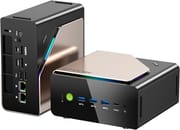
The chassis is two-tone black and brushed gold, 6.06 x 5.94 x 2.9 inches, and weighs just over 2 pounds. That is bigger than a budget box, though it still sits on a desk or VESA mounts behind a monitor with the bracket in the box. The aluminum shell gives the dual-fan cooling system thermal mass, and GMKtec tuned that cooling with three power profiles: Silent at 35W, Balanced at 54W, and Performance at 80W. Display output runs over HDMI 2.1 and DisplayPort 1.4 for up to 8K, USB4 handles fast peripherals, and the OCuLink connector feeds an external graphics card.
The Intel Core Ultra 9 285H is Arrow Lake’s mobile flagship: 16 cores split into 6 performance, 8 efficiency, and 2 low-power. It pairs with integrated Intel Arc 140T graphics and a separate NPU. Multiple reviewers confirmed the system runs 32-billion parameter LLMs locally on the 64GB RAM configuration at around 15 tokens per second with models like DeepSeek. The Arc 140T handles 1080p medium settings, with Forza Horizon 5 hitting 88 FPS and Cyberpunk 2077 managing a playable 58 FPS.
Two 2.5 Gigabit Ethernet ports run on Realtek RTL8125BG controllers, enough for NAS projects or networked workflows (a NAS build that wants 10GbE is better served by the Minisforum MS-01). Wireless is Intel’s AX201 at WiFi 6, with no WiFi 6E or 7 at this price. The front panel carries three USB-A 3.2 ports and a USB-C with DisplayPort Alt Mode; the rear adds two USB-A 2.0 ports, the USB4 connector, and separate 3.5mm headphone and microphone jacks.
Reviewer Insights

Lon.TV’s Perspective
Lon.TV took the machine apart on camera and showed the internal layout. He praised the triple M.2 slot arrangement and the quality of the cooling solution, noting fan noise stayed between 32-39 dB even under sustained load. “This is one of the quieter high-performance mini PCs I’ve tested,” he observed while running benchmark comparisons. His teardown confirmed the dual SO-DIMM slots for RAM expansion and highlighted the thoughtful internal cable management. He recommended it for buyers who prioritize expandability and don’t mind the larger footprint.
Level1Techs’ Perspective
Level1Techs reviewed it as a workstation and worked through the BIOS options. They warned that the OCuLink port is not hot-pluggable, meaning you must power down completely before connecting or disconnecting external GPUs. “This is a critical detail that could save you from damaging expensive hardware,” they noted emphatically. The unlocked BIOS allows for tweaking power limits and enabling features that other manufacturers lock down. Their testing focused on developer workloads and virtualization scenarios where the 16-core processor excelled. The review also noted how close the Core Ultra 285H runs to its desktop namesake and clocked the dual-fan cooling at a quiet 32 to 39 dB even under load; the only nitpicks were the Realtek (rather than Intel) NICs and a front USB-C port that is not USB4.
NotebookCheck’s Assessment
According to NotebookCheck, it earns a 75% score with praise for its performance-per-volume ratio but criticism for the cooling system’s noise at full load. Their measured power draw of just 7W at idle demonstrates efficient low-load operation, though gaming pushed consumption to 70-75W. They specifically noted the fan speed control only adjusts in rough 20% increments, limiting fine-tuning options. The review highlighted the elegant black and gold design aesthetic while pointing out the substantial plastic content in the chassis construction.
TechRadar’s Take
TechRadar awarded 4 out of 5 stars, calling the EVO-T1 a “Core Ultra mini PC with class to spare.” Reviewer Mark Pickavance emphasized the 99 TOPS AI capability as the feature that positions this device for the local AI market. He rated the build quality highly and described the brushed aluminum finish as premium in hand. The main criticism centered on the processor being designed for laptops rather than desktop duty, though he acknowledged this is standard for the mini PC category. “If you want the latest Intel hardware and can accept the higher-than-normal price, this is a classy piece of gear,” he concluded.
WCCFTech’s Analysis
WCCFTech gave the EVO-T1 their Innovative Award, calling it the “strongest Arrow Lake Mini PC tested” at the time of review. Their benchmark suite showed Cinebench 2024 multi-core scores of 1101 and Geekbench 6 multi-core reaching 15,887. Gaming benchmarks at 1080p demonstrated the Arc 140T’s capabilities with F1 24 hitting 69 FPS at high settings. They measured peak temperatures of 97C under stress testing but noted the system remained acceptably quiet during typical use. At $999 for the tested 64GB/1TB configuration, they felt the value was solid given the comprehensive feature set.
Customer Reviews
Across 22 ratings on Amazon, the GMKtec EVO-T1 averages 4.6 stars, with about 72 percent leaving five stars and the rest split between four and three stars (no one- or two-star reviews are listed). Owners who use it as a small workstation or homelab box are the happiest: Raff, a verified buyer running the Ultra 9 285H configuration, wrote “This is one very nice mini PC” and reported it handling Proxmox with many VMs and containers around the clock while staying quiet. Reviewers repeatedly call out the generous port selection and the Oculink port for an external GPU; one verified buyer, Lanier Davies, attached his to an external Nvidia card “via Oculink” for AI video work, and Shivors, a verified three-star reviewer, noted that adding storage was as simple as opening the back and sliding in an SSD.
Shivors summed up the machine as “a good machine with a few trade-offs,” pointing to the integrated graphics as the limit for demanding gaming and video editing. Two verified buyers in Japan flagged Wi-Fi problems: one described the connection becoming unstable after a few hours and suspected interference from the metal cover, and another warned that the wireless tops out at Wi-Fi 6, both saying a wired connection sidestepped the issue. A couple of reviewers mentioned slow support replies, and one Canadian buyer felt it was “Not as fast as you would expect.”
Read more owner reviews on Amazon.
A Workstation Box for AI and Creative Work
The Core Ultra 9 285H, 99 TOPS of AI acceleration, triple M.2 storage expansion, and OCuLink external GPU support (a feature shared with the more compact GMKtec EVO-X1) suit developers, content creators, and people running models locally. Dual 2.5GbE networking, a 128GB RAM ceiling, and VESA mounting cover deployments from home offices to studios.
Buyers after a pure gaming machine or an inexpensive office PC should look elsewhere. The price and the chassis size only make sense when the 16 cores, the memory ceiling, and the OCuLink port will get used.
Starry Hope’s Mini PC Comparison Chart lines the EVO-T1 up against alternatives from Beelink, Minisforum, and other manufacturers.
Frequently Asked Questions
Can the GMKtec EVO-T1 run local AI models and LLMs?
Yes. The 99 TOPS of combined acceleration comes from the Intel Core Ultra 9 285H’s CPU, integrated Arc 140T GPU, and dedicated NPU. Reviewers ran 32-billion parameter models like DeepSeek at roughly 15 tokens per second on 64GB of DDR5, and the RAM ceiling of 128GB leaves room for larger models.
Is the OCuLink port hot-pluggable for external GPUs?
No, the OCuLink Gen4x4 port is not hot-pluggable. You must completely power down the system before connecting or disconnecting an external GPU to avoid potential hardware damage. This is an important consideration when planning your eGPU workflow.
How many monitors can the GMKtec EVO-T1 support?
The EVO-T1 supports up to four displays simultaneously through its HDMI 2.1 port, DisplayPort 1.4, USB4 with video output, and front USB-C with DisplayPort Alt Mode. HDMI 2.1 supports up to 8K at 60Hz or 4K at 144Hz resolution.
What is the maximum RAM and storage capacity?
The EVO-T1 supports up to 128GB of DDR5-5600 RAM via its two SO-DIMM slots. For storage, the three M.2 2280 NVMe slots (all PCIe 4.0 x4 speed) can accommodate up to 12TB total when using 4TB drives in each slot.
How loud is the cooling system during normal use?
Reviewers measured fan noise between 32-39 dB under typical workloads. Three power modes (Silent at 35W, Balanced at 54W, Performance at 80W) trade noise against output, and heavy sustained loads in Performance mode are audible.
Can I mount the GMKtec EVO-T1 behind my monitor?
Yes, the EVO-T1 includes a VESA mounting bracket in the box for attaching behind compatible monitors. At 2.09 pounds, it’s light enough for most VESA mount setups, though you should verify your monitor arm can handle the additional weight.
What gaming performance can I expect from the integrated graphics?
The Intel Arc 140T integrated GPU provides playable 1080p gaming at medium settings. Benchmarks show Forza Horizon 5 at 88 FPS, F1 24 at 69 FPS on high settings, Cyberpunk 2077 at 58 FPS with upscaling, and Metro Exodus with ray tracing at around 45 FPS. For demanding games at higher settings, the OCuLink port enables external GPU expansion.