
ACEMAGIC M1 (Ryzen 7 6800H)
Updated on

Note: The ACEMAGIC M1 with Ryzen 7 6800H is no longer in production. ACEMAGIC now ships the M1 chassis with a Ryzen 7 7735HS (a Rembrandt-R refresh that uses the same Radeon 680M graphics in 24GB / 512GB and 24GB / 1TB configurations). Buyers shopping the current M1 lineup may want the Intel-based ACEMAGIC M1 or a comparable AMD option from Starry Hope’s Mini PC Comparison Chart.
The AMD Ryzen 7 6800H build launched into the budget mini PC market. Unlike its Intel-powered siblings, this variant used AMD’s Zen 3+ architecture with integrated Radeon 680M graphics, which gives it stronger GPU performance for light gaming and creative work. The DDR5 memory paired well with the Radeon 680M’s appetite for bandwidth. Launch prices started under $300 for a machine with 8 cores, 16 threads, and enough connectivity for a workstation setup.
Pros and Cons
| Pros | Cons |
|---|---|
| Radeon 680M delivers GTX 1650-class gaming performance | Dual-channel RAM is required for full GPU performance |
| DDR5 RAM provides bandwidth for integrated graphics | Some units ship in a single-channel configuration |
| Launch prices started under $300 | Thermal throttling possible under sustained heavy loads |
| Triple 4K display support via HDMI, DP, and USB-C | Drivers are not always available on ACEMAGIC’s own site |
| 2.5GbE networking for NAS and homelab use | Support response times can be slow |
| Upgradeable RAM (64GB max) and dual storage options |
ACEMAGIC M1 (Ryzen 7 6800H) Comparison Chart
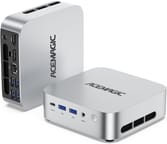 ACEMAGIC M1 (Ryzen 7 6800H) | ACEMAGIC M1 (Ryzen 7 6800H) | ACEMAGIC M1 (Ryzen 7 6800H) | |
| Price | List Price: Amazon Prices: | List Price: Amazon Prices: | List Price: Amazon Prices: |
| Version | 16GB/512GB | 16GB/1TB | 32GB/1TB |
| Performance Rating | 4.8 | 4.8 | 5.2 |
| Operating System | Windows 11 Pro | Windows 11 Pro | Windows 11 Pro |
| Processor | Octa-core 3.20 Ghz (max 4.70 Ghz) AMD Ryzen 7 6800H | Octa-core 3.20 Ghz (max 4.70 Ghz) AMD Ryzen 7 6800H | Octa-core 3.20 Ghz (max 4.70 Ghz) AMD Ryzen 7 6800H |
| GPU | Integrated AMD Radeon 680M | Integrated AMD Radeon 680M | Integrated AMD Radeon 680M |
| RAM | 16 GB DDR5 | 16 GB DDR5 | 32 GB DDR5 |
| Internal Storage | 512 GB | 1 TB | 1 TB |
| Dimensions width x length x thickness | 5.05 x 5.05 x 1.5 inches (128.27 x 128.27 x 38.1 mm) | 5.05 x 5.05 x 1.5 inches (128.27 x 128.27 x 38.1 mm) | 5.05 x 5.05 x 1.5 inches (128.27 x 128.27 x 38.1 mm) |
| Weight | 1.18 lbs (0.54 kg) | 1.18 lbs (0.54 kg) | 1.18 lbs (0.54 kg) |
| WiFi | Wi-Fi 6 (802.11ax) | Wi-Fi 6 (802.11ax) | Wi-Fi 6 (802.11ax) |
| Bluetooth | Bluetooth 5.2 | Bluetooth 5.2 | Bluetooth 5.2 |
| Ethernet | 1 Ethernet port at 2.5 Gbps | 1 Ethernet port at 2.5 Gbps | 1 Ethernet port at 2.5 Gbps |
| HDMI | 1 Full-Size HDMI Port | 1 Full-Size HDMI Port | 1 Full-Size HDMI Port |
| DisplayPort | 1 DisplayPort (1.4) | 1 DisplayPort (1.4) | 1 DisplayPort (1.4) |
| VGA | No VGA Ports | No VGA Ports | No VGA Ports |
| USB Ports | 6 USB 3, 1 USB-C USB-C supports DisplayPort Alt Mode for triple 4K display output | 6 USB 3, 1 USB-C USB-C supports DisplayPort Alt Mode for triple 4K display output | 6 USB 3, 1 USB-C USB-C supports DisplayPort Alt Mode for triple 4K display output |
| Thunderbolt Ports | No | No | No |
| OCuLink | No | No | No |
| Internal SATA Ports | No SATA ports | No SATA ports | No SATA ports |
| Card Reader | No Card Reader | No Card Reader | No Card Reader |
| Headphone Jack | combo | combo | combo |
| Fanless | No | No | No |
| VESA Mount | Yes | Yes | Yes |
| In the Box | ACEMAGIC M1, Power Adapter, User Manual, VESA Mount Bracket with Screws, HDMI Cable | ACEMAGIC M1, Power Adapter, User Manual, VESA Mount Bracket with Screws, HDMI Cable | ACEMAGIC M1, Power Adapter, User Manual, VESA Mount Bracket with Screws, HDMI Cable |
| Expandability | RAM upgradeable to 64GB DDR5, storage expandable via M.2 NVMe and 2.5-inch SATA bay | RAM upgradeable to 64GB DDR5, storage expandable via M.2 NVMe and 2.5-inch SATA bay | RAM upgradeable to 64GB DDR5, storage expandable via M.2 NVMe and 2.5-inch SATA bay |
Related Mini PCs
-
 ACEMAGIC K1 (Intel Core i5-12600H)The Intel version of ACEMAGIC's K1 pairs the 12-core Core i5-12600H with triple 4K output, seven…
 -
 ACEMAGIC K5 (Ryzen 5 PRO 7640HS)The AMD build of ACEMAGIC's 5-inch K5 chassis pairs a six-core Zen 4 Ryzen 5 PRO 7640HS and Radeon…
 -
 ASUS NUC 14 ProThe ASUS NUC 14 Pro pairs Intel Core Ultra processors with a toolless chassis, two DDR5 SODIMM…
 -
 FIREBAT F1The FIREBAT F1 puts an 8-core Ryzen 7 H 255 and Radeon 780M graphics in a 5-inch square chassis…
 -
 GEEKOM A6The GEEKOM A6 pairs an AMD Ryzen 7 6800H with Radeon 680M graphics, USB4, 2.5GbE, and two M.2 slots…
 -
 HP Elite Mini 805 G8HP's 1-liter Elite Mini 805 G8 pairs a 6-core AMD Ryzen 5 PRO 5650G with DDR4 memory, dual M.2…
Eight Zen 3+ cores with Radeon 680M graphics
The AMD variant shares the same compact 5x5x1.5 inch chassis as the Intel version but swaps the internals for AMD’s mobile platform. The Ryzen 7 6800H brings eight Zen 3+ cores with boost clocks up to 4.7GHz, providing strong multi-threaded performance for productivity workloads. Its integrated Radeon 680M graphics carries 12 RDNA2 compute units and outperforms Intel’s Iris Xe by a wide margin, so this build handles esports titles at playable framerates and light creative work that would struggle on the Intel M1.
The Radeon 680M’s performance scales dramatically with memory bandwidth, so buyers should verify their unit ships with a dual-channel RAM configuration. Single-channel setups suffer a severe performance penalty, particularly in graphics-intensive tasks. The DDR5 platform supports upgrades to 64GB, and the 2.5-inch SATA bay adds capacity beyond the single M.2 2280 NVMe slot for anyone building a media server or a local file store.
Connectivity matches the Intel version: HDMI, DisplayPort 1.4, and USB-C with DisplayPort Alt Mode enable triple 4K display configurations. Six USB-A 3.0 ports handle peripherals, while 2.5 Gigabit Ethernet suits network-intensive applications. WiFi 6 and Bluetooth 5.2 cover wireless, and the included VESA mount bracket allows behind-monitor installation for clean desk setups.
Driver downloads and thermal headroom
ACEMAGIC’s own site does not always carry the M1’s drivers, and support tickets can wait. Tech-savvy users comfortable with driver management and OS reinstallation will find these minor, but buyers expecting Apple or Dell-level support infrastructure should factor them into their purchasing decision.
The thermal design handles typical workloads effectively, but the 45W TDP Ryzen 7 6800H can push the compact chassis to its limits under sustained all-core loads. Expect thermal throttling during extended rendering or compilation tasks, which reduces peak performance in those scenarios.
Stronger graphics than the Intel builds, now off the shelf
The Radeon 680M gave this build stronger graphics than the Intel M1 variants, which suited light gaming and media playback. The DDR5 memory and upgradeable storage gave it room to grow.
ACEMAGIC has since retired the 6800H configuration and now ships the same chassis with a Ryzen 7 7735HS. The 7735HS is a Rembrandt-R refresh: same 8 cores, 16 threads, same Radeon 680M graphics, with marginally higher clocks. The dual-channel RAM dependence, thermal behavior, port selection, and cooling quirks carry over to the new SKU.
The Intel-based ACEMAGIC M1 covers the i9-13900HK and i9-11900H variants, and Starry Hope’s Mini PC Comparison Chart sets either one against other mini PCs. ACEMAGIC also builds outside the M1 chassis; see our ACEMAGIC Retro X5 coverage.
Frequently Asked Questions
What processor and graphics does the AMD ACEMAGIC M1 use?
The Ryzen 7 6800H, with 8 cores, 16 threads, and boost clocks up to 4.7GHz. Graphics come from the integrated Radeon 680M and its 12 RDNA2 compute units, which is a large step up from Intel’s Iris Xe.
Can the AMD ACEMAGIC M1 handle gaming?
Yes. The Radeon 680M integrated graphics delivers performance comparable to a dedicated GTX 1650, so esports titles and casual games run smoothly at 1080p with appropriate settings. AAA games at high settings will struggle, though many modern titles are playable with reduced quality settings.
Why is dual-channel RAM important for this system?
The Radeon 680M GPU shares system memory, so memory bandwidth sets the ceiling on graphics performance. Dual-channel DDR5 provides roughly double the bandwidth of single-channel, which means dramatically higher frame rates in games. Some units may ship with a single-channel configuration, so verify before purchase.
How does the AMD M1 compare to the Intel M1?
Choose Intel for pure productivity and AMD for balanced productivity with light gaming. The Intel versions (i9-13900HK and i9-11900H) offer stronger single-threaded CPU performance and use proven DDR4 memory. The Ryzen 7 6800H provides substantially better integrated graphics performance via Radeon 680M and uses newer DDR5 memory, typically at lower prices.
What storage and RAM upgrades are possible?
RAM goes up to 64GB using DDR5 SO-DIMM modules. Storage expands through the M.2 NVMe slot (2280 form factor) and a 2.5-inch SATA bay. Both RAM slots and storage bays are user-accessible.
How many displays can the AMD ACEMAGIC M1 support?
Three, at 4K and 60Hz. The outputs are HDMI, DisplayPort 1.4, and USB-C with DisplayPort Alt Mode.