
MINISFORUM M1-1295
Updated on

The MINISFORUM M1-1295 puts a desktop-class Intel Core i9-12950HX into a compact CNC-machined aluminum chassis. The 16-core, 24-thread HX chip gives it multi-threaded throughput closer to a workstation than to a typical mini PC, which suits heavy CPU work in a small footprint. Two SO-DIMM slots take up to 96GB of RAM, above the 64GB MINISFORUM lists as the official maximum.
Pros and cons
| Pros | Cons |
|---|---|
| Desktop-class i9-12950HX with 16 cores and 24 threads | Integrated graphics only, not suitable for gaming |
| Two SO-DIMM slots take 96GB, past the 64GB official spec | Memory is DDR4, a generation behind DDR5 |
| Two M.2 2280 PCIe 4.0 slots, up to 8TB total | Can get loud under sustained heavy workloads |
| Triple 4K output via HDMI 2.1, DisplayPort 1.4, and USB-C | No Thunderbolt or USB4 port |
| CNC-machined aluminum chassis under 2.5 pounds | Two of the four Type-A ports are USB 2.0 |
| Internal SATA and USB 3.0 headers, plus a VESA bracket in the box | Amazon listings under this model number now show a different MINISFORUM machine |
Related Videos
MINISFORUM M1-1295 Comparison Chart
 MINISFORUM M1-1295 | |
| Price | List Price: $549 Amazon Prices: |
| Version | 32GB/1TB/Intel Core i9-12950HX |
| Performance Rating | 6.0 |
| Operating System | Windows 11 Pro |
| Processor | Sixteen-core 2.30 Ghz (max 5.00 Ghz) Intel Core i9-12950HX |
| GPU | Integrated Intel UHD Graphics |
| RAM | 32 GB |
| Internal Storage | 1 TB |
| Dimensions width x length x thickness | 7.68 x 7.6 x 2.04 inches (195.07 x 193.04 x 51.82 mm) |
| Weight | 2.47 lbs (1.12 kg) |
| WiFi | Wi-Fi 6E (802.11ax) |
| Bluetooth | Bluetooth 5.2 |
| Ethernet | 1 Ethernet port at 2.5 Gbps |
| HDMI | 1 HDMI Port |
| DisplayPort | 1 DisplayPort |
| VGA | No VGA Ports |
| USB Ports | 2 USB 2.0, 2 USB 3, 1 USB-C |
| Thunderbolt Ports | No |
| OCuLink | No |
| Internal SATA Ports | 1 SATA port |
| Card Reader | No Card Reader |
| Headphone Jack | separate |
| Fanless | No |
| VESA Mount | Yes |
| In the Box | Mini PC, 120W power adapter (19V / 6.32A), VESA bracket, user manual |
| Expandability | RAM: 2x DDR4 SO-DIMM slots (max 96GB tested, 64GB official), Storage: 2x M.2 2280 PCIe 4.0 NVMe slots, 1x internal SATA header, 1x internal USB 3.0 header |
Related Mini PCs
-
 MINISFORUM M1 ProThe MINISFORUM M1 Pro is a compact aluminum mini PC sold in two CPU tiers: the 14-core Intel Core…
 -
 MINISFORUM UM880 PlusThe MINISFORUM UM880 Plus puts an AMD Ryzen 7 8845HS with Radeon 780M graphics in a 5-inch cube,…
 -
 Beelink EQR7The Beelink EQR7 pairs an AMD Ryzen 7 7735U with a built-in power supply, dual Gigabit Ethernet,…
 -
 Beelink SER5 MAX (Ryzen 7 7735HS)The Beelink SER5 MAX pairs an 8-core Ryzen 7 7735HS and Radeon 680M graphics with 24GB of LPDDR5,…
 -
 BOSGAME M4The BOSGAME M4 pairs an AMD Ryzen 7 8745HS with 32GB of DDR5, an OCuLink port for an external GPU,…
 -
 BOSGAME P3 LiteThe BOSGAME P3 Lite pairs an AMD Ryzen 7 6800H and Radeon 680M graphics with dual 2.5G Ethernet,…
Sixteen cores, 96GB of headroom, and triple 4K output

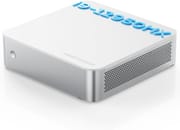
The flat aluminum shell measures 7.68 x 7.60 x 2.04 inches and weighs just under 2.5 pounds, with a plain top face that recalls Apple’s Mac Mini. Every port sits on the rear panel, so nothing breaks up the front. The CNC machining leaves tight seams at the edges.
The Intel Core i9-12950HX combines 8 performance cores and 8 efficiency cores for a total of 16 cores and 24 threads, with boost clocks reaching up to 5.0 GHz. That covers video encoding, 3D rendering, virtualization, and software compilation in a chassis that fits behind a monitor. The 32GB of DDR4-3200 RAM can be upgraded to 96GB across the two SO-DIMM slots, and How_RV’s teardown confirms 96GB works despite the official 64GB maximum specification.
The rear panel carries HDMI 2.1 (4K@60Hz), DisplayPort 1.4 (4K@144Hz), and USB-C with DisplayPort Alt Mode, which together drive three 4K displays. The 2.5 Gigabit Ethernet port uses a Realtek RTL8125 controller, while WiFi 6E and Bluetooth 5.2 handle wireless connectivity. Four USB Type-A ports sit alongside them, and inside the case there is a SATA header for adding a drive, an extra USB 3.0 header, and a 1x PCIe slot.
Reviewer Insights

Independent hands-on coverage of this machine is thin. Several videos that surface for it are AI-narrated summaries set over MINISFORUM marketing renders, and the only teardown comes from How_RV.
How_RV_going to do it? provides a detailed teardown of the M1-1295. The reviewer calls it “a great mini PC” that is “a little bit more spacious than the other ones,” confirms that 96GB of RAM works despite the official 64GB spec, and shows the internal SATA and USB 3.0 headers plus a 1x PCIe slot. He is clear that “it is not the best for gaming as it is” because of the integrated graphics, but rates it a smooth, capable productivity machine that runs “very good, very smooth.”
Buy it for CPU throughput, skip it for graphics work
The i9-12950HX runs 16 cores at up to 5.0 GHz, the memory ceiling reaches 96GB, and two PCIe 4.0 slots leave room to grow, at a $549 list price. Anyone who needs dedicated GPU power should look elsewhere, and the fan is audible once the load stays high.
Amazon listings under this model number have been relisted as a different MINISFORUM model (the M1 Lite, on a Core Ultra 5 125U), so confirm you are buying the i9-12950HX version before ordering. The Mini PC Comparison Chart lists its specs alongside the rest of the catalog.
Frequently Asked Questions
Can the MINISFORUM M1-1295 support more than 64GB of RAM?
Yes. MINISFORUM officially specifies 64GB as the maximum, but How_RV’s teardown confirms 96GB of DDR4 running in the machine. The two SO-DIMM slots are what make that possible.
Is the MINISFORUM M1-1295 good for gaming?
It is not designed for gaming. Intel UHD integrated graphics can handle basic games and older titles at low settings but will struggle with modern AAA games. The 16-core CPU is where the machine’s strength sits, so productivity and professional workloads are the better fit.
How many displays can the MINISFORUM M1-1295 support?
Up to three 4K displays run at once, through HDMI 2.1 (4K@60Hz), DisplayPort 1.4 (4K@144Hz), and USB-C with DisplayPort Alt Mode.
What storage expansion options does the M1-1295 offer?
Two M.2 2280 PCIe 4.0 NVMe slots hold up to 8TB between them. An internal SATA header takes a 2.5-inch drive as well, with the right cable.
Is the MINISFORUM M1-1295 noisy during operation?
Light and moderate workloads stay reasonably quiet, but the cooling fan becomes more audible during heavy CPU tasks. If near-silent operation is a priority, this is not the machine for it under sustained load.
Does the M1-1295 support VESA mounting?
Yes. A VESA mounting bracket ships in the box, so the machine can hang behind a monitor or under a desk instead of taking up desk space.
What operating system comes with the MINISFORUM M1-1295?
Windows 11 Pro comes pre-installed. The hardware is standard Intel, so most Linux distributions run on it without special work.