

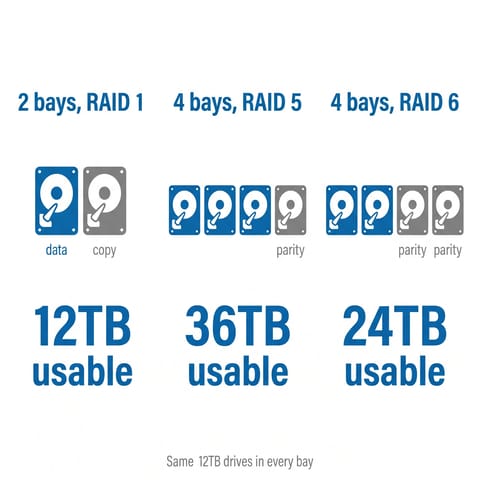
A four-bay NAS gives you three times the usable space of a two-bay box with the same drives. With four identical drives in RAID 5, three drives’ worth of space holds data and the fourth drive’s worth holds parity, so the array survives one drive failure. Put the same drives in a two-bay box with RAID 1 and you get one drive’s worth of space.
Every price below is the list price for the box alone, diskless, as of late October 2026. Drives are extra, and four NAS-grade hard drives are a large part of the total cost, so price them before you pick a box.
The five 4-bay NAS picks at a glance
| Model | List price | CPU | Network | M.2 slots | Memory | Video transcoding | Software |
|---|---|---|---|---|---|---|---|
| UGREEN DXP4800 Plus | $656.99 | Intel Pentium Gold 8505 (2022) | 10GbE + 2.5GbE | 2x PCIe 4.0 | 8GB DDR5, max 64GB | Intel Quick Sync | UGOS Pro |
| UGREEN DXP4800 GT | $559.99 | AMD Ryzen Embedded R2514 (2022) | 2x 10GbE | 2x PCIe 3.0 x2 | 8GB DDR4, max 64GB, ECC capable | Radeon Vega, HDR tone mapping in Plex untested | UGOS Pro |
| Synology DS925+ | $700.00 | AMD Ryzen V1500B (2018) | 2x 2.5GbE | 2x, Synology SSDs only | 4GB ECC DDR4, max 32GB | None | DSM 7.3 |
| TerraMaster F4-425 Plus | $649.99 (N150), $509.99 (N95) | Intel N150 (2025) or N95 | 2x 5GbE | 3x PCIe 3.0 x1 | 16GB DDR5 (N150), max 32GB | Intel Quick Sync | TOS 7 |
| AOOSTAR WTR Pro 5825U | $379.00 barebone | AMD Ryzen 7 5825U (2022) | 2x 2.5GbE | 2x PCIe 3.0 x4 | None included, max 64GB | Radeon Vega, no HDR tone mapping in Plex | None, bring your own |
None of these chips is new. The newest is the Intel N150 from early 2025, and the Synology’s V1500B belongs to a family AMD launched in 2018. NAS makers use embedded and older laptop chips because they idle at low power and are cheap, and for file serving, photo backup, and a handful of containers, any of them is enough. The chip starts to matter when you want Plex to convert 4K video on the fly or want to run several virtual machines.
UGREEN DXP4800 Plus pairs 10GbE with Quick Sync transcoding
UGREEN NASync DXP4800 Plus
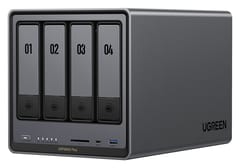
Editor's ChoiceThe DXP4800 Plus lists at $656.99. Its Pentium Gold 8505 has one performance core and four efficiency cores, scores about 9,000 on PassMark’s CPU test, and includes Intel’s Quick Sync video engine. Plex’s own tone-mapping documentation lists Intel processors from Kaby Lake onward for hardware HDR-to-SDR conversion on Linux and NAS servers, so a 4K HDR movie can play on an older TV or a phone without washed-out colors. Plex needs a Plex Pass subscription for hardware transcoding; Jellyfin does it for free.
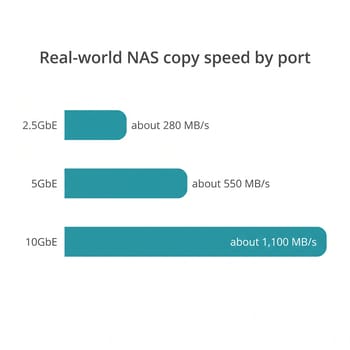
One 10GbE port and one 2.5GbE port come on the board, so a desktop with a 10GbE card can copy files at around 1,100 MB/s once the drive array can keep up. The operating system lives on its own 128GB SSD, which leaves the four bays and two PCIe 4.0 M.2 slots free for data and gives TrueNAS or Unraid a separate drive to install on. Memory starts at 8GB of DDR5 and goes to 64GB across two slots, and there is no drive compatibility list: any SATA drive or NVMe SSD works.
UGREEN’s software has less depth than Synology’s. Simon Handby at ITPro wrote that “UGOS Pro is extremely user-friendly, and generally quite capable, but it doesn’t have the depth you might expect from, say, Synology Disk Station Manager,” and counted 29 apps in its App Center. Plex installs through Docker rather than as a one-click package. Under a long, heavy load, KitGuru saw the CPU reach 100 degrees Celsius and the fan get loud, and measured about 24 watts at idle with four hard drives installed. The memory UGREEN labels “ODECC” is the on-die error correction built into every DDR5 chip, not ECC memory modules.
UGREEN DXP4800 GT costs less and adds a second 10GbE port
UGREEN NASync DXP4800 GT
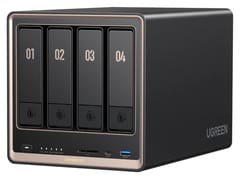
Best ValueThe DXP4800 GT launched in June 2026 and lists at $559.99, about $97 below the DXP4800 Plus. For that money it has two 10GbE ports, an AMD Ryzen Embedded R2514 that accepts ECC memory modules, and two bays that also take U.2 NVMe SSDs. Alastair Jennings at TechRadar edited video straight off it over 10GbE and called it “the best-value 4-bay NAS with 10GbE networking that I have seen yet.” PCWorld gave it an Editors’ Choice award and measured 25 watts at idle with the drives asleep and 40 to 42 watts in normal use.
The Radeon Vega graphics transcode H.264 and H.265 for Plex, but Lon.TV’s tests of AMD’s Vega-based chips found that “hardware tone mapping is not supported on these chips,” so HDR movies look washed out when Plex converts them (Lon.TV did not test the R2514 itself). The 8GB memory module in the box is not ECC, so you have to buy ECC modules to get the protection, and a single module runs in single-channel mode. The OS sits on a 64GB eMMC chip soldered to the board, which makes a TrueNAS or Unraid install less straightforward than on the DXP4800 Plus. The two M.2 slots also run at PCIe 3.0 x2, about 2GB/s per SSD, against PCIe 4.0 on the DXP4800 Plus.
Those limits matter less when your library is mostly SDR video or your TVs play HDR files directly, and in that case the GT is the better value. It is also the only box here that can link two machines at full 10GbE speed at once without a switch.
Synology DS925+ has the strongest backup software
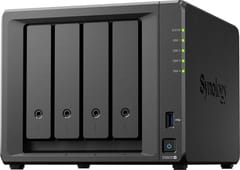
Synology DiskStation DS925+
Best for BackupsThe DS925+ runs DSM, Synology’s operating system. Its Hyper Backup app makes versioned, encrypted backups of the NAS to a USB drive, another NAS, or cloud storage. Active Backup for Business backs up Windows and Mac computers to the NAS, and Active Backup for Microsoft 365 does the same for Microsoft 365 accounts, both with no per-seat fee. Synology Photos, Synology Drive, and Snapshot Replication have years of fixes behind them. For a home or small office that wants a backup appliance and does not want to maintain Docker containers, none of the other four boxes ships with a comparable backup suite.
Its chip is the oldest of the five, and its network ports tie the WTR Pro’s as the slowest. The Ryzen V1500B has no graphics engine, so Plex and Jellyfin transcode on its four CPU cores, which are too slow for 4K HEVC. The two 2.5GbE ports are the network ceiling for the life of the box, because it has no PCIe slot or network upgrade slot. Memory starts at 4GB of ECC DDR4 and tops out at 32GB. Dong Knows Tech found that “Its network throughput is generally limited by the 2.5Gbps ports,” and measured about 730 watt-hours per day with four hard drives, an average of about 30 watts.
Drive support is better than at launch. Synology’s DSM 7.3 release in October 2025 restored storage-pool creation with third-party hard drives and 2.5-inch SATA SSDs, so WD Red and Seagate IronWolf drives work in the four bays. The two M.2 slots still take only Synology-listed NVMe SSDs for new pools and caches, per Synology’s drive compatibility policy. Synology’s cheaper four-bay, the DS425+, uses a Celeron J4125 from 2019 with 2GB of memory; that is a step down from the DS925+ in both CPU and memory. Our UGREEN vs Synology comparison covers the software gap in more detail.
TerraMaster F4-425 Plus has 5GbE and a cheaper N95 version
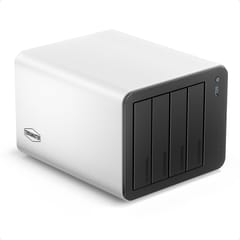
The F4-425 Plus comes in two versions in the same aluminum case. The N150 model lists at $649.99 with 16GB of DDR5, and the N95 model lists at $509.99 with 8GB of DDR4. Both have two 5GbE ports, three M.2 NVMe slots, and Intel Quick Sync for Plex and Jellyfin, and both run TerraMaster’s TOS 7 or a third-party system such as Unraid. TOS includes TRAID, which mixes drive sizes in one array the way Synology’s SHR does.
A 5GbE port carries about 500 to 550 MB/s, roughly double a 2.5GbE port, and it falls back to 2.5GbE or 1GbE on an older switch. The limits are the M.2 slots, which get one PCIe 3.0 lane each and top out just under 1,000 MB/s, the single memory slot, and the lack of a PCIe slot. Mark Pickavance at TechRadar wrote that “A few niggles, like the feet that fall off, suggest this product was rushed to market,” while Rob Andrews at NASCompares measured about 13 watts at idle with three SSDs and no hard drives.
At list price the N150 model costs within $10 of the DXP4800 Plus, which has a faster CPU and a 10GbE port, so the N150 version is mostly a sale-price buy. The N95 model at $509.99 is the cheapest box here that ships with its own NAS software, though running more than a few containers on it calls for a memory upgrade.
AOOSTAR WTR Pro 5825U has the fastest CPU and no software
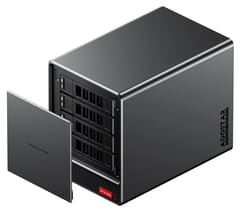
The WTR Pro 5825U is a barebone four-bay box with an eight-core, 16-thread Ryzen 7 5825U, a laptop chip from 2022 with a PassMark score of about 18,350, double the DXP4800 Plus. It lists at $379.00 with no memory, no SSD, and no NAS software. Add two DDR4 SO-DIMMs and an NVMe drive for the operating system, then install TrueNAS, Unraid, Proxmox, or a Linux distribution yourself. In return you get enough CPU for several virtual machines and containers at once, two M.2 slots at PCIe 3.0 x4, and two 2.5GbE ports.
The drive bays are not hot-swappable, so you have to power down to replace a failed drive, and Rob Andrews at NASCompares found the trays hard to use: “Trying to get a hard drive out of these trays is incredibly difficult.” Andrews measured 31 to 32 dBA at idle with four drives, and NotebookCheck measured 37 to 38 dB(A) at idle with no hard drives installed. There is no vendor app store, phone backup app, or remote-access service, and 10GbE means adding a USB adapter or giving up an M.2 slot to a network card.
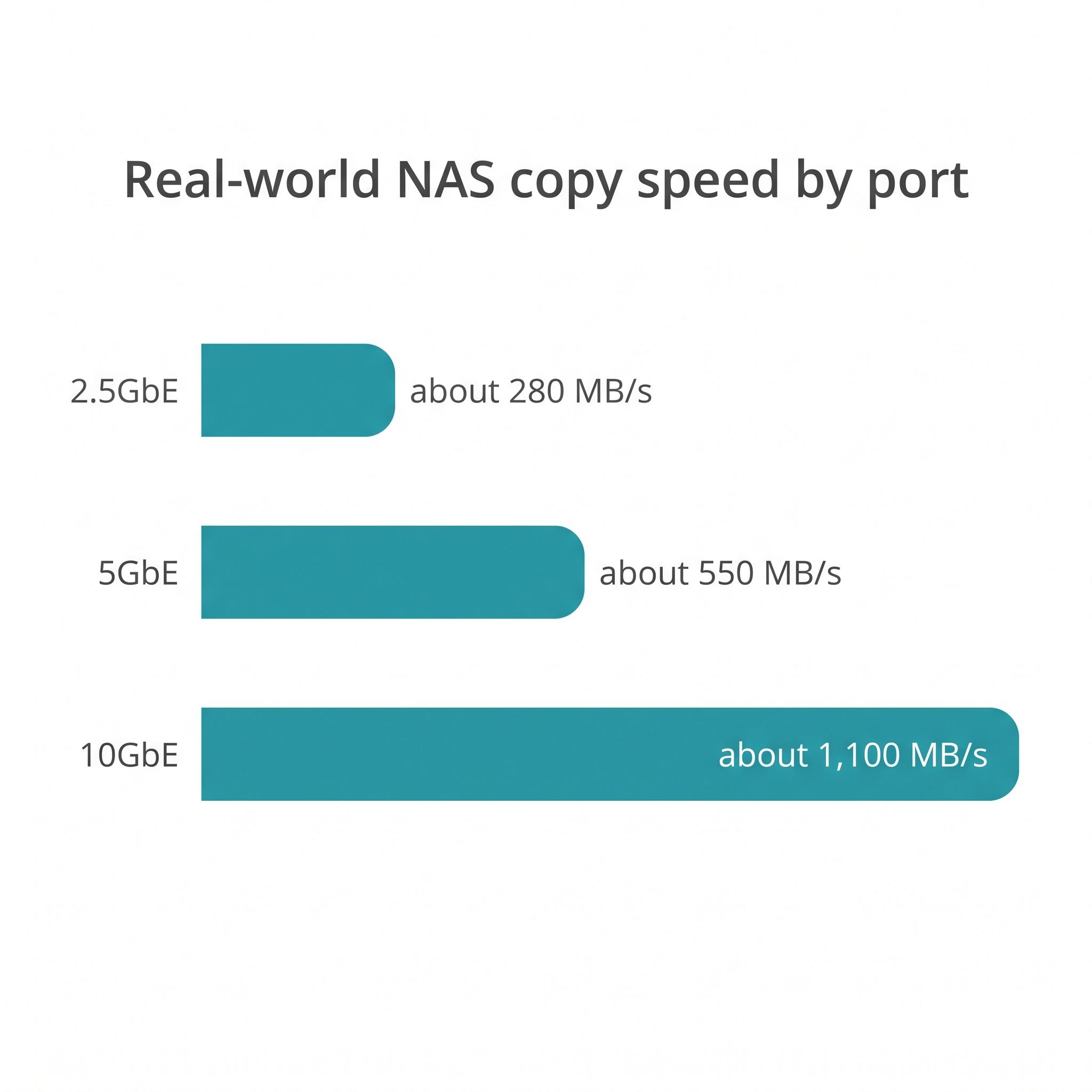
Network speed limits file copies more than the CPU does
A 2.5GbE port moves about 280 MB/s in practice. That is enough to stream any video file, back up phones, and serve a family’s documents, and it is about as fast as a single hard drive. Four hard drives in RAID 5 can read faster than that, so a 2.5GbE port becomes the bottleneck the moment you copy a large folder of photos or video from a desktop. A 10GbE port raises the ceiling to about 1,100 MB/s, and 5GbE sits in between.
Faster ports only help if the rest of the path matches. A 10GbE NAS needs a 10GbE card or adapter in the computer and either a 10GbE switch or a direct cable between the two. If your router and switch are gigabit, every box here runs at about 110 MB/s until you upgrade them. Our article on 10GbE versus 2.5GbE for a home NAS works through when the upgrade pays off. The DS925+ has no way to add a faster port later, and the WTR Pro has no built-in route to 10GbE short of a USB adapter or an M.2 network card that gives up an SSD slot, while the two UGREEN boxes have 10GbE built in.
RAID 5 or RAID 6 on four drives
With four drives, RAID 5 gives you three drives of usable space and survives one failure. RAID 6 gives you two drives of usable space and survives two failures. The case for RAID 6 is the rebuild: when a drive fails, the NAS has to read every sector of the other three to rebuild the fourth, which can take a day or more on large drives, and a second failure during that window loses the array in RAID 5. NASCompares’ guide treats RAID 5 as reasonable for small arrays and leans toward RAID 6 as drives grow.
For a typical home NAS with four drives of 8TB to 16TB, RAID 5 plus a separate backup is a reasonable choice, and RAID 6 is the safer one if you can give up the space. Either way, RAID is not a backup. It keeps the NAS running after a drive dies; it does nothing about a deleted folder, ransomware, a failed power supply, or a fire. Keep a second copy of anything you care about on a USB drive, another NAS, or cloud storage.
Who should buy which
| If you want | Buy |
|---|---|
| A Plex or Jellyfin server that handles 4K HDR | UGREEN DXP4800 Plus |
| Two 10GbE ports or ECC memory at the lowest price | UGREEN DXP4800 GT |
| Backups of PCs, Macs, and Microsoft 365 with little maintenance | Synology DS925+ |
| The lowest price with vendor software included | TerraMaster F4-425 Plus (N95) |
| TrueNAS, Unraid, or Proxmox on an eight-core CPU | AOOSTAR WTR Pro 5825U |
If four bays already looks tight, the Minisforum N5 Air is a five-bay box that lists at $535.00 barebone, with an eight-core Ryzen 7 255, 10GbE plus 5GbE, and a PCIe slot. The UGREEN DXP480T Plus goes the other way, with four M.2 slots and no drive bays, for silent all-flash storage. Our NAS comparison chart lists every model side by side with filters for bays, network speed, and transcoding, and for readers still deciding whether a dedicated NAS box is worth it, our guide to using a mini PC as a NAS covers the other route.


