
TerraMaster F4-425 Plus
Published on

The TerraMaster F4-425 Plus is a 4-bay NAS for home backups, photo libraries, a Plex or Jellyfin server, and a few Docker containers, sold without drives. The main model pairs an Intel N150 with 16GB of DDR5, three M.2 NVMe slots, and two 5GbE ports in an aluminum case, and it runs TerraMaster’s TOS or a third-party system such as Unraid. Its limits are single-lane M.2 slots, no PCIe slot for a 10GbE card, and no ECC memory. It launched in October 2025 at $569.99. TerraMaster’s store now sells the N150 model for $649.99 and a newer Intel N95 model with 8GB of DDR4 for $509.99.
Pros and cons
| Pros | Cons |
|---|---|
| Two 5GbE ports, double the speed of 2.5GbE | No PCIe slot, so no internal route to 10GbE |
| Three M.2 NVMe slots for SSD cache or a separate SSD pool | Each M.2 slot runs at PCIe 3.0 x1, just under 1,000 MB/s |
| Intel N150 with Quick Sync for Plex and Jellyfin transcoding | Non-ECC memory in a single SO-DIMM slot |
| 16GB of DDR5 on the N150 model, upgradable to 32GB | The N95 model ships with 8GB of DDR4 |
| Aluminum shell, tool-less trays, about 13 W idle with SSDs | TOS setup and monitoring screens are less polished than Synology DSM |
| Unraid, Proxmox, and Debian installs work | The HDMI port shows a terminal only, not video |
Related Videos
TerraMaster F4-425 Plus Comparison Chart
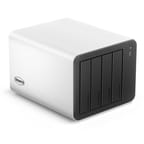 TerraMaster F4-425 Plus | TerraMaster F4-425 Plus | |
| Price | List Price: $649.99 Amazon Prices: Loading prices... | List Price: $509.99 Amazon Prices: Loading prices... |
| Version | Intel N150, 16GB DDR5, diskless | Intel N95, 8GB DDR4, diskless |
| Drive Bays | 4 x 3.5-inch SATA (2.5-inch compatible) Hot-swap, tool-less trays | 4 x 3.5-inch SATA (2.5-inch compatible) Hot-swap, tool-less trays |
| M.2 Slots | 3 x M.2 NVMe, cache or storage pool PCIe 3.0 x1 each | 3 x M.2 NVMe, cache or storage pool PCIe 3.0 x1 each |
| Max Raw Capacity | 120 TB | 120 TB |
| Included Drives | None (diskless) | None (diskless) |
| System Drive | none (TOS installs on the drives) | none (TOS installs on the drives) |
| Processor | Quad-core 3.60 Ghz Intel Processor N150 | Quad-core 3.40 Ghz (max 3.40 Ghz) Intel Processor N95 |
| Hardware Transcoding | Yes (Intel Quick Sync (UHD Graphics)) | Yes (Intel Quick Sync (UHD Graphics)) |
| RAM | 16 GB DDR5 SO-DIMM Max 32 GB, 1 slot Non-ECC SO-DIMM; DDR5 on-die ECC only | 8 GB DDR4 SO-DIMM Max 16 GB, 1 slot DDR4 non-ECC; no published max |
| ECC Memory | No (DDR5's built-in on-die ECC only) | No |
| Network Ports | 2 x 5GbE RJ45 | 2 x 5GbE RJ45 |
| PCIe Slot | No | No |
| Expansion Unit | None; USB DAS units mount as external drives | None; USB DAS units mount as external drives |
| Operating System | TOS 7 | TOS 7 |
| Third-Party OS | Yes (Owners run Unraid, Proxmox, and Debian) | Yes (Owners run Unraid, Proxmox, and Debian) |
| File Systems | Btrfs, ext4 (external drives also EXT3, NTFS, FAT32, HFS+) | Btrfs, ext4 (external drives also EXT3, NTFS, FAT32, HFS+) |
| USB Ports | 3 USB 3, 1 USB-C Front: USB-A. Rear: 2x USB-A, USB-C. All 10Gbps | 3 USB 3, 1 USB-C Front: USB-A. Rear: 2x USB-A, USB-C. All 10Gbps |
| Thunderbolt Ports | No | No |
| HDMI | 1 | 1 |
| WiFi | No | No |
| Idle Power | 13.3 W (N150 model, three M.2 SSDs, no hard drives) | 13.3 W (N150 model, three M.2 SSDs, no hard drives) |
| Load Power | 63 W (N150 model, four 7,200 rpm HDDs, read and write, NASCompares) | 63 W (N150 model, four 7,200 rpm HDDs, read and write, NASCompares) |
| Power Supply | 90W external | 90W external |
| Noise | 33 dB (low fan mode; 43 dB peak in heavy disk use, NASCompares) | 33 dB (low fan mode; 43 dB peak in heavy disk use, NASCompares) |
| Dimensions width x length x thickness | 7.1 x 8.6 x 5.9 inches (180.34 x 218.44 x 149.86 mm) | 7.1 x 8.6 x 5.9 inches (180.34 x 218.44 x 149.86 mm) |
| Weight | 6.4 lbs (2.91 kg) | 6.4 lbs (2.91 kg) |
| Released | October 2025 at $569.99 | October 2025 at $569.99 |
| In the Box | Main unit, 90W power adapter, Cat 6 Ethernet cable, M.2 screws. | Main unit, 90W power adapter, Cat 6 Ethernet cable, M.2 screws. |
| Expandability | RAM to 32GB on the N150 model (one SO-DIMM). 3x M.2 NVMe, PCIe 3.0 x1. No PCIe slot. | One SO-DIMM (DDR4). 3x M.2 NVMe, PCIe 3.0 x1. No PCIe slot. |
Four drive bays, three M.2 slots, and one memory slot
The F4-425 Plus measures about 7.1 x 8.6 x 5.9 inches and weighs 6.4 pounds without drives. The outer shell is extruded aluminum, while the front panel and the four trays are plastic. Each 3.5-inch drive snaps into a push-lock tray without screws, and each bay takes a SATA hard drive or 2.5-inch SSD, hot-swappable. TerraMaster rates the bays for 30TB drives, or 120TB raw across four bays; its 144TB figure adds three 8TB M.2 SSDs. With four drives the unit supports RAID 5, RAID 6, RAID 10, and TerraMaster’s TRAID, which mixes drive sizes in the way Synology’s SHR does. There is no separate system drive: TOS installs onto the data drives.
The three M.2 2280 NVMe slots and the SO-DIMM slot sit under the aluminum shell, which slides off after you remove four screws on the bottom. TOS can use the M.2 drives as a cache for the hard drives or as their own storage pool, and TerraMaster supports RAID 5 across the three SSDs. Each slot gets one PCIe 3.0 lane, so a single drive tops out just under 1,000 MB/s, and cheaper Gen 3 SSDs are the sensible fit. The N150 model ships with 16GB of DDR5 on one non-ECC SO-DIMM and takes up to 32GB. DDR5 chips carry on-die ECC, but the N150 does not support ECC modules, so there is no end-to-end error correction.
The N95 model, added in 2026, keeps the same case, bays, M.2 slots, and network ports. It swaps the CPU for an Intel N95 and ships with 8GB of DDR4 in the one slot. TerraMaster does not publish a memory maximum for it; Intel rates the N95 for 16GB. Plan on a memory upgrade if you want to run more than a few containers on that model.
Network, ports, and power

Networking is two 5GbE RJ45 ports on separate PCIe 3.0 lanes. One link carries about 500 to 550 MB/s, and link aggregation or SMB Multichannel across both ports raises TerraMaster’s rated ceiling to 1,020 MB/s. A 5GbE port also runs at 2.5GbE or 1GbE on an older switch. There is no PCIe slot or network upgrade slot, so 10GbE on a single link is not an option. The front has a 10Gbps USB-A port; the rear has two more 10Gbps USB-A ports, a 10Gbps USB-C port, and an HDMI port that TerraMaster limits to terminal output.
In the NASCompares tests, the N150 model drew about 13.3 W at idle with three SSDs and no hard drives, 55 W at idle with four 7,200 rpm hard drives, and 61 to 63 W under combined read and write load. Power comes from a 90 W external adapter. A single 120mm fan at the rear pulls air across the drives, and TerraMaster rates the unit at 20.9 dB(A) with four drives in standby.
The Intel N150, TOS, and third-party systems

The N150 is a four-core, four-thread Intel chip from early 2025 with a 3.6GHz boost, a 6 W TDP, and a PassMark score of about 5,500. That covers file sharing, backups, photo indexing, several Docker containers, and a light VM, and its UHD Graphics handle H.264 and H.265 transcoding for Plex, Emby, and Jellyfin through Quick Sync. The N95 in the cheaper model is the older 2023 chip in the same class, with a PassMark score of about 5,300. Neither chip suits several VMs at once.
TOS is TerraMaster’s own system; the N150 model shipped with TOS 6, and TerraMaster now lists TOS 7. It includes TRAID, Btrfs snapshots, HyperLock-WORM protection against file changes, a photo app with face and object recognition, Docker with Portainer, VirtualBox, and backup tools such as CloudSync and TerraSync. There is no built-in media center app; Plex, Emby, and Jellyfin install from the app center. Reviewers found the setup flow and some monitoring screens less polished than Synology DSM. Owners on Amazon report running Unraid, Proxmox, and Debian with ZFS in place of TOS. For how UGREEN and Synology handle the same software choices, see UGREEN vs Synology.
Reviewer Insights
Every review below tested the N150 model with 16GB of RAM. They agree on the aluminum build, the 5GbE ports, and the three M.2 slots, and they split on how much TOS lags Synology and QNAP.
NASCompares
Rob Andrews of NASCompares made the idle and load power measurements above. He noted that the HDMI port has limited use under TOS and becomes usable under a third-party OS. His cons list includes TOS 6, whose interface and apps remain less polished than the top NAS platforms, and missing extras such as drive locks and redundant fans. His summary: “Altogether, the F4-425 Plus arrives as one of the most fully featured mid-tier NAS options available in 2025, combining strong hardware, software maturity, and quiet, power-efficient design.”
TechRadar
“A few niggles, like the feet that fall off, suggest this product was rushed to market,” wrote Mark Pickavance of TechRadar. He listed the price, the storage capacity, the 5GbE ports, and the 16GB of RAM as pros, and the four-core CPU, no ECC option, no USB4 or Thunderbolt, and trays without locks as cons. His verdict: “With the Intel N150 processor, this NAS is a notch above the basic F4-425, but it can’t match machines with enough PCIe lanes to offer Thunderbolt and 10Gbe LAN ports.”
TechPowerUp
TechPowerUp compared it with the older F4-424 and focused on the build: “The outer housing is a solid piece of extruded aluminium, into which a metal ‘skeleton’ slots, to which some plastic parts and the motherboard is attached. It really causes the entire product to feel a lot more premium, making for a more solid feeling chassis.” It also noted the newer processor, faster Ethernet, and extra NVMe slot over the F4-424, and listed the silver and black color scheme as a matter of taste.
Hardware Busters
Hardware Busters summed up the hardware this way: “The hybrid F4-425 Plus has a lot going for it: dual 5GbE networking, high-speed USB ports, support for multiple NVMe SSDs alongside four SATA drive bays, and a capable Intel N150 processor paired with 16GB of DDR5 RAM.” It lists TerraMaster’s rated power draw of 14 W with four Seagate 4TB drives in hibernation and 45 W during reads and writes, and it describes the HDMI port as limited to system logs.
CGMagazine
Brendan Frye of CGMagazine scored it 9 out of 10 in February 2026 and wrote: “It stands out as one of the most versatile hybrid NAS systems available at its price point.” His cons were the single-lane NVMe slots, the shared pool of PCIe 3.0 lanes that can limit bandwidth when every subsystem is busy, and the lack of ECC support.
Fstoppers
Darren J. Spoonley of Fstoppers, a photographer setting up his first NAS, wrote in March 2026: “From the moment I opened the box to seeing the drive appear in Finder on my Mac took roughly ten minutes.” He added: “Over my 5GbE network, the transfer speeds settled around 410 to 420 MB/s. For my workflow, that is more than sufficient.” His complaints were a TNAS mobile app that slows down in very large folders, a TOS interface that looks dated, and fiddly drive trays.
Elevated Systems
Elevated Systems ran four WD Red Plus drives in TRAID with Gen 3 SSDs as cache. Over a single 5GbE link from a Mac Studio, he measured 472 MB/s reads and 262 MB/s writes with the cache, and 294 MB/s reads and 153 MB/s writes straight to the hard drive pool. Jellyfin played a 4K HEVC Dolby Vision movie with hardware decoding at about 3% CPU. He found that “The trays are solid, and the toolless design makes drive installs fast and painless,” but the automatic setup put his SSDs and hard drives into one pool: “While the setup process works, it’s far from polished. The auto mode is too aggressive and the manual steps lack guidance.” His unit also shipped with a cable ticking against the fan, which he fixed by opening the case and moving it.
Ryan Adapts
Ryan Adapts ran four hard drives with no NVMe and praised the aluminum shell, saying “this thing has some weight to it, especially once you put four hard drives in it.” He found the front panel and trays are the only plastic parts and that thicker drives need care to line up in the bays. A Zorin OS VM install took over an hour on his low-RPM drives. Rebuilding the pool as RAID 10 did not make it much faster, and he concluded that the NAS’s processing power was the limit for that install.
Customer Reviews
The N150 model holds 4.0 out of 5 stars from 53 ratings on Amazon. Chad Hester boots TOS and his apps from an M.2 SSD and wrote that with Plex “so long as it isn’t transcoding the CPU usage is around 2-3% usage.” Ephemeral runs Unraid on it and wrote that “installing Unraid was fast and easy,” while noting that the bay nearest the M.2 slots runs warmer during heavy writes. Jimmy T, who came from a QNAP, installed Debian with ZFS instead of TOS and took a star off because “the software looks worse than what competitors had ten years ago.”
The low ratings center on software and support. Jose E. Roman rated it one star, calling the native Docker setup “horrible” and the warranty registration system “dismal and buggy,” and Nathaniel M. reported that the “unit froze after 3 weeks.” The N95 model has only a handful of ratings so far. Read more owner reviews on Amazon.
A 4-bay NAS with 5GbE and three M.2 slots, without 10GbE or ECC
The F4-425 Plus fits a household or small office that wants RAID 5 across four drives, an SSD pool or cache for containers, and a network link faster than 2.5GbE without paying for 10GbE. Pick the N150 model with 16GB if you plan to run Docker or a VM; the N95 model with 8GB suits plain file storage unless you add memory. If you need 10GbE, a PCIe slot, or ECC memory, look at a more expensive 4-bay unit.
Frequently Asked Questions
What is the difference between the N150 and N95 versions of the F4-425 Plus?
The original model has an Intel N150 with 16GB of DDR5, upgradable to 32GB. The newer, cheaper model has an Intel N95 with 8GB of DDR4. Both have four drive bays, three M.2 NVMe slots, and two 5GbE ports in the same aluminum case. The two chips perform about the same, so the choice comes down to 16GB of DDR5 versus 8GB of DDR4.
Does the TerraMaster F4-425 Plus support ECC memory?
No. TerraMaster ships a non-ECC SO-DIMM, and neither the Intel N150 nor the N95 supports ECC modules. The DDR5 in the N150 model has on-die ECC inside each chip, which does not correct errors between the memory and the CPU.
Can the F4-425 Plus transcode video for Plex or Jellyfin?
Yes. The Intel UHD Graphics in both chips support Quick Sync, which Plex, Emby, and Jellyfin use for H.264 and H.265 hardware transcoding. TOS has no built-in media center, so you install one of those apps from the app center.
Can I install Unraid or another OS on the F4-425 Plus?
Yes. Owners report running Unraid, Proxmox, and Debian on it. TOS installs on the data drives rather than a separate system drive, so a third-party system usually boots from a USB stick or an M.2 SSD. The HDMI port then works as a local console.
Can the F4-425 Plus be upgraded to 10GbE?
Not internally. It has no PCIe slot. The two 5GbE ports can be bonded with link aggregation or used together with SMB Multichannel for up to 1,020 MB/s, which needs a switch or a computer with multi-gig ports.
How much power does the TerraMaster F4-425 Plus use?
NASCompares measured about 13.3 W at idle with three SSDs and no hard drives, 55 W at idle with four 7,200 rpm hard drives, and 61 to 63 W under combined read and write load. The unit uses a 90 W external power adapter.