

UGREEN makes the better hardware and Synology makes the better software. The hardware gap has grown since UGREEN’s NASync line reached retail in 2024. Synology’s 2025 refresh put an AMD chip from 2018, with no graphics engine, in the DS925+ and its larger Plus models and kept 2.5GbE ports, while UGREEN moved to 10GbE across most of its range. UGREEN’s UGOS Pro software has improved with regular updates, and Synology spent much of 2025 in a drive-compatibility fight with its own customers before it lifted the rule for hard drives.
UGREEN prices are its store list prices in September 2026. UGREEN has raised several list prices since launch, so its store numbers sit above the launch prices you will see in older reviews.
The model pairs and what they cost per bay
Both brands sell diskless boxes, so the fairest price comparison is list price divided by drive bays. Synology does not print prices on its US site, so its numbers below are launch prices from reviews, or a typical retail range where no launch price was published.
| Tier | UGREEN | List | Per bay | Synology | Price | Per bay |
|---|---|---|---|---|---|---|
| 2-bay | DXP2800 | $439.99 | $220 | DS225+ | $399.99 | $200 |
| 4-bay | DXP4800 Plus | $729.99 | $183 | DS925+ | $639.99 | $160 |
| 4-bay | DXP4800 GT | $699.99 | $175 | DS425+ | about $500 to $550 | about $130 |
| 5/6-bay | DXP6800 Pro | $1,209.99 | $202 | DS1525+ | $799.99 | $160 |
| 8-bay | DXP8800 Plus | $1,509.99 | $189 | DS1825+ | about $1,150 to $1,250 | about $150 |
Per bay, Synology is cheaper at every tier, and that is its main advantage on hardware. The $729.99 DXP4800 Plus carries a 12th-generation Intel Pentium Gold 8505, 8GB of DDR5 that expands to 64GB, a 10GbE port plus a 2.5GbE port, and a 128GB system SSD. The $639.99 DS925+ carries an AMD Ryzen V1500B, a chip AMD launched in 2018, with 4GB of DDR4 that tops out at 32GB, and two 2.5GbE ports with no way to add 10GbE. The $90 difference buys a newer CPU, twice the starting memory, four times the network speed on one port, and a working media engine.
UGREEN runs regular sales on its own store. In late September 2026 the DXP4800 Plus was $656.99 and the DXP4800 GT was $559.99 there, which closes most of the per-bay gap.
UGREEN’s Intel chips transcode video and Synology’s Ryzen models cannot
When Plex or Jellyfin streams a 4K HEVC movie to a phone on a cellular connection, or to a TV that cannot play the file’s format, the server has to re-encode it on the fly. A chip with a built-in video engine does that with little effort. A chip without one does it on the CPU cores, and a four-core embedded CPU runs out of headroom quickly.
Every Intel-based UGREEN NASync model has Intel Quick Sync, the video engine in Intel’s integrated graphics. That covers the N100 in the DXP2800, the Pentium Gold 8505 in the DXP4800 Plus, and the Core i5-1235U in the DXP6800 Pro and DXP8800 Plus. The AMD-based DXP4800 GT uses a Ryzen Embedded R2514 with Radeon Vega graphics, and PCWorld’s review confirms that “integrated Vega graphics handle the hardware transcoding of H.264 and H.265.” Plex requires a Plex Pass subscription for hardware transcoding; Jellyfin does it for free.
Synology’s Ryzen models have no graphics engine at all. The DS925+, DS1525+, and DS1825+ all use the Ryzen V1500B, and NASCompares’ DS1825+ review states that “the processor lacks integrated graphics, which means it does not support hardware-accelerated video transcoding.” These boxes can still run Plex and stream to clients that play the file as it is (direct play), which covers many home setups with a modern TV. The limit shows up when a remote viewer or an older device forces a transcode of 4K HEVC.
The DS225+ and DS425+ use the Celeron J4125 from 2019, which has Intel graphics with Quick Sync. A Plex forum thread on the DS425+ has run for months with owners reporting that hardware transcoding fails on it, and the fix that works as of early 2026 is a community-written script, not an update from Synology or Plex. Synology also removed its own Video Station app and server-side HEVC processing in DSM 7.2.2 in 2024, so DSM leaves video playback to Plex, Jellyfin, or the client device. On r/synology, a December 2025 thread titled “Highly considering moving to a UGREEN NAS from Synology in order to have a more functional Plex Media server” drew 117 comments. If you are building a Plex or Jellyfin server and want it on a mini PC instead of a NAS, our guide to setting up a mini PC as a Plex server covers the same Quick Sync question from that side.
UGREEN builds in 10GbE from the four-bay Plus up
A 2.5GbE port moves roughly 280 to 295 MB/s in practice, which is faster than a single hard drive but slower than a four-drive RAID array reading in parallel or any NVMe SSD. A 10GbE port raises that ceiling to about 1,100 MB/s. Streaming video and phone photo backup stay far below 2.5GbE, while copying a 200GB video project to the NAS or restoring a full backup can fill it.
UGREEN puts 10GbE on the board from the DXP4800 Plus upward. The DXP4800 Plus has one 10GbE port and one 2.5GbE port; the DXP4800 GT has two 10GbE ports; the DXP6800 Pro and DXP8800 Plus have two 10GbE ports plus two Thunderbolt 4 ports, which let a Mac or PC connect directly at up to 40Gb/s without a 10GbE switch. The two-bay DXP2800 has a single 2.5GbE port.
Synology’s 2025 desktop line has no built-in 10GbE at all. The DS225+ and DS425+ have one 2.5GbE port and one 1GbE port. The DS925+ has two 2.5GbE ports and no expansion slot, so it stays at 2.5GbE for life. The DS1525+ takes Synology’s E10G22-T1-Mini module, a small 10GbE card sold separately, and the DS1825+ has a PCIe slot (Gen3, running at x4) for a 10GbE or 25GbE card. On those two you can get to 10GbE, but you pay for Synology’s card on top of the box price.
Our article on 10GbE versus 2.5GbE for a home NAS works through when the faster port pays off. The DS925+ and the two-bay models of both brands have no way to add a faster port later, so decide on network speed before you buy one of them.
Third-party hard drives work on both, but Synology still locks M.2
When Synology launched the 2025 Plus models, starting with the DS925+ in the US on June 4, 2025, it required drives from its own compatibility list, which in practice meant Synology-branded drives. NASCompares’ DS925+ review found the box “will not initialise DSM without Synology-branded HDDs or drives on the compatibility list.” After months of complaints from owners and reviewers, on October 8, 2025, Synology released DSM 7.3, which restored installation and storage-pool creation with third-party hard drives and 2.5-inch SATA SSDs on the 2025 DiskStation Plus models.
The walk-back did not cover M.2 NVMe SSDs. Synology’s own drive-policy page, last updated in May 2026, says unlisted M.2 NVMe SSDs in DS Plus models are “not supported” for new storage pools or cache creation; they only work if migrated from an older Synology system. Synology’s list for those slots is its own SSDs. So on a DS925+ you can fill the four bays with any WD Red or Seagate IronWolf drive you like, but the two M.2 slots take only Synology’s own NVMe drives for new pools and caches.
UGREEN has no drive list you have to follow. Any SATA hard drive or SSD works in the bays, and any M.2 NVMe SSD works in the M.2 slots as either a cache or a separate fast storage pool. One setup UGREEN owners use puts Docker apps and their databases on a mirrored pair of NVMe drives so the hard drives can spin down when nothing is being served. One owner who moved from a DS218+ to a DXP4800 Plus described that setup in a March 2026 r/UgreenNASync thread: “I run all my apps on my NVME’s in RAID 1, this means when the apps aren’t in use the hard drives can spin down and sleep.”
ECC memory comes with Synology’s DS925+ and larger models
ECC (error-correcting code) memory detects and fixes single-bit errors in RAM before they get written to disk. On a server that holds the only copy of your family photos, it is a reasonable thing to want. The DS925+, DS1525+, and DS1825+ all ship with ECC DDR4 modules.
UGREEN’s Intel models list “ODECC” on their spec sheets. That is DDR5 on-die ECC, a feature built into every DDR5 chip that corrects errors inside the memory chip itself. It does not protect data as it travels between the memory and the CPU, which is what ECC modules do, so it is not a substitute for real ECC. Treat “ODECC” on a UGREEN spec sheet as standard DDR5 behavior, not a server feature.
If you want real ECC on the UGREEN side, the DXP4800 GT is the model. Its Ryzen R2514 supports ECC SODIMMs; PCWorld’s review lists “ECC modules supported” for its two memory slots. UGREEN’s store page says the included 8GB DDR4 module is a standard non-ECC stick, so you have to buy ECC modules to get the protection.
UGREEN ships more memory. The DS225+ and DS425+ ship with 2GB and top out at 6GB, which is tight for more than a couple of Docker containers. The DS925+ ships with 4GB. Three commenters on a February 2026 r/synology thread with more than 200 replies pushed back on the idea that 4GB is enough for a home NAS; one wrote, “Running a media server, Docker containers, and a Linux Virtual Machine will use up your ram quickly.” Every UGREEN model in this comparison ships with 8GB: DDR5 on the Intel models and DDR4 on the DXP4800 GT. The four-bay and larger models take up to 64GB.
DSM is the reason to buy Synology
DSM’s best apps have no close equivalent on UGREEN. Hyper Backup makes versioned, deduplicated, encrypted backups to another NAS, a USB drive, or cloud storage. Active Backup for Business backs up Windows and Mac computers, servers, virtual machines, and Microsoft 365 or Google Workspace accounts to the NAS, free of per-seat fees. Snapshot Replication, Synology Photos, Synology Drive, and Surveillance Station have had years of fixes behind them. DSM 7.3 is a long-term support release, with maintenance updates through October 2027 and critical security fixes through October 2028, according to Synology’s software life-cycle policy.
UGOS Pro, UGREEN’s Debian-based system, covers the basics well: file sharing, a photo app with face and object recognition, a sync app, a mobile app, Docker with a good interface, and virtual machines. Its gaps are in backup and security depth. WunderTech’s comparison puts the backup gap plainly: “on the UGREEN side you’re mostly syncing your data, not backing it up,” because a deletion on the NAS can carry through to the backup destination. PCWorld’s DXP4800 GT review calls the missing full-volume encryption its “most notable shortcoming”; individual shared folders can be encrypted, whole volumes cannot. UGREEN ships regular updates, so both gaps may close.
In the same March 2026 r/UgreenNASync thread, which asked former Synology users about regrets, one who moved from a DS1621+ to a DXP4800 Plus wrote: “Hardware is great, software sucks. If the Synology software is a 100, the uGOS software is a 20. So, I installed Unraid on it and have been real happy with it.” Others in the same thread were happier with UGOS, and one described UGREEN as a “docker mainframe” where “docker solves everything.”
On r/synology, the post “Why I Chose Synology Over UGREEN” from February 2026 made the opposite case after the buyer returned a UGREEN unit: “What really made the difference for me was the software ecosystem.” The replies are split in much the same way, with one commenter summing it up as “Ugreen will give you superior hardware for the same price, Synology superior OS and app ecosystem.”
TrueNAS and Unraid install on UGREEN hardware
A UGREEN NASync box is an x86 PC with drive bays. The operating system lives on a separate internal SSD or eMMC chip, so you can install TrueNAS, Unraid, Proxmox, or plain Debian on a replacement boot drive and leave the data bays for data. UGREEN confirmed in 2024 that a third-party system does not void the hardware warranty, and its current line, as reported by Need to Know IT in August 2026, is that installing a third-party system “does not by itself change its hardware-warranty policy,” though UGREEN will not support the software and damage from modification may not be covered. The common snag is fan control: under TrueNAS or Unraid the fans may run at full speed or too slowly until you set them up yourself.
The open-OS route can also extend the hardware’s useful life. If UGOS Pro stops getting updates for your model, or never gains a feature you need, you can move to an open-source system that runs on standard x86 hardware. Synology hardware runs DSM and nothing else in any supported way, so when Synology ends DSM updates for a model, it stops getting security fixes.
Power use is close
NASCompares measured the DS925+ at about 28 watts idle, and Dong Knows Tech measured about 730 watt-hours a day with four hard drives, an average of roughly 30 watts. PCWorld measured the DXP4800 GT at 25 watts idle with the drives asleep and 40 to 42 watts in normal use. UGREEN’s own spec sheet lists the DXP6800 Pro at about 25 watts with drives in hibernation and 43 watts with drives in use.
At 30 watts around the clock and 17 cents per kilowatt-hour, a four-bay NAS costs about $45 a year to run. Our breakdown of what a server costs to run 24/7 has the math for other rates.
Pair by pair
DXP2800 vs DS225+. The DXP2800 is the better two-bay box for anything past file storage. Its N100 is several generations newer than the DS225+‘s J4125, it ships with 8GB instead of 2GB, and it has two M.2 slots where the DS225+ has none. The DS225+ costs $40 less at list and runs DSM, which makes it the better pick for a simple backup target for a couple of computers. Neither has 10GbE.
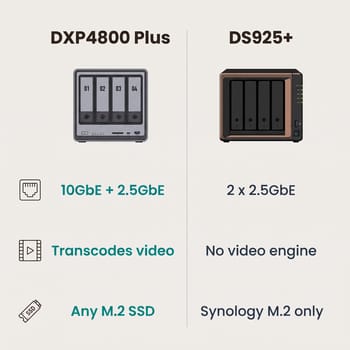
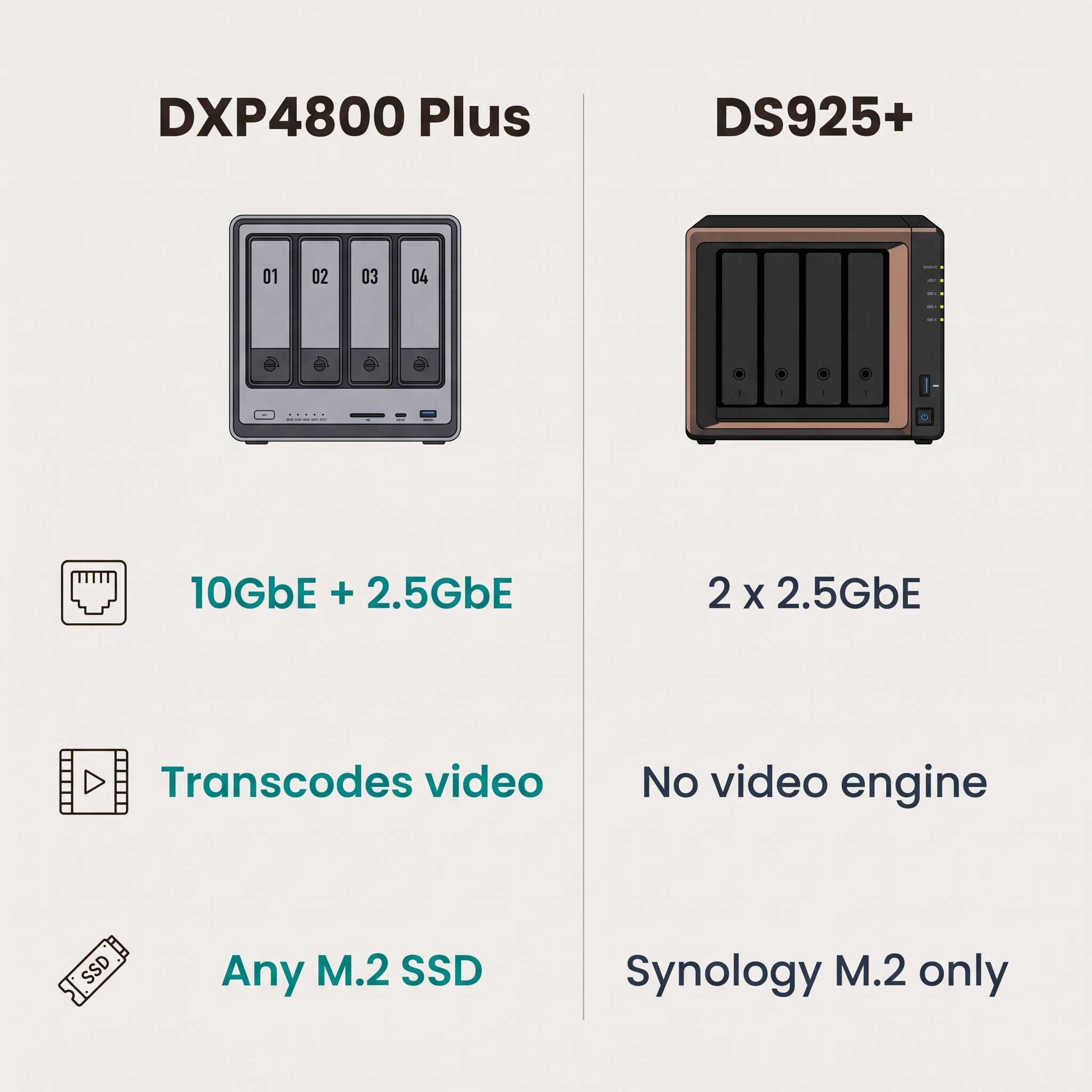
DXP4800 Plus vs DS925+. The DXP4800 Plus has the faster CPU, more memory, 10GbE, Quick Sync, and M.2 slots that take any SSD. The DS925+ has DSM, ECC memory, a lower list price, and support for Synology’s DX525 expansion unit, which adds five more bays over USB-C. Buy the DXP4800 Plus for Plex, Jellyfin, or Docker, and the DS925+ for an office that wants Active Backup to protect a handful of PCs.
DXP4800 GT vs DS425+. The DS425+ is Synology’s cheaper four-bay, with the same J4125 and 2GB of memory as the DS225+ and no expansion unit support. The DXP4800 GT costs more but adds two 10GbE ports, real ECC support, H.265 transcoding, and two bays that also take U.2 NVMe drives. If you would otherwise buy the DS425+ for price, the DS925+ is the better Synology to stretch to.
DXP6800 Pro and DXP8800 Plus vs DS1525+ and DS1825+. At these sizes Synology’s boxes cost about $40 less per bay and reach 10GbE only through an extra card. The UGREEN pair has a Core i5 with ten cores against a four-core Ryzen, dual 10GbE and Thunderbolt 4 built in, and a PCIe slot. UGREEN has also opened pre-orders for the DXP6800 Ultra and DXP8800 Ultra, with newer Intel Core 5 and Core 7 chips at higher list prices. Buyers who plan to fill eight bays and keep the box for years should check whether the Ultra has shipped before they buy.
Who should buy which
| If you want | Buy |
|---|---|
| A Plex or Jellyfin server that transcodes | UGREEN (any Intel model, or the DXP4800 GT) |
| Automated backups of PCs, Macs, and Microsoft 365 | Synology (DS925+ or larger) |
| Docker containers and self-hosted apps | UGREEN |
| 10GbE without buying an add-in card | UGREEN DXP4800 Plus or higher |
| ECC memory at the lowest list price | Synology DS925+ (ECC included) |
| ECC memory plus 10GbE | UGREEN DXP4800 GT (add an ECC module) |
| The option to run TrueNAS or Unraid later | UGREEN |
| The least time spent on setup and maintenance | Synology |
| The lowest price per bay | Synology |
If you are still deciding whether you need a dedicated NAS box at all, a small PC with external or internal drives can do much of the same work. Our guide to using a mini PC as a NAS covers that route, including the Beelink ME Mini, a compact all-flash box with six M.2 slots.

