
UGREEN NASync DXP6800 Pro
Published on

The UGREEN NASync DXP6800 Pro is a six-bay NAS for a video or photo studio, a small office, or a home lab that wants to run virtual machines next to its storage. It is UGREEN’s six-bay pick in the UGREEN vs Synology comparison. Two 10GbE ports and two Thunderbolt 4 ports come on the board, so an editing Mac or PC can plug in directly without a 10GbE switch or an add-in card. A 12th-generation Intel Core i5-1235U runs UGOS Pro, which is easy to set up but has fewer apps and storage features than Synology’s DSM. NotebookCheck called its idle power draw very high, and NotebookCheck, Android Police, and Dong Knows Tech all found its fans audible in a quiet room, so it suits an office or a closet better than a living room. It launched through Kickstarter in March 2024 at a $1,199.99 list price.
Pros and Cons
| Pros | Cons |
|---|---|
| Two 10GbE ports and two Thunderbolt 4 ports on the board | High idle power: NotebookCheck measured 36.6 to 41.9W with four hard drives |
| 10-core Core i5-1235U with Intel Quick Sync for Plex and Jellyfin | Fans are audible in a quiet room and can rev up for minutes at a time |
| PCIe 4.0 x4 slot for a network card or more SSDs | The PCIe slot is only reachable by taking the case apart |
| 128GB system SSD keeps the OS off the six data bays | UGOS Pro has fewer apps than DSM and no flexible RAID like SHR |
| RAM expands from 8GB to 64GB across two SO-DIMM slots | ”ODECC” on the spec sheet is DDR5 on-die ECC, not ECC modules |
| No drive lock; TrueNAS, Unraid, and Proxmox VE install without voiding the warranty | The i5-1235U dates from early 2022; the newer DXP6800 Ultra with a Core 5 120U now sells beside it |
UGREEN NASync DXP6800 Pro Comparison Chart
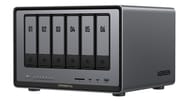 UGREEN NASync DXP6800 Pro | |
| Price | List Price: $1099.99 Amazon Prices: Loading prices... |
| Version | 8GB, diskless |
| Drive Bays | 6 x 3.5-inch SATA (2.5-inch compatible) Hot-swap, tool-less trays |
| M.2 Slots | 2 x M.2 NVMe, cache or storage pool M.2 2280 NVMe |
| Max Raw Capacity | 192 TB |
| Included Drives | None (diskless) |
| System Drive | 128GB SSD |
| Processor | Deca-core 3.30 Ghz (max 4.40 Ghz) Intel Core i5-1235U |
| Hardware Transcoding | Yes (Intel Quick Sync) |
| RAM | 8 GB DDR5 SO-DIMM Max 64 GB, 2 slots DDR5-4800; on-die ECC only |
| ECC Memory | No (DDR5's built-in on-die ECC only) |
| Network Ports | 2 x 10GbE RJ45 |
| PCIe Slot | Yes (PCIe 4.0 x4, low-profile; case must come off) |
| Expansion Unit | None |
| Operating System | UGOS Pro |
| Third-Party OS | Yes (TrueNAS, Unraid, and Proxmox VE install; UGREEN allows it) |
| File Systems | Btrfs, ext4 |
| USB Ports | 2 USB 3, 2 USB-C Front: 2x Thunderbolt 4, USB-A 10Gbps. Rear: USB-A 10Gbps, 2x USB 2.0 |
| Thunderbolt Ports | 2 |
| HDMI | 1 |
| WiFi | No |
| Idle Power | 22.4 W (No drives installed, idle (36.6 to 41.9W idle with 4x 4TB IronWolf)) |
| Load Power | 43.07 W (Drives in access, maker spec) |
| Power Supply | 250W internal |
| Noise | 34.61 dB (4 HDDs idle, NotebookCheck; up to 43 dB under heavier work) |
| Dimensions width x length x thickness | 10.2 x 11.5 x 7.9 inches (259.08 x 292.1 x 200.66 mm) |
| Weight | 13.9 lbs (6.32 kg) |
| Released | March 2024 at $1,199.99 |
| In the Box | Main unit, power cord, 2 Cat7 LAN cables, SSD thermal pads, tray keys, screws, screwdriver. |
| Expandability | RAM to 64GB (2x SO-DIMM). 2x M.2 NVMe for cache or a pool. PCIe 4.0 x4 low-profile slot. |
Drive bays, memory, and ports

The DXP6800 Pro measures about 11.5 x 10.2 x 7.9 inches and weighs about 14 pounds without drives, in a gray aluminum case with a built-in 250W power supply, so there is no external power brick. The six SATA bays take 3.5-inch drives without tools and 2.5-inch drives with the included screws, and each numbered tray has a lock with two keys in the box. UGREEN rates the bays for 32TB drives, or 192TB raw; its 208TB figure adds two 8TB M.2 SSDs. There is no drive compatibility lock, so standard Western Digital, Seagate, and Toshiba drives work, and any NVMe SSD fits the M.2 slots.
The OS lives on a separate 128GB SSD, so the box boots without any data drives installed. The two M.2 2280 slots sit with the RAM behind a cover on the base and work either as an SSD cache for the hard drive pool or as their own storage pool. Memory is one 8GB DDR5-4800 SO-DIMM, and the second slot takes the total to 64GB. The “ODECC” on UGREEN’s spec sheet is the on-die error correction inside every DDR5 chip. It does not protect data on its way between memory and the CPU the way ECC modules do.
The front panel has two Thunderbolt 4 ports at 40Gb/s, a 10Gbps USB-A port, and an SD 4.0 card reader, which lets a photographer copy a card straight to the NAS. The back has the two 10GbE ports, a second 10Gbps USB-A port, two USB 2.0 ports, an 8K-capable HDMI output, and the PCIe 4.0 x4 slot for a low-profile card. There is no Wi-Fi and no SFP+ port. The two 10GbE ports can be aggregated for 20Gb/s in total, but a single client still tops out at 10GbE. The eight-bay DXP8800 Plus shares this hardware and adds two bays.
Core i5-1235U performance, power, and noise

The Core i5-1235U is a 15W Alder Lake laptop chip from early 2022 with two performance cores and eight efficiency cores, 12 threads in total, and a 4.4GHz boost clock. Its PassMark CPU Mark is about 12,500, roughly 40 percent above the Pentium Gold 8505 in the four-bay DXP4800 Plus. That is enough for file serving to a small team, several Docker containers, a few virtual machines, and Plex or Jellyfin transcoding through Quick Sync. It is well behind current Core Ultra and Ryzen AI chips, so buyers planning a heavy virtualization host should compare it with newer boxes.
NotebookCheck measured 22.4W at idle with no drives installed and 36.6 to 41.9W at idle with four 4TB Seagate IronWolf drives, which the review called very high. UGREEN’s own figures are 24.91W with the drives in hibernation and 43.07W during drive access. Switched off, the unit draws 0.05W, or 2.39W with Wake-on-LAN enabled, and UGOS Pro can power it on and off on a schedule to cut the bill. Over a day of real use, Dong Knows Tech measured about 785Wh.
NotebookCheck called it clearly audible at 34.61 dB(A) with the hard drives idling and up to 43 dB(A) under heavier work. ITPro found the two rear 90mm fans quiet in its lab, while Android Police and Dong Knows Tech both heard them in a quiet room, and Dong Knows Tech saw them rev up for a few minutes at a time without a clear reason. The rear fans sit behind a magnetic dust filter.
Reviewer Insights
ITPro
“The DXP6800 Pro is extremely well built and for an anticipated MSRP of around £810, offers an incredible hardware specification,” wrote Dave Mitchell in his April 2024 ITPro review. Over 10GbE with four 4TB WD Red Pro drives in RAID 5, Iometer returned sequential reads of 8.9Gbit/s and writes of 6Gbit/s, and a mirrored NVMe cache raised sequential writes by 20.5 percent. To reach the PCIe slot he had to remove the feet, the rear panel, and the outer shell, and a Broadcom dual-port 10GbE card then worked without problems. He also judged it good value against Qnap: “If you want a NAS with dual integrated Thunderbolt 4 ports, the DXP6800 Pro is an absolute bargain as Qnap’s 6-bay Core i5-12400 powered TVS-h674T costs nearly three times as much.” His caution was the software of that time: “This hardware package lays a very solid foundation but the UGOS software is clearly a work in progress and has a long journey ahead of it before it can match the features offered by Qnap and Synology.”
StorageReview
For its April 2024 review, StorageReview ran the unit with six 4TB WD Red Plus drives in RAID 6. Lyle Smith wrote that “The i5 1235U chip features ten cores and 12 threads and is more akin to what one would find in a high-end workstation rather than a traditional NAS.” He praised the tool-less trays, the numbered bays, the magnetic fan filter, and the spring-assisted cover over the M.2 and RAM slots. At that time several apps were still marked coming soon, and he wrote that “UGREEN will need to quickly get these core functions released and will need to partner with other application providers to get their systems competitive with other NAS vendors who have been in the market much longer.”
Dong Knows Tech
After more than two weeks of testing, Dong Ngo gave it 7.9 out of 10 at Dong Knows Tech and wrote: “Hardware-wise, the DXP6800 Pro outperforms any Synology DiskStation server by a considerable margin.” He found it among the fastest servers he had tested over 10GbE, but a RAID 0 pair of NVMe SSDs copied more slowly than on Synology’s DS923+. A RAID 5 build took over an hour per TB of protected space. His cons were the app library (“The currently available apps are generally shallow or lacking in depth.”), no Plex package or flexible RAID, the hard-to-reach PCIe slot, and fans that rev up now and then.
Android Police
The build won over Cody Toombs, who gave it 8.5 out of 10 at Android Police in November 2024: “The shell feels like sturdy metal, and there’s a magnetic filter on the back to cover the intake fans.” He counted about twenty apps in the App Center, none from third parties, so software such as Plex has to run in Docker or a virtual machine. He also noted that UGREEN allows third-party operating systems without voiding the warranty, and he found the fans loud enough to stand out in an otherwise quiet room, which could be annoying in a home office.
NotebookCheck
The most recent review is from NotebookCheck in July 2026, on UGOS Pro 1.16, more than two years after launch. Daniel Schmidt measured a steady 9.5Gbit/s each way over 10GbE in iPerf3, and his verdict reads: “The Ugreen NASync DXP6800 Pro impresses with its powerful i5 hardware, fast dual Ethernet, and Thunderbolt 4, but lags behind established competitors in terms of software maturity and RAID features.” He found UGOS Pro much improved since launch, with an IP SAN manager and virus scanning added, but push notifications for faults did not work reliably. He also wrote: “Another positive aspect is that the device isn’t limited to UGOS Pro: Users can also install TrueNAS Scale, Unraid, Proxmox VE, or other operating systems if they wish.”
Customer Reviews
On Amazon, the DXP6800 Pro holds 4.6 out of 5 stars from 89 ratings, with 79 percent five-star and 2 percent one-star. Clintre replaced an older Synology with it for a home lab and wrote that “it runs quiet even at full load”, with UGOS Pro “easy to use, but limited in certain areas, as it is just not mature yet.” Clintre stayed on UGOS Pro and runs missing features in Docker.
Another buyer, MP, reached full 10GbE line rate with six Seagate drives but reported “significant audible vibration generated by the 6-bay chassis”, fixed with foam strips on the drive sleds. Chris Yates noted that “Power consumption is decent not negligible, and can add up over the years with 24 hours operations.” One buyer, Pw, returned the unit after days of setup trouble and wrote that the Thunderbolt connection did not show up on a Mac.
Who the DXP6800 Pro suits
The DXP6800 Pro fits a creator or small office that wants six drives, a fast direct link to one or two workstations over Thunderbolt 4 or 10GbE, and room for Docker containers and virtual machines. Because the OS sits on its own SSD and UGREEN allows other operating systems, TrueNAS, Unraid, or Proxmox can take over the whole box. An office that depends on Synology’s app catalog and SHR is better served by a DiskStation. UGREEN now also sells the DXP6800 Ultra, which keeps the six bays, dual 10GbE, and Thunderbolt 4, moves to an Intel Core 5 120U, raises the memory limit to 96GB, and costs more.
Frequently Asked Questions
Does the UGREEN DXP6800 Pro have ECC memory?
Not in the server sense. It ships with a standard 8GB DDR5 SO-DIMM, and the “ODECC” on UGREEN’s spec sheet is the on-die error correction built into every DDR5 chip. That corrects errors inside the memory chip only, not on the path to the CPU.
Can a Mac connect to the DXP6800 Pro over Thunderbolt?
The two front Thunderbolt 4 ports run at up to 40Gb/s and let a Mac or PC connect directly without a 10GbE switch. One Amazon buyer could not get the Thunderbolt link to show up on a Mac.
Can I install TrueNAS or Unraid on the DXP6800 Pro?
Yes. It is a standard x86 system with a 128GB system SSD, and TrueNAS Scale, Unraid, Proxmox VE, and OpenMediaVault can replace UGOS Pro. UGREEN allows third-party operating systems without voiding the warranty.
How much power does the DXP6800 Pro use at idle?
NotebookCheck measured 22.4W with no drives installed and 36.6 to 41.9W with four 4TB hard drives idling. UGREEN quotes 24.91W with the drives in hibernation and 43.07W during drive access.
What is the difference between the DXP6800 Pro and the DXP6800 Ultra?
The DXP6800 Ultra keeps the six bays, two M.2 slots, dual 10GbE, two Thunderbolt 4 ports, and PCIe x4 slot, but uses an Intel Core 5 120U and supports up to 96GB of RAM. It sells for more than the DXP6800 Pro.