
Synology DiskStation DS925+
Published on

The Synology DiskStation DS925+ is a four-bay NAS for homes and small offices that want Synology’s DSM software: Hyper Backup, Active Backup for Business, Synology Photos, and Synology Drive. It ships with 4GB of ECC memory and two 2.5GbE ports, and it can grow to nine bays with the DX525 expansion unit. The AMD Ryzen V1500B processor has no graphics engine, so Plex and Jellyfin cannot transcode video in hardware, and the M.2 slots accept only drives on Synology’s compatibility list for new storage pools or caches. Since DSM 7.3 in October 2025, third-party hard drives and 2.5-inch SATA SSDs work in the four main bays.
Pros and Cons
| Pros | Cons |
|---|---|
| DSM 7.3 with Hyper Backup, Active Backup, Synology Photos, and Drive | No integrated graphics, so no hardware video transcoding |
| 4GB of ECC DDR4, expandable to 32GB across two slots | M.2 pools and caches still require Synology-listed SSDs |
| Third-party hard drives and SATA SSDs supported since DSM 7.3 | Two 2.5GbE ports and no slot for a 10GbE upgrade |
| Four hot-swap bays, expandable to nine with the DX525 | DX525 connects over a 5Gbps USB-C link |
| Quad-core, eight-thread CPU for containers and light VMs | Only 4GB of memory installed; the CPU family dates to 2018 |
| Quiet fans; NASCompares found the drives make most of the noise | Synology’s DSM is the only supported operating system |
Synology DiskStation DS925+ Comparison Chart
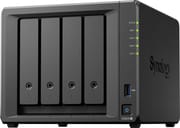 Synology DiskStation DS925+ | |
| Price | List Price: $639.99 Amazon Prices: Loading prices... |
| Version | 4GB ECC, diskless |
| Drive Bays | 4 x 3.5-inch SATA (2.5-inch compatible) Hot-swap, tool-less trays |
| M.2 Slots | 2 x M.2 NVMe, cache or storage pool Vendor-branded drives only |
| Max Raw Capacity | 96 TB |
| Included Drives | None (diskless) |
| System Drive | None (DSM installs on the data drives) |
| Processor | Quad-core 2.20 Ghz AMD Ryzen Embedded V1500B |
| Hardware Transcoding | No (No iGPU; software transcoding only) |
| RAM | 4 GB DDR4 SO-DIMM Max 32 GB, 2 slots 4GB x1 fitted; one slot free |
| ECC Memory | Yes (ECC SO-DIMM) |
| Network Ports | 2 x 2.5GbE RJ45 |
| PCIe Slot | No |
| Expansion Unit | DX525 (5 bays, USB-C) |
| Operating System | DSM 7.3 |
| Third-Party OS | No (DSM only; no supported alternative OS) |
| File Systems | Btrfs, ext4 |
| USB Ports | 2 USB 3, 1 USB-C 2x USB-A 5Gbps; USB-C is for the DX525 only |
| Thunderbolt Ports | No |
| HDMI | No |
| WiFi | No |
| Idle Power | 12.33 W (4 Synology HAT5300-12T HDDs in hibernation (maker test)) |
| Load Power | 64 W (Peak, 4 bays and SSDs filled, CPU under load, both 2.5GbE links active, NASCompares test) |
| Power Supply | 100W external adapter |
| Noise | 20.5 dB (Idle, full of Synology SATA HDDs, maker spec) |
| Dimensions width x length x thickness | 7.8 x 8.8 x 6.5 inches (198.12 x 223.52 x 165.1 mm) |
| Weight | 5 lbs (2.27 kg) |
| Released | April 2025 at $639.99 |
| In the Box | Main unit, power adapter and cord, 2 LAN cables, accessory pack. |
| Expandability | RAM to 32GB (2x DDR4 ECC SO-DIMM). 2x M.2 NVMe (Synology SSDs for pools and cache). DX525 adds 5 bays. |
Hard drives are open, M.2 SSDs are not
When the DS925+ launched in 2025, it would not install DSM unless the hard drives were on Synology’s compatibility list, which at the time listed only Synology-branded drives. Synology reversed that with DSM 7.3 on October 8, 2025: 2025 DiskStation Plus models running DSM 7.3 can install and create storage pools on third-party hard drives and 2.5-inch SATA SSDs. You can fill the four bays with WD Red, Seagate IronWolf, or Toshiba NAS drives. Synology’s drive compatibility policy for DS Plus models lists unlisted hard drives and SATA SSDs as supported for new installation and pool creation.
The two M.2 2280 NVMe slots on the underside still take only listed SSDs for new pools and caches. The same policy page lists unlisted M.2 NVMe SSDs as supported only when migrated from an existing Synology system, not for new storage pools or cache creation. The compatibility list for these slots holds Synology’s own NVMe SSDs, so an SSD cache or a fast M.2 volume means buying them. Budget for them before you count on the M.2 slots, or plan to leave the slots empty.
Ryzen V1500B, ECC memory, and no video engine

The AMD Ryzen Embedded V1500B has four cores and eight threads at 2.2GHz with a 16W TDP, and it scores about 4,500 on PassMark’s CPU Mark. That is below the Intel N100 (about 5,300) and N150 (about 5,500), and the V1000 family it belongs to launched in 2018. For file serving, backups, a handful of Docker containers, and Synology’s own apps, it has enough headroom. For media servers it is the wrong chip: it has no integrated graphics, so there is no hardware engine for Plex or Jellyfin to transcode with. Files that play directly on your TV or phone stream fine; a 4K HEVC file that a remote client needs converted has to be handled by the four CPU cores, which are too slow for that job.
The DS925+ ships with a single 4GB DDR4 ECC SO-DIMM and has a second slot, for a maximum of 32GB. Synology says multi-module setups need identical modules and recommends its own, and it will not give full warranty support for non-Synology memory. Volumes larger than 108TB need the full 32GB. The 4GB base amount is tight once you run more than a few containers or a virtual machine, so plan on a memory upgrade if you use the box for more than storage and backup.
2.5GbE ports and DX525 expansion over USB-C

The rear panel has two 2.5GbE ports, one USB 3.2 Gen 1 port, and a USB-C expansion port, with a second USB 3.2 Gen 1 port on the front. The two network ports can be combined with link aggregation or SMB multichannel for failover or more total bandwidth to several clients. There is no PCIe slot and no Synology network upgrade slot, so the DS925+ cannot move to 10GbE later. Its predecessor, the DS923+, could take Synology’s E10G22-T1-Mini card.
The USB-C port connects only to Synology’s DX525, a five-bay expansion unit that brings the total to nine bays. Synology quotes 216TB of raw capacity across nine bays with 24TB drives, or 96TB in the four internal bays. The link runs at USB 3.2 Gen 1 speed (5Gbps), so drives in the expansion unit share that bandwidth.
The case measures about 6.5 x 7.8 x 8.8 inches and weighs about 5 pounds without drives. Two 92mm fans cool it, with full-speed, cool, and quiet fan modes. Synology rates it at 20.5 dB(A) at idle with Synology hard drives installed, 37.91 watts during file access, and 12.33 watts with its four test hard drives in hibernation. Power comes from a 100W external adapter.
Reviewer Insights
NASCompares
NASCompares reviewed the DS925+ in May 2025, before DSM 7.3, so its sections on drive restrictions describe the launch rules that Synology has since relaxed for hard drives and SATA SSDs. On hardware, the review called the move from a dual-core to a quad-core, eight-thread CPU a good fit for VMs and containers, and wrote: “The continued inclusion of ECC memory (4GB, expandable to 32GB) reinforces its focus on reliability.” It also noted that “Integrated graphics processors have been phased out from this particular product family” and that Synology points media-focused buyers to the DS425+ and DS225+ instead.
The main hardware complaint was networking: “However, the removal of 10GbE upgrade options feels like a significant regression, especially as external 2.5G/5G USB network adapters are now commonplace.” On expansion, the reviewer confirmed “This USB-C provides 5 Gb/s connectivity and only supports the new DX525 expansion chassis”. In testing, the unit measured about 36 to 37 dB(A) fully idle, and “In a fully idle state, with base apps installed and the system not being accessed, the DS925+ drew approximately 28 watts.” The review also found that “Thermal performance on the DS925+ is particularly strong, especially considering the plastic enclosure.”
Dong Knows Tech
Dong Knows Tech tested the DS925+ for a couple of months and updated the review after DSM 7.3. Dong Ngo ran it with Synology drives and third-party drives: “I then tested it again using DSM 7.3, which has native support for third-party drives. In both cases, the performance remained the same.” Throughput topped out at the network ports: “Its network throughput is generally limited by the 2.5Gbps ports.” He measured about 730 watt-hours of power use per 24 hours with four hard drives, which averages about 30 watts.
The review compared the DS925+ with the DS923+ it replaces and found that “the DS925+ proved to be the same as the DS923+ in terms of real-world experience.” Out of the box, the DS925+ was faster because the DS923+ has only Gigabit ports; with its optional 10GbE card fitted, the DS923+ was faster. His verdict: “if you can live with the 2.5Gbps connection grade, which is plenty fast in most cases, the DS925+ is a solid NAS server to get.” He did not test the DX525: “I didn’t test the DS925+ (or any previous Synology Plus server) with an expansion unit”.
Customer Reviews
On Amazon, the diskless DS925+ has 4.2 out of 5 stars from 157 ratings. Kimberly Roberts, a verified buyer upgrading from a DS416Play, hesitated because of the drive restrictions, then moved her WD Red drives across and wrote, “I was surprised it just worked, was up and running again within an hour.” Nathan, also verified, runs it quietly: “I run this on cool mode, no noise at all.” He gave it four stars because of memory costs, writing, “I would have loved to take this beast to 16 gb, but you need to install matched pairs.”
The complaints are about the M.2 slots, setup, and stability. Verified buyer Christopher J. Shaker wrote, “I like the NVMe SSD slots, but they ONLY appear to support Synology drives for SSD caching, or for disk drives! That was an unwelcome surprise.” Eric, installing a mix of Seagate and WD drives, reported that “on my first attempt it failed formatting my drives as it said they were incompatible.” He fixed it by loading DSM manually during setup. Tim, who bought Synology drives to avoid compatibility problems, gave it one star: “I’ve had three lockups in four weeks requiring a hard reboot.”
Who should buy the DS925+
Buy the DS925+ if the NAS is mainly a backup target and photo library for a home or small office and you want DSM’s backup apps with ECC memory. It is the backup-first pick in our UGREEN vs Synology comparison, where the UGREEN DXP4800 Plus wins on CPU, 10GbE, and transcoding. Owners of an older Synology can move their existing drives into it.
Look elsewhere if you want a Plex or Jellyfin server that transcodes, a path to 10GbE, or freedom to use any NVMe SSD for caching or fast storage. For those jobs, a UGREEN model with an Intel chip, or Synology’s DS1525+ with its 10GbE card option, fits better. The rest of our NAS coverage is on the NAS hub.
Frequently Asked Questions
Can the Synology DS925+ use WD Red or Seagate IronWolf drives?
Yes. Since DSM 7.3 (October 8, 2025), 2025 DiskStation Plus models support installation and storage pool creation with third-party hard drives and 2.5-inch SATA SSDs. Update to DSM 7.3 or later during setup. Synology still recommends drives from its compatibility list.
Can I use any NVMe SSD in the DS925+ M.2 slots?
No. Creating an M.2 storage pool or SSD cache still requires drives on Synology’s compatibility list, which means Synology’s own NVMe SSDs. Unlisted M.2 SSDs work only when migrated from an existing Synology system.
Does the DS925+ support Plex hardware transcoding?
No. The AMD Ryzen V1500B has no integrated graphics, so Plex and Jellyfin cannot transcode in hardware. Direct play to a TV or app that supports the file format works; converting 4K HEVC on the fly falls to the CPU, which is too slow for it.
How much RAM does the DS925+ support?
It ships with 4GB of DDR4 ECC in one of two SO-DIMM slots and supports up to 32GB (two 16GB modules). Synology requires identical modules in multi-module setups and recommends its own. Volumes over 108TB need 32GB.
Can the DS925+ be upgraded to 10GbE?
No. It has two 2.5GbE ports and no PCIe or network upgrade slot. You can combine the two ports with link aggregation or SMB multichannel, but a single transfer stays near 2.5GbE speed.
How many drives can the DS925+ hold with expansion?
Nine: the four internal bays plus five in one DX525 expansion unit. The DX525 connects through the rear USB-C port at 5Gbps. The two M.2 slots are separate from that count.
How much power does the DS925+ use?
Synology rates it at 37.91 watts during file access and 12.33 watts with the hard drives in hibernation. NASCompares measured about 28 watts idle, and Dong Knows Tech measured about 730 watt-hours per day with four hard drives, an average near 30 watts.