
UGREEN NASync DXP2800
Published on

The UGREEN NASync DXP2800 is a 2-bay NAS for home backups, photo libraries, and a small media or container server, sold without drives. It pairs an Intel N100 with 8GB of DDR5, two M.2 NVMe slots, and one 2.5GbE port in a metal case, and it runs UGREEN’s UGOS Pro, or TrueNAS or Unraid, which UGREEN allows without voiding the warranty. The N100 has Intel Quick Sync, so Plex or Jellyfin can transcode video in hardware. Its limits are two drive bays (RAID 1 or RAID 0 only), one RAM slot capped at 16GB, and no PCIe slot for a faster network card. When crowdfunding opened in March 2024, the DXP2800 carried a $399 MSRP, and UGREEN’s own store now sells it for $389.99.
Pros and cons
| Pros | Cons |
|---|---|
| Intel N100 with Quick Sync for hardware video transcoding | One RAM slot, officially limited to 16GB |
| Two M.2 NVMe slots work as SSD cache or a separate SSD pool | No PCIe slot, so no route to 10GbE beyond a USB adapter |
| 2.5GbE port plus 10Gbps USB-C and USB-A on the front | Two bays mean Basic, JBOD, RAID 0, or RAID 1 only |
| Metal body, tool-less 3.5-inch trays, magnetic dust filter | UGOS Pro ships fewer apps than Synology DSM or QNAP QTS |
| UGREEN keeps the hardware warranty with TrueNAS or Unraid installed | The M.2 slots sit behind both drive trays |
| About 7 W at idle in one measured test | Owners call the setup documentation thin |
UGREEN NASync DXP2800 Comparison Chart
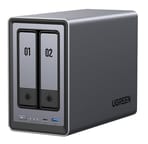 UGREEN NASync DXP2800 | |
| Price | List Price: $389.99 Amazon Prices: Loading prices... |
| Version | 8GB DDR5, diskless |
| Drive Bays | 2 x 3.5-inch SATA (2.5-inch compatible) Hot-swap, tool-less trays |
| M.2 Slots | 2 x M.2 NVMe, cache or storage pool |
| Max Raw Capacity | 64 TB |
| Included Drives | None (diskless) |
| System Drive | 32GB eMMC |
| Processor | Quad-core 3.40 Ghz (max 3.40 Ghz) Intel Processor N100 |
| Hardware Transcoding | Yes (Intel Quick Sync (UHD Graphics)) |
| RAM | 8 GB DDR5 SO-DIMM Max 16 GB, 1 slot DDR5-4800, on-die ECC only |
| ECC Memory | No (DDR5's built-in on-die ECC only) |
| Network Ports | 1 x 2.5GbE RJ45 |
| PCIe Slot | No |
| Expansion Unit | None |
| Operating System | UGOS Pro |
| Third-Party OS | Yes (Disable the BIOS watchdog first; hardware warranty stays) |
| File Systems | Btrfs, ext4 |
| USB Ports | 2 USB 3, 1 USB-C Front: USB-C and USB-A 10Gbps. Rear: USB-A 5Gbps, 2x USB 2.0 |
| Thunderbolt Ports | No |
| HDMI | 1 |
| WiFi | No |
| Idle Power | 5.24 W (One 2TB HDD in hibernation, UGREEN lab figure) |
| Load Power | 34.7 W (Peak in a CPU, RAM, and disk stress test, OCinside measurement) |
| Power Supply | 60W external (12V/5A) |
| Noise | 34.2 dB (Two IronWolf Pro 20TB HDDs in access, ComputerBase measurement) |
| Dimensions width x length x thickness | 4.3 x 9.1 x 7 inches (109.22 x 231.14 x 177.8 mm) |
| Weight | 3.5 lbs (1.59 kg) |
| Released | March 2024 at $399 |
| In the Box | Main unit, 12V/5A adapter, CAT7 Ethernet cable, tray keys, screws and screwdriver, SSD pads. |
| Expandability | RAM to 16GB (one SO-DIMM). 2x M.2 NVMe for cache or a pool. No PCIe slot. |
Two drive bays, two M.2 slots, and one memory slot
The DXP2800 measures about 4.3 x 9.1 x 7 inches. The body is powder-coated metal, while the front panel and the two drive trays are plastic. Each 3.5-inch drive clips into its tray without screws, and the trays lock with the included key; 2.5-inch drives and SSDs still need screws. Each bay takes a SATA hard drive or SSD, and UGREEN rates the unit for up to 64TB across the two bays (two 32TB drives), or 80TB counting two 8TB M.2 SSDs. With two drives the only protected layout is RAID 1, which gives you the capacity of the smaller drive; RAID 5 and RAID 6 need a unit with more bays. UGOS Pro lives on a 32GB eMMC chip, so both bays and both M.2 slots stay free for data.
The two M.2 2280 NVMe slots sit on the left side of the drive cage, so installing an SSD means pulling both drive trays first. UGOS Pro can use them as a read and write cache for the hard drives or as a separate SSD storage pool, which suits Docker containers, databases, and photo thumbnails. Memory is 8GB of DDR5-4800 on one SO-DIMM in a compartment on the bottom, and UGREEN supports a swap to a single 16GB module. UGREEN lists “ODECC” support. That is the on-die ECC built into every DDR5 chip, not ECC memory modules, and the N100 does not support ECC SO-DIMMs.
Network, ports, and power

Networking is one 2.5GbE RJ45 port, and there is no PCIe slot or proprietary network slot, so the DXP2800 has no upgrade path to 10GbE short of a USB network adapter. The front carries a 10Gbps USB-C port and a 10Gbps USB-A port for backing up external drives. The rear has a 5Gbps USB-A port, two USB 2.0 ports, the Ethernet jack, and an HDMI port that plays video from UGREEN’s Theater app at up to 4K 60Hz. A 100mm fan sits at the rear behind a magnetic dust filter, and power comes from a 12V/5A external adapter.
UGREEN’s lab measured 16.38 W with a 2TB hard drive active and 5.24 W with it hibernating. OCinside measured about 7 W at idle and a peak of 34.7 W under a combined CPU, RAM, and disk stress test. In quiet mode UGREEN rates the fan at 29 to 34 dB. After two months of use, Rack 2 Reality found it quiet with SSDs and noticeable with hard drives.
The Intel N100, UGOS Pro, and third-party systems

The N100 is a four-core, four-thread Intel chip from early 2023 with a 3.4GHz boost and a PassMark score of about 5,300. That is enough for file sharing, backups, photo indexing, a few Docker containers, and a light VM, and its UHD Graphics handle Plex or Jellyfin transcoding through Quick Sync. It is a low-power chip, though, and several containers plus a Windows VM will run into its four cores. UGREEN’s DXP2800 GT, a newer 2-bay model, moves to an AMD Ryzen Embedded chip with a 10GbE port for buyers who need faster networking.
UGOS Pro is UGREEN’s Debian-based system. It covers RAID setup, SMB and other file protocols, phone photo backup with face and object recognition, a media player app, a Docker app, and virtual machines. It ships with fewer apps than Synology DSM or QNAP QTS, and Plex and Jellyfin install as Docker containers rather than native packages. UGREEN allows TrueNAS, Unraid, and similar systems and says a third-party OS does not void the hardware warranty. NASCompares’ Unraid guide covers disabling the BIOS watchdog timer first, and because the OS sits on eMMC, a replacement system usually boots from a USB stick or an M.2 drive. For a wider look at UGOS Pro against Synology’s software, see UGREEN vs Synology.
Reviewer Insights
Docker arrived after the How-To Geek review of a pre-release unit. In 2025, Macworld and Packetswitch still found UGOS Pro behind Synology DSM and QNAP QTS on apps and features, while The Gadgeteer called it full-featured. Every review below praised the hardware.
How-To Geek
How-To Geek scored a pre-release unit 6 out of 10 in April 2024, in a review by Andrew Heinzman. He liked the hardware, the easy RAM and M.2 upgrades, and the mobile app, but wrote that “The Debian-based Ugreen operating system, called UGOS, needs a lot of work.” At the time UGOS had no Docker or third-party apps, no hybrid RAID, no cloud backup, and no two-factor login for remote access; UGREEN told him Docker would come in May 2024, and later reviews confirm it did. He also pointed out that the lack of a PCIe slot rules out a 10GbE upgrade. His conclusion: “I’ll gladly recommend this product to enthusiasts, but not first-time NAS users.”
OCinside
In December 2024, OCinside tested two hard drives in RAID 1 on a Btrfs volume. Writing a 50GB file to the array took 290 seconds, which the site reported as about 181 MB/s, and network throughput on its 1GbE test network was about 950 Mbps. The site measured about 7 W at idle and 34.7 W at its peak under stress. It liked the screwless 3.5-inch trays and the preset drive-health tasks, found the registration requirement for UGREEN’s media features annoying, and noted that the four-core N100 suits VMs and containers rather than demanding projects. OCinside gave it its Price Tip award.
Macworld
In July 2025, Simon Jary of Macworld tested the DXP2800 alongside the DXP4800 Plus and found drive installation tool-less and simple. He called the interface user-friendly and intuitive, while noting that UGOS Pro is less mature than Synology’s and QNAP’s systems. The system shipped with 20 apps, and Plex ran well as a Docker container. His cons were drives sold separately and fewer apps than the competition.
Packetswitch
Paying for the unit himself, Suresh Vinasiththamby of Packetswitch set up two 8TB Seagate IronWolf drives in RAID 1 and wrote it up in June 2025. His summary of the value: “this is the best bang for the buck.” He noted that the RAM upgrade stops at 16GB because there is only one slot, and that UGOS lacks features Synology and QNAP offer. He ran Pi-hole in Docker and an Ubuntu Server VM; Pi-hole first failed on a port conflict that went away after he removed and reinstalled the Virtual Machine app.
Rack 2 Reality
Paul of Rack 2 Reality ran Home Assistant, Pi-hole, and other containers on the DXP2800 for two months. He found it quiet with SSDs and noisier with hard drives, and he wrote: “UGOS is still developing, but I’ve personally had no issues with it. Everything works as expected.” He called it a good deal for people who run their own Docker services and use community support, and pointed buyers who want more polished software and plug-and-play apps to Synology.
The Gadgeteer
In his recording studio, Julian Perry of The Gadgeteer used a sample from UGREEN to store large video files for an October 2025 review, and moved files over 100GB each without interruption over 2.5GbE. He wrote: “Its operation is also silent, so it even works in my studio without impacting the open mics and recordings.” He listed no cons.
Customer Reviews
The DXP2800 holds 4.5 out of 5 stars from 925 ratings on Amazon. Old-and-Wise, replacing a Synology DS411, wrote that “The DXP2800 runs fast and feels fast” and praised the magnetic dust filter over the fan. K. A. Dawg found the built-in Theater app fine but added: “if you’re planning to build a media server, I think you’re better off installing Jellyfin through Docker.” Ken Zaske reported that “None of the drives I installed are on the certified list, but all of them are working just fine.”
The complaints center on documentation, noise, and fan dust. PorscheBob rated it four stars and wrote that “my four star rating is due solely to the lack of simplified instructions that anyone could follow,” and Old-and-Wise called the lack of documentation his only complaint. Arunabh wrote that “the chassis can amplify HDD vibrations during heavy writing” with large drives, and MediaKid warned owners to “keep an eye on the dust buildup in the rear fan.” Read more owner reviews on Amazon.
A 2-bay NAS capped at 16GB of RAM and 2.5GbE
The DXP2800 fits a household that wants mirrored storage for photos and backups, a Plex or Jellyfin server with hardware transcoding, and a few Docker containers. If you expect to need RAID 5, a 10GbE network, or several VMs, a 4-bay unit is the better starting point. If you want flash storage and no hard drives at all, a small M.2 NAS such as the Beelink ME Mini is another option.
Frequently Asked Questions
Does the UGREEN DXP2800 have ECC memory?
Only on-die ECC. UGREEN lists “ODECC” support, which is the error correction built into every DDR5 memory chip. It does not correct errors between the memory and the CPU the way ECC SO-DIMMs do, and the Intel N100 does not support ECC modules.
Can the DXP2800 transcode video for Plex or Jellyfin?
Yes. The Intel N100’s UHD Graphics support Quick Sync, which Plex and Jellyfin use for hardware transcoding. Both run as Docker containers on UGOS Pro rather than as native apps.
How much RAM can the UGREEN DXP2800 take?
UGREEN supports up to 16GB. The unit ships with 8GB of DDR5-4800 on a single SO-DIMM in a compartment on the bottom, so an upgrade means replacing that module with one 16GB module.
Can I install TrueNAS or Unraid on the DXP2800?
Yes. UGREEN says a third-party OS does not void the hardware warranty, though it only supports UGOS Pro. You need to disable the watchdog timer in the BIOS first, and because UGOS Pro lives on the 32GB eMMC, the replacement system usually boots from a USB stick or an M.2 drive.
Can the DXP2800 be upgraded to 10GbE?
Not internally. It has one 2.5GbE port and no PCIe slot. A USB network adapter on a 10Gbps front port is the only route to a faster link. UGREEN’s DXP2800 GT is the 2-bay model with a built-in 10GbE port.
How much power does the UGREEN DXP2800 use?
UGREEN rates it at 16.38 W with a hard drive active and 5.24 W with the drive hibernating, measured with one 2TB drive. OCinside measured about 7 W at idle with two drives in RAID 1 and 34.7 W at peak under a stress test.