
UGREEN NASync DXP2800 GT
Published on

The UGREEN NASync DXP2800 GT is a two-bay NAS for home labs and small offices that want 10GbE and room for containers or a small virtual machine. The 10GbE port needs SSDs behind it, because two hard drives cannot come close to filling the link. On a 1GbE or 2.5GbE network, the cheaper UGREEN DXP2800 handles the same home jobs. UGREEN launched the GT in June 2026 at $509.99.
Pros and Cons
| Pros | Cons |
|---|---|
| A 10GbE port on a two-bay unit | One network port, so no failover and no second link |
| Takes ECC SO-DIMMs, up to 64GB across two slots | The included 8GB module is not ECC, and one module runs single-channel |
| Both bays also take U.2 NVMe SSDs at PCIe 3.0 x4 | The M.2 slots run at PCIe 3.0 x2 and are fiddly to reach |
| Radeon Vega graphics include H.264 and H.265 engines | No AV1 decode, and NASCompares expects software transcoding in most cases |
| Quiet fan, measured at 29dB(A) at idle | Idle power of 15 to 20 watts with two hard drives spinning |
| Memory upgrades through a panel on the underside | UGOS Pro has no volume encryption and fewer apps than Synology DSM |
UGREEN NASync DXP2800 GT Comparison Chart
 UGREEN NASync DXP2800 GT | |
| Price | List Price: $459.99 Amazon Prices: Loading prices... UGREEN store: |
| Version | 8GB, diskless |
| Drive Bays | 2 x 3.5-inch SATA (2.5-inch compatible) 2 x U.2 NVMe (Both bays take U.2 in place of SATA (PCIe 3.0 x4)) Not hot-swap, tool-less trays |
| M.2 Slots | 2 x M.2 NVMe, cache or storage pool PCIe 3.0 x2 each, M.2 2280 |
| Max Raw Capacity | 64 TB |
| Included Drives | None (diskless) |
| System Drive | 64GB eMMC |
| Processor | Quad-core 2.10 Ghz (max 3.70 Ghz) AMD Ryzen Embedded R2514 |
| Hardware Transcoding | Yes (Radeon Vega graphics: H.264 and H.265, no AV1 decode; media server support varies) |
| RAM | 8 GB DDR4 SO-DIMM Max 64 GB, 2 slots Ships with one non-ECC DDR4-2666 module |
| ECC Memory | Yes (ECC SO-DIMM) |
| Network Ports | 1 x 10GbE RJ45 |
| PCIe Slot | No |
| Expansion Unit | None |
| Operating System | UGOS Pro |
| Third-Party OS | Yes (The OS sits on soldered eMMC, so another OS boots from USB or an M.2 drive) |
| File Systems | Btrfs, ext4 |
| USB Ports | 2 USB 3, 1 USB-C Front: USB-C and USB-A 10Gbps. Rear: USB-A 10Gbps, 2x USB 2.0 |
| Thunderbolt Ports | No |
| HDMI | 1 |
| WiFi | No |
| Idle Power | 15 W (Two WD Red HDDs spinning, no file activity; ranged from 14.84W to 20.14W) |
| Load Power | 35.9 W (CPU and two HDDs at full load, measured maximum) |
| Power Supply | 72W external |
| Noise | 29 dB (Idle at 30 cm, measured; as low as 34dB(A) at times under combined load, 41dB(A) on drive access peaks) |
| Dimensions width x length x thickness | 4.3 x 9.1 x 7 inches (109.22 x 231.14 x 177.8 mm) |
| Weight | 5.6 lbs (2.55 kg) |
| Released | June 2026 at $509.99 |
| In the Box | Main unit, 72W power adapter, Cat7 cable, HDMI cable, U.2 heatsinks, thermal pads, screws, screwdriver, keys. |
| Expandability | RAM to 64GB (2x SO-DIMM, ECC supported). 2x M.2 2280 PCIe 3.0 x2. U.2 in both bays. No PCIe slot. |
U.2 in both bays, ECC up to 64GB, and one network port

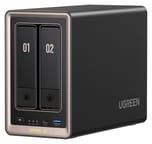
The DXP2800 GT measures about 9.1 x 4.3 x 7 inches and weighs about 5.6 pounds without drives, in a dark gray metal case with a copper-toned front frame. The two lockable, tool-less bays take 3.5-inch or 2.5-inch SATA drives up to 32TB each, or 64TB raw. UGREEN advertises 80TB by counting two 8TB M.2 SSDs as well. RAID options stop at JBOD, Basic, RAID 0, and RAID 1. Both bays also accept U.2 NVMe SSDs at PCIe 3.0 x4, and a U.2 drive replaces the SATA drive in that bay rather than adding a third. Techtest describes the bays as hot-swap, but UGREEN’s manual says to shut the unit down before inserting or removing a drive.
The two M.2 2280 slots work as an SSD cache for the hard drives or as their own storage pool for containers and virtual machines. They connect at PCIe 3.0 x2, about 2GB/s per slot, which is still more than the 10GbE port can carry. The slots sit inside the case beside the first bay, and Mighty Gadget found them fiddly to fill. The operating system lives on a 64GB eMMC chip soldered to the board, so it takes no bay but cannot be swapped out.
Memory is 8GB of DDR4-2666 in one of two SO-DIMM slots, behind a panel on the underside. Each slot takes up to 32GB, for 64GB in total. UGREEN’s manual lists the memory type as “SODIMM DDR4 (ECC supported),” but the included module is not ECC, so error correction means buying ECC modules yourself. With one module installed, memory runs in single-channel mode until a second is added.
The front has a 10Gbps USB-C port and a 10Gbps USB-A port. The back has the 10GbE RJ45 port, a second 10Gbps USB-A port, two USB 2.0 ports, and an HDMI 2.0b port with 4K output. There is no PCIe slot, Thunderbolt, SD card reader, or Wi-Fi. UGREEN’s phone app can also cast a video stored on the NAS to a screen on that HDMI port, a feature it still labels as beta.
Enough CPU for containers and a small VM, weaker at transcoding

The Ryzen Embedded R2514 is a four-core, eight-thread chip from late 2022 built on AMD’s older Zen+ design, with a 3.7GHz boost clock and a PassMark CPU Mark of about 6,700. That sits above the Intel N100 in the standard DXP2800, at about 5,300, and below the Pentium Gold 8505 in UGREEN’s DXP4800 Plus. It has the headroom for file serving, several Docker containers, and a small virtual machine. Techtest would not call it a pure virtualization monster, but says it has enough power for home-lab setups, and warns against running several Windows VMs.
Its Radeon Vega graphics include H.264 and H.265 engines, and Neowin notes there is no AV1 decode. Mighty Gadget and NASCompares rate the AMD graphics below Intel Quick Sync for transcoding, while Techtest sees no problem running Jellyfin with transcoding on the chip, though it gives no test results. On the cautious side, NASCompares expects software transcoding rather than hardware in most cases on these graphics, though not as a blanket statement, and heavy on-the-fly transcoding for multiple clients remains an unknown quantity to Mighty Gadget. Plex needs a Plex Pass subscription for hardware transcoding and installs through Docker. Lon.TV’s Plex tests on newer Zen 2 and Zen 3 chips with the same family of graphics found transcoding worked but “hardware tone mapping is not supported on these chips,” so HDR video looked washed out. Lon.TV did not test the R2514 itself.
SSDs near the 10GbE limit and a quiet fan
Over 10GbE with an NVMe SSD, Techtest measured 1,137MB/s reads and 789MB/s writes in CrystalDiskMark, and about 900MB/s and 700MB/s in Windows file copies. Neowin’s SSD pool also came close to the limit of its 10GbE link. Mighty Gadget could only test at 2.5GbE, where one hard drive filled the link at 280 to 290MB/s. Two mirrored hard drives write at the speed of one drive and read only modestly faster, well under the 1.25GB/s a 10GbE port can carry.
With two WD Red drives spinning and no file activity, Notebookcheck measured 14.84 to 20.14 watts at idle, along with 31.15 watts with the CPU at full load, and a maximum of 35.9 watts with the CPU and drives at full load. Techtest measured about 8.9 watts at idle with one NVMe SSD and no hard drives, and a little over 10 watts under network load. UGREEN lists 42.36 watts during drive access and 18.12 watts in drive hibernation, and the unit runs on a 72W external adapter.
Fan noise in Notebookcheck’s test came to 29.11dB(A) at idle from 30 cm and as low as 34dB(A) at times under combined CPU and drive load, with brief peaks of 41dB(A) from hard drive access. The fan reached 47dB(A) for a moment at startup.
No volume encryption in UGOS Pro, and other systems boot from USB or M.2
UGOS Pro is UGREEN’s Debian-based system, with a phone app, a browser desktop, Docker, virtual machines, photo recognition, and a choice of ext4 or Btrfs volumes. Folder encryption is available, but volume encryption is not. The Surveillance Center app connects ONVIF and RTSP cameras. Mighty Gadget could not add its H.265 cameras because the app supported only H.264 at the time, and Neowin could not zoom in on a live feed.
TrueNAS and Unraid can replace UGOS Pro. Older UGREEN models needed the BIOS watchdog turned off first, and Mighty Gadget found it already disabled on this one. Its testing of another OS was not finished at the time of the review. A replacement system can boot from a USB stick or an M.2 drive. NASCompares says doing this does not void the hardware warranty, though the soldered eMMC makes the process harder than on earlier models with a removable OS drive. Neowin points out that reaching the eMMC or the CMOS battery takes a full teardown.
Reviewer Insights
Related Videos
Notebookcheck
Daniel Schmidt at Notebookcheck wrote in October 2026 that the unit “impresses with powerful hardware, excellent build quality, and a generous feature set for a 2-bay NAS,” adding that “idle power consumption could be lower.” He also lists missing volume encryption and a smaller app selection as drawbacks. He recommends it for enthusiasts and small offices running containers, virtual machines, or a media server, and points elsewhere for simple storage: “Those who only need occasional file backups can find more affordable and energy-efficient alternatives.”
Neowin
Neowin scored it 8 out of 10 and tore one down. After a week on a desk, the review concludes, “It provides great performance, takes up little space, and is, on the whole, very quiet.” It lists the unit as extremely power efficient, a different view from Notebookcheck’s. Its cons are DDR4 memory, the PCIe 3.0 x2 NVMe slots, hard-to-access internals, the non-removable eMMC, and a UGOS it calls still very much in development. The text adds, “What is a bit disappointing to see is that UGREEN made it harder to do what you like with the hardware.”
Mighty Gadget
James Smythe at Mighty Gadget scored it 85 percent and wrote, “The DXP2800 GT is not a groundbreaking product, and there are real limitations to weigh up.” He criticizes the fiddly M.2 slots and the missing SD reader, and on H.265 camera support he wrote, “I cannot recommend buying the GT series mainly for surveillance until H.265 support arrives.” On the network port: “The single 10GbE port is hard to fully exploit with only two mechanical bays.” He counts cheaper DDR4 upgrades, U.2 support, and the option of running Unraid or TrueNAS in its favor.
Techtest
Michael Barton at the German site Techtest gave it a clear recommendation for buyers who want a flexible, low-power two-bay x86 NAS with 10GbE. UGREEN’s photo app is one of the strongest among consumer NAS systems in his view, though he would like a shortcut to it outside the main NAS app. He marks down the older CPU, and his unit did not quite reach full 10GbE speed.
Vortez
David Mitchelson at Vortez reviewed it next to the DXP4800 GT and wrote, “The easily accessible memory upgrade compartment deserves particular praise, making future expansion a matter of minutes rather than requiring the chassis to be dismantled.” On the downside he names single-channel memory, narrower app support than rivals, and Gen3-only M.2 slots.
NASCompares
NASCompares covers the two-bay and four-bay GT models together after a few weeks of use. On the two-bay model it says, “Now, I will criticize it a bit that it only has the one network port, so failover is not an option, which is super annoying.” It rates the hardware above Synology and QNAP models at similar prices, and rates UGOS as solid but behind their software, with no WORM support and no official Plex app. On media servers, it says “hardware transcoding on an Intel chip is just better.”
Tech TRX
Tech TRX focuses on home use and setup, and praises the setup wizard and slide-out trays. In a comparison from a phone, its uploads to the NAS finished faster than the same uploads to Google Drive, and files opened right away on another device, while Google Drive needed time to process video. The video gives no timings and lists no drawbacks. Its list of supported RAID levels includes 5, 6, and 10, but this two-bay unit stops at RAID 1.
Conclusion
ECC memory and U.2 drives are the reasons to choose the DXP2800 GT over a cheaper two-bay unit, and they pay off in a home lab or small office that already has 10GbE gear and SSDs. Its fan is quiet enough for a desk, and upgrading the memory takes a few minutes.
On a slower network with two hard drives, most of what it adds goes unused, so the UGREEN DXP2800 or the other picks in our best 2-bay NAS guide make more sense. Synology’s software suits a backup-focused setup better, and the UGREEN vs Synology comparison covers that choice. Two more bays on the DXP4800 GT make RAID 5 possible, and that model also adds a second 10GbE port and an SD reader. The NAS comparison chart lists other models.
Frequently Asked Questions
Does the UGREEN DXP2800 GT support ECC memory?
Yes, up to 64GB with two ECC DDR4 SO-DIMMs of up to 32GB each. Plan on replacing the included 8GB module, which is not ECC.
How many 10GbE ports does the DXP2800 GT have?
One RJ45 port, which also works at slower network speeds. The four-bay DXP4800 GT has two.
Will two hard drives reach 10GbE speed in the DXP2800 GT?
No. Notebookcheck notes that two hard drives can hardly fill the link even in RAID 0, and a RAID 1 mirror writes at the speed of one drive. Getting most of the port’s speed takes an SSD.
What do the U.2 bays on the DXP2800 GT do?
They give an NVMe SSD a PCIe 3.0 x4 link, twice the lanes of the x2 M.2 slots. Each U.2 drive uses up a bay, and UGREEN includes heatsinks and thermal pads for them in the box.
How much power does the DXP2800 GT use?
In reviewer tests, about 15 to 20 watts at idle with two hard drives spinning, about 36 watts at its peak with the CPU and drives at full load, and under 10 watts at idle with one NVMe SSD and no hard drives.
Can the DXP2800 GT run TrueNAS or Unraid?
Yes, it is an x86 system with a standard BIOS. UGOS Pro stays on the soldered eMMC, so the new system needs its own USB stick or M.2 drive. Mighty Gadget had not finished testing another OS on it when the review was published.