
AOOSTAR WTR PRO 5825U
Published on

The AOOSTAR WTR PRO 5825U is a 4-bay NAS for people who want to install their own storage system, such as TrueNAS, Unraid, or Proxmox, on hardware with several times the multi-core performance of the Intel N100 and N150 chips in many budget 4-bay units. It pairs an 8-core AMD Ryzen 7 5825U with two DDR4 memory slots (up to 64GB), two M.2 NVMe slots, and two 2.5GbE ports in an all-metal case. AOOSTAR sells it barebone, with no memory, no SSD, and no NAS software, so the first job is to add RAM, an M.2 drive for the operating system, and the OS itself. The drive bays are not hot-swappable, and there is no 10GbE port or PCIe slot for adding one. AOOSTAR’s US store sells the barebone unit for $379.00; it launched at $389 in September 2024.
Pros and cons
| Pros | Cons |
|---|---|
| 8-core, 16-thread Ryzen 7 5825U with room for VMs and containers | No NAS operating system; you install and maintain your own |
| Two DDR4 SO-DIMM slots, up to 64GB in dual channel | Drives are not hot-swappable; the unit must be powered down to change one |
| Two M.2 NVMe slots at PCIe 3.0 x4 each | Dual 2.5GbE only, with no PCIe slot, USB4, or OCuLink for a faster link |
| 10Gbps USB-C port with display output, plus HDMI and DisplayPort | Drive trays make removing a drive difficult |
| Ports on the side panel save desk depth | Fan noise is audible even at idle |
| All-metal case with a magnetic front cover and a sliding power-button guard | Ships with a conservative 15 W CPU power limit |
Related Videos
AOOSTAR WTR PRO 5825U Comparison Chart
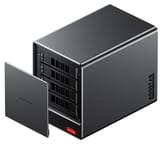 AOOSTAR WTR PRO 5825U | |
| Price | List Price: $379.00 Amazon Prices: Loading prices... |
| Version | Barebone (no RAM, SSD, or OS) |
| Drive Bays | 4 x 3.5-inch SATA (2.5-inch compatible) Not hot-swap, tool-less trays |
| M.2 Slots | 2 x M.2 NVMe, cache or storage pool PCIe 3.0 x4 each |
| Max Raw Capacity | 96 TB |
| Included Drives | None (diskless) |
| System Drive | None (install your own M.2 SSD) |
| Processor | Octa-core 2.00 Ghz (max 4.50 Ghz) AMD Ryzen 7 5825U |
| Hardware Transcoding | Yes (AMD Radeon Vega 8 (VCN)) |
| RAM | 0 GB DDR4 SO-DIMM Max 64 GB, 2 slots DDR4-3200, dual channel |
| ECC Memory | No |
| Network Ports | 2 x 2.5GbE RJ45 |
| PCIe Slot | No |
| Expansion Unit | None |
| Operating System | None (barebone, Windows 11 Pro key) |
| Third-Party OS | Yes (Bring your own OS: TrueNAS, Unraid, Proxmox, or Linux) |
| File Systems | ZFS (with TrueNAS or Unraid; no NAS OS included, so Btrfs, ext4, or XFS depend on the OS you install) |
| USB Ports | 2 USB 3, 1 USB-C Side panel: USB-C 10Gbps, 2x USB-A 5Gbps, 2x USB 2.0 |
| Thunderbolt Ports | No |
| HDMI | 1 |
| WiFi | No |
| Idle Power | 12 W (One NVMe SSD, no hard drives, Windows 11, at the wall) |
| Load Power | 50 W (Full CPU load at the default 15 W limit, one NVMe SSD, no hard drives, at the wall) |
| Power Supply | 120W external (19V) |
| Noise | 32 dB (4 HDDs idle, NASCompares; 39 to 41 dB with drives and CPU busy) |
| Dimensions width x length x thickness | 5.9 x 9 x 7.3 inches (149.86 x 228.6 x 185.42 mm) |
| Weight | 10.1 lbs (4.59 kg) |
| Released | September 2024 at $389 |
| In the Box | Main unit, 120W adapter, HDMI cable, M.2 A+E to NVMe adapter, drive stickers, screws, manual. |
| Expandability | RAM to 64GB (2x SO-DIMM). 2x M.2 NVMe PCIe 3.0 x4. Wi-Fi slot takes a third NVMe via adapter. No PCIe slot. |
Four drive bays, two M.2 slots, and 64GB of DDR4
The WTR PRO measures about 5.9 x 9.0 x 7.3 inches and weighs about 10 pounds without hard drives. A magnetic metal cover on the front hides four drive trays that take 3.5-inch SATA hard drives, and 2.5-inch drives also fit, though AOOSTAR notes that some 2.5-inch models may be incompatible because 2.5-inch drive dimensions are not uniform. AOOSTAR rates the bays for up to 24TB per drive, or 96TB across all four. The power button sits behind a sliding logo plate that prevents accidental presses, and a 120mm fan on the rear pulls air through the drive cage. The bays are not hot-swappable: Robtech says to power the unit down before adding or removing a drive, which rules out replacing a failed disk while the array stays online.
The two SO-DIMM slots and two M.2 2280 slots sit under a plate on the bottom of the case. Both M.2 slots run at PCIe 3.0 x4, and because the unit ships barebone, one of them usually holds the operating system drive, leaving the other for a cache or a small SSD pool. A third M.2 slot, keyed for a Wi-Fi card, can hold a third NVMe SSD at PCIe 3.0 x1 through the adapter in the box. No Wi-Fi card is installed, and the case has no antenna mounts for one. The Ryzen 7 5825U does not support ECC memory, so the slots take standard DDR4-3200 SO-DIMMs.
Network, ports, and power

All the ports sit on one side panel rather than the back. They include two 2.5GbE ports on Intel I226-V controllers, a 10Gbps USB-C port that carries display output, HDMI 2.1, DisplayPort 1.4, two 5Gbps USB-A ports, two USB 2.0 ports, a microSD slot, and a 3.5mm audio jack. With HDMI, DisplayPort, and USB-C, the WTR PRO can drive three displays and work as a desktop PC as well as a NAS. The two 2.5GbE ports can be bonded for about 5Gbps across several clients, but a single transfer stays at 2.5GbE speed, and without a PCIe slot the only faster option is a USB network adapter.
Power comes from a 120 W, 19 V external adapter. Robtech measured 12 W at idle with one NVMe SSD and no hard drives, and about 50 W at full CPU load; hard drives add to both figures. NotebookCheck measured 5.5 to 13 W at idle (8.7 W average) and 46 to 68 W under load on its Ryzen unit, also without hard drives. The CPU ships with a 15 W sustained power limit; the BIOS lets you raise it to 25 W for more multi-core performance at the cost of higher power draw.
The Ryzen 7 5825U and your choice of operating system

The Ryzen 7 5825U is an 8-core, 16-thread Zen 3 laptop chip from 2022 with a 4.5GHz boost and a PassMark score of about 18,350. That is enough to run file sharing, Docker containers, and a few VMs at once. It is an older design, though: it has PCIe 3.0 rather than 4.0, DDR4 rather than DDR5, and Radeon Vega 8 graphics that are weak for 3D work. The Vega 8 includes AMD’s video encode and decode engine, which Plex and Jellyfin can use for hardware transcoding on Linux, though AMD support in both apps trails Intel Quick Sync.
AOOSTAR does not make NAS software. The barebone unit comes with a Windows 11 Pro key, and the configured versions ship with Windows installed; for NAS use you install TrueNAS, Unraid, Proxmox, OpenMediaVault, or a Linux distribution yourself. That gives full control over the storage stack, but there is no vendor app store, phone backup app, or remote-access service, and setup takes more knowledge than a Synology or UGREEN unit. For how those vendor systems compare, see UGREEN vs Synology.
AOOSTAR also sells the WTR PRO chassis with an Intel N100 and, from 2025, an Intel N150. Those Intel boards have one SO-DIMM slot and one M.2 slot for an NVMe drive, and NotebookCheck found the N150 version much slower. As of September 2026, AOOSTAR’s US store and Amazon US sell only the Ryzen 5825U model.
Reviewer Insights
Three reviewers tested the Ryzen version, and all three found the CPU capable. NASCompares and Robtech praised the metal case and named the network ceiling or the lack of expansion as the main limit; NotebookCheck listed the dual 2.5GbE ports as a pro and faulted the missing NAS operating system and the noise instead.
NotebookCheck
NotebookCheck tested the Ryzen 7 5825U and Intel N150 versions side by side in May 2025, in a review by Sebastian Bade using loan units that shipped with Windows 11 Pro. Its conclusion: “The Aoostar WTR Pro impresses as a versatile NAS server with solid performance and good energy efficiency.” On the two versions, it wrote that “the test shows that the disadvantages in terms of performance clearly outweigh the Intel N150 model and that the more powerful AMD Ryzen 7 5825U model is the better choice.” It found the SoC stayed cool under load and described the power limits as conservative. Without hard drives, it measured 37 to 38 dB(A) at idle and 41.5 to 43 dB(A) under load on the Ryzen unit. It listed the two 2.5GbE ports among the pros. Its cons were the lack of a pre-installed NAS operating system, which means more setup effort, low processor performance limits, and a unit louder than typical mini PCs. It added that the free choice of software “requires a certain amount of knowledge.”
NASCompares
Rob Andrews of NASCompares reviewed the Ryzen model in September 2024 and scored it 7.8 out of 10. He ran Unraid with four Seagate IronWolf 4TB drives in a ZFS array and saturated a 2.5GbE link at 279 MB/s, with both ports nearly saturated once aggregated. Internally, each M.2 slot reached about 2.6GB/s writes and more than 3GB/s reads, but copying between the two SSDs dropped to about 560MB/s, which he attributed to a shared internal controller. He measured 31 to 32 dBA at idle and 39 to 41 dBA with the CPU at 50% and all drives active. He called the case completely metal on the exterior, liked the side-mounted ports, and found the trays hard to use: “Trying to get a hard drive out of these trays is incredibly difficult and is not the simple ejection process that most click-and-load trays have. You could very easily damage a drive trying to remove it from these trays.” He marked it down for the missing 10GbE, PCIe slot, and USB4 or OCuLink port.
Robtech
Robtech tested a Ryzen unit supplied by AliExpress with two DDR4-3200 sticks and a 1TB SSD. He said, “The WTR Pro is made of a nice aluminum wraparound case with plastic on the front and back,” and he pointed out that the drives are not hot-swappable. With the default 15 W power limit, multi-core results trailed another 5825U mini PC he had tested; raising the limit to 25 W in the BIOS put it ahead. He found CPU temperatures among the best he had recorded, but said “Fan noise is not great, especially idle fan noise.” On networking: “Dual 2.5 GB LAN is pretty limiting for an NAS. At least 5 GB would have allowed the power users more room to work with.” Ubuntu ran without problems, and he confirmed the USB-C port drove his USB-C monitor.
Customer Reviews
The WTR PRO 5825U barebone holds 3.7 out of 5 stars from 5 ratings on Amazon. Elizabeth Cale uses it as a home server for file hosting and virtualization and wrote that “The standout feature is its 4+2 bay layout: four SATA drive bays plus two M.2 slots, letting me expand storage capacity massively.” Victor Evrard runs Proxmox on it and gave it four stars for the hardware.
Victor also reported a problem he saw on two units: “on Linux, bay 3 (third from the bottom) drops from 6.0 Gbps to 1.5 Gbps under sustained load and generates SATA CRC errors.” A udev rule that sets SATA link power management to maximum performance fixed it, and he wrote that “AOOSTAR support supplied this fix quickly and it works. It just isn’t documented anywhere.” Casey Siens rated it one star because the unit has no built-in Wi-Fi, and reported poor support when he tried to add an antenna. Read more owner reviews on Amazon.
A fast 4-bay NAS for people who run their own software
The WTR PRO 5825U suits a homelab owner who wants eight CPU cores, 64GB of memory headroom, and four hard drive bays for TrueNAS, Unraid, or Proxmox, and who is comfortable choosing and maintaining the software. Budget for RAM and an M.2 system drive on top of the barebone price. If you want a vendor NAS app with phone backup and remote access, or hot-swappable bays, a UGREEN or Synology 4-bay unit fits better. If you need 10GbE, look at a model with a built-in 10GbE port or a PCIe slot.
Frequently Asked Questions
Does the AOOSTAR WTR PRO come with an operating system?
No NAS operating system is included. The barebone unit comes with a Windows 11 Pro key, and you install TrueNAS, Unraid, Proxmox, or a Linux distribution yourself on an M.2 SSD that you supply.
Are the WTR PRO drive bays hot-swappable?
No. You need to power the unit down before adding or removing a drive, so a failed disk cannot be replaced while the array stays online.
How much RAM does the WTR PRO 5825U support?
Up to 64GB of DDR4-3200 across two SO-DIMM slots in dual channel. The barebone unit ships with no memory installed. The Ryzen 7 5825U does not support ECC memory.
Can the WTR PRO be upgraded to 10GbE?
Not internally. It has two 2.5GbE ports and no PCIe slot, USB4, or OCuLink port. A USB network adapter on the 10Gbps USB-C port is the only route to a faster link.
What is the difference between the WTR PRO 5825U and the N150 version?
Both use the same 4-bay case with two 2.5GbE ports. The Ryzen 7 5825U version has an 8-core CPU, two SO-DIMM slots for up to 64GB, and two M.2 slots. The Intel N150 version has a 4-core CPU, one SO-DIMM slot, and one M.2 slot for an NVMe drive, and NotebookCheck found it much slower.
How much power does the AOOSTAR WTR PRO 5825U use?
Without hard drives, Robtech measured 12 W at idle and about 50 W at full CPU load, and NotebookCheck measured an 8.7 W idle average and 46 to 68 W under load. Each hard drive adds several watts. The unit runs from a 120 W external adapter.