

The marketing pitch for fanless mini PCs in 2026 is essentially irresistible. Zero noise. Zero dust. An aluminum slab that looks like a piece of furniture rather than a computer. Arctic’s Senza AI 370 hides an entire Ryzen AI 9 HX 370 under your desk for around $1,400. Kubb sells colorful 3-inch cubes powered by Intel’s Twin Lake N150 starting at $500. MINIX’s 0dB line keeps expanding. Qualcomm’s Snapdragon X2 reference designs look like drink coasters with no fans at all. The message from every direction is clear: fans are yesterday’s problem.
What none of these launch pages tell you is how the box behaves after 30 minutes of sustained work. Five-minute burst benchmarks look great because the chassis hasn’t heated up yet. But the thermal physics that govern passive cooling don’t care about your marketing materials, and the performance difference between a burst test and a sustained workload is where buyers either love their fanless purchase or start shopping for a return label.
How Heat Limits Fanless Performance
The core concept is simple enough that it fits in a sentence: a fanless mini PC can only dissipate as much heat as its heatsink surface area allows, and once the workload generates more heat than the chassis can shed, the processor throttles to protect itself. An actively-cooled mini PC with a fan can push air across that heatsink, dramatically increasing the rate of heat dissipation and letting the processor sustain higher clock speeds for longer.
This isn’t a flaw in fanless design. It’s physics. And “fanless” isn’t the only alternative to traditional fans anymore: Frore Systems’ AirJet solid-state cooling (used in Qualcomm’s Snapdragon X2 reference designs) uses vibrating piezoelectric membranes to move air with no spinning parts. It’s a third category between passive and active, but a single AirJet module currently dissipates only 5 to 10W (depending on which generation), scaling to roughly 45W with a five-module assembly, keeping it in the ultrabook and thin-client class for now.
The Arctic Senza’s massive under-desk heatsink (536mm long, larger than many laptop screens) exists precisely because passive cooling at higher wattages requires enormous surface area. KitGuru’s review found it handled a 12-hour 4K video encode at up to 115W without thermal issues. But that chassis is the size of a large AIO cooler, and its ambient environment matters: passive cooling performance degrades in warm rooms and enclosed desk cabinets where heat has nowhere to go. The smaller fanless boxes that actually fit on your desk, the ones most buyers are shopping for, have far less thermal headroom.
Club386 tested the older Arctic Senza 5700G and recorded a peak of 68.5 degrees Celsius during prolonged all-core load at 82W. That’s well within safe limits for a passive design, but it’s also a 65W desktop APU, not the 28W mobile chip you’ll find in most sub-$500 fanless boxes. Drop down to an Intel N100 or N150 fanless unit, and you’re looking at a processor with a 6W base TDP that typically sustains 10 to 15 watts in most mini PC implementations. That low power envelope is exactly why these chips work in tiny fanless enclosures, but it also means the processor simply cannot deliver the sustained performance of a higher-wattage actively-cooled chip.
Sustained Load Testing Shows Which Mini PCs Throttle
The divergence between burst and sustained performance is where the buying decision lives. Most review outlets run Cinebench or a similar benchmark for a few minutes and publish the result. The reviewers who run 15 to 30 minutes of sustained load tell a very different story.
ServeTheHome’s testing of the Beelink SER9 (actively cooled, Ryzen AI 9 HX 370) is instructive. The system drew 78W under load and sustained that level for over 30 minutes without downclocking. As Patrick Kennedy noted: “Most mini PCs get a few seconds at their maximum power levels, then drop down. This just sat at its maximum performance level.” That sustained consistency is what a properly designed active cooling system delivers.
Fanless systems face a fundamentally different curve. Apple’s own M2 MacBook Air (fanless) shows a 32 percent performance drop after 30 minutes of sustained load compared to the fan-equipped MacBook Pro running the same chip. The M1 Air showed a 22 percent drop. Even Apple’s famously efficient silicon can’t escape the thermal physics of passive cooling. The same physics shapes fanless x86 mini PCs, where sustained loads of 15 to 30 minutes routinely produce noticeable drops below burst-test performance; the exact penalty depends on chassis design, processor TDP, and ambient temperature, but the pattern holds: smaller boxes and higher-wattage chips throttle harder and faster.
The practical implication is straightforward. If your workload consists of short bursts followed by idle periods (email, browsing, document editing, video calls), the processor recovers between bursts and you’ll never notice the throttle. If your workload is sustained (video encoding, compiling large projects, running local AI models, 24/7 server duties), the throttle compounds over time and your fanless box delivers meaningfully less performance than its spec sheet suggests.
The Noise Math: Active Cooling Ranges From Quiet to Noticeably Loud
The fanless sales pitch assumes that fans are loud. In 2026, that assumption deserves scrutiny. ServeTheHome measured the Beelink SER9 at 35 dBA idle and 40 dBA under load in a 34 dBA noise floor studio. The MINISFORUM MS-A2, a more powerful workstation-class system, came in at 39 dBA idle and around 50 dBA under sustained load, per the same outlet. That 50 dBA under load is noticeable in a quiet room, so the noise picture depends heavily on which actively-cooled system you pick and how hard you push it.
To put those numbers in perspective: a typical quiet office sits at roughly 40 dBA. A whispered conversation at five feet is about 30 dBA. The Beelink SER9’s 35 to 40 dBA range sits comfortably below normal room noise for most home offices. The MS-A2’s 50 dBA under load does not. The difference between 35 dBA (a well-designed active system at idle) and true silence (fanless) is real and measurable, but for most people in a normal home office running moderate workloads, it’s not the dramatic gap the marketing implies.
Where the noise delta matters is specific environments. Recording studios, podcast setups, and home theater rooms where any fan hum shows up on a microphone or disrupts the listening experience. If you’re recording audio in the same room as your computer, a fanless system isn’t a luxury; it’s a requirement. But if your mini PC sits on a desk three feet from where you work, with ambient noise from HVAC, street sounds, or other household activity, the modern actively-cooled mini PC is effectively inaudible.
Dust and Longevity: The Real Trade-Off
Fanless proponents often cite dust as a major advantage, and they have a point. Fans pull air (and dust) through the chassis continuously. Over months and years, that dust accumulates on heatsink fins, clogs vents, and degrades cooling performance. The Beelink SER9’s dust filter requires removing six screws to access, which means most owners simply won’t clean it regularly.
A fanless box eliminates that failure mode entirely. No intake, no dust buildup inside the chassis, no fan bearings to wear out. For deployments where the PC needs to run unattended for years (digital signage, kiosk systems, embedded controllers), this reliability advantage is significant.
But “no dust” isn’t the same as “no maintenance.” Fanless heatsink fins still accumulate surface dust from the ambient environment, and that dust layer acts as insulation that reduces heat dissipation over time. The maintenance is less frequent and less invasive (a compressed air blast versus opening the chassis), but it isn’t zero. And the practical difference in a typical home office matters less than you’d think; an actively-cooled mini PC in a reasonably clean room will run for years before dust becomes a performance issue.
The Workload Budget Framework
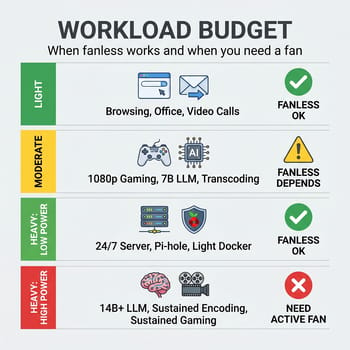
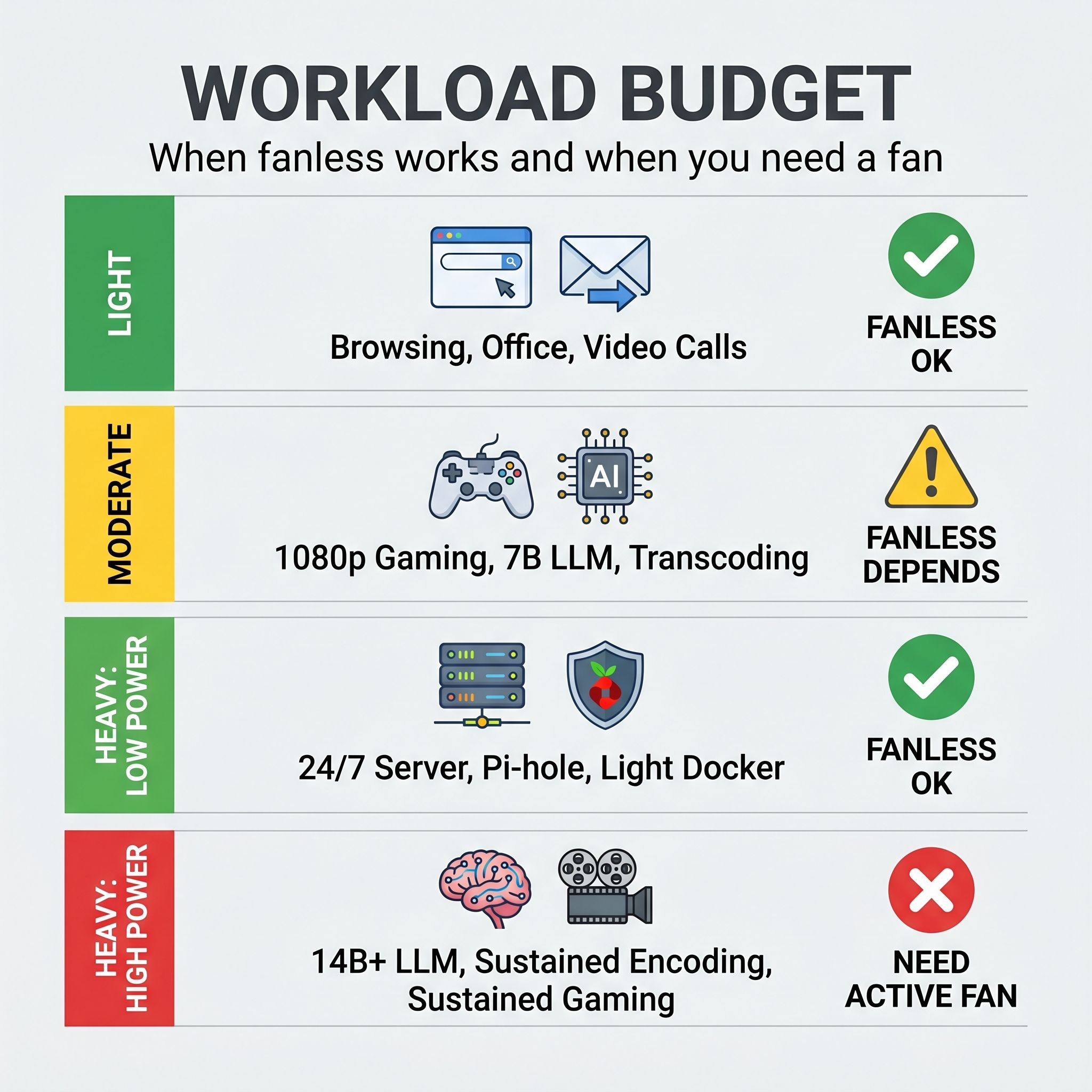
Rather than asking “should I buy fanless?” the better question is “does my workload fit within a fanless thermal budget?” The answer depends on which of four tiers your daily use falls into.
Light workload (web browsing, Office apps, email, video streaming, 1-2 video calls): Fanless wins cleanly. An Intel N100 or N150 fanless box like the MeLE Quieter 4C handles this tier without breaking a sweat. These processors are designed for exactly this power envelope, and you’ll never push them hard enough to trigger meaningful throttle. The silence and simplicity are pure upside with no performance penalty. If silence is less important than price, an actively cooled budget box like the BOSGAME E3 covers this same workload tier at low fan speeds you’ll rarely hear.
Moderate workload (light 1080p gaming, running a 7B local LLM, 4K media transcoding, light Docker containers): This is the decision zone. A fanless box with a higher-wattage passive design (like the Arctic Senza AI 370) can handle moderate sustained loads, but you’re paying $1,000+ for the thermal engineering that makes it possible. An actively-cooled box at the same processor tier, like the Beelink SER9 at similar pricing, delivers the same or better sustained performance while costing less and taking up far less space. The question becomes: is silence worth the price premium and the larger chassis?
Heavy workload, low power (24/7 home server at 6-15W: Pi-hole, reverse proxy, lightweight Docker containers): This is the exception that proves the rule. A fanless N100 box drawing 6 to 10 watts under sustained server load runs well within its passive thermal budget, even 24/7. The workload is sustained but the heat output is so low that the chassis can dissipate it indefinitely. For headless, always-on duties where the CPU never hits more than 15W, fanless is actually the better choice because it eliminates fan failure as a reliability risk.
Heavy workload, high power (sustained gaming, 14B+ parameter local LLMs, continuous video encoding, multi-container server stacks): Active cooling wins decisively. If you’re running local LLM inference at scale, compiling code for hours, or pushing the CPU past 25W sustained, the throttle penalty of a fanless design (often well above 20 percent on the cited Apple Silicon data, and typically worse on higher-TDP x86 chips) is too large to ignore. You need a system like the GMKtec EVO-X1 or MINISFORUM MS-A2 that can sustain full clock speeds indefinitely.
Two Scenarios Where Fanless Wins
The home office professional works from a desk in a quiet room, attends video calls, edits documents and spreadsheets, browses the web with 15 to 20 tabs, and occasionally edits photos. Their workload is bursty: short periods of moderate CPU usage separated by long stretches of near-idle. A fanless N100 or N150 mini PC at $200 to $400 handles everything they throw at it, runs completely silent during calls (no fan noise leaking into the microphone), and sits unobtrusively on a shelf behind the monitor. The five-year reliability of no moving parts is a genuine bonus in this scenario, and the thermal throttle never becomes relevant because sustained loads simply don’t happen.
The home theater enthusiast wants a PC behind their TV or projector for 4K media playback, streaming services, and casual web browsing. The living room demands silence; any fan hum disrupts the viewing experience. A fanless box like the MINIX Z100-0dB VESA-mounts behind the TV, draws minimal power, and handles 4K HDR playback without engaging the kind of sustained CPU load that would trigger throttling. More budget-conscious setups can achieve the same with a Celeron-class fanless box like the Bmax MaxMini B1 Pro, which VESA-mounts behind a TV and runs silently for streaming and light web use. This is the scenario where fanless design advantages (silence, no dust in an entertainment center, low power draw) align perfectly with the workload requirements.
Two Scenarios Where Active Cooling Pays
The AI hobbyist runs local language models, experiments with Stable Diffusion, compiles machine learning projects, and occasionally uses the same machine for productivity work. Even a 7B parameter model generates sustained GPU and CPU load during inference, and a 14B model pushes any integrated GPU hard for extended periods. A fanless box that throttles by even 20 percent on sustained load means noticeably slower token generation and longer training runs. An actively-cooled system at the same price point, like the Beelink SER9 or GMKtec EVO-X1, delivers sustained performance that makes the difference between a usable local AI workflow and one that tests your patience.
The power-hungry self-hoster runs a 24/7 home server with a dozen Docker containers, a Plex media server doing real-time transcoding, a reverse proxy, Home Assistant, and a database that sees regular write bursts. This workload pushes sustained CPU usage into the 30 to 50 watt range, which is firmly in active-cooling territory. A fanless box throttling by 25 percent under that load means slower transcoding, longer backup windows, and occasional timeouts that are maddeningly hard to debug. The MINISFORUM MS-A2 or a similar actively-cooled system handles continuous server duty at full performance, and its 39 dBA idle noise is quiet enough for a closet or utility room. (If your server stack is lighter, just a reverse proxy, Pi-hole, and a couple of containers, a fanless N100 box handles that tier comfortably, as discussed in the workload budget above.)
The Buying Decision
The framework simplifies to three questions. First, is your workload bursty or sustained? If bursty, fanless works. If sustained for more than 15 minutes at a stretch, active cooling delivers meaningfully more performance. Second, does your environment demand true silence? If you’re recording audio or the PC shares a quiet living space, the acoustic advantage of fanless is real. If the room has normal ambient noise, modern active cooling is quiet enough. Third, is the fanless premium worth it for your use case? A fanless N100 box at $200 makes sense for light workloads. But at the $1,000+ tier, the Arctic Senza’s passive engineering competes with actively-cooled systems that deliver equal or better sustained performance, more compact form factors, and lower prices.
The plain answer for most mini PC buyers in 2026 is that actively-cooled systems have gotten quiet enough that the old objections about fan noise don’t hold the way they used to. If you’re shopping in the light-workload tier, fanless is excellent and often the right pick. If you’re doing anything that sustains CPU load for more than a few minutes at a time, the thermal physics haven’t changed, and a fan remains the most efficient way to keep your processor running at the speed you paid for.


