
Trycoo WI-6 Mini PC
Updated on

The Trycoo WI-6 Mini PC is a low-cost desktop for everyday work in a 4.72-inch square footprint. Intel’s N-series quad-cores drive it, Windows 11 Pro is preinstalled, and the two HDMI outputs plus the USB-C port cover a three-screen desk. The single SO-DIMM slot accepts up to 64GB of DDR4 and the M.2 slot holds up to 2TB, so the cheapest build is not the ceiling.
The lineup runs to four builds on one chassis: 8GB/256GB and 16GB/512GB on the Intel N100 at $149.99 and $179.99, a 16GB/512GB N95 at $185.99, and a 16GB/512GB N150 at $205.99. Every one of them bolts to the back of a monitor with the VESA bracket in the box, which is the main reason to pick a case this small.
| Pros | Cons |
|---|---|
| 4.72-inch square case with a VESA bracket in the box | WiFi 5 and Bluetooth 4.2, behind the Beelink Mini S12 Pro’s WiFi 6 |
| One SO-DIMM slot takes 64GB of DDR4; the M.2 2280 slot takes 2TB | Single-channel DDR4 held Robtech’s multi-core results back |
| Four builds from $149.99 to $205.99 across the N100, N95, and N150 | Intel UHD graphics only, so no current games |
| Two HDMI 2.0 ports plus USB-C DisplayPort drive three 4K screens | The bundled boot drive is M.2 SATA and the slot runs NVMe at Gen 3 x1 |
| Robtech measured 9 W at idle and a 32 W ceiling | Robtech measured 35 dBA of fan noise under load |
| Windows 11 Pro preinstalled, with Linux supported | DisplayPort output only through the single USB-C port |
Related Videos
Trycoo WI-6 Mini PC Comparison Chart
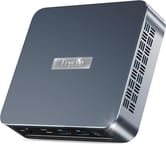 Trycoo WI-6 Mini PC | Trycoo WI-6 Mini PC | Trycoo WI-6 Mini PC | Trycoo WI-6 Mini PC | |
| Price | List Price: $179.99 Amazon Prices: Loading prices... | List Price: $149.99 Amazon Prices: | List Price: $185.99 Amazon Prices: | List Price: $205.99 Amazon Prices: |
| Version | 16GB/512GB/Intel N100 | 8GB/256GB/Intel N100 | 16GB/512GB/Intel N95 | 16GB/512GB/Intel N150 |
| Performance Rating | 4.9 | 4.3 | 4.9 | 4.9 |
| Operating System | Windows 11 Pro | Windows 11 Pro | Windows 11 Pro | Windows 11 Pro |
| Processor | Quad-core 3.40 Ghz (max 3.40 Ghz) Intel Processor N100 | Quad-core 3.40 Ghz (max 3.40 Ghz) Intel Processor N100 | Quad-core 3.40 Ghz (max 3.40 Ghz) Intel Processor N95 | Quad-core 3.60 Ghz Intel Processor N150 |
| GPU | Integrated Intel UHD Graphics | Integrated Intel UHD Graphics | Integrated Intel UHD Graphics | Integrated Intel UHD Graphics |
| RAM | 16 GB | 8 GB | 16 GB | 16 GB |
| Internal Storage | 512 GB | 256 GB | 512 GB | 512 GB |
| Dimensions width x length x thickness | 4.72 x 4.72 x 1.57 inches (119.89 x 119.89 x 39.88 mm) | 4.72 x 4.72 x 1.57 inches (119.89 x 119.89 x 39.88 mm) | 4.72 x 4.72 x 1.57 inches (119.89 x 119.89 x 39.88 mm) | 4.72 x 4.72 x 1.57 inches (119.89 x 119.89 x 39.88 mm) |
| Weight | unknown | unknown | unknown | unknown |
| WiFi | Wi-Fi 5 (802.11ac) | Wi-Fi 5 (802.11ac) | Wi-Fi 5 (802.11ac) | Wi-Fi 5 (802.11ac) |
| Bluetooth | Bluetooth 4.2 | Bluetooth 4.2 | Bluetooth 4.2 | Bluetooth 4.2 |
| Ethernet | 1 Ethernet port at 1 Gbps | 1 Ethernet port at 1 Gbps | 1 Ethernet port at 1 Gbps | 1 Ethernet port at 1 Gbps |
| HDMI | 2 Full-Size HDMI Ports | 2 Full-Size HDMI Ports | 2 Full-Size HDMI Ports | 2 Full-Size HDMI Ports |
| DisplayPort | DisplayPort over USB-C | DisplayPort over USB-C | DisplayPort over USB-C | DisplayPort over USB-C |
| VGA | No VGA Ports | No VGA Ports | No VGA Ports | No VGA Ports |
| USB Ports | 2 USB 2.0, 2 USB 3, 1 USB-C | 2 USB 2.0, 2 USB 3, 1 USB-C | 2 USB 2.0, 2 USB 3, 1 USB-C | 2 USB 2.0, 2 USB 3, 1 USB-C |
| Thunderbolt Ports | No | No | No | No |
| OCuLink | No | No | No | No |
| Internal SATA Ports | No SATA ports | No SATA ports | No SATA ports | No SATA ports |
| Card Reader | No Card Reader | No Card Reader | No Card Reader | No Card Reader |
| Headphone Jack | combo | combo | combo | combo |
| Fanless | No | No | No | No |
| VESA Mount | Yes | Yes | Yes | Yes |
| In the Box | Mini PC, HDMI cable, power adapter, user manual, VESA mount | Mini PC, HDMI cable, power adapter, user manual, VESA mount | Mini PC, HDMI cable, power adapter, user manual, VESA mount | Mini PC, HDMI cable, power adapter, user manual, VESA mount |
| Expandability | RAM upgradable to 64GB, SSD upgradable to 2TB | RAM upgradable to 64GB, SSD upgradable to 2TB | RAM upgradable to 64GB, SSD upgradable to 2TB | RAM upgradable to 64GB, SSD upgradable to 2TB |
Related Mini PCs
-
 Bmax B4 PlusThe BMAX B4 Plus is an Intel N100 mini PC with a 2.5-inch SATA drive bay next to its M.2 slot, so a…
 -
 Bmax B4 UltraThe Bmax B4 Ultra is an ultra-compact mini PC featuring Intel's N150 processor, 12GB LPDDR5 RAM,…
 -
 BOSGAME B100The BOSGAME B100 is a budget Intel N100 mini PC with 16GB of DDR4, a 512GB NVMe SSD, dual HDMI plus…
 -
 BOSGAME B95The BOSGAME B95 is a low-cost Intel N95 mini PC with 16GB of DDR4, a 512GB M.2 SSD, 2.5Gb Ethernet,…
 -
 CyberGeek Nano A1The CyberGeek Nano A1 is a compact Intel N100 mini PC with Windows 11 Pro, Wi-Fi 6, dual HDMI 4K…
 -
 DreamQuest Pro Mini PCThe DreamQuest Pro Mini PC is a budget Intel N95 box (16GB or 32GB RAM, 512GB or 1TB SSD) with dual…
Four builds on Intel’s low-power quad-cores
The two cheapest builds use Intel’s 12th Gen Alder Lake N100, a 4-core, 4-thread chip with a 6-15W TDP that runs about 25% ahead of the previous Celeron generation. The N95 build sits in the same performance class at $185.99. The N150, from the newer Twin Lake family, posts a PassMark score close to the N100’s and lists at $205.99. All four builds ship with Windows 11 Pro and the same Intel UHD graphics, so the chip choice buys headroom inside one performance class.
Memory and storage are the parts a buyer can change later. Builds ship with 8GB or 16GB of DDR4, and the single SO-DIMM slot accepts up to 64GB. The M.2 2280 slot takes drives up to 2TB and runs NVMe drives at PCIe Gen 3 x1 (the bundled drive is SATA), well short of PCIe 4.0, which shows up in large file copies more than in office work or streaming.
Both HDMI 2.0 ports output 4K, and adding the USB-C port with its DisplayPort 1.4 support brings the display count to three. The rest of the port set is two USB 3.2 connectors at 10Gbps, two USB 2.0 connectors for a keyboard and mouse, and a combo headphone jack. Networking runs on Gigabit Ethernet plus dual-band WiFi 5 with Bluetooth 4.2, which is where the spec sheet shows its age against boxes at the same price.
Office work and 4K playback are comfortable; rendering is not
Browsing with a stack of tabs, editing documents, and streaming 4K video all run without complaint on the N100. The integrated Intel UHD graphics carry 24 execution units and decode H.264 and H.265 in hardware, which is what makes this box usable as a media player under a TV.
For desk work the draw is the three-display support, enough for a spreadsheet, a video call, and a mail window to each get a screen. Light photo editing in something like Lightroom is workable, though the single-channel memory becomes the limit once files get large or edits stack up.
Video editing, 3D rendering, and current games sit outside what an N-series chip and Intel UHD graphics can do. Buyers with that kind of load want a Ryzen box with Radeon graphics, such as the ACEMAGICIAN AMR5, or a machine with a discrete GPU.
A 1.57-inch-thick case that hides behind a monitor
The plastic chassis measures 4.72 x 4.72 x 1.57 inches, which is small even by mini PC standards, and the bracket in the box attaches it to any VESA-compatible monitor. Trycoo also includes an HDMI cable, a power adapter, and a user manual, so the only parts a buyer supplies are a screen, a keyboard, and a mouse.
A fan does the cooling. Robtech called the machine very quiet at idle and rated its load noise around average, and an N-series chip rarely runs long enough at full tilt for that to matter during office use. The case does get warm to the touch over a long session, which one owner review below also mentions.
Reviewer Insights
The WI-6 is a white-label box that ships under more than one brand. The same chassis sells as the Trycoo WI-6 and the PELADN WI-6, and Robtech’s video is titled for both, so most of the hands-on testing lives under the PELADN name. On PassMark multi-thread the N100 in the base configuration lands around 5,643, the N95 near 5,400, and the Twin Lake N150 at roughly 5,478, which puts all three within a few hundred points of each other and all three at entry level by 2026; any low-power Ryzen, or a newer N355, pulls clearly ahead. No major outlet has bench-tested this SKU (NotebookCheck ran only a short product-announcement blurb when PELADN introduced it), so the grounded figures below come from Robtech, an independent reviewer who tested the N150 version and ran his own measurements.
Robtech rates the N150 build above average for a budget box
Robtech measured an “idle power draw of 9 W” rising to “a 32 watt maximum” when “pushing the N150 to its performance limit,” with “a maximum CPU temp of 84C.” On noise the unit “is very quiet at idle,” while load fan noise he called “around average” registered “35 dBA.” The chip “performs like an N150 should in multi-core out of the box with no bias tweaks required,” and he rated its Cinebench single-core result “one of the better performers” and its Geekbench single-core score “very good, taking second spot on the chart.” Multi-core was “less impressive,” with “even a couple of N100s come out ahead,” which he tied to the single “16 GB stick of DDR4 3200 RAM” rather than dual-channel DDR5. In 3DMark the box was “one of the top performing N150s with DDR4 memory in Fire Strike” and took “the crown” in Time Spy. He flagged the bundled “M.2 SATA SSD” as “very average speed-wise” (the slot supports NVMe drives “but only at Gen 3 X1 speed”), a Bluetooth range of “just over 3 m or 10 1/2 ft,” and that secure boot “is not working” because “the factory keys haven’t been installed.” His verdict: “an above average budget Intel N150 mini PC.”
Electronikz: a score with no measurements behind it
The Electronikz writeup gives the WI-6 a “9.2/10” score and frames it as an owner’s impression (“I recently purchased the Trycoo WI-6 Mini PC”), praising the blend of power and compact size for “users like students.”
The slow SATA boot drive and the single DDR4 stick are the two upgrade targets Robtech’s numbers point at, and both are cheap to change. Buyers who lean on wireless should also weigh the WiFi 5 and Bluetooth 4.2 radios, a generation behind alternatives like the Beelink Mini S12 Pro with its WiFi 6 and Bluetooth 5.2.
Customer Reviews
Across 247 ratings on Amazon, the Trycoo WI-6 Mini PC averages 4.4 stars, with 79 percent of buyers leaving five stars. Jeannie I., a verified buyer, hooked hers up to three monitors with an adapter and wrote that “the performance is great for my 3d printing using the orca slicer,” while also noting “it does get kinda warm.” William Hulbert, a verified purchaser, drives “a 10 watt blue diode laser, running Lightburn Software” with his and reported it “Works flawless. Worth the price!” Verified buyer Char Char called it “Easy set up for beginners” and “Super compact, and speedy!”
The lower ratings cluster around early hardware failure. About 10 percent of ratings are one or two stars. One verified buyer reported that the unit “Worked for about two weeks, then made a burning smell once when I pressed the power button, and now appears to be completely fried,” and was left outside the return window. Another verified owner, madhu babu, was briefer still: “It’s dead in two months.” Two reported failures do not make a pattern in a mostly positive set, but they matter if the machine has to run unattended.
Read more owner reviews on Amazon.
A cheap three-screen desk box with dated wireless
This machine suits a buyer who wants a small, inexpensive Windows desktop for browsing, office work, and 4K video, and who plans to mount it out of sight behind a screen. The $149.99 8GB build is the entry point, and the $179.99 16GB N100 and the $205.99 N150 add headroom inside the same performance class.
Anyone moving heavy traffic over Wi-Fi should price a WiFi 6 box instead.
Starry Hope’s Mini PC Comparison Tool puts the specs of every box in this class side by side, including the WiFi 6 and Ryzen alternatives named above.
Frequently Asked Questions
What operating system does the Trycoo WI-6 come with?
Windows 11 Pro comes preinstalled and activated. Linux distributions install and run on it as well, which is what makes it usable as a small always-on server.
Can I upgrade the RAM and storage on the Trycoo WI-6?
Yes. The single SO-DIMM slot takes DDR4 up to 64GB, and the M.2 2280 slot takes an SSD up to 2TB. That slot runs at PCIe 3.0 or SATA speeds, so both SATA and NVMe drives work in it.
What’s the difference between the N100, N95, and N150 processor variants?
All three are 4-core, 4-thread Intel chips built for everyday computing. The N100 (12th Gen Alder Lake) runs about 25% ahead of the previous Celeron generation, the N95 sits in the same class, and the N150 (13th Gen Twin Lake) posts a PassMark score close to the N100’s. On PassMark multi-thread the three land within a few hundred points of each other.
Does the Trycoo WI-6 support multiple monitors?
Yes, three 4K displays at once. The two HDMI 2.0 ports drive two of them, and the USB Type-C port drives the third over DisplayPort 1.4.
Is the Trycoo WI-6 good for gaming?
Only for basic or older titles. The integrated Intel UHD graphics handle casual and older games at low settings, and current releases need more than they can give. For gaming, look at a mini PC with AMD Ryzen processors and Radeon integrated graphics, or one with a discrete GPU.
How loud is the cooling fan?
Robtech called the machine very quiet at idle and measured 35 dBA under load, a level he rated around average. During office tasks and browsing the N-series chip rarely gives the fan a reason to spin up.
Can I mount the Trycoo WI-6 behind my monitor?
Yes. The VESA bracket in the box attaches it to the back of any VESA-compatible monitor, which hides the machine from view and clears the desk under the screen.
What’s included in the box with the Trycoo WI-6?
The package holds the mini PC, a power adapter, an HDMI cable, a VESA mounting bracket, and a user manual. A monitor, keyboard, and mouse are not included.