
Minisforum N5 Pro
Published on

The Minisforum N5 Pro is a five-bay NAS for homelab builders who want the storage box and the server in one chassis. It runs AMD’s 12-core Ryzen AI 9 HX PRO 370, a laptop-class chip far faster than the Celeron and Pentium parts in entry NAS units, and the PRO chip lets it use ECC memory up to 96GB. Networking is built in at 10GbE and 5GbE, and a low-profile PCIe slot, an OCuLink port, and two USB4 ports take add-in cards, external GPUs, and fast external drives. Minisforum ships its own MinisCloud OS on a 128GB system SSD but does not lock the hardware, so TrueNAS, Proxmox, Unraid, or Windows can replace it. The purchase comes down to whether you want that much compute in a NAS and are willing to bring your own operating system, because the stock software is the weakest part of the package.
Pros and Cons
| Pros | Cons |
|---|---|
| 12-core, 24-thread Ryzen AI 9 HX PRO 370 with Radeon 890M graphics for VMs, containers, and hardware transcoding | MinisCloud OS is immature, and first setup runs through a desktop or phone app rather than a web page |
| ECC support on DDR5-5600 SO-DIMMs, up to 96GB | The three internal M.2 slots share four PCIe lanes and run at x2, x1, and x1 |
| Built-in 10GbE and 5GbE ports, no add-in card needed | A large external 280W power brick instead of an internal supply |
| Included adapter adds two 7mm U.2 NVMe drives | Fitting the U.2 adapter means removing an internal fan, and it only takes thin 7mm drives |
| PCIe 4.0 x4 slot (x16 physical), OCuLink, and two USB4 ports | Plastic drive trays and a magnetic front cover with no locks |
| Accepts third-party operating systems with no drive lock | Idle draw of about 45-49W with five hard drives is higher than low-power NAS units |
Related Videos
Minisforum N5 Pro Comparison Chart
 Minisforum N5 Pro | Minisforum N5 Pro | Minisforum N5 Pro | Minisforum N5 Pro | |
| Price | List Price: $899.00 Amazon Prices: Loading prices... | List Price: $1179.00 Amazon Prices: Loading prices... | List Price: $1463.00 Amazon Prices: | List Price: $1759.00 Amazon Prices: |
| Version | Barebone (no RAM), 128GB OS SSD | 16GB DDR5, 128GB OS SSD | 48GB DDR5 ECC, 128GB OS SSD | 96GB DDR5 ECC, 128GB OS SSD |
| Drive Bays | 5 x 3.5-inch SATA (2.5-inch compatible) 2 x U.2 NVMe (Via included adapter in the 2 data M.2 slots; 7mm, 15TB max) Hot-swap, tool-less trays | 5 x 3.5-inch SATA (2.5-inch compatible) 2 x U.2 NVMe (Via included adapter in the 2 data M.2 slots; 7mm, 15TB max) Hot-swap, tool-less trays | 5 x 3.5-inch SATA (2.5-inch compatible) 2 x U.2 NVMe (Via included adapter in the 2 data M.2 slots; 7mm, 15TB max) Hot-swap, tool-less trays | 5 x 3.5-inch SATA (2.5-inch compatible) 2 x U.2 NVMe (Via included adapter in the 2 data M.2 slots; 7mm, 15TB max) Hot-swap, tool-less trays |
| M.2 Slots | 2 x M.2 NVMe, cache or storage pool Gen4 x2 + Gen4 x1 (OS slot x1) | 2 x M.2 NVMe, cache or storage pool Gen4 x2 + Gen4 x1 (OS slot x1) | 2 x M.2 NVMe, cache or storage pool Gen4 x2 + Gen4 x1 (OS slot x1) | 2 x M.2 NVMe, cache or storage pool Gen4 x2 + Gen4 x1 (OS slot x1) |
| Max Raw Capacity | 150 TB | 150 TB | 150 TB | 150 TB |
| Included Drives | None (diskless) | None (diskless) | None (diskless) | None (diskless) |
| System Drive | 128GB M.2 SSD (Gen4 x1 slot) | 128GB M.2 SSD (Gen4 x1 slot) | 128GB M.2 SSD (Gen4 x1 slot) | 128GB M.2 SSD (Gen4 x1 slot) |
| Processor | Twelve-core 2.00 Ghz (max 5.10 Ghz) AMD Ryzen AI 9 HX PRO 370 | Twelve-core 2.00 Ghz (max 5.10 Ghz) AMD Ryzen AI 9 HX PRO 370 | Twelve-core 2.00 Ghz (max 5.10 Ghz) AMD Ryzen AI 9 HX PRO 370 | Twelve-core 2.00 Ghz (max 5.10 Ghz) AMD Ryzen AI 9 HX PRO 370 |
| Hardware Transcoding | Yes (AMD Radeon 890M (VCN)) | Yes (AMD Radeon 890M (VCN)) | Yes (AMD Radeon 890M (VCN)) | Yes (AMD Radeon 890M (VCN)) |
| RAM | 0 GB DDR5 SO-DIMM Max 96 GB, 2 slots DDR5-5600, ECC or non-ECC | 16 GB DDR5 SO-DIMM Max 96 GB, 2 slots 16GB non-ECC DDR5 installed | 48 GB DDR5 SO-DIMM Max 96 GB, 2 slots 48GB DDR5 ECC installed | 96 GB DDR5 SO-DIMM Max 96 GB, 2 slots 2x 48GB DDR5 ECC installed |
| ECC Memory | Yes (ECC SO-DIMM) | Yes (ECC SO-DIMM) | Yes (ECC SO-DIMM) | Yes (ECC SO-DIMM) |
| Network Ports | 1 x 10GbE RJ45 1 x 5GbE RJ45 | 1 x 10GbE RJ45 1 x 5GbE RJ45 | 1 x 10GbE RJ45 1 x 5GbE RJ45 | 1 x 10GbE RJ45 1 x 5GbE RJ45 |
| PCIe Slot | Yes (PCIe 4.0 x4 in x16 slot, low profile) | Yes (PCIe 4.0 x4 in x16 slot, low profile) | Yes (PCIe 4.0 x4 in x16 slot, low profile) | Yes (PCIe 4.0 x4 in x16 slot, low profile) |
| Expansion Unit | None | None | None | None |
| Operating System | MinisCloud OS | MinisCloud OS | MinisCloud OS | MinisCloud OS |
| Third-Party OS | Yes (Reviewers ran TrueNAS, Proxmox, and Windows 11) | Yes (Reviewers ran TrueNAS, Proxmox, and Windows 11) | Yes (Reviewers ran TrueNAS, Proxmox, and Windows 11) | Yes (Reviewers ran TrueNAS, Proxmox, and Windows 11) |
| File Systems | ZFS | ZFS | ZFS | ZFS |
| USB Ports | 3 USB 3, 2 USB-C (2 USB4) 2x USB4, 3x USB-A 10Gbps (1 internal), 1x USB 2.0 | 3 USB 3, 2 USB-C (2 USB4) 2x USB4, 3x USB-A 10Gbps (1 internal), 1x USB 2.0 | 3 USB 3, 2 USB-C (2 USB4) 2x USB4, 3x USB-A 10Gbps (1 internal), 1x USB 2.0 | 3 USB 3, 2 USB-C (2 USB4) 2x USB4, 3x USB-A 10Gbps (1 internal), 1x USB 2.0 |
| Thunderbolt Ports | No | No | No | No |
| HDMI | 1 | 1 | 1 | 1 |
| WiFi | No | No | No | No |
| Idle Power | 45 W (Five 28TB HDDs installed; 45-49W measured) | 45 W (Five 28TB HDDs installed; 45-49W measured) | 45 W (Five 28TB HDDs installed; 45-49W measured) | 45 W (Five 28TB HDDs installed; 45-49W measured) |
| Load Power | 120 W (Five 28TB HDDs, standard NAS load; 120-125W measured) | 120 W (Five 28TB HDDs, standard NAS load; 120-125W measured) | 120 W (Five 28TB HDDs, standard NAS load; 120-125W measured) | 120 W (Five 28TB HDDs, standard NAS load; 120-125W measured) |
| Power Supply | 280W external (19V) | 280W external (19V) | 280W external (19V) | 280W external (19V) |
| Noise | 39 dB (Five 28TB HDDs, idle; 39-41 dB(A) measured) | 39 dB (Five 28TB HDDs, idle; 39-41 dB(A) measured) | 39 dB (Five 28TB HDDs, idle; 39-41 dB(A) measured) | 39 dB (Five 28TB HDDs, idle; 39-41 dB(A) measured) |
| Dimensions width x length x thickness | 7.83 x 9.92 x 7.95 inches (198.88 x 251.97 x 201.93 mm) | 7.83 x 9.92 x 7.95 inches (198.88 x 251.97 x 201.93 mm) | 7.83 x 9.92 x 7.95 inches (198.88 x 251.97 x 201.93 mm) | 7.83 x 9.92 x 7.95 inches (198.88 x 251.97 x 201.93 mm) |
| Weight | 11 lbs (5 kg) | 11 lbs (5 kg) | 11 lbs (5 kg) | 11 lbs (5 kg) |
| Released | July 2025 at $1,019 | July 2025 at $1,019 | July 2025 at $1,019 | July 2025 at $1,019 |
| In the Box | Main unit, 280W power adapter, M.2-to-U.2 adapter, HDMI cable, Ethernet cable, power cord. | Main unit, 280W power adapter, M.2-to-U.2 adapter, HDMI cable, Ethernet cable, power cord. | Main unit, 280W power adapter, M.2-to-U.2 adapter, HDMI cable, Ethernet cable, power cord. | Main unit, 280W power adapter, M.2-to-U.2 adapter, HDMI cable, Ethernet cable, power cord. |
| Expandability | Up to 96GB DDR5 ECC (2x SO-DIMM). PCIe 4.0 x4 slot (x16 physical). OCuLink. 2x U.2 via adapter. | Up to 96GB DDR5 ECC (2x SO-DIMM). PCIe 4.0 x4 slot (x16 physical). OCuLink. 2x U.2 via adapter. | Up to 96GB DDR5 ECC (2x SO-DIMM). PCIe 4.0 x4 slot (x16 physical). OCuLink. 2x U.2 via adapter. | Up to 96GB DDR5 ECC (2x SO-DIMM). PCIe 4.0 x4 slot (x16 physical). OCuLink. 2x U.2 via adapter. |
A Ryzen AI 9 mini PC tray under five drive bays

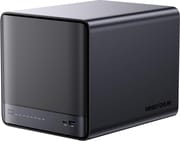
The N5 Pro measures about 7.8 x 9.9 x 8 inches and weighs about 11 pounds without drives. Five 3.5-inch SATA bays with tool-less trays sit behind a glossy magnetic front cover, and each bay also accepts 2.5-inch drives and takes hard drives up to 30TB, for 150TB of raw hard-drive capacity. Below the drive cage is a compute tray that slides out of the front after two screws, which ServeTheHome compares to Minisforum’s MS-A2 mini PC. The front strip carries the power button, status and drive LEDs, one USB4 port, and one USB-A port. On the back sit the second USB4 port, HDMI 2.1, OCuLink, the two Ethernet jacks, a USB-A 10Gbps port, a USB 2.0 port, the PCIe slot opening, and the 19V power input, and a third USB-A port inside the chassis is there for booting an alternate OS from a flash drive.
The Ryzen AI 9 HX PRO 370 is a Zen 5 laptop-class chip with four full Zen 5 cores and eight Zen 5c cores, 24 threads, a 5.1 GHz boost clock, a 50 TOPS NPU, and Radeon 890M integrated graphics. Its PassMark multi-thread score is about 33,300, several times what the Intel N-series and Celeron chips in entry NAS units reach. The PRO version matters for storage because AMD enables ECC on it, and Minisforum sells the N5 Pro with 48GB or 96GB of ECC DDR5 or with 16GB of standard DDR5. The Radeon 890M handles hardware video decode and encode for Plex or Jellyfin, including AV1 and HEVC.
The three M.2 slots take 2280 or 22110 drives (the system slot also takes 2230), but they share four PCIe 4.0 lanes: slot A runs at x1 and holds the 128GB system drive, slot B runs at x2, and slot C at x1. The included adapter board replaces slots B and C with two 7mm U.2 connectors for enterprise NVMe drives up to 15TB each. Each slot still outruns a 10GbE link, so the lane split matters more for local VM storage than for network file serving. For faster NVMe, the PCIe 4.0 x4 slot can take an M.2 carrier card or a second network card, and it supplies up to 75W.
The 10GbE port uses a Marvell AQC113 controller in the review units (the maker lists a Realtek RTL8127 as an alternative), and the 5GbE port uses a Realtek RTL8126. There is no Wi-Fi. Power comes from a 280W external adapter, sized to feed the PCIe slot as well as the drives and processor.
Reviewer Insights

ServeTheHome
ServeTheHome reviewed the N5 Pro with five 28TB hard drives installed and opened with “There have been few platforms I have been more excited about recently than the Minisforum N5 Pro.” The review explains the choice of chip: “Instead of using a lower-performance part, this system uses a fast AMD Ryzen AI processor with a decent integrated GPU, NPU, and, of course, Zen 5 cores. This is a winning combination.” It describes the layout as “a MS-A2 style compute tray at the bottom with 3.5″ hard drives on top.”
ServeTheHome measured 45 to 49W at idle with the five drives installed and about 120 to 125W under a typical NAS load. The review faulted the external power brick, the tight PCIe lane budget that leaves the M.2 slots at x1, x1, and x2, and a MinisCloud OS that still needs work: setup required downloading an app, and some parts were not fully translated to English. It concluded that the N5 Pro is a strong hardware platform for people building their own NAS.
NotebookCheck
NotebookCheck tested a unit with 32GB of ECC memory and ran it under both MinisCloud OS and Windows 11 Pro. It wrote that “The Minisforum N5 Pro presents itself as a mighty and modern NAS/mini server that delivers impressive computing power with the AMD Ryzen AI 9 HX PRO 370 on the Zen 5 architecture.” On cooling, the review found that “Despite its compact design, the cooling system impresses with low temperatures and moderate noise levels.” NotebookCheck marked down idle power consumption, the internal SSDs running at PCIe 4.0 x2 and x1 speed, no Wi-Fi, and a sensitive glossy front.
Level1Techs
The Level1Techs video review framed the N5 Pro as an enthusiast product: “This is a ridiculously insane NAS platform that is not for the uninitiated and is basically made only for unhinged customers.” It measured about 7.6W at idle and 34 dB from about a foot away with no drives installed, and explained that the 279W (sold as 280W) brick is sized so the PCIe slot can draw 75W. The video’s case for the hardware was “5.1 GHz, 96 gigs of memory, all that room for virtual machines and containers and everything else. That’s why you buy this is cuz all of that runs really fast.” It found no web interface on first boot of MinisCloud OS, which had to be configured through Minisforum’s app, and said the OS has far fewer features than TrueNAS or Unraid.
Jim’s Garage
Jim’s Garage tore the unit down and ran it as a Proxmox host with TrueNAS in a virtual machine. He praised the hardware: “The quality of the device, the build quality is great for a first NAS. I’m really impressed with what they’ve achieved.” He added that “The way that the IO MMU groups are laid out actually lends itself quite well to virtualizing your NAS.” He showed that installing the U.2 daughterboard means removing an internal fan, and on the slower M.2 slots he said “You’re not going to be getting the full speed obviously of NVME Gen 4 drives, but you will be able to saturate the link speed… it shouldn’t really matter.” He called MinisCloud OS a promising first attempt but noted untranslated Chinese text in it and said its closed-source FNOS base may be a hard stop for most people. His buying advice leaned toward the cheaper non-Pro N5: in his view the Pro gets too expensive, and its extra CPU power and ECC support are not worth the premium for most buyers.
Britec09
Britec09 walked through the unboxing, the four internal fans, and the MinisCloud OS setup. He said “Minisforum have knocked this out the park. The design on this thing is absolutely insane,” and described the buyer as “someone who is a power user who wants to run multiple virtual machines and also run literally Plex at the same time.” On noise, he reported that “Under load, it was pretty quiet.” He pointed out that the plastic drive trays have no locks and called the operating system a work in progress.
Family Pop TV
Family Pop TV swapped the factory SSD for a blank drive, installed Windows 11 Pro, and tested the N5 Pro as a workstation, including an external desktop graphics card over OCuLink. He summed it up as “At this point, calling the N5 Pro just a NAS isn’t accurate. It’s misleading.” He measured idle draw under 50W with five large drives and about 120W under typical NAS workloads, saw temperatures stay under 50C, and heard a constant fan hum around 40 dB that he found noticeable in a quiet room but not annoying. He noted the chunky 280W brick and said the lack of a lock on the front cover isn’t ideal.
Who the N5 Pro is for
ServeTheHome, Jim’s Garage, and Britec09 all praised the hardware and called MinisCloud OS unfinished, and Level1Techs found it usable but with far fewer features than TrueNAS or Unraid, so plan on a third-party OS if the NAS software matters to you. Jim’s Garage also pointed most buyers to the cheaper non-Pro N5, so the Pro makes sense mainly when you will use its extra cores and ECC memory. The N5 Pro puts five hard drives, ECC memory, 10GbE, and enough CPU for a stack of VMs and containers into one box next to the file shares. The barebone model suits buyers who already own SO-DIMMs, and the 48GB and 96GB kits are the ones with ECC memory installed.
Five bays cap raw hard-drive capacity at 150TB, the M.2 lane split slows local NVMe pools, and the U.2 option only takes thin 7mm drives. Buyers who want a finished vendor NAS app should look at Synology or UGREEN units instead (our UGREEN vs Synology comparison covers how their software differs), and buyers who only store files and stream media can get by with far less processor and lower idle power.
Frequently Asked Questions
Does the Minisforum N5 Pro support ECC memory?
Yes. The Ryzen AI 9 HX PRO 370 supports ECC, and the N5 Pro takes up to 96GB of DDR5-5600 ECC across two SO-DIMM slots. Minisforum sells 48GB and 96GB ECC kits installed, and the 16GB model ships with standard non-ECC DDR5. The barebone model has no memory, so you choose ECC or non-ECC modules yourself.
Can I install TrueNAS or Unraid on the Minisforum N5 Pro?
Yes. Minisforum lists Windows 11 and Linux support alongside MinisCloud OS, and the hardware has no drive or OS lock. Reviewers ran TrueNAS in a Proxmox virtual machine and installed Windows 11 Pro. The internal USB-A port can hold a boot flash drive for Unraid, or you can replace the 128GB system SSD.
How do U.2 drives work in the N5 Pro?
An adapter board included in the box plugs into the two data M.2 slots and provides two U.2 connectors for 7mm U.2 NVMe drives up to 15TB each. With the adapter fitted, the unit has one M.2 slot for the system drive plus the two U.2 drives. Installing the adapter requires removing an internal fan, and the drives run at the same x2 and x1 PCIe 4.0 lane widths as the M.2 slots.
How fast are the network ports on the N5 Pro?
The N5 Pro has one 10GbE RJ45 port and one 5GbE RJ45 port built in. The PCIe 4.0 x4 slot can take an add-in network card for more or faster ports.
How much power does the Minisforum N5 Pro use?
ServeTheHome measured 45 to 49W at idle with five 28TB hard drives installed and about 120 to 125W under a typical NAS load. Level1Techs measured about 7.6W at idle with no drives. The unit runs from a 280W external power adapter.
What’s included in the box with the Minisforum N5 Pro?
The box holds the N5 Pro with its 128GB system SSD installed, the 280W power adapter and power cord, the M.2-to-U.2 adapter board, an HDMI cable, and an Ethernet cable. Hard drives are not included, and the barebone model also has no memory.