

For years, the standard advice for anyone wanting to write code on a Chromebook has been to enable Linux, wrestle with Crostini, and accept that you’re working inside a container that occasionally forgets it exists. That changed on March 18, 2026, when Google announced full-stack vibe coding in AI Studio — a browser-based experience that pairs the new Antigravity coding agent with native Firebase integration. You describe what you want to build in plain English, and Gemini 3.1 Pro handles the implementation. The entire workflow runs in a Chrome tab, which means it works on any Chromebook with a browser and an internet connection.
The announcement landed with considerable force. Google’s official post on X pulled in tens of thousands of likes and millions of views, suggesting the developer community sees this as more than a minor feature update. For Chromebook users specifically, the implications are worth unpacking carefully, because while the headlines promise “build production apps from any device,” the reality is more nuanced and more interesting than the marketing suggests.
What the Antigravity Agent Actually Does
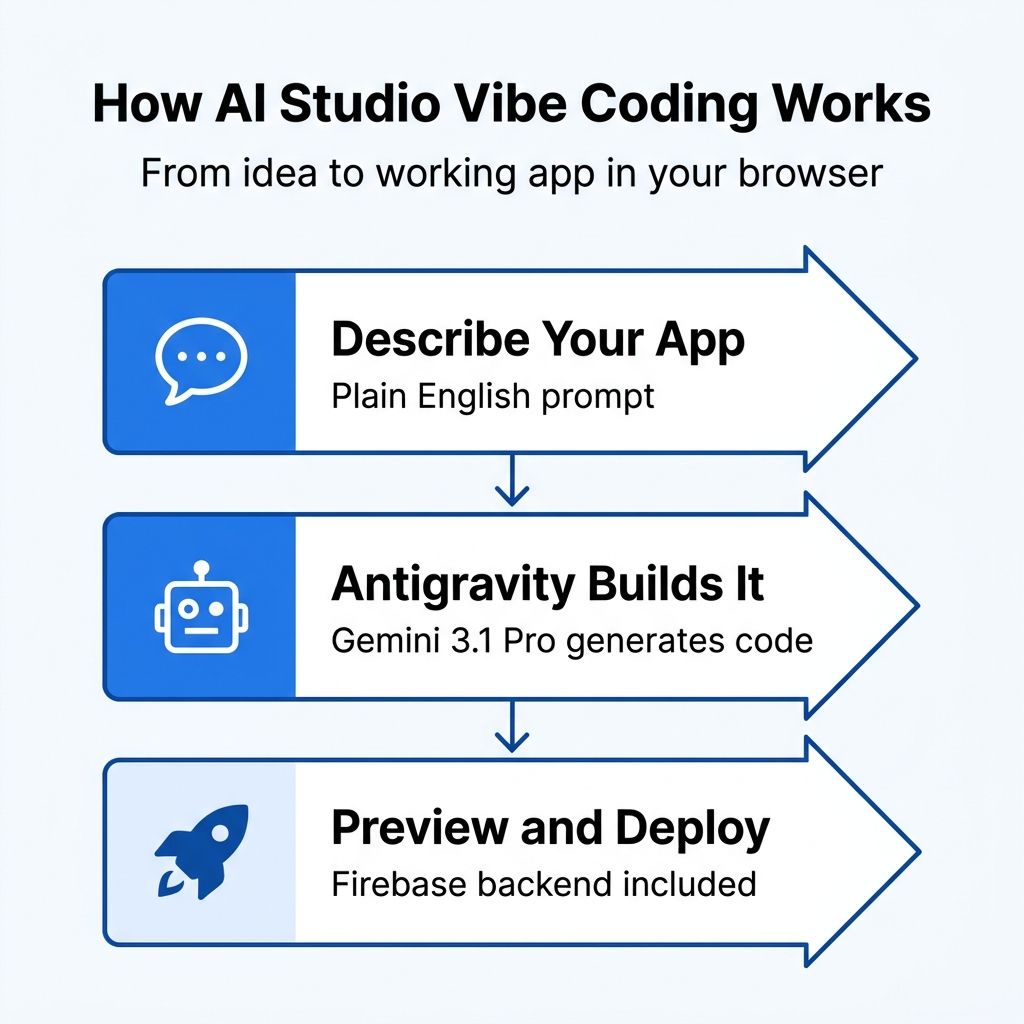
The core addition to AI Studio is the Antigravity agent, which functions as an AI pair programmer that can scaffold and build entire applications from text prompts. You tell it what you want — a recipe organizer, a multiplayer game, a project management tool — and Antigravity generates working code in React, Angular, or Next.js. What sets it apart from earlier AI coding tools is the backend integration. When your app needs a database, the agent detects this automatically and, after you approve a Firebase integration, provisions Cloud Firestore. When it needs user login, Firebase Authentication gets wired up. When it needs animations or UI components, libraries like Framer Motion and Shadcn get installed without you touching a package manager.
Google demonstrated this with several example applications: a multiplayer laser tag game with real-time leaderboards, a collaborative 3D particle visualization using Three.js, and a recipe organizer powered by Gemini. These aren’t toy demos. They involve WebSocket connections, persistent data storage, user authentication, and third-party API integration — the kind of infrastructure that would normally take a professional developer days to set up. A new Secrets Manager lets you store API credentials for services like payment processors or Google Maps, which means apps built this way can interact with the broader web ecosystem rather than existing in isolation.
The internal numbers are striking. Google claims its teams have built hundreds of thousands of apps using this system during internal testing, which suggests serious engineering investment behind the feature rather than a rushed launch.
Why This Matters for Chromebook Users
The historical Chromebook development story has always been one of workarounds. Enable Linux in settings, install a code editor, set up Node.js, configure a local server, and hope your device has enough RAM to handle the container overhead alongside Chrome. It works, but it’s the kind of setup that makes sense for developers who already know what they’re doing, not for students, teachers, or anyone exploring coding for the first time.
AI Studio sidesteps all of that. Because the coding environment runs entirely in Google’s cloud and renders in your browser, your Chromebook’s hardware specifications become largely irrelevant to the development experience. A $250 Chromebook with 4GB of RAM can access the same Antigravity agent as a premium laptop. The processing happens on Google’s servers, and your device just needs to display the result and handle text input. This is the same dynamic that makes Google’s own Gemini AI features work well on Chromebook Plus devices — the heavy lifting happens in the cloud, and the browser is just the interface.
There’s a satisfying irony in the fact that Google’s own AI development tools now work best on Google’s own hardware platform. Chromebooks were designed from day one around the premise that the browser is enough. For a decade, critics have pointed to software development as the clearest counterexample. You can’t run Visual Studio Code natively, you can’t install Docker without Linux, you can’t compile large projects locally. AI Studio doesn’t address those specific limitations, but it renders many of them irrelevant by moving the entire development process into the browser.
The Honest Assessment: What You Can and Cannot Build
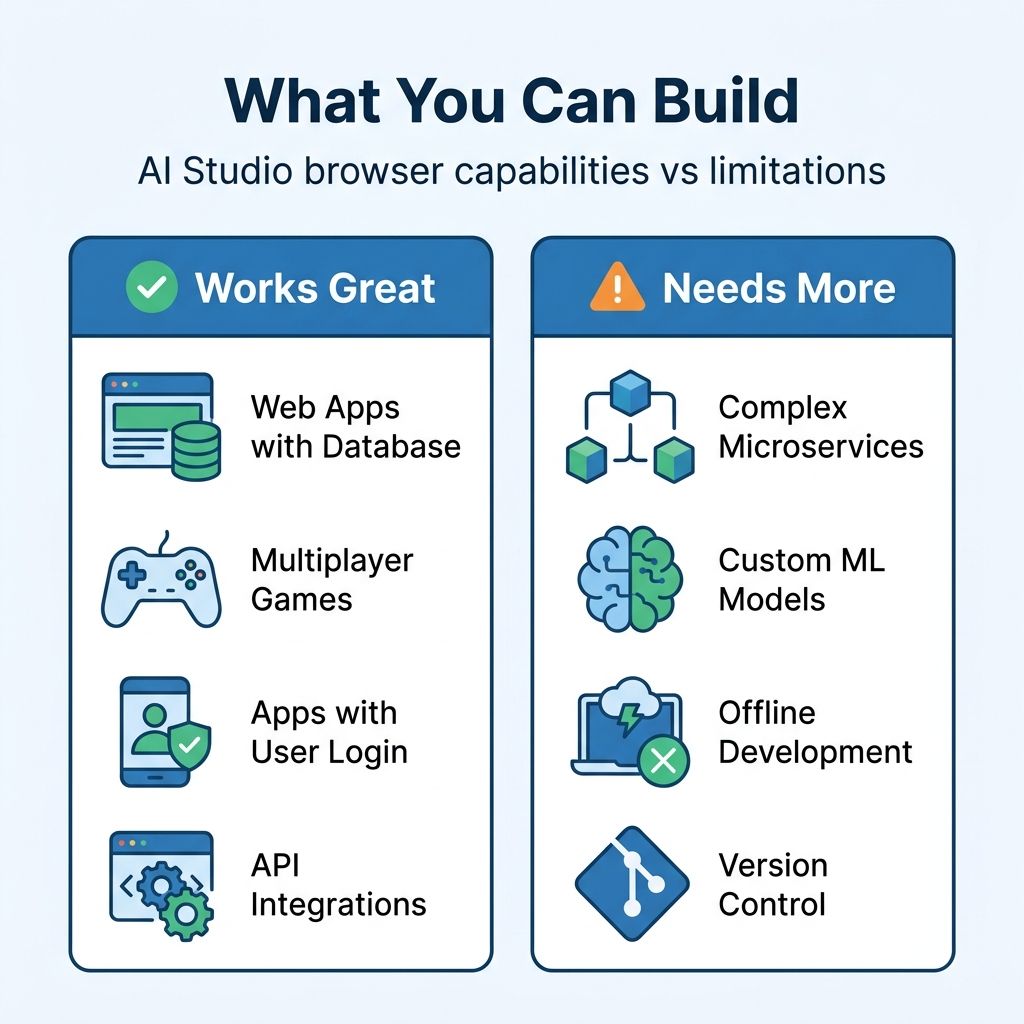
The enthusiasm needs tempering with honesty, because AI Studio’s browser-based vibe coding has real boundaries. The tool excels at prototyping and building straightforward web applications — the kind of app that has a frontend, a database, maybe some authentication, and interactions with a few APIs. For a student building their first project, a teacher creating a classroom tool, or a non-developer turning an idea into a working prototype, this is genuinely transformative.
Where it gets more complicated is scale and complexity. The apps generated through AI Studio’s browser interface are essentially single-page applications with Firebase backends. That’s powerful for a wide range of use cases, but it’s not the same as building a complex microservices architecture, working with custom machine learning models, or developing anything that requires fine-grained control over server infrastructure. For those workflows, Google offers Antigravity as a standalone desktop IDE with deeper capabilities — but that’s a locally installed application, which on a Chromebook would circle back to the Linux container approach.
It’s also worth being straightforward about cost. AI Studio is free for prototyping and testing, which is genuinely generous and makes it an excellent classroom tool. But deploying to production means using the Gemini API or Vertex AI, both of which bill by token. A student experimenting with app ideas pays nothing. A startup trying to ship a real product will accumulate costs that scale with usage. Google is building a pipeline from free experimentation to paid production, which is a smart business model but one that users should understand from the start.
How This Changes the “Things Chromebooks Can’t Do” Conversation
I’ve written before about the things Chromebooks genuinely struggle with — professional creative software, serious gaming, specialized industry applications. Software development has always been on that list with a large asterisk. You could technically write code on a Chromebook through Linux, but the experience ranged from awkward to painful depending on your project’s complexity and your device’s hardware.
AI Studio doesn’t remove that asterisk entirely, but it does shrink it considerably. The person who wants to build a web app to manage their small business inventory no longer needs to learn about package managers, build tools, and deployment pipelines. The computer science teacher who wants students to create real applications during class no longer needs to worry about whether the school’s Chromebooks can handle a Linux development environment. The hobbyist with an app idea no longer needs a separate computer to turn that idea into something functional.
This shift parallels what happened when Google Docs made office productivity viable in the browser. Nobody claimed Google Docs replaced Microsoft Office for every use case — it didn’t and still doesn’t. But for the vast majority of document-writing needs, it proved that the browser was enough. AI Studio is making a similar argument for a certain tier of software development: not all of it, but enough to matter for the audience that Chromebooks already serve.
The Bigger Picture: Browser-Based Development Was Already Growing
AI Studio isn’t emerging into a vacuum. Browser-based development environments like Replit, StackBlitz, and GitHub Codespaces have been chipping away at the “you need local tools” assumption for years. What Google adds to this landscape is the AI layer that makes the browser-based approach accessible to people who don’t already know how to code. Replit is powerful but still assumes you understand programming concepts. StackBlitz is fast but still expects you to write JavaScript. AI Studio lets you describe what you want in natural language and generates the technical implementation.
For Chromebook users, this expanding ecosystem of browser-based tools means the argument for buying a more expensive laptop “in case you need to code someday” gets weaker with each passing month. The combination of AI Studio for building apps, Gemini for research and writing, and the broader suite of browser-based productivity tools creates a platform that handles more real-world workflows than critics typically acknowledge.
The important caveat is that all of this depends on a reliable internet connection. If you need to work without internet access, AI Studio offers nothing. The tool is entirely cloud-dependent, and there’s no offline mode for code generation or Firebase integration. For users in areas with spotty connectivity, or for anyone who values the ability to work anywhere regardless of network conditions, this remains a meaningful limitation.
What to Actually Expect
If you own a Chromebook and you’re curious about building apps, AI Studio is worth trying right now. Navigate to aistudio.google.com in Chrome, sign in with your Google account, and start describing what you want to build. The learning curve is essentially zero for basic prototyping — you’re writing English, not code. Experiment with small projects first to understand what the tool handles well and where it stumbles. Try building a to-do app, a quiz game, or a simple dashboard, and you’ll quickly develop an intuition for the kinds of applications where AI-assisted coding shines.
For teachers considering this for classroom use, the free tier makes it immediately practical. Students can prototype real applications without any setup beyond opening a browser tab, and the Firebase integration means those applications can actually store data and handle multiple users. It’s a dramatically lower barrier to entry than installing development tools on school-managed Chromebooks, where IT policies often restrict Linux access.
For anyone hoping that AI Studio turns a Chromebook into a replacement for a professional development workstation, temper those expectations. It’s a powerful prototyping tool and a legitimate path to shipping simple web applications. It is not yet a substitute for a full IDE, version control workflow, and the ecosystem of tools that professional developers rely on daily. But for the majority of Chromebook users — the students, teachers, small business owners, and curious tinkerers — the gap between “I have an idea for an app” and “I have a working app” just got dramatically smaller. That’s worth paying attention to, regardless of what computer you’re using.


