
Acer Chromebook 315 (CB315-5H/5HT)

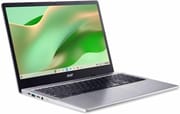
The Acer Chromebook 315 delivers a spacious 15.6-inch FHD IPS display with an Intel Processor N100 for users who need a larger screen for productivity work. Released in late 2023, this budget-friendly Chromebook targets students, remote workers, and anyone who prefers a full-sized keyboard with a dedicated numeric keypad. The inclusion of WiFi 6E and a 1080p 60fps webcam with Acer’s TNR (Temporal Noise Reduction) technology positions it well for video conferencing and modern wireless networks. With an Auto Update Expiration date extending to June 2033, buyers can expect nearly a decade of software support. The OceanGlass touchpad, made from recycled ocean-bound plastics, adds an eco-conscious touch to this practical everyday machine.
Pros and Cons of the Acer Chromebook 315
| Pros | Cons |
|---|---|
| Large 15.6-inch FHD IPS display | No keyboard backlighting |
| Full-size keyboard with numeric keypad | Plastic build feels budget-oriented |
| 1080p 60fps webcam with TNR technology | No HDMI port requires USB-C adapter |
| WiFi 6E for modern wireless connectivity | eMMC storage slower than NVMe SSD |
| Long software support through June 2033 | Some early units reported reliability issues |
| DTS-tuned upward-firing speakers | Weighs 3.73 lbs, heavier than smaller Chromebooks |
Acer Chromebook 315 (CB315-5H/5HT) Comparison Chart
 Acer Chromebook 315 (CB315-5H) 4GB/128GB | Acer Chromebook 315 (CB315-5H) 8GB/64GB | Acer Chromebook 315 (CB315-5HT) Touchscreen | |
| Price | List Price: $329.99 Amazon Prices: Loading prices... | List Price: Amazon Prices: Loading prices... | List Price: Amazon Prices: Loading prices... |
| Model number | CB315-5H-C7KX | CB315-5H-C4Z5 | CB315-5HT-C66N |
| Performance Rating | 3.5 | 4.8 | 4.8 |
| Chromebook Plus | No | No | No |
| Processor | Quad-core 3.40 Ghz (max 3.40 Ghz) Intel Processor N100 | Quad-core 3.40 Ghz (max 3.40 Ghz) Intel Processor N100 | Quad-core 3.40 Ghz (max 3.40 Ghz) Intel Processor N100 |
| RAM | 4 GB | 8 GB | 8 GB |
| Internal Storage | 128 GB eMMC | 64 GB eMMC | 64 GB eMMC |
| Screen Size | 15.6" | 15.6" | 15.6" |
| Screen Resolution | 1920x1080 | 1920x1080 | 1920x1080 |
| Screen Type | IPS | IPS | IPS |
| Touch Screen | No | No | Yes |
| Stylus / Pen | No Stylus Support | No Stylus Support | No Stylus Support |
| Dimensions width x length x thickness | 14.42 x 9.61 x 0.82 inches (366.27 x 244.09 x 20.83 mm) | 14.42 x 9.61 x 0.82 inches (366.27 x 244.09 x 20.83 mm) | 14.42 x 9.61 x 0.82 inches (366.27 x 244.09 x 20.83 mm) |
| Weight | 3.73 lbs (1.7 kg) | 3.73 lbs (1.7 kg) | 3.73 lbs (1.7 kg) |
| Backlit Keyboard | No | No | No |
| Webcam | 1080p 60fps | 1080p 60fps | 1080p 60fps |
| WiFi | Wi-Fi 6E (802.11ax) | Wi-Fi 6E (802.11ax) | Wi-Fi 6E (802.11ax) |
| Bluetooth | Bluetooth 5.1 | Bluetooth 5.1 | Bluetooth 5.1 |
| Ethernet | No | No | No |
| Cellular Modem | No | No | No |
| HDMI | No HDMI | No HDMI | No HDMI |
| USB Ports | 2 USB 3, 2 USB-C 2x USB-C 3.2 Gen 1 with DisplayPort and Power Delivery, 2x USB-A 3.2 Gen 1 | 2 USB 3, 2 USB-C 2x USB-C 3.2 Gen 1 with DisplayPort and Power Delivery, 2x USB-A 3.2 Gen 1 | 2 USB 3, 2 USB-C 2x USB-C 3.2 Gen 1 with DisplayPort and Power Delivery, 2x USB-A 3.2 Gen 1 |
| Thunderbolt Ports | No | No | No |
| Card Reader | microSD Card Reader | microSD Card Reader | microSD Card Reader |
| Battery | No Battery | No Battery | No Battery |
| Battery Life | 12.5 hours | 12.5 hours | 12.5 hours |
| Fanless | No | No | No |
| Auto Update Expiration Date | June, 2033 | June, 2033 | June, 2033 |
Related Chromebooks
-
 Acer Chromebook 15 315The Acer Chromebook 15 315 combines a comfortable 15.6'' ComfyView display and fanless design for…
 -
 Acer Chromebook 715The Acer Chromebook 715 boasts a 15.6-inch full-HD IPS display, a backlit keyboard, and up to 11…
 -
 ASUS Chromebook CX1 (CX1500)The ASUS Chromebook CX1 (CX1500) boasts a full HD display, long-lasting battery, and peppy…
 -
 ASUS Chromebook CX15The ASUS Chromebook CX15 delivers a spacious 15.6-inch Full HD display, full-size keyboard with…
 -
 Lenovo 3i ChromebookThe Lenovo 3i Chromebook offers a large 15.6-inch anti-glare FHD display with a numeric keypad,…
 -
 Lenovo IdeaPad 3i ChromebookA budget-friendly 15.6" Chromebook featuring a Full HD display, Intel Celeron N4500 processor, and…
Detailed Insights into the Acer Chromebook 315

The Acer Chromebook 315 measures 14.42 x 9.61 x 0.82 inches and weighs 3.73 pounds, making it a substantial presence on any desk while remaining portable enough for occasional transport. The silver plastic chassis maintains a clean, professional appearance though it does show fingerprints readily. The 15.6-inch display with narrow side bezels provides ample screen real estate for document editing, spreadsheets, and split-screen multitasking. Acer has incorporated their OceanGlass touchpad made from recycled materials, delivering a smooth tracking surface while reducing environmental impact. The upward-firing speakers flanking the keyboard provide better audio directionality than bottom-firing alternatives, with DTS tuning for improved sound quality during video calls and media playback.
At the heart of the system lies the Intel Processor N100 with 4 cores and 4 threads running at up to 3.40 GHz. This Alder Lake-N generation processor achieves a PassMark score of approximately 5,643, providing adequate performance for typical Chromebook workloads including web browsing, document editing, and video conferencing. For users who need more multitasking headroom, the 8GB RAM variants offer better performance when running multiple Chrome tabs alongside Android apps. The eMMC storage, while sufficient for ChromeOS, is slower than NVMe SSD alternatives found in premium Chromebooks.
Connectivity includes WiFi 6E (802.11ax) for fast, modern wireless networks and Bluetooth 5.1 for peripherals. The port selection provides two USB-C 3.2 Gen 1 ports with DisplayPort Alt Mode and Power Delivery, two USB-A 3.2 Gen 1 ports, a microSD card reader, and a 3.5mm headphone/microphone combo jack. The symmetrical USB-C placement allows charging from either side of the device. There is no HDMI port, so external display connections require a USB-C monitor or adapter.
Reviewer Insights on the Acer Chromebook 315

The Acer Chromebook 315 CB315-5H represents the 2023 refresh of Acer’s 15.6-inch Chromebook line with updated Intel Alder Lake-N processors. While professional video reviews specifically covering this exact model (CB315-5H with Intel N100) are limited, the specifications align closely with other Acer Chromebooks in the same generation like the CB314-4H, which shares the same processor platform and software support timeline.
According to Acer’s official product page, the device features their TNR (Temporal Noise Reduction) solution optimized for video calling, which improves webcam quality in low-light conditions. The 1080p 60fps webcam with manual privacy shutter represents a notable upgrade over the typical 720p cameras found in budget Chromebooks. The device also includes a spill-resistant keyboard, a common durability feature in Acer’s education-focused lineup.
The CB315-5H builds on Acer’s established Chromebook 315 lineage while bringing modern conveniences like WiFi 6E connectivity and the extended AUE date through June 2033. Users familiar with previous Chromebook 315 generations will find a similar form factor with upgraded internals and longer software support.
Customer Reviews of the Acer Chromebook 315
Amazon customers have rated the Acer Chromebook 315 CB315-5H 4.0 out of 5 stars based on 12 reviews. The most praised aspects include the sharp FHD display and easy setup process. One satisfied buyer noted the screen is “very sharp” and the laptop represents “good value for the price,” highlighting that it works well for everyday tasks. The large display and straightforward Chrome OS experience also make it a practical option for setting up a Chromebook for seniors.
However, some customers have encountered issues with early units. One reviewer reported significant reliability problems including random freezing, unexpected sign-out issues, and ultimately complete device failure after only a few weeks of use. Another buyer expressed disappointment about the lack of a touchscreen on the non-touch models, noting their previous Chromebooks all had touch capability. At least one negative review appears to reflect general dissatisfaction with ChromeOS rather than hardware-specific issues.
Overall, the customer sentiment is cautiously positive, with most buyers finding the Acer Chromebook 315 meets expectations for basic productivity tasks. The display quality and webcam receive particular praise, while concerns about long-term reliability and the learning curve for ChromeOS newcomers represent the primary complaints.
Conclusion
The Acer Chromebook 315 CB315-5H stands out as a practical choice for users who prioritize screen size and keyboard comfort over portability. Its combination of a spacious 15.6-inch FHD IPS display, full-size keyboard with numeric keypad, and modern WiFi 6E connectivity makes it well-suited for students working on papers, remote workers handling spreadsheets, or anyone who values a larger viewing area. The 1080p webcam with TNR technology provides better video conferencing quality than typical budget alternatives.
That said, users who need keyboard backlighting for working in dim environments or prefer a lighter, more portable machine should consider alternatives. The lack of an HDMI port means you will need a USB-C adapter for traditional monitors, and the plastic build feels decidedly budget-oriented. Power users or those planning intensive Linux development work would benefit from stepping up to a Chromebook Plus device with more RAM and faster NVMe storage.
For those comparing options, see our Chromebook Comparison Chart to find the best match for your needs.
Frequently Asked Questions
What processor does the Acer Chromebook 315 (CB315-5H) use?
The Acer Chromebook 315 CB315-5H is powered by the Intel Processor N100, featuring 4 cores and 4 threads with a maximum clock speed of 3.40 GHz. This Alder Lake-N generation processor scores approximately 5,643 on PassMark’s CPU benchmark, providing adequate performance for web browsing, document editing, video conferencing, and typical ChromeOS workloads.
Can I upgrade the RAM in the Acer Chromebook 315?
No, the Acer Chromebook 315 uses soldered LPDDR5 memory that cannot be upgraded after purchase. The CB315-5H-C7KX model comes with 4GB RAM, while the CB315-5H-C4Z5 and CB315-5HT-C66N models come with 8GB RAM. Choose the RAM configuration that meets your needs at purchase time.
What ports does the Acer Chromebook 315 have?
The Acer Chromebook 315 includes 2x USB-C 3.2 Gen 1 ports with DisplayPort Alt Mode and Power Delivery, 2x USB-A 3.2 Gen 1 ports, a microSD card reader, a 3.5mm headphone/microphone combo jack, and a Kensington lock slot. There is no HDMI port, so external displays require a USB-C connection or adapter.
How long will the Acer Chromebook 315 (CB315-5H) receive updates?
The Acer Chromebook 315 CB315-5H has an Auto Update Expiration (AUE) date of June 2033. Until this date, the device will receive ChromeOS updates including new features, security patches, and bug fixes. This provides nearly a decade of software support from its late 2023 release date.
Does the Acer Chromebook 315 have a touchscreen?
It depends on the model. The CB315-5HT-C66N variant includes a touchscreen, while the CB315-5H-C7KX and CB315-5H-C4Z5 do not. Check the model number carefully when purchasing: models with “5HT” have touch capability, while “5H” models are non-touch.
Does the Acer Chromebook 315 have a backlit keyboard?
No, the Acer Chromebook 315 CB315-5H does not have keyboard backlighting. Users who frequently work in low-light environments may want to consider alternatives with backlit keyboards. The device does include a full-size keyboard with a dedicated numeric keypad.
Is the Acer Chromebook 315 a Chromebook Plus?
No, the Acer Chromebook 315 CB315-5H is not officially certified as a Chromebook Plus. While it does feature a 1080p webcam, it lacks other Chromebook Plus requirements such as a minimum of 8GB RAM on all configurations. Users seeking Chromebook Plus AI features and performance should consider certified models.