
ASUS Chromebook CX15
Updated on

The ASUS Chromebook CX15 pairs a 15.6-inch Full HD screen with a full-size keyboard and number pad at a $239 list price. Inside is Intel’s dual-core Celeron N4500 with 8GB of RAM and 128GB of eMMC storage, enough for browsing and document work in Chrome OS. The shell is plastic but carries MIL-STD 810H durability testing, and at 0.79 inches thick and 3.51 pounds it stays easy to carry for a 15-inch machine. WiFi 6 and Bluetooth 5.4 handle wireless, and Chrome OS automatic updates run through June 2031.
Pros and cons
| Pros | Cons |
|---|---|
| Under $250 for the 8GB model | Touchpad is small for a 15-inch laptop |
| Large 15.6-inch Full HD anti-glare display | No keyboard backlight |
| Full-size keyboard with a number pad | Only one USB-A port limits peripheral options |
| MIL-STD 810H drop and vibration testing | Webcam tops out at 720p |
| Up to 11 hours of battery life | Only 128GB of eMMC storage, not upgradeable |
| WiFi 6 and Bluetooth 5.4 | No Ethernet port |
Related Videos
ASUS Chromebook CX15 Comparison Chart
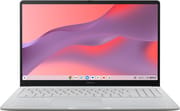 ASUS Chromebook CX15 | |
| Price | List Price: $239.00 Amazon Prices: |
| Model number | --- |
| Performance Rating | 3.7 |
| Chromebook Plus | No |
| Processor | Dual-core 1.10 Ghz (max 2.80 Ghz) Intel Celeron Processor N4500 |
| RAM | 8 GB |
| Internal Storage | 128 GB eMMC |
| Screen Size | 15.6" |
| Screen Resolution | 1920x1080 |
| Screen Type | FHD Anti-Glare NanoEdge IPS |
| Touch Screen | No |
| Stylus / Pen | No Stylus Support |
| Dimensions width x length x thickness | 14.15 x 9.14 x 0.79 inches (359.41 x 232.16 x 20.07 mm) |
| Weight | 3.51 lbs (1.6 kg) |
| Backlit Keyboard | No |
| Webcam | 720p |
| WiFi | Wi-Fi 6 (802.11ax) |
| Bluetooth | Bluetooth 5.4 |
| Ethernet | No |
| Cellular Modem | No |
| HDMI | Full-Size HDMI |
| USB Ports | 1 USB 3, 1 USB-C |
| Thunderbolt Ports | No |
| Card Reader | microSD Card Reader |
| Battery | 42Wh |
| Battery Life | Up to 11 hours |
| Fanless | No |
| Auto Update Expiration Date | June, 2031 |
Related Chromebooks
-
 ASUS Chromebook CX1 (CX1500)The ASUS Chromebook CX1 (CX1500) is a 15.6-inch full HD Chromebook with a number pad, an Intel…
 -
 Acer Chromebook 715The Acer Chromebook 715 is a 15.6-inch full-HD IPS Chromebook with an aluminum chassis, a keyboard…
 -
 Acer Chromebook 315 (CB315-5H/5HT)A budget-friendly 15.6-inch Chromebook with Intel N100 processor, FHD IPS display, WiFi 6E, and…
 -
 ASUS Chromebook C424The ASUS Chromebook C424 boasts a crisp 14-inch FHD anti-glare display, durable spill-resistant…
 -
 Lenovo IdeaPad 3i ChromebookThe Lenovo IdeaPad 3i Chromebook is a 15.6-inch Full HD Chromebook with an Intel Celeron N4500 and…
 -
 HP Chromebook 15a (15a-nb0013dx)The HP Chromebook 15a (15a-nb0013dx) is a fanless 15.6-inch Chromebook with an Intel N200, 8GB of…
A drop-rated 15.6-inch shell over dual-core internals
The chassis is plastic throughout, tested to the MIL-STD 810H standard for drops, vibration, and temperature extremes. The body measures 14.15 inches wide and 0.79 inches thick, and the 3.51-pound weight keeps it manageable for a 15.6-inch laptop on a daily commute. Narrow NanoEdge bezels put the screen-to-body ratio at 87%, so the footprint stays smaller than the panel size suggests. ASUS sells it in Pure Grey along with Fabric Blue and Misty Green.
The Intel Celeron N4500 is a dual-core chip with a 1.1 GHz base clock that boosts to 2.8 GHz. It handles web browsing, Google Docs, video streaming, and light Android apps. The 8GB RAM configuration gives more multitasking headroom than the 4GB variant many reviewers tested, and the 128GB of eMMC storage leaves room for offline files and Play Store apps. Demanding 3D games need a cloud service such as GeForce Now instead of local hardware.
Every port sits on the left edge: one USB-C 3.2 Gen 1 that also takes the 45W charger, one USB-A 3.2 Gen 1, a full-size HDMI 1.4 output for an external display, a 3.5mm headphone and microphone combo jack, and a microSD card reader. WiFi 6 (802.11ax) runs on a 2x2 antenna configuration, and Bluetooth 5.4 covers current wireless accessories. There is no Ethernet port at this price, though a USB Ethernet adapter adds wired networking. With a single USB-A port, two wired peripherals at once means a hub.
Reviewer Insights
Matt On Tech rated the keyboard the best part
Matt On Tech tested the 4GB CX1505CKA at its $160 Walmart price. He called the keyboard “the real star of the show,” said he typed thousands of words on it with no complaints, and said the build holds up well for the money: “You could easily spend $500 or $600 on another laptop and end up with something that doesn’t really feel much more premium.” He counted the 1080p display as a major win at this price, and found the touchpad small and the ports limited, all on the left side. The 4GB of RAM was his main performance complaint: the interface hitched and slowed as he opened more tabs, and he suggested the laptop for people who keep no more than half a dozen tabs open. He expects about 10 hours of battery life, and he called it “the minimum viable laptop that I would recommend,” a fit for people who use a phone or tablet most of the time and turn to a laptop when they need a keyboard.
ShortCircuit preferred the CX15 keyboard over the CX34
ShortCircuit covered the CX15 alongside the $599 ASUS Chromebook Plus CX34 in a video ASUS sponsored. On the 4GB CX15, the host said he strongly prefers its keyboard to the CX34’s because of the number pad and the Google key. He saw “a bit more of a delay” moving between Chrome tabs and opening Google Docs, but said none of the delays upset him, and he called the display “perfectly serviceable” for 1080p video. He came away “pretty impressed” by the speakers. He leaned toward the CX34 overall, and called the CX15 a steal at its $160 sale price.
Three publications scored it between 3.5 and 4 stars
Matthew S. Smith at PCWorld gave it 3.5 out of 5. He measured 10 hours and 57 minutes in the CrXPRT 2 battery test, well short of the more than 13 hours PCWorld recorded on the Chromebook Plus CX34, but still “a full workday of solid use,” and called its touchpad “the smallest touchpad I’ve tried on any 15-inch (or larger) laptop in 2025.” Lewis Maddison at TechRadar gave it 4 out of 5 and listed a good keyboard and a “great display” among its strengths, against a poor trackpad and few ports. Darragh Murphy at Tom’s Guide also gave it 4 out of 5 and called it “a fine choice for anyone after a budget laptop that can breeze through the basics, even if it offers just the bare minimum.”
Customer Reviews
Joanie Cathey, a verified buyer, replaced a laptop with it and wrote: “We decided to replace our laptop with the Chromebook. So far we are pleased, as it has all the features as the laptop, plus it’s the same size and less expensive.”
One verified buyer wrote “The battery life is excellent,” while Lynn Cross, also a verified purchaser, gave it four stars and wrote: “I am, however a little disappointed in the battery life, it does go down fairly quickly.” The lone one-star review in this set is a verified buyer complaining about a defective unit and a slow refund from a third-party seller, not the Chromebook’s design. A UK buyer also noted that the US-shipped unit came with a US plug and a US keyboard layout.
Buy it for the screen size and the keyboard
Students get the durability rating and 128GB of storage for offline work, and remote workers get a comfortable typing surface and a screen large enough for document editing and video conferences. The 8GB configuration sold here has more multitasking room than the 4GB model most reviewers tested, and the auto-update expiration date of June 2031 keeps Chrome OS security patches coming for years.
Heavy local workloads and 3D gaming sit outside what the Celeron N4500 can do, so buyers who need either should price a faster machine. Starry Hope’s Chromebook Comparison Chart sorts the catalog by price, processor, and screen size for that comparison.
Frequently Asked Questions
How long will the CX15 receive Chrome OS updates?
Automatic Chrome OS updates run through June 2031 on this model (CX1505CKA), which covers security patches and new features until that date.
Can it run Android apps?
Yes. Play Store apps install and run on it, and the 8GB configuration keeps them responsive alongside open Chrome tabs.
Is the CX15 a good pick for students?
The MIL-STD 810H construction, up to 11 hours of battery life, and 128GB of storage cover a school day away from an outlet, and the full-size keyboard with numeric keypad suits essay writing and math assignments. Students working on a budget are the clearest fit at this price.
Does the CX15 have a touchscreen?
No. The 15.6-inch display is a non-touch IPS panel with an anti-glare coating.
What ports does the CX15 have?
One USB-C 3.2 Gen 1 port that also handles charging, one USB-A 3.2 Gen 1 port, a full-size HDMI 1.4 output, a 3.5mm headphone and microphone combo jack, and a microSD card slot. All of them sit on the left side.
How much does it weigh?
3.51 pounds, or about 1.59 kg, which is light for a 15.6-inch laptop. The 0.79-inch thickness keeps it easy to slide into a bag for a commute.
Can I play games on the CX15?
Casual Android games from the Play Store and browser-based games run without trouble. The Intel Celeron N4500 is not built for demanding 3D titles, so cloud gaming services like NVIDIA GeForce Now or Xbox Cloud Gaming are the way to play those over the WiFi 6 connection.