
HP Chromebook 15a (15a-nb0013dx)
Updated on

The HP Chromebook 15a (15a-nb0013dx) pairs an Intel Processor N200 with 8GB of LPDDR5 RAM, enough for web browsing, document editing, and streaming. Its 15.6-inch display sits above a full-size keyboard with a numeric keypad, a layout aimed at spreadsheet work and data entry. It suits students and remote workers who want a large screen at a low price.
Pros and Cons
| Pros | Cons |
|---|---|
| Full numeric keypad for productivity work | HD display looks stretched on 15.6-inch screen |
| Excellent keyboard feel and layout | No HDMI port for external displays |
| LPDDR5 memory outperforms typical DDR4 Chromebooks | 64GB eMMC storage fills up quickly |
| USB-C ports on both sides for convenient charging | All-plastic build feels less premium |
| HP rates the battery at up to 11.5 hours | 250-nit display can feel dim in bright rooms |
| Fanless design means silent operation | No keyboard backlighting |
Related Videos
HP Chromebook 15a (15a-nb0013dx) Comparison Chart
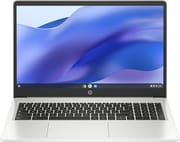 HP Chromebook 15a (15a-nb0013dx) | |
| Price | List Price: Amazon Prices: Loading prices... |
| Model number | 15a-nb0013dx |
| Performance Rating | 4.1 |
| Chromebook Plus | No |
| Processor | Quad-core 3.70 Ghz (max 3.70 Ghz) Intel Processor N200 |
| RAM | 8 GB |
| Internal Storage | 64 GB eMMC |
| Screen Size | 15.6" |
| Screen Resolution | 1366x768 |
| Screen Type | anti-glare |
| Touch Screen | No |
| Stylus / Pen | No Stylus Support |
| Dimensions width x length x thickness | 14.28 x 9.51 x 0.78 inches (362.71 x 241.55 x 19.81 mm) |
| Weight | 3.81 lbs (1.73 kg) |
| Backlit Keyboard | No |
| Webcam | 720p HD |
| WiFi | Wi-Fi 6 (802.11ax) |
| Bluetooth | Bluetooth 5.3 |
| Ethernet | No |
| Cellular Modem | No |
| HDMI | No HDMI |
| USB Ports | 1 USB 3, 2 USB-C USB-C ports support Power Delivery and DisplayPort 1.4 |
| Thunderbolt Ports | No |
| Card Reader | microSD Card Reader |
| Battery | 2 cell, 47Wh, Li-ion Polymer |
| Battery Life | 11.5 hours |
| Fanless | Yes |
| Auto Update Expiration Date | June, 2033 |
Related Chromebooks
-
 Acer Chromebook 715The Acer Chromebook 715 is a fanless 15.6-inch full-HD IPS Chromebook with an aluminum chassis, a…
 -
 Acer Chromebook 15 315The Acer Chromebook 15 315 combines a comfortable 15.6'' ComfyView display and fanless design for…
 -
 HP Chromebook 14 G7The HP Chromebook 14 G7 packs a 14-inch anti-glare WLED screen, Wi-Fi 6, a 720p HD webcam, and…
 -
 Samsung Chromebook 4+The Samsung Chromebook 4+ is a fanless 15.6-inch FHD Chromebook with an Intel Celeron N4000, dual…
 -
 ASUS Chromebook CX1 (CX1500)The ASUS Chromebook CX1 (CX1500) is a 15.6-inch full HD Chromebook with a number pad, an Intel…
 -
 HP Chromebook 14a (14a-nf series)The HP Chromebook 14a (14a-nf series) spans two tiers of the same chassis: an Amazon-exclusive…
A number pad, LPDDR5 memory, and no HDMI port
The all-plastic chassis in Natural Silver weighs 3.81 pounds, which is light enough to carry daily for a 15.6-inch machine. The build feels sturdy enough for classroom and desk use and the occasional bump, and the deck is wide enough to hold a full keyboard with a number pad without crowding the palm rest. HP put a USB-C port on each side of the chassis, so the charger can go on whichever side the outlet is.
The Intel Processor N200 and 8GB of LPDDR5-4800 memory keep several browser tabs open alongside Google Docs or Sheets without noticeable lag. Scott from Scott The IT Guy was notably impressed, stating “I am surprised and shocked how fast this laptop actually is” and comparing it favorably to more expensive business laptops. The fanless design runs silently, so there is no vent noise during long sessions.
You get two USB-C 3.2 Gen 1 ports with Power Delivery and DisplayPort support, one USB-A 3.2 port, a microSD card reader, and a headphone/microphone combo jack. There is no HDMI port, so an external monitor or projector needs a USB-C adapter or hub, and wired networking needs a USB ethernet adapter. Wi-Fi 6 (802.11ax) and Bluetooth 5.3 handle wireless duties.
Reviewers rate the keyboard and audio above the display

Chrome Unboxed on the keyboard and the 250-nit panel
Chrome Unboxed provided detailed coverage of the HP Chromebook Plus variant in the 15a series. Robby Payne highlighted the excellent keyboard as a standout feature, noting “If you decide to pick up this Chromebook Plus model for its larger size and its excellent key framing and keyboard layout, I just don’t think you’re going to be disappointed.” However, he expressed frustration with the display brightness, commenting “Seriously, please give us 300 nits” in reference to the dim 250-nit panel. The review praised the dual speakers as better than average for the category while acknowledging that the all-plastic construction makes the MSRP harder to justify at full price.
A business-laptop reviewer finds it faster than expected
Scott The IT Guy offered a candid take from someone who typically works with high-end business laptops and generally avoids Chromebooks. He was surprised by the overall quality, stating “It feels like a $500, $600 laptop. It doesn’t feel cheap at all.” On audio he said, “The speaker system built into this laptop is absolutely amazing.” Scott also noted the WiFi performance, claiming “This laptop outperforms my [business class] laptop. The signal strength is higher, the speed is higher.” He recommended it to anyone finding it on sale under $200.
According to NotebookCheck, the HP Chromebook 15a series represents a “bare minimum internet machine for students and casual surfers” with the publication giving it a 77.2% rating. They praised the sturdy construction suitable for student use and the stable WiFi performance, while criticizing the dated display technology and lack of keyboard backlighting. The review emphasized that the device “makes significant hardware compromises to maintain its low price point” but acknowledged it succeeds at its primary mission of affordable internet access.
About Chromebooks noted that while the base model’s 1366x768 resolution “isn’t going to look crisp at all” when spread across the 15.6-inch panel, the DDR5 memory represents “a win over typical DDR4 found in competing Chromebooks.” Kevin Tofel’s coverage highlighted the privacy shutter on the webcam and convenient USB-C placement as thoughtful features.
Customer Reviews
Across 4,124 ratings on Amazon, the HP Chromebook 15a (15a-nb0013dx) averages 4.4 stars. Roughly seven in ten reviewers leave five stars, praising the low weight, the roomy 15-inch screen, and a price they find easy to justify for everyday browsing and Google Docs work. Several buyers single out the 8GB of RAM and the number pad. Billy, a verified buyer who describes himself as a semi-retired accountant, wrote that he settled on this HP “mainly because of the expanded memory” and that even running QuickBooks Online “the Chromebook performs remarkably.” Angala T Napoli, also a verified purchase, kept it short: “It’s lightweight and does the job.”
The panel draws the lower ratings. A verified three-star reviewer was blunt that “Black is more like a hazy grey and white is dirty snow,” which made reading hard, and also flagged that the storage is eMMC rather than the SSD the listing implied. The second is multitasking headroom. Verified buyer Ortiz noted it “cant run too many tabs without it freezing up, like 7-10 tabs” before it slows down. One buyer received a unit that arrived with a “Chrome OS is missing or damaged” error, though they reported Amazon replaced it.
Read more owner reviews on Amazon.
Best as a big-screen machine for text and spreadsheets
Buyers who want a large screen and a full keyboard at the bottom of the price range get both here, with silent operation and a battery that lasts a school or work day. It works as a student laptop or a secondary home computer for browsing and productivity apps.
Creative professionals and anyone who plugs into an external display every day will want something else, since every monitor connection runs through a USB-C adapter and the 64GB of storage pushes files to the cloud or a card. Readers weighing alternatives can work through Starry Hope’s Chromebook Comparison Chart.
Frequently Asked Questions
How long will the HP Chromebook 15a (15a-nb0013dx) receive updates?
Chrome OS automatic updates run until June 2033, with security patches and feature updates from Google until then.
Can I connect the HP Chromebook 15a (15a-nb0013dx) to an external monitor?
Yes, you can connect to external monitors using either of the two USB-C ports, which support DisplayPort 1.4 output. However, there is no dedicated HDMI port, so you will need a USB-C to HDMI adapter or hub for HDMI-only monitors or projectors.
Is the storage expandable on the HP Chromebook 15a (15a-nb0013dx)?
The 64GB eMMC internal storage is not user-upgradeable, but the built-in microSD card reader expands it. A 128GB or 256GB card holds photos, videos, and downloaded media and keeps the internal storage free for apps and Chrome OS.
Does the HP Chromebook 15a (15a-nb0013dx) have a touchscreen?
No. The display is standard non-touch, which helps keep the price and the weight down, but means you cannot use touch-based Android apps or draw directly on the screen.
Can I run Linux apps on the HP Chromebook 15a (15a-nb0013dx)?
Yes. Chrome OS’s Linux development environment installs and runs Linux apps alongside your Chrome apps, which helps developers or anyone who needs specific Linux software.
Is the HP Chromebook 15a (15a-nb0013dx) good for students?
Yes. The 15.6-inch screen makes document work comfortable for students, the full keyboard with numeric keypad helps with math assignments and spreadsheets, and the sturdy build handles daily backpack transport. HP rates the battery at up to 11.5 hours, enough for a full school day, at a price education budgets can absorb.
What type of charger does the HP Chromebook 15a (15a-nb0013dx) use?
Charging is USB-C with Power Delivery (PD). A 45W USB-C charger comes in the box, and third-party USB-C PD chargers work as well. Both USB-C ports support charging, so you can plug in from either side.