
Lenovo IdeaPad 3i Chromebook
Updated on

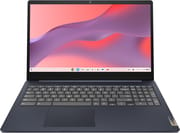
The Lenovo IdeaPad 3i Chromebook pairs a 15.6-inch Full HD display with an Intel Celeron N4500, at a price aimed at students and anyone who needs a machine for web browsing and document editing. The rated battery life is up to 10 hours, enough to cover a school day or a long flight without reaching for the charger. The keyboard is full size and carries a number pad, which helps if you spend your day in spreadsheets or data entry.
A 15.6-inch screen and 10-hour battery on a TN panel
| Pros | Cons |
|---|---|
| Large 15.6-inch Full HD display | TN panel with limited viewing angles |
| Rated 10-hour battery life | No backlit keyboard |
| Full-size keyboard with number pad | All-plastic chassis |
| WiFi 6 and Bluetooth 5.1 connectivity | Celeron processor struggles with heavy multitasking |
| Privacy shutter on 720p webcam | Limited 64GB base storage |
| HDMI and USB-C display output | eMMC storage cannot be upgraded |
Related Videos
Lenovo IdeaPad 3i Chromebook Comparison Chart
 Lenovo IdeaPad 3i Chromebook | Lenovo IdeaPad 3i Chromebook | |
| Price | List Price: $249.00 Amazon Prices: Loading prices... Best Buy: Loading price... | List Price: Amazon Prices: Loading prices... |
| Model number | --- | 82N4003CUS |
| Performance Rating | 2.6 | 3.7 |
| Chromebook Plus | No | No |
| Processor | Dual-core 1.10 Ghz (max 2.80 Ghz) Intel Celeron Processor N4500 | Dual-core 1.10 Ghz (max 2.80 Ghz) Intel Celeron Processor N4500 |
| RAM | 4 GB | 8 GB |
| Internal Storage | 192 GB eMMC | 64 GB eMMC |
| Screen Size | 15.6" | 15.6" |
| Screen Resolution | 1920x1080 | 1920x1080 |
| Screen Type | TN | TN |
| Touch Screen | No | No |
| Stylus / Pen | No Stylus Support | No Stylus Support |
| Dimensions width x length x thickness | 14.25 x 9.57 x 0.75 inches (361.95 x 243.08 x 19.05 mm) | 14.25 x 9.57 x 0.75 inches (361.95 x 243.08 x 19.05 mm) |
| Weight | 3.48 lbs (1.58 kg) | 3.48 lbs (1.58 kg) |
| Backlit Keyboard | No | No |
| Webcam | 720p | 720p |
| WiFi | Wi-Fi 6 (802.11ax) | Wi-Fi 6 (802.11ax) |
| Bluetooth | Bluetooth 5.1 | Bluetooth 5.1 |
| Ethernet | No | No |
| Cellular Modem | No | No |
| HDMI | Full-Size HDMI | Full-Size HDMI |
| USB Ports | 2 USB 3, 1 USB-C USB-C supports charging and display output | 2 USB 3, 1 USB-C USB-C supports charging and display output |
| Thunderbolt Ports | No | No |
| Card Reader | microSD Card Reader | microSD Card Reader |
| Battery | 47Wh, Li-Polymer | 47Wh, Li-Polymer |
| Battery Life | 10.0 hours | 10.0 hours |
| Fanless | No | No |
| Auto Update Expiration Date | June, 2031 | June, 2031 |
Related Chromebooks
-
 Lenovo IdeaPad Flex 3i Chromebook 15.6"The Lenovo IdeaPad Flex 3i Chromebook 15.6" pairs a full-size keyboard with numeric keypad and a…
 -
 ASUS Chromebook CX1 (CX1500)The ASUS Chromebook CX1 (CX1500) is a 15.6-inch full HD Chromebook with a number pad, an Intel…
 -
 Lenovo Chromebook 3 11"The Lenovo Chromebook 3 11 is a fanless 11.6-inch Chromebook with an Intel Celeron N4020, 4GB of…
 -
 Samsung Chromebook 4+The Samsung Chromebook 4+ is a fanless 15.6-inch FHD Chromebook with an Intel Celeron N4000, dual…
 -
 Acer Chromebook 715The Acer Chromebook 715 is a 15.6-inch full-HD IPS Chromebook with an aluminum chassis, a keyboard…
 -
 Acer Chromebook 315 (CB315-5H/5HT)A budget-friendly 15.6-inch Chromebook with Intel N100 processor, FHD IPS display, WiFi 6E, and…
Ports and keyboard hold up better than the processor
The chassis is all plastic and feels reasonably sturdy, which is what this price usually buys. It measures about 14.3 x 9.6 x 0.75 inches and weighs about 3.5 pounds. It comes in Arctic Grey and Abyss Blue. Lenovo also calls it the IdeaPad 3 Chromebook 15IJL6 (model family 82N4) and sold it in the US as the Lenovo 3i Chromebook (15” Intel); the 8GB/64GB configuration is model 82N4003CUS.
The Intel Celeron N4500 runs web browsing, Google Docs, and streaming video without trouble, then slows down once you open many browser tabs at once or push into more demanding Android apps. The 8GB RAM variant multitasks noticeably better than the 4GB model, so take the extra memory if your budget stretches that far. Research papers, online classes, and email run reliably on it. Students using school-managed devices should also be aware of what monitoring software can see on their Chromebooks.
The port set runs to two USB-A 3.2 ports, one USB-C that carries both charging and display output, a full-size HDMI 1.4 port, and a microSD card reader for storage expansion. Wireless is WiFi 6 and Bluetooth 5.1.
Reviewer Insights
MergeDroid’s Perspective
MergeDroid reviewed the 2023 IdeaPad 3i Chromebook in its Pentium Silver N6000 configuration, which uses the same 15.6-inch chassis, noting that “as you’d expect at this price point, it’s an all plastic build, but it feels solid enough.” MergeDroid liked the keyboard and the number pad, praised the speakers being located on the keyboard deck rather than the bottom, and highlighted the privacy shutter on the webcam as a nice security feature.
The main criticism from MergeDroid centered on the display, stating “the display on this Lenovo is where the compromise comes.” The TN panel has washed-out colors and poor viewing angles. MergeDroid still found the build quality better than that of the equivalent Asus CX1500 that MergeDroid had reviewed earlier, and demonstrated the USB-C port’s ability to support dual monitor setups.
TechSnacker’s Perspective
TechSnacker covers daily use, saying “this Chromebook is great for watching videos, web browsing, and you know like light tasks.” He praised the 10-hour battery life as enough to last students through a full day of classes, and noted the 3.5-pound weight and the Energy Star rating.
TechSnacker was blunt about the limits, noting “definitely not for a power user or video editor or multiple browser tabs open.” He found the TN panel’s viewing angles problematic unless you view it straight on, and noted the keyboard is not backlit, which he called unsurprising for a Chromebook under $200.
Customer Reviews
Across 42 Amazon ratings for the 4GB configuration, the Lenovo IdeaPad 3i Chromebook averages 4.1 stars, and the split behind that average is wide: 64 percent of raters give it five stars while 20 percent sit at one or two. Verified buyer connie kirby wrote “A great size to do all your work . Starts right up as soon as you open it,” and verified buyer Larry Moonan reported it “Working like a charm.” A repeat customer posting as whenincognito, also a verified buyer, said “I have been so happy with Lenovo Chromebooks that this is my third,” and credited the brand’s build quality.
Battery and connectivity drive the negative reviews. Verified buyer Stone, in a two-star review, wrote “2 years later battery is dead and not charging. Besides this it had some glitches,” and a one-star reviewer described freezing and charging trouble. Verified buyer Kim gave it four stars but cautioned “I wish I would have noticed that there was only one USB port,” and added that the USB-C port “is only for charging and will not work for transferring data,” along with difficulty getting printers to connect. Read more owner reviews on Amazon.
A big-screen school laptop that stops at light work
This machine covers web browsing, Google Workspace, and casual streaming, and the 8GB model is the configuration worth paying for. Power users and anyone running demanding applications should look elsewhere. If you want better color and viewing angles than a TN panel gives, or more headroom than the Celeron has, step up to a Chromebook Plus model or a device with an Intel Core processor. Starry Hope’s Chromebook Comparison Chart lines the alternatives up side by side so you can weigh features against price.
Frequently Asked Questions
How long will this Chromebook receive Chrome OS updates?
Automatic Chrome OS updates run through June 2031. Until that Auto Update Expiration (AUE) date, it gets security patches, new features, and bug fixes.
Can I connect an external monitor?
Two ports do it. The built-in HDMI 1.4 port takes a direct connection, and the USB-C port carries display output as well. MergeDroid demonstrated a dual monitor setup on the N6000 version of this chassis.
Is the 4GB or 8GB RAM version better for students?
The 8GB version, if you keep several tabs open while researching or attending online classes. The 4GB model handles basic browsing and single-task work, but it slows under heavier workloads.
Does this Chromebook have a backlit keyboard?
No. The keyboard is not backlit, one of the cost-saving measures at this price point. If you frequently work in low-light environments, look at a different model with backlighting or keep a desk lamp nearby.
Can I expand the storage?
A microSD card reader handles expansion. The internal eMMC storage is not upgradeable, so a card is the way to add space for downloads, Android apps, and offline files. One variant comes bundled with a 128GB SD card already installed.
How is the webcam for video calls and online classes?
The 720p webcam and built-in microphone are adequate for Google Meet, Zoom, and the other video conferencing applications commonly used in education. A privacy shutter covers the lens when the camera is not in use.
How long does the battery last?
Up to 10 hours from the 47Wh battery, which covers a full school day without reaching for a charger.