
Acer Chromebook Spin 512
Updated on

The Acer Chromebook Spin 512 is a ruggedized, education-focused 2-in-1 convertible that brings classroom durability and versatile computing to students, teachers, and everyday users. Built around a 12-inch IPS touchscreen with an unusual 3:2 aspect ratio, this Chromebook delivers 18% more vertical screen real estate compared to traditional 16:9 displays, making it excellent for document editing and web browsing. The device passed MIL-STD 810G military-grade testing, can withstand drops from 48 inches onto plywood or steel surfaces, and tolerates up to 132 pounds of downward force on its lid. With an Intel Celeron N5100 quad-core processor, 4GB of LPDDR4 RAM, and 32GB of eMMC storage, the Spin 512 handles Chrome OS tasks with adequate speed while maintaining impressive battery life of up to 12 hours.
| Pros | Cons |
|---|---|
| Military-grade durability (MIL-STD 810G) survives 48-inch drops | RAM is soldered and non-upgradeable |
| 3:2 aspect ratio provides 18% more vertical screen space | Only 32GB eMMC storage limits offline app capacity |
| Built-in Wacom EMR stylus with garage prevents stylus loss | Speakers lack bass response for music playback |
| Dual camera system with 8MP world-facing camera | All-plastic construction feels budget-oriented |
| 360-degree convertible hinge supports four usage modes | Performance adequate but not fast for heavy multitasking |
| Software updates guaranteed until June 2031 | No M.2 slot for storage expansion |
Related Videos
Acer Chromebook Spin 512 Comparison Chart
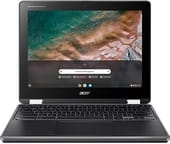 Acer Chromebook Spin 512 | |
| Price | List Price: $429.99 Amazon Prices: Loading prices... |
| Model number | R853TA-C7KT / NX.A91AA.001 |
| Performance Rating | 2.8 |
| Chromebook Plus | No |
| Processor | Quad-core 1.10 Ghz (max 2.80 Ghz) Intel Celeron N5100 Processor |
| RAM | 4 GB |
| Internal Storage | 32 GB eMMC |
| Screen Size | 12" |
| Screen Resolution | 1366x912 |
| Screen Type | IPS |
| Touch Screen | Yes |
| Stylus / Pen | Supported |
| Dimensions width x length x thickness | 11.7 x 9.1 x 0.83 inches (297.18 x 231.14 x 21.08 mm) |
| Weight | 2.87 lbs (1.3 kg) |
| Backlit Keyboard | Yes |
| Webcam | HD |
| WiFi | IEEE 802.11 a/b/g/n/ac/ax |
| Bluetooth | Bluetooth 5.0 |
| Ethernet | No |
| Cellular Modem | No |
| HDMI | No HDMI |
| USB Ports | 2 USB 3, 2 USB-C (with DisplayPort and charging) |
| Thunderbolt Ports | No |
| Card Reader | microSD Card Reader |
| Battery | 3 cell, Lithium Ion |
| Battery Life | 12.0 hours |
| Fanless | No |
| Auto Update Expiration Date | June, 2031 |
Related Chromebooks
-
 Acer Chromebook Spin 11 CP311The Acer Chromebook Spin 11 combines functionality and portability with its 11.6-inch touch IPS…
 -
 Acer Chromebook 15The Acer Chromebook 15 stands out with a 15.6" FHD IPS touch display, backlit keyboard, and up to…
 -
 ASUS Chromebook Flip CR1The ASUS Chromebook Flip CR1 combines rugged durability with educational versatility, featuring…
 -
 Samsung Chromebook Plus v2The Samsung Chromebook Plus v2 boasts a versatile 12.2" touch LED screen, dual cameras, and pen…
 -
 Lenovo Flex 3i Chromebook 12.2"The Lenovo Flex 3i Chromebook astounds with a 12.2" IPS touch screen, quad-core processing power,…
 -
 Lenovo Flex 3 ChromebookThe Lenovo Flex 3 Chromebook hits the sweet spot with its 11.6-inch IPS touchscreen, 4GB RAM, and…
Detailed Insights into the Acer Chromebook Spin 512

The Acer Chromebook Spin 512 takes build quality seriously for an education device, incorporating a spill-resistant keyboard with a drainage gutter system that channels liquids away from internal components. The moisture-resistant touchpad and Corning Gorilla Glass-protected display with antimicrobial coating address real classroom concerns about germs and accidental spills. Weighing 2.87 pounds and measuring just 0.83 inches thick, the Spin 512 remains portable enough for students carrying it between classes throughout the day. The textured plastic shell provides grip and hides minor scratches, though it does feel more budget-oriented compared to aluminum-chassis Chromebooks aimed at professional users.
Performance from the Intel Celeron N5100 quad-core processor proves adequate for standard Chrome OS tasks like web browsing, document editing, Google Classroom assignments, and video conferencing. The processor’s four cores clocked at 1.1GHz with burst speeds up to 2.8GHz handle typical student workloads without noticeable lag, though opening many browser tabs simultaneously or running Android apps alongside Chrome tabs can slow things down. Consumer Reports testing rated the Spin 512’s performance as “fair,” meaning it works well for basic productivity but struggles with demanding applications. The 4GB of RAM supports light multitasking but does impose limits on how many apps can run smoothly at once.
Connectivity options on the Spin 512 cover the essentials with two USB Type-C ports supporting DisplayPort output and power delivery, two USB Type-A ports for legacy accessories, a microSD card slot for storage expansion, and a 3.5mm audio jack. The USB-C ports sit on opposite sides of the chassis, providing flexibility for charging from either side. WiFi 6 (802.11ax) wireless delivers fast network connections, while Bluetooth 5.0 handles peripherals like wireless headphones or mice. There is no built-in Ethernet port, but the USB-A ports can accommodate a USB Ethernet adapter for wired networking in labs or classrooms. The dual-camera setup stands out in this price range, featuring an 88-degree wide-field-of-view HDR webcam for video calls and an 8-megapixel autofocus world-facing camera positioned above the keyboard for scanning documents, capturing whiteboard notes, or educational science photography.
Reviewer Insights on the Acer Chromebook Spin 512

ChromebookParts.com Technical Analysis
ChromebookParts.com published an in-depth teardown guide examining the Spin 512’s internal construction and repairability. The video reveals a highly modular design where the battery, speakers, touchpad, daughterboard, and cameras can all be replaced independently without requiring specialized tools beyond a standard Phillips-head screwdriver. This repairability proves valuable for schools and IT departments performing in-house maintenance on large fleets of devices. The teardown shows the 43Wh battery, organized internal cable routing, and compact motherboard layout. The reviewer notes that while the RAM is soldered to the motherboard, most other components remain user-serviceable, earning high marks for sustainability in educational deployments.
Android Headlines Full Review
According to Android Headlines, the Spin 512 impressed as “a viable consideration as a top contender in the Chrome OS market overall.” Reviewer Daniel Golightly praised the dual-camera system as potentially “one of the best two-camera Chrome OS gadgets” tested, particularly highlighting the world-facing camera’s utility for educational activities. The 3:2 aspect ratio display received special mention for providing more usable screen space for productivity tasks. At its original $499 price point, Android Headlines called it “an exceptional value.” The review did note that speakers sound “abysmal when used for music” due to lack of bass response, though they work well for video conferencing and acceptable for movie watching. Anyone exploring music production on a Chromebook will need external speakers or headphones with this device.
Education User Perspective
Eric Lawson created an introduction video for students at York Schools explaining practical usage of the Spin 512. He demonstrates the dual nature of the device as both a Chromebook running Chrome OS and an Android tablet when folded into tablet mode. The built-in stylus with its garage door compartment receives practical praise as a “fine point stylus specifically great when you’re using it in tablet mode and want to annotate over the top like a whiteboard feature.” His perspective highlights how the device handles the sometimes confusing dual-ecosystem of Chrome apps (web-based) and Android apps (from the Play Store), a real consideration for managed educational accounts.
Customer Reviews of the Acer Chromebook Spin 512
Customer feedback on the Acer Chromebook Spin 512 reflects its primary use case as an education device deployed in schools and institutions. Parents and students appreciate the rugged build quality that survives backpack life and the occasional drop, with many noting the device held up better than expected after a year or more of daily use. The 3:2 aspect ratio screen receives consistent praise for making documents and web pages easier to read without constant scrolling. The built-in stylus with its garage storage earns positive mentions from art students and note-takers who find the EMR technology responsive and the garage prevents the common problem of lost styluses.
Common criticisms center on the limited 32GB storage, which fills quickly if students install many Android apps, and the 4GB RAM which can cause slowdowns when too many tabs open. Some users report the fan noise becomes noticeable during intensive tasks, though others find it acceptably quiet for classroom use. The plastic construction, while durable, disappoints users expecting premium materials at the $249-$499 price point depending on configuration and retailer. Battery life generally meets or exceeds the claimed 12 hours for typical school day use, though power-intensive activities like video playback drain it faster.
Conclusion
The Acer Chromebook Spin 512 succeeds at what it was designed to do: provide a durable, versatile Chromebook for education environments at an accessible price point. Its military-grade certification, spill-resistant keyboard, and Gorilla Glass display address real classroom durability concerns, while the 3:2 aspect ratio touchscreen and 360-degree hinge support multiple learning modes from traditional laptop use to tablet-style annotation. The built-in stylus with garage storage and dual camera system including the world-facing 8MP camera add genuine utility for educational activities like document scanning and digital art.
For students, teachers, or parents looking for a Chrome OS device that can survive backpack life while providing all-day battery and practical features, the Spin 512 delivers strong value. The Intel Celeron N5100 processor handles standard school tasks adequately, and Chrome OS updates through June 2031 ensure years of security patches and new features. Those needing more performance for demanding multitasking or seeking premium build materials should look at higher-end Chromebooks, but for its target education market, the Spin 512 earns its reputation as an exceptional value.
Frequently Asked Questions
Can the RAM be upgraded on the Acer Chromebook Spin 512?
No, the RAM on the Acer Chromebook Spin 512 is soldered directly to the motherboard and cannot be upgraded. The device comes with 4GB of LPDDR4 RAM, which is sufficient for typical Chrome OS tasks like web browsing and document editing but may feel limiting when running many Android apps simultaneously.
Does the Acer Chromebook Spin 512 include a stylus?
Yes, the Spin 512 includes a built-in Wacom EMR stylus with 4096 levels of pressure sensitivity. The stylus stores in a garage compartment on the device’s chassis, preventing loss. It works great for annotation, digital art, and handwritten notes in tablet mode.
How long will the Acer Chromebook Spin 512 receive Chrome OS updates?
The Acer Chromebook Spin 512 R853TA model will receive automatic Chrome OS updates including new features and security patches until June 2031, according to Google’s Auto Update Expiration policy.
Is the Acer Chromebook Spin 512 good for students?
The Spin 512 was specifically designed for education use and excels as a student device. It features military-grade durability (MIL-STD 810G), a spill-resistant keyboard, up to 12 hours of battery life, and a world-facing camera for scanning documents. The 3:2 aspect ratio display provides extra vertical space for reading and writing.
What ports does the Acer Chromebook Spin 512 have?
The Spin 512 includes 2 USB Type-C ports (with DisplayPort output and power delivery), 2 USB Type-A ports, a microSD card slot for storage expansion, and a 3.5mm headphone/microphone combo jack. The USB-C ports are positioned on opposite sides for convenient charging from either direction.
How durable is the Acer Chromebook Spin 512?
The Spin 512 passed MIL-STD 810G military-grade durability testing and can withstand drops from 48 inches onto plywood or steel surfaces. The lid tolerates up to 132 pounds of downward force. The keyboard is spill-resistant with a drainage gutter system, and the touchscreen is protected by antimicrobial Gorilla Glass.