
ASUS Chromebit CS10
Updated on

The ASUS Chromebit CS10 has reached its Chrome OS end-of-life date (June 2020 per Google’s official AUE schedule) and is no longer receiving security updates. While it may still function for basic offline tasks, we recommend considering current Chromebooks for a secure browsing experience.
The ASUS Chromebit CS10 launched in late 2015 at $85, packing Chrome OS into a candy-bar-sized board that plugged straight into the HDMI port of a television or monitor. Any spare display became a Chrome OS workstation for less money than the Windows computing sticks on sale at the time. It sold into classrooms, digital signage screens, and travel bags.
Related Videos
ASUS Chromebit CS10 Comparison Chart
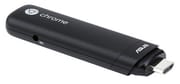 ASUS Chromebit CS10 | |
| Price | List Price: $84.99 Amazon Prices: |
| Model number | CS10 |
| Performance Rating | 2.0 |
| Chromebook Plus | No |
| Processor | Quad-core 1.80 Ghz Rockchip RK3288C |
| RAM | 2 GB |
| Internal Storage | 16 GB eMMC |
| Screen Size | No Screen |
| Screen Resolution | No Screen |
| Screen Type | No Screen |
| Touch Screen | No |
| Stylus / Pen | No Stylus Support |
| Dimensions width x length x thickness | 1.22 x 4.84 x 0.67 inches (30.99 x 122.94 x 17.02 mm) |
| Weight | 0.16 lbs (0.07 kg) |
| Backlit Keyboard | No |
| Webcam | No Webcam |
| WiFi | 802.11 a/b/g/n/ac |
| Bluetooth | Bluetooth 4.0 |
| Ethernet | No |
| Cellular Modem | No |
| HDMI | Full-Size HDMI |
| USB Ports | 1 USB 2.0 |
| Thunderbolt Ports | No |
| Card Reader | No Card Reader |
| Battery | No Battery |
| Battery Life | 0.0 hours |
| Fanless | Yes |
| Auto Update Expiration Date | June, 2020 |
Related Chromebooks
-
 ASUS Chromebook C403The ASUS Chromebook C403 is a fanless 14-inch education Chromebook with an anti-glare 1366x768…
 -
 ASUS Chromebook C423The ASUS Chromebook C423 pairs a 14-inch 1366x768 display with a dual-core Celeron N3350, 4GB of…
 -
 Acer Chromebook 315The Acer Chromebook 315 (CB315-4H) is a fanless 15.6-inch FHD IPS Chromebook with an Intel Celeron…
 -
 Acer Chromebook 15 CB315 (AMD)The Acer Chromebook 15 CB315 (AMD) is a 15.6-inch budget Chromebook built around AMD's 7th-gen…
 -
 HP Chromebook 14 (AMD)The HP Chromebook 14 (AMD) is a fanless 14-inch Chromebook built on the AMD A4-9120C APU with…
 -
 Lenovo Flex 3 ChromebookThe Lenovo Flex 3 Chromebook is a fanless 11.6-inch convertible with an IPS touchscreen, a MediaTek…
0.16 pounds of fanless hardware, held back by 2GB of RAM
The stick is 4.84 inches long, 1.22 inches wide, and weighs 0.16 pounds, so it slips into a pocket. Build quality held up in use, with SjslTech noting that “it does feel quite premium though… not that cheap plastic you get on the eBay Android sticks back in the day.” There is no fan inside, so it runs silent. ASUS bundled a flexible HDMI extension cable for televisions where the rigid connection would otherwise block adjacent ports.
The Rockchip RK3288C processor and 2GB of LPDDR3 RAM covered what Chrome OS asked of hardware in 2015. TechRadar’s benchmark testing recorded an Octane score of 7707, which they noted felt “zippier to navigate than Windows on the competing Intel Computing Stick.” The 16GB of eMMC storage suited a browser-first system that kept documents in Drive. The 2GB ceiling shows up as soon as you multitask. Engadget observed system lockups “when running Netflix while working in Google Docs and Slack simultaneously.”
The single USB 2.0 port required a hub for connecting both a keyboard and mouse if Bluetooth peripherals weren’t available. 802.11ac Wi-Fi and Bluetooth 4.0 covered the wireless side, and PCWorld praised its “superior WiFi authentication capabilities for hotel networks.” HDMI output topped out at 1080p, even though the chip could decode 4K video.
Reviewer Insights
Michael MJD found a device stuck in an update loop
Michael MJD’s retrospective examined the Chromebit in 2024. He described it as “essentially what happens when Google decides to merge a Chromebook with something like a Fire TV stick.” His testing revealed the update loop issues that plague many Chromebits today, where the device fails to progress past outdated Chrome OS versions. Despite these limitations, he found niche value in using it for digital signage or “converting an older TV into a sort of smart TV.” He summed up its fate: “It was useless enough for Google to quickly decide to kill it off.”
SjslTech: high-bitrate video stutters on Chrome OS 86
SjslTech purchased a used Chromebit for $10 AUD and put it through browsing and video tests. He noted the device is now stuck on Chrome OS version 86 and lacks access to the Play Store or Linux support. Video playback testing showed it “struggles significantly with high-bitrate 1080p and 4K content” with “constant stutters and lag spikes.” Despite these shortcomings, he concluded that “for 10 dollars, it’s not too bad” for basic browsing or as a candidate for loading a lightweight Linux distribution.
TechRadar’s launch verdict was built around upcycling an old display
TechRadar awarded the Chromebit 4 out of 5 stars at launch, praising it as “a perfect solution for office or home users looking to upcycle old displays.” They noted that “by partnering with Chrome OS, Asus has found the perfect formula for its Chromebit to overcome some of the limitations of earlier Windows-based PC-on-a-stick rivals.” The review highlighted the Rockchip processor’s solid performance for general computing tasks while acknowledging the single USB port’s connectivity limitations.
Engadget saw a fit in classrooms and spare monitors
Engadget’s review summed it up as “It under-promises while managing to over-deliver.” Chris Velazco recommended it as “just cheap and just good enough to find a home in classrooms and tinkerers’ dens.” The review praised its suitability for educational environments and as a gateway device for elderly users transitioning to Chrome OS. However, it cautioned against expecting too much: “Keep your expectations in check: Buy it to be your kid’s first computer, a terminal for Airbnb guests or a way to breathe life into an extra monitor.”
The cheapest Chrome OS hardware yet, aimed at schools and signage
Google was pushing Chrome OS into every form factor it could build. Chromebooks were the headline product, but the broader plan also included Chromeboxes (compact desktop boxes from ASUS, Acer, HP, and Samsung), Chromebases (all-in-ones with the computer built into the back of a monitor), and the Chromebit (a Chrome OS computer on an HDMI stick). Each of these targeted a slightly different niche: the Chromebox for traditional desktop replacement, the Chromebase for reception desks and digital signage, and the Chromebit for the cheapest possible “add Chrome OS to any HDMI display” scenario. Google was aiming at the whole post-PC hardware market, Windows laptops included.
The Chromebit slotted into the same conceptual space as Intel’s Compute Stick (released earlier in 2015 with Windows or Ubuntu), Lenovo’s Ideacentre Stick 300, and a wave of generic Android HDMI sticks that were already selling for $30 on auction sites. The pitch was identical across the category: a full operating system on a candy-bar-sized board, with a single HDMI plug and one or two USB ports. Intel aimed at the Windows-on-the-couch crowd. ASUS and Google went after the cheapest possible thin client for classrooms, conference rooms, and signage displays. At $84.99, the Chromebit was the cheapest Chrome OS hardware that had ever shipped, and that headline number drove most of the launch coverage.
For schools that had already standardized on Chrome OS for student laptops, the Chromebit promised a way to extend the same management stack to a digital signage TV in the hallway or a spare classroom monitor used as a Khan Academy station. IT teams could enroll a Chromebit in the same Google Admin console used for student Chromebooks, push the same policies, and walk away. Fleet management was the strongest practical argument the stick had over the unmanaged Android sticks competing for the same shelf space.
Thermal limits and smarter TVs closed the category
The form factor imposed a hard thermal ceiling. Any chip that fit on a candy-bar board with no fan was a low-power mobile-class SoC, and those chips struggled with anything past single-tab browsing once the web grew heavier. Even at launch the Rockchip RK3288C felt like a budget tablet processor, and four years later it could no longer keep up with Chrome OS itself. The single USB 2.0 port also became a bigger annoyance over time, because the ecosystem of wireless peripherals matured unevenly and many cheap keyboards still wanted a USB receiver.
The TV market also moved past the problem the stick PC was trying to solve. By 2018, most new televisions and many monitors shipped with their own apps for Netflix, YouTube, and Spotify, plus Chromecast Built-in, eroding the “add a smart layer to a dumb display” argument. Roku, Fire TV, and Chromecast covered the media side better than any general-purpose stick PC ever did, while a $35 Raspberry Pi covered the tinkerer side with more flexibility. That left the stick in a middle ground, running a desktop OS on hardware too slow for desktop work, with cheaper and more flexible options on either side of it.
Inside Google, the platform’s priorities also shifted. The arrival of Android apps on Chrome OS in 2017 and Linux app support in 2018 made the most-capable Chromebooks far more useful, but neither of those features ever came to the RK3288 Chromebits because the SoC predated the kernel and graphics-driver work that made them possible. The Chromebit was therefore stuck running the original web-only Chrome OS while every newer Chromebook gained the ability to run Linux distributions and Play Store apps. Google formally ended Chromebit AUE coverage in June 2020, and no successor stick was ever announced.
A frozen browser makes it a private-network device
A CS10 still plugged into a TV or monitor keeps booting, signing in, and running Chrome OS at the last version it received (build 86 era). Google no longer ships security patches, bug fixes, or web-platform updates for it. Web standards have moved on since then, so newer CSS, modern JavaScript APIs, and current TLS handshakes on some streaming services will fall back, glitch, or fail outright over time. Everything on the device stays at its 2020 state, browser included.
Owners running a Chromebit on a kiosk, signage screen, or always-on dashboard should weigh exposure carefully. On a private LAN with no public-facing services, the security risk from an unpatched Chrome OS stays limited; on an open Wi-Fi network or with banking and credential entry, the risk profile is far worse. Removing personal accounts (Powerwash plus a fresh sign-in dedicated to the kiosk role) is the minimum hygiene step. Pinning the device to a single trusted URL through Chrome’s kiosk app mode shrinks the attack surface further.
Replacing the stock OS is theoretically possible but practically rough. The RK3288 has Linux support in the mainline kernel, but the Chromebit’s bootloader, firmware, and ARM userland make installing a general-purpose Linux distribution far harder than on a typical x86 Chromebook. There is no equivalent of the Mr Chromebox firmware-replacement workflow that x86 Chromebox and Chromebook owners use to install Linux directly. A handful of community projects have managed to boot Armbian or a minimal Debian on RK3288 Chromebits, but expect a weekend of work and a soldered serial console.
Owners keep it on a private network as a single-purpose dashboard and accept the update caveats, donate or recycle it through a responsible e-waste channel, or move to a current Chromebox or ARM Chromebook that still receives updates. As a daily-driver web terminal in 2026 it has run its course.
Current Chromeboxes and ARM Chromebooks cover the same job
Anyone who wants the same compact Chrome OS setup should look at current Chromebox devices or ARM-based Chromebooks that still receive updates. A Chromebox gives up the pocketable size but adds a fan, more RAM, and several USB ports; an ARM Chromebook keeps the fanless design and adds a screen and keyboard.
For those weighing current options, the Chromebook Comparison Chart lets you sort and filter every active model by specs and price.
Frequently Asked Questions
Q: What is the ASUS Chromebit CS10?
A: The ASUS Chromebit CS10 is a 2015 Chrome OS computer built into an HDMI stick. It plugs directly into the HDMI port of a TV or monitor and runs Chrome OS on a Rockchip RK3288C ARM processor with 2GB of RAM and 16GB of eMMC storage. With a Bluetooth keyboard and mouse attached, any HDMI display becomes a basic Chromebook.
Q: When did the ASUS Chromebit CS10 reach end of life?
A: Google ended Chrome OS Auto Update Expiration coverage for the Chromebit CS10 in June 2020. After that date the device stopped receiving security updates, browser updates, and new Chrome OS features. It still boots and runs at the last shipped version (build 86 era), but it is no longer a supported Chrome OS endpoint.
Q: Is the Chromebit CS10 still safe to use in 2026?
A: Without ongoing security updates, the Chromebit CS10 should not be used for browsing that involves passwords, banking, or any sensitive data. It is reasonable for an air-gapped kiosk, a signage dashboard on a private LAN, or a single-purpose display, with personal accounts removed first via Powerwash. Avoid it for general web browsing on public or shared networks.
Q: Did the Chromebit CS10 ever get Android apps or Linux support?
A: No. Android apps from the Play Store and Linux app support only ever shipped on newer Chrome OS hardware. The Chromebit CS10’s Rockchip RK3288C predates the kernel and driver work those features required, so the device remained limited to the original web-only Chrome OS throughout its supported life.
Q: Can I install Linux on a Chromebit CS10?
A: Not easily. The RK3288 SoC has mainline Linux kernel support, but the Chromebit lacks the simple firmware-replacement path that x86 Chromebooks and Chromeboxes have via Mr Chromebox firmware. Community projects have booted Armbian and minimal Debian on RK3288 Chromebits, typically with a serial console and a lot of patience.
Q: How much did the ASUS Chromebit CS10 cost at launch?
A: ASUS launched the Chromebit CS10 in November 2015 at a list price of $84.99 in the United States. It was the cheapest Chrome OS device that had shipped to that point, which was the headline feature in most launch reviews.
Q: Where can I buy a new ASUS Chromebit CS10?
A: The Chromebit CS10 was discontinued years ago and is not sold new through retail channels. Used units occasionally appear on auction sites and reseller marketplaces, sometimes for under $20, but every unit available today is well past Auto Update Expiration and should be evaluated as a frozen-version device, not a current Chromebook.