
Acer Chromebook 311 (AMD)
Updated on

The Acer Chromebook 311 (CB311-10H) runs an AMD A4-9120C dual-core processor with integrated Radeon R4 graphics behind an 11.6-inch 1366x768 screen, paired with 4GB of RAM and 64GB of eMMC storage. Acer rates the battery at up to 10 hours, which covers a school day of browsing and document work for students and other light users. Chrome OS updates run through June 2029, extended from the original June 2026 date.
| Pros | Cons |
|---|---|
| Rubberized chassis with reinforced corners; Phil Viverito called it “bombproof basic” and found “it doesn’t flex at all” | 11.6-inch 1366x768 screen leaves little room for side-by-side windows |
| Up to 10 hours of rated battery life | No touchscreen on this model |
| $169.99 list price, under $200 | 4GB of soldered RAM with no upgrade path |
| 2.87 lbs and 0.93 inches thick | No HDMI port, so external displays need a USB-C adapter |
| Two USB-C ports and two USB 3.0 Type-A ports | Bluetooth 4.1 |
| WiFi 5 (802.11ac) with 2x2 MU-MIMO | Software support ends at the June 2029 Auto Update Expiration |
Acer Chromebook 311 (AMD) Comparison Chart
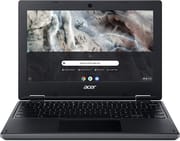 Acer Chromebook 311 (AMD) | |
| Price | List Price: $169.99 Amazon Prices: Loading prices... |
| Model number | CB311-10H-41M9 |
| Performance Rating | 1.9 |
| Chromebook Plus | No |
| Processor | Dual-core 1.60 Ghz (max 2.40 Ghz) AMD A4-9120C APU with Radeon R4 Graphics |
| RAM | 4 GB |
| Internal Storage | 64 GB eMMC |
| Screen Size | 11.6" |
| Screen Resolution | 1366x768 |
| Screen Type | ComfyView |
| Touch Screen | No |
| Stylus / Pen | No Stylus Support |
| Dimensions width x length x thickness | 11.65 x 8.11 x 0.93 inches (295.91 x 205.99 x 23.62 mm) |
| Weight | 3.3 lbs (1.5 kg) |
| Backlit Keyboard | No |
| Webcam | 1280 x 720 |
| WiFi | Wi-Fi 5 (802.11ac) |
| Bluetooth | Bluetooth 4.1 |
| Ethernet | No |
| Cellular Modem | No |
| HDMI | No HDMI |
| USB Ports | 2 USB 3, 2 USB-C |
| Thunderbolt Ports | No |
| Card Reader | microSD Card Reader |
| Battery | 3 cell, 4200 mAh, Li-ion |
| Battery Life | 10.0 hours |
| Fanless | No |
| Auto Update Expiration Date | June, 2029 |
Related Chromebooks
-
 Acer Gateway Chromebook 311The Acer Gateway Chromebook 311 is an 11.6-inch 1366x768 ChromeOS laptop on an Intel Celeron N4500…
 -
 Acer Chromebook Spin 11 CP311The Acer Chromebook Spin 11 combines functionality and portability with its 11.6-inch touch IPS…
 -
 ASUS Chromebook C203XAThe ASUS Chromebook C203XA is a rugged 11.6-inch education laptop with a MediaTek MT8173C, an…
 -
 Lenovo Flex 3 ChromebookThe Lenovo Flex 3 Chromebook is a fanless 11.6-inch convertible with an IPS touchscreen, a MediaTek…
 -
 ASUS Chromebook Flip CR1The ASUS Chromebook Flip CR1 (CR1100FKA) is a rugged 11.6-inch education convertible on an Intel…
 -
 Dell Chromebook 3120The Dell Chromebook 3120 is a fanless 11.6-inch education Chromebook with an Intel N100, sold in…
Entry-level AMD hardware in a chassis built to take knocks

The chassis measures 11.65 x 8.11 x 0.93 inches and weighs 2.87 pounds. Rubberized texture and reinforced corners cover the edges that meet a desk or a floor first, and the non-reflective ComfyView panel keeps reflections down during long sessions. The keyboard deck does not flex when typing hard, or when the machine is carried one-handed while open.
The AMD A4-9120C is a dual-core chip that turbos up to 2.4GHz. It handles browsing, Google Workspace documents, and educational apps, and the integrated Radeon R4 graphics cover basic video playback. The 4GB of DDR4 memory is the limit for heavy tab use, while the 64GB of eMMC storage holds local files and Android apps alongside the 100GB of Google Drive storage included with the purchase.
Two USB Type-C ports carry charging and DisplayPort output, alongside two USB 3.0 Type-A ports, a microSD card reader, and a combo headphone and microphone jack. There is no HDMI port, so an external monitor needs a USB-C adapter. Wireless is 802.11ac Wi-Fi 5 with 2x2 MU-MIMO plus Bluetooth 4.1, and the HD webcam uses an 88-degree wide-angle lens with HDR support for video calls and virtual classroom sessions.
Reviewer Insights

Phil Viverito, These Old Games: speaker quality improved after system updates
Phil Viverito describes the Chromebook 311 as “rubberized, bombproof basic” and notes that “it doesn’t flex at all.” The build quality impressed him enough to pass what he calls the “one-hand carry test” where it still responds to the keyboard and trackpad while walking around. His testing revealed good WiFi and Bluetooth functionality, and he found the built-in camera and microphone to be functional and adequate for basic video conferencing needs.
Viverito points out that the 11.6-inch screen size “limits usability” for those who need more screen real estate, though he acknowledges this is a reasonable trade-off for portability. He notes that initial speaker quality was poor but improved significantly after system updates. The reviewer appreciated that the Chromebook supports Android apps and Google Drive features, and he even successfully ran Ubuntu 16.04 via Crouton for users who need Linux capabilities. His overall verdict positions this as suitable for basic computing tasks at a compelling price point, frequently available around $225 on sale.
Customer Reviews
Across 40 ratings on Amazon, the Acer Chromebook 311 (AMD) averages 4.4 stars, with 74% of buyers leaving five stars and 12% leaving one or two. Frank D., a verified buyer on his third Acer Chromebook, wrote that they “are unbelievably easy to use and just synch right in with your google account.” Craz, another verified buyer, bought one for a homeschooled daughter and wrote “Works great for the price. Was definitely impressed with the quality for such a cheap price.” Missy Grey called it “Light weight” and good for travel.
Coco, a verified buyer and repeat Acer owner, gave it one star and reported that “It loses connection constantly with my internet” and that she had “to restart it constantly,” also flagging that the listing did not mention it was a touchscreen. Banker Man left two stars and wrote “This computer is so bad I don’t even use it anymore.” Lbdobbins, one of the five-star reviewers, noted a limitation: “There are a few things it won’t let me open in Chrome, so I had to download Firefox.”
Read more owner reviews on Amazon.
A sensible pick at its list price for light Chrome OS work
A few tabs, Google Docs, email, and video calls are within reach of this hardware, and Chrome OS updates keep running until June 2029, so a machine bought today has years of patched service left in it. Anyone who works with a dozen tabs open, or who wants a touchscreen, should put the money toward an 8GB model instead.
If you are weighing several options at once, the Chromebook Comparison Chart lets you sort and filter the full catalog side by side.
Frequently Asked Questions
Can the RAM be upgraded on the Acer Chromebook 311?
No. The 4GB of DDR4 memory is soldered to the board, so there is no upgrade path on this machine. If you need headroom for heavy tab use, look at a Chromebook that ships with 8GB.
How long will the Acer Chromebook 311 receive software updates?
Chrome OS updates, including security patches, run through June 2029. That is an extension of the original June 2026 Auto Update Expiration date, and extended-support updates may reduce Android app support. After June 2029 the device keeps working, without further updates.
Does the Acer Chromebook 311 have a touchscreen?
The 11.6-inch 1366x768 ComfyView panel is non-touch. For touch and a 360-degree convertible hinge, look at the Acer Chromebook Spin 311 instead.
Can I connect an external monitor to the Acer Chromebook 311?
Either of the two USB Type-C ports carries DisplayPort output, so an external monitor works through a USB-C to HDMI or USB-C to DisplayPort adapter. There is no built-in HDMI port on this machine, so the adapter is not optional.
Is the Acer Chromebook 311 good for online learning and video calls?
An HD webcam with an 88-degree wide-angle lens and HDR support pairs with a built-in microphone, and WiFi 5 (802.11ac) with 2x2 MU-MIMO holds the connection. Acer rates the battery at up to 10 hours, enough for a full school day of classes.