
ASUS Chromebook C203XA
Updated on

The ASUS Chromebook C203XA is a rugged 11.6-inch education Chromebook built around the MediaTek MT8173C, an ARM quad-core chip ASUS chose for fanless thermals and all-day battery rather than raw speed. The machine is engineered to MIL-STD-810G drop and shock standards, with a wrap-around rubber bumper, a spill-resistant keyboard, and reinforced I/O ports. ASUS aimed it squarely at school deployments where a Chromebook gets passed between dozens of students per year, but the same design language works well at home for younger kids or as a beater travel laptop. It ships with Chrome OS, gets automatic updates, runs Google Play apps, and serves up roughly 10 hours of battery on a charge.
This page covers the C203XA-YS02-GR configuration: 4GB LPDDR3 memory, 32GB eMMC storage, and the 11.6-inch 1366x768 anti-glare panel. ASUS only ever sold this exact spec in the US retail channel, so there are no RAM or storage variants to choose between. New retail supply is now thin, with Amazon currently showing limited stock of the original SKU.
| Pros | Cons |
|---|---|
| MIL-STD-810G rugged build holds up to drops and spills | 4GB RAM caps multitasking and heavy Android apps |
| Fanless ARM design means no fan noise and cool operation | 1366x768 panel is fine for schoolwork, dim for media |
| 10-hour battery covers a full school or travel day | Auto Update Expiration is June 2027, so the support runway is short |
| 180-degree lay-flat hinge for group work and sharing | Non-backlit keyboard hurts in dim rooms |
| Two USB-C ports plus HDMI for easy display-out | 32GB eMMC fills up quickly if you sideload Android apps |
ASUS Chromebook C203XA Comparison Chart
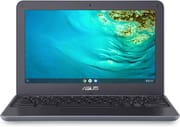 ASUS Chromebook C203XA | |
| Price | List Price: $249.99 Amazon Prices: Loading prices... |
| Model number | C203XA-YS02-GR |
| Performance Rating | 2.6 |
| Chromebook Plus | No |
| Processor | Quad-core 1.70 Ghz (max 2.10 Ghz) MediaTek MT8173C |
| RAM | 4 GB |
| Internal Storage | 32 GB eMMC |
| Screen Size | 11.6" |
| Screen Resolution | 1366x768 |
| Screen Type | Anti-glare display, LED Backlit, 200nits |
| Touch Screen | No |
| Stylus / Pen | No Stylus Support |
| Dimensions width x length x thickness | 11.57 x 7.87 x 0.88 inches (293.88 x 199.9 x 22.35 mm) |
| Weight | 2.65 lbs (1.2 kg) |
| Backlit Keyboard | No |
| Webcam | 720p HD |
| WiFi | Wi-Fi 5 (802.11ac) |
| Bluetooth | Bluetooth 4.2 |
| Ethernet | No |
| Cellular Modem | No |
| HDMI | Full-Size HDMI |
| USB Ports | 2 USB 3, 2 USB-C USB-C supports display out and power delivery |
| Thunderbolt Ports | No |
| Card Reader | microSD Card Reader |
| Battery | 3 cell, 47WHrs, Li-ion |
| Battery Life | 10.0 hours |
| Fanless | No |
| Auto Update Expiration Date | June, 2027 |
Related Chromebooks
-
 Acer Chromebook 311 (AMD)The Acer Chromebook 311 combines an 11.6-inch ComfyView screen, robust AMD processing, and 10-hour…
 -
 ASUS Chromebook Flip CR1The ASUS Chromebook Flip CR1 (CR1100FKA) is a rugged 11.6-inch education convertible on an Intel…
 -
 ASUS Chromebook CX1 (CX1101)The ASUS Chromebook CX1 combines a sleek form factor with practical features: an 11.6” anti-glare…
 -
 Acer Gateway Chromebook 311Compact, efficient, and budget-friendly, the Acer Gateway Chromebook 311 offers 10-hour battery…
 -
 Lenovo Flex 3 ChromebookThe Lenovo Flex 3 Chromebook hits the sweet spot with its 11.6-inch IPS touchscreen, 4GB RAM, and…
 -
 Dell Chromebook 3120A rugged and affordable 11.6-inch Chromebook with Intel N100 processor, available in clamshell and…
The ASUS Chromebook C203XA is more than just a durable laptop. Its MediaTek MT8173C quad-core CPU pairs two performance cores with two efficiency cores; it stays cool enough for fanless operation and handles the kind of workload most students put a Chromebook through: a dozen browser tabs, Google Docs, classroom Meet calls, and a handful of Android apps. Heavier work like editing large images or running emulators starts to lag at 4GB of RAM; this is not a power-user machine, and ASUS never pitched it as one. The 2-mm key travel and full-size layout give it a typing feel closer to a mid-tier consumer laptop than the cramped 11-inch competition.
Despite its compact size, the C203XA covers the connectivity basics. It includes WiFi 5 (802.11ac, dual-band) and Bluetooth 4.2, USB Type-C and USB Type-A ports, an HDMI output, and a microSD card reader for cheap storage expansion. Schools that need wired network access can connect a USB Ethernet adapter to the USB-A port; both USB-C ports also handle display out and power delivery, so a single cable can run a desk dock. The 180-degree lay-flat hinge lets the screen drop flat against the desk, which is handy for group huddles around a single device and protects the hinge from the leverage drops that snap weaker laptops in half.
Who it is for
The C203XA aims at a specific reader: a parent buying a first laptop for an elementary or early-middle-school kid; a school district outfitting a one-to-one classroom on a tight budget; or an adult who wants a cheap, fanless, throw-in-the-bag travel notebook for browsing and email. If that is you, this Chromebook earns its place. If you want to edit video, run a local Linux dev environment, or push 8+ browser tabs alongside Android apps, look at a more capable Chromebook in the $300 range instead.
The ruggedness claim is more than marketing. ASUS rates the chassis to the MIL-STD-810G standard, designed to survive a 1.2-meter fall onto concrete from a standard desk height. The reinforced corners and rubber bumper are the parts that turn a $250 spill into a wiped-down keyboard instead of a dead motherboard.
Limitations to know
Three things to weigh before buying. First, the Auto Update Expiration is June 2027, just over a year out from today. Google will keep pushing ChromeOS updates until then, after which the device still works but stops receiving security patches. Second, the MediaTek M8173C is an ARM chip, which means a small but real slice of Android apps in Google Play either run poorly or do not install at all because the developer never shipped an ARM build. Third, you cannot upgrade the RAM or the eMMC storage; both are soldered to the board. Buy the spec you want from the start.
Reviewer Insights
The C203XA never drew a lab-tested review from the major Chromebook publications. ASUS sold it mainly through K-12 education and B2B channels rather than consumer retail, so the outlets that measure display brightness, run battery rundowns, and benchmark silicon (NotebookCheck, Laptop Mag, PCMag, Chrome Unboxed) never put a unit on the bench. A fresh search in June 2026 across those publications and YouTube turned up no first-person hands-on review of this exact model: most “C203XA” videos are AI-voiced slideshows reading the Amazon listing, and the real review videos that surface cover its Intel-based sibling, the C202SA. Rather than borrow another Chromebook’s numbers, here is the editorial coverage that genuinely exists for the C203XA, followed by the verifiable specifications worth weighing.
Android Central: Jerry Hildenbrand
Hildenbrand, who covers Chromebooks full-time for Android Central, wrote up the C203XA as a Prime Day deal pick in July 2022, including his own photo of the unit. His framing was the rugged-for-kids angle: “This ASUS Chromebook C203XA has a goofy name but is built rugged and spillproof.” He set expectations plainly, calling it a device that “isn’t the most premium Chromebook you can buy but it’s not trying to be,” with “modest specs: A MediaTek CPU, a 1366 x 768 11-inch display, 32GB of storage, and 4GB of RAM,” which in his words is “more than enough to do plenty of things a Chromebook is excellent at doing and about the same as a Chromebook you’ll find in the classroom.” This is a deal write-up and first-person impression, not a measured review; it reported no brightness, battery, or benchmark figures.
NotebookCheck: Codrut Nistor
NotebookCheck’s only C203XA coverage is a December 2022 deal note, also not a lab review, but it is useful for chip context. Nistor flagged the processor as “severely dated,” describing it as “the 2015-released Mediatek MT8173C,” and concluded the machine “can still be useful to kids and teenagers, and even adults who just need a resilient tool for (very) light tasks.” He noted the listing held a 4.3 out of 5 average across 122 Amazon ratings as of that writing. No independent measurements accompanied the piece.
What the specs say (vendor figures labeled)
With no measured review to lean on, the grounded facts come from the spec sheet and our own reference data. The headline performance and brightness numbers below are ASUS claims, not tested results:
- Display: an 11.6-inch 1366x768 anti-glare panel rated at 200 nits (vendor spec). No reviewer has measured actual brightness; 200 nits is on the dim side for use near a bright window.
- Battery: “up to 10 hours” (vendor claim) from the 47Wh three-cell pack. Treat that as a best-case ASUS figure rather than a measured runtime.
- Build: MIL-STD-810G compliance, a spill-resistant keyboard, and a scratch-resistant case (all vendor claims), with a 180-degree lay-flat hinge.
- Keyboard: a full-size, non-backlit, spill-resistant deck with roughly 2-mm key travel per ASUS. There is no independent typing-feel verdict for this exact model.
- Processor: the MediaTek MT8173C is a 2015-era ARM quad-core (two performance plus two efficiency cores) chosen for fanless thermals and battery life rather than speed. Because it is an ARM part, the Windows-laptop PassMark scale does not apply; our catalog lists an Octane 2.0 score of roughly 9,575, which is entry-level even by Chromebook standards. It is comfortable with Docs, browsing, and Classroom, and it strains under heavy multitasking.
- Support window: the Auto Update Expiration is June 2027, so a unit bought in 2026 has roughly a year of ChromeOS security updates left.
This section is short on purpose. With no one having measured the device, the candid move is to label the vendor figures as claims and leave the gaps rather than fill them with another laptop’s numbers.
Customer reception
Amazon owner reviews lean strongly positive on the rugged-build promise. The recurring story is the same one: a kid dropped it, a kid stepped on it, a kid spilled juice on the keyboard, and the Chromebook kept working. That is the C203XA’s whole reason for existing, and the field feedback bears it out. Parents and IT admins also call out the USB-C charger as a nice touch; it doubles as a fast phone charger and accepts international voltage, so you can leave the brick at home on a trip and use any common phone wall wart in a pinch.
The complaints cluster around two themes. Performance feels sluggish if you treat the C203XA like a $500 laptop; the M8173C is fine for a kid in Google Classroom but starts to stumble at a dozen open tabs plus a Meet call. And the 32GB of storage is small, especially once Android apps start sideloading data. Both are predictable for a $250 ARM-based education Chromebook; neither is a deal-breaker if you bought the right device for the job.
The bottom line
The C203XA is a focused product. It is a rugged, fanless, 11.6-inch ARM Chromebook with all-day battery, priced for a school district or a parent who knows the laptop is about to take real-world abuse. Within that lane it does its job well, and the build quality has earned a track record of survival in households with young kids.
What pushes it out of the running for many buyers in 2026 is the support runway. June 2027 is close enough that anyone buying the C203XA today gets roughly a year of ChromeOS security updates before the device falls off the supported list. If the kid is going to use it hard for one or two school years, that is fine. If you want a Chromebook that will still be a primary device in 2028, look at a model with a longer AUE date, ideally one of the newer Chromebook Plus models. For everything in between, the C203XA is a defensible budget pick if you can still find one new at its original price.
For those weighing their options, our Chromebook Comparison Chart lets you sort and filter the full catalog by specs, price, and AUE date to find the best match.
Frequently Asked Questions
What processor does the ASUS Chromebook C203XA use?
It runs a MediaTek MT8173C, a 64-bit ARM quad-core SoC with two performance cores and two efficiency cores. The chip is fanless and tuned for battery life rather than peak speed. It handles Google Docs, web browsing, classroom Meet calls, and most Android apps fine, but it lags behind Intel-based budget Chromebooks on heavy multitasking.
What is the screen size of the ASUS Chromebook C203XA?
It has an 11.6-inch HD anti-glare display at 1366x768 resolution with 200 nits of brightness. The anti-glare coating helps in bright classrooms; the resolution is fine for schoolwork but low for media.
Is the RAM or storage upgradeable?
No. Both the 4GB of LPDDR3 RAM and the 32GB of eMMC storage are soldered to the mainboard. You can expand storage with a microSD card or external USB drive, but the internal spec is fixed for the life of the device. If 32GB feels tight, the microSD slot is the easiest workaround.
Does the ASUS Chromebook C203XA have a backlit keyboard?
No, the C203XA does not have a backlit keyboard. The keyboard itself is spill-resistant and uses 2-mm key travel, which gives it a more confident typing feel than most 11-inch Chromebooks, but you cannot use it comfortably in a dark room. If a backlit deck matters, see our list of Chromebooks with backlit keyboards.
What wireless connectivity does the Chromebook have?
The C203XA has WiFi 5 (802.11ac, dual-band) and Bluetooth 4.2. That is one generation behind current WiFi 6 budget Chromebooks but is still plenty fast for streaming video, Google Meet calls, and typical Chrome browsing on a home or school network.
Does the Chromebook have a webcam?
Yes, there is a 720p HD webcam above the display with a digital microphone. It is fine for Google Meet and Zoom calls; do not expect content-creation video quality from it.
How long does the battery last?
ASUS rates the 47Whr three-cell battery at up to 10 hours of typical use. In practice, expect 7 to 9 hours of mixed Chrome browsing and document work, and a bit more if you stick to lighter tasks like reading and Google Docs. The fanless ARM chip is the main reason the runtime holds up.
When does the ASUS Chromebook C203XA stop receiving updates?
The Auto Update Expiration date is June 2027, confirmed against Google’s Chrome Enterprise device list. Until then, the device gets ChromeOS feature updates and security patches on Google’s normal cadence. After June 2027 it still works, but Google stops shipping security fixes for it, so it is worth treating that date as the practical end of useful life for anything sensitive.