
Acer Chromebook 315
Updated on

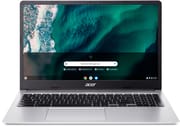
A 15.6-inch Full HD IPS display anchors the Acer Chromebook 315, paired with an Intel Celeron N5100, Wi-Fi 6, and a backlit keyboard that carries a full numeric keypad. That mix suits students and remote workers who want screen space and a number pad more than they want speed. Chrome OS updates run through June 2031.
| Pros | Cons |
|---|---|
| 15.6-inch Full HD IPS display | Display brightness limited to around 236 nits (Mezha.ua testing) |
| Fanless, so it runs silently | Battery life falls short of claims (5.5-6 hours real-world vs 10 hours advertised) |
| Wi-Fi 6 wireless | RAM is soldered at 4GB or 8GB depending on the build |
| Full-size keyboard with a numeric keypad | eMMC storage cannot be upgraded |
| Two USB-C and two USB-A ports | Webcam tops out at 720p |
| Chrome OS support through June 2031 | Entry-level chip strains under heavy multitasking |
Related Videos
Acer Chromebook 315 Comparison Chart
5 configurations
| Configuration | Processor | RAM | Storage | Screen | List price | Amazon price | Compare |
|---|---|---|---|---|---|---|---|
| CB315-4H-C2JF / NX.AZ0AA.002 | Celeron N5100 | 4 GB | 32 GB | 1920x1080 | $399.99 | Loading... | Details
|
| CB315-4HT-C72W / NX.AZ1AA.002 | Celeron N5100 | 4 GB | 32 GB | 1920x1080 touch | $429.99 | Details
| |
| CB315-4H-C8XU / NX.AZ0AA.001 | Celeron N4500 | 4 GB | 64 GB | 1920x1080 | $359.99 | Loading... | Details
|
| CB315-4HT-P8PQ / NX.AZ1AA.004 | Pentium Silver N6000 | 8 GB | 64 GB | 1920x1080 touch | $439.99 | Loading... | Details
|
| CB315-4H-C6MH / NX.AZ0AA.003 | Celeron N5100 | 8 GB | 64 GB | 1920x1080 | $379.99 | Details
|
Specs shared by every configuration
| Chromebook Plus | No |
|---|---|
| Screen Size | 15.6" |
| Screen Resolution | 1920x1080 |
| Screen Type | IPS |
| Stylus / Pen | No Stylus Support |
| Dimensions width x length x thickness | 14.4 x 9.6 x 0.79 inches (365.76 x 243.84 x 20.07 mm) |
| Weight | 3.53 lbs (1.6 kg) |
| Backlit Keyboard | Yes |
| Webcam | 720p HD |
| WiFi | Wi-Fi 6 (802.11ax) |
| Bluetooth | Bluetooth 5.0 |
| Ethernet | No |
| Cellular Modem | No |
| HDMI | No HDMI |
| USB Ports | 2 USB 3, 2 USB-C (1 USB 3.2 Gen 2, 1 USB 3.2 Gen 1. Supports DisplayPort over USB-C and charging) |
| Thunderbolt Ports | No |
| Card Reader | microSD Card Reader |
| Battery | 3 cell, 45 Wh, Li-ion |
| Battery Life | 10.0 hours |
| Fanless | Yes |
| Auto Update Expiration Date | June, 2031 |
Related Chromebooks
-
 Acer Chromebook 15 CB315 (AMD)The Acer Chromebook 15 CB315 (AMD) is a 15.6-inch budget Chromebook built around AMD's 7th-gen…
 -
 Acer Chromebook 15The Acer Chromebook 15 stands out with a 15.6" FHD IPS touch display, backlit keyboard, and up to…
 -
 ASUS Chromebook C523The ASUS Chromebook C523 is a fanless 15.6-inch Chromebook with an anti-glare display, an Intel…
 -
 Samsung Chromebook 4+The Samsung Chromebook 4+ is a fanless 15.6-inch FHD Chromebook with an Intel Celeron N4000, dual…
 -
 ASUS Chromebook C423The ASUS Chromebook C423 pairs a 14-inch 1366x768 display with a dual-core Celeron N3350, 4GB of…
 -
 Lenovo IdeaPad 3i ChromebookThe Lenovo IdeaPad 3i Chromebook is a 15.6-inch Full HD Chromebook with an Intel Celeron N4500 and…
Fanless cooling and a number pad in a plastic shell

The 15.6-inch 1920x1080 IPS panel has comfortable viewing angles and adequate color reproduction for everyday tasks. In its review of the CB315-4HT touch variant, Mezha.ua measured the display brightness at approximately 236 nits, which falls below the 300-nit threshold typically recommended for comfortable use in bright environments. Indoor lighting suits it better than an outdoor cafe or a sunny classroom.
The plastic chassis flexes under pressure but holds together well enough for daily use, and the silver-gray finish looks at home in an office or a classroom. At 3.53 pounds it weighs more than an ultraportable, and the extra footprint is what makes room for the full-size keyboard. The dedicated number pad on the right speeds up spreadsheet work and any task built on frequent number entry.
The quad-core Celeron N5100 handles the workloads Chrome OS is built around: web browsing with multiple tabs, document editing in Google Workspace, video streaming, and light Android app usage. It runs efficiently enough for the fanless cooling design, so the machine stays silent no matter what it is doing. Demanding Android games and heavy multitasking push past what the chip does comfortably. RAM comes as 4GB or 8GB depending on the configuration, and the 8GB builds stay noticeably smoother with several applications open.
Two USB-C ports carry both charging and DisplayPort output, two USB-A ports take older peripherals, and a microSD slot plus a combination headphone and microphone jack fill out the edges. Wi-Fi 6 (802.11ax) connects to newer routers for better speeds in congested environments, and Bluetooth 5.0 handles wireless audio and other accessories. There is no HDMI port on the chassis.
Reviewer Insights

MergeDroid’s Perspective
MergeDroid examined the Acer Chromebook 315 and came away impressed with the value for the price point. MergeDroid singled out the 15.6-inch Full HD screen at this price, called the keyboard with its numeric pad well-suited for productivity and office work, and noted that performance sits in the entry-level category, recommending the device for users with modest computing needs rather than power users expecting desktop-class responsiveness.
Mezha.ua
Mezha.ua’s review of the CB315-4HT touchscreen variant found the Intel Pentium Silver N6000 processor handles daily tasks smoothly despite modest benchmark results. They measured display brightness at approximately 236 nits and praised the color accuracy while noting the narrow 45% NTSC color gamut produces somewhat dull colors. Real-world battery testing showed roughly 6 hours of typical office work, leading the reviewer to suggest carrying the power adapter for full-day use. The review recommended the Chromebook 315 for students and remote workers who prioritize simplicity and web-based workflows over professional application support.
Customer Reviews
Across 3 ratings on Amazon, the Acer Chromebook 315 averages 4.7 stars, with two five-star ratings and one four-star. That is a small sample. Both written reviews are positive. One verified buyer, posting as Amazon Customer, said they upgraded specifically for the longer update window and found setup simple: “Our old Acer no longer gets the updates, so we opted for this new version which expires in 2029!!” The other verified review, from Gennine Francis, centered on a smooth buying and shipping experience rather than the hardware itself, noting the unit arrived “like new.”
No negative reviews appear in this set, and neither written review touches battery life, build quality, or speed under load.
Read more owner reviews on Amazon.
Better on a desk than in a backpack
The 3.53-pound weight and the half-day battery suit a desk more than a class-to-class carry. The full-width keyboard and the Full HD panel make long document sessions comfortable once it has a surface to live on. Shoppers weighing this model against alternatives can browse the Chromebook Comparison Chart to see how it lines up across the full lineup.
Frequently Asked Questions
How long does the Acer Chromebook 315 battery last?
Mezha.ua measured roughly 6 hours of typical office work on the CB315-4HT, against Acer’s advertised 10-hour claim. Plan on carrying the charger for a full day at school or work.
Can the RAM or storage be upgraded on the Chromebook 315?
No. The RAM and eMMC storage are soldered to the motherboard, and cannot be changed after purchase. The microSD card slot still adds room for media files and documents.
Is the Acer Chromebook 315 good for students?
Google Docs, research, video streaming, and educational apps all run comfortably, which covers most student workloads. The 15.6-inch display makes reading and writing easier than a smaller Chromebook does, and the numeric pad helps with math assignments.
How does the display brightness compare to other Chromebooks?
Mezha.ua’s testing of the CB315-4HT put brightness around 236 nits, under the 300-nit threshold typically recommended for bright environments. Expect a comfortable picture indoors with controlled lighting and a struggle in very bright rooms or outdoor settings.
Can the Chromebook 315 connect to external monitors?
Both USB-C ports support DisplayPort output, so a monitor connects over a USB-C cable or a USB-C to HDMI or DisplayPort adapter. An external display can either extend or mirror the built-in screen.
How long will the Chromebook 315 receive software updates?
Google provides Chrome OS feature updates and security patches through June 2031. That Auto Update Expiration (AUE) date is the cutoff for new updates; the machine keeps working afterward without them.